

In today’s competitive content landscape, ensuring your writing is engaging and accessible to read is essential. As a freelance writer, mastering tone and readability can set you apart and keep your audience hooked. With the power of AI tools, you can revolutionize how you improve your content, making it easier to maintain a consistent tone and enhance readability. This blog will explore the best AI tools to help you achieve these goals, putting you in the driver’s seat of your writing journey.
Tone and readability are crucial aspects of effective content writing. Tone ensures your message resonates with the intended audience, while readability keeps readers engaged and ensures your content is accessible. AI tools, powered by advanced algorithms, have become indispensable in content creation, helping writers maintain consistency and clarity.
In fact, McKinsey’s 2025 State of AI survey found that 88% of organizations now use AI in at least one business function, showing how quickly these tools have become part of everyday workflows, not experimental add-ons. These tools analyze your text and provide suggestions for improvement. This blog will cover various AI tools designed to enhance tone and readability, equipping you to elevate your writing.
What does “AI tools” mean in this post?
AI tools are software applications that use machine learning to analyze and improve writing. They can help you adjust tone, simplify wording, improve clarity, and make content easier to scan, while you remain in control of the final voice and decisions.
How to choose AI tools fast
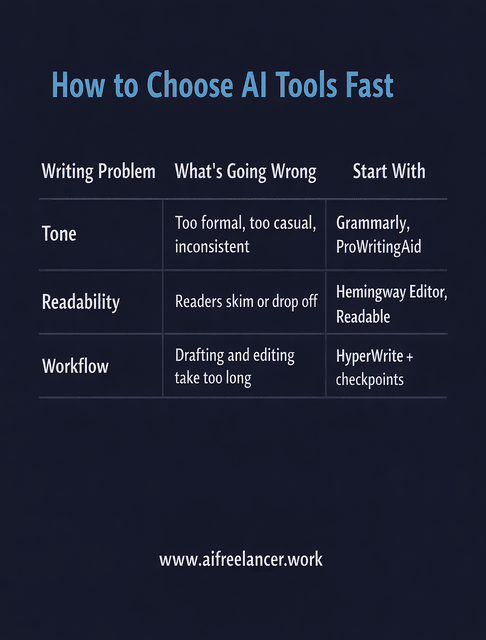
Most writers waste time testing tools randomly. A better approach is to pick tools by role, then layer them.
- Tone problem: Your writing feels too formal, too casual, or inconsistent across sections
→ Start with a tone checker (Grammarly, ProWritingAid) - Readability problem: Readers drop off, skim, or miss key points
→ Start with clarity tools (Hemingway Editor, Readable) - Workflow problem: Drafting takes too long, or editing becomes a bottleneck
→ Add a writing assistant (HyperWrite) and keep editing checkpoints
A simple “layered” setup that matches real SERP intent
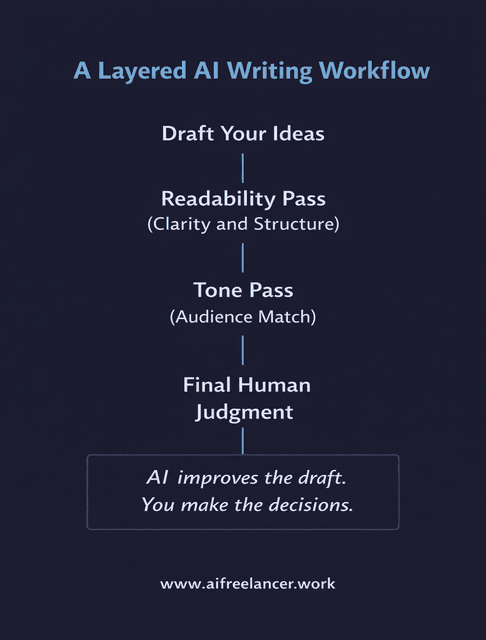
- Draft your ideas
- Run a readability pass (clarity and structure)
- Run a tone pass (match audience)
- Final human judgment (you)
Everything I’ve shared here—and more—is in my book, available on Amazon. Click the link if you’re ready to level up.
AI Tools for Tone Improvement
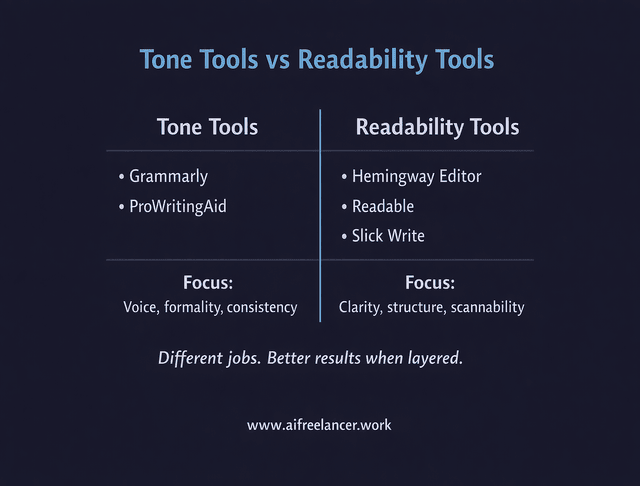
Understanding the significance of tone in writing is vital. Tone conveys your attitude towards the subject and shapes how your audience perceives your message. AI tools can help maintain a consistent tone across your content, ensuring your writing aligns with your brand or personal style.
Tools Using AI to Analyze and Adjust Tone
- Grammarly: Known for its comprehensive writing enhancements, Grammarly offers advanced tone detection capabilities. It suggests adjustments to ensure your writing matches the desired formal, casual, or professional tone. By detecting and adjusting the tone, Grammarly helps your writing resonate with the intended audience and align with the context, greatly enhancing communication effectiveness.
- Hemingway Editor: This tool simplifies sentences and ensures your tone is clear and direct. It highlights complex sentences and passive voice, helping you create more engaging content. By streamlining your writing, Hemingway Editor improves clarity and readability, making your message more impactful.
- ProWritingAid: This tool provides a detailed tone analysis and suggests improvements to align your writing with the intended audience’s expectations. It offers comprehensive feedback on style, grammar, and readability, ensuring your content is polished and practical.
Quick Pick Guide
- Choose Grammarly when you need fast tone alignment for client-facing writing (emails, landing pages, polished drafts).
- Choose ProWritingAid when you want deeper feedback and style patterns across longer work.
- Use Hemingway Editor when your tone problem is actually a clarity problem (wordy, indirect, buried point).
Tone Checkpoints That Prevent Rework
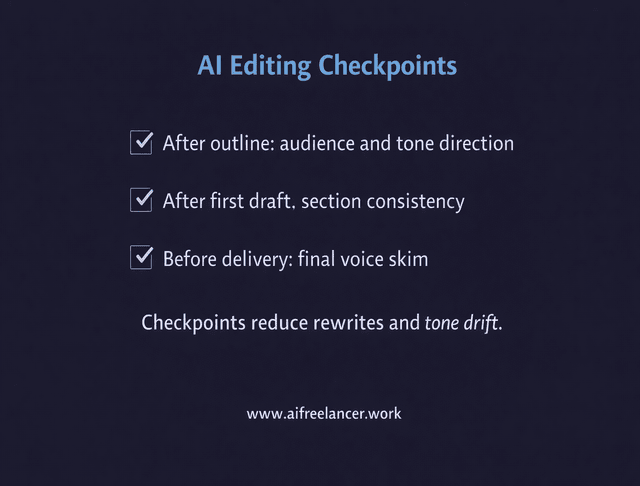
- Check tone after the outline (so the direction matches the audience)
- Check tone again after the first full draft (so sections stay consistent)
- Do a final tone skim before delivery (so you catch small “voice drift” edits)
Case Studies: Successful Tone Improvements with AI
Many freelance writers have successfully used AI tools to enhance the tone of their content. For instance, a writer using Grammarly noticed a significant improvement in reader engagement due to a more consistent tone and greater clarity, leading to increased readership and positive feedback.
Another writer found Hemingway Editor invaluable for refining their blog posts, making them more concise and impactful. This resulted in higher reader retention and better overall content comprehension. These tools have proven essential for maintaining a professional and engaging writing style, ultimately improving the quality and effectiveness of the written material.
What to Copy From These Results
- Use tone tools to standardize voice, not to “rewrite everything.”
- Treat suggestions as options, then accept only what preserves your intent
- Save a short “tone baseline” note for each client (formal, friendly, direct, academic)
AI Tools for Readability Enhancement
Readability is vital to keeping your audience’s attention. Well-structured, easy-to-read content ensures that a broad audience understands your message. An AI writing platform can help simplify and clarify your text, making it more accessible without losing your original intent.
Usability research from Nielsen Norman Group shows that 79% of users scan new web pages, while only 16% read word-for-word, indicating that structure, clarity, and scannability often determine whether readers stay or leave. Readability tools earn their place in your workflow because they help you shape content that matches how people actually consume text online.
Tools Using AI to Simplify and Clarify Text
- Readable: This tool analyzes readability comprehensively, assigns grades, and suggests revisions to make your content easier to read. It evaluates text for clarity, conciseness, and overall readability, ensuring your writing is accessible to a broad audience. The features include readability scores, keyword density analysis, and suggestions to improve the structure and flow of your content.
- Slick Write: It identifies complex sentences and offers simpler alternatives, enhancing the overall readability of your writing. Slick Write checks for grammar, spelling, and stylistic issues, providing detailed feedback on sentence structure, word usage, and readability. It helps streamline your writing process by highlighting areas that need simplification and clarity.
- Grammarly: Besides tone, Grammarly improves readability by detecting overly complex words and phrases and suggesting more straightforward alternatives. It offers real-time writing assistance and checks for grammar, punctuation, and style issues. Grammarly’s readability features ensure your content is clear, concise, and easy to understand, making it a valuable tool for writers to enhance their overall quality.
Quick Pick Guide
- Choose Hemingway Editor when you need punchier, clearer writing fast
- Choose Readable when you want scoring and measurable readability targets
- Choose Slick Write when you want quick, broad feedback on flow and structure
- Use Grammarly as a final pass to smooth phrasing and reduce complexity
Readability Fixes That Usually Move Engagement
- Shorten long sentences that hide the main point
- Replace abstract openings with a concrete first line
- Add subheads that match what readers are scanning for
- Convert dense paragraphs into short blocks and lists where appropriate
Case Studies: Improved Readability with AI Tools
Freelance writers have reported significant improvements in their work after incorporating AI tools for readability. For example, one writer used Readable to enhance their website content, resulting in a better user experience and higher engagement metrics. Another writer found Grammarly’s readability features indispensable for composing more precise and engaging emails. These tools help writers simplify complex sentences and enhance clarity, enabling them to connect more effectively with their audiences. This demonstrates the practical benefits of using AI in content creation.
Integrating AI Tools into Your Writing Process
Integrating AI tools into your writing process is essential to maximizing their benefits. Recent industry data backs this up. According to HubSpot’s summary of Orbit Media’s 2024 blogger survey, 54% of content marketers use AI to generate ideas, but only 6% rely on it to write entire articles. That means most professionals lean on AI as a smart assistant—for brainstorming, refining tone, and improving readability—while keeping humans in charge of the final voice and judgment.
Here are some best practices and tips for effective integration.
A simple workflow you can reuse on every assignment
- Draft without over-editing
- Run a readability pass (structure and clarity)
- Run a tone pass (audience fit and consistency)
- Do a final human review (accuracy, voice, and intent)
- Deliver, then save what worked as a reusable checklist
Tools Using AI for Workflow Integration
- AI Writing Assistants: Tools like HyperWrite offer seamless integration with various writing platforms, providing real-time suggestions to improve tone and readability. These assistants adapt to your unique writing style and preferences, making it easier to produce polished, engaging content. HyperWrite, for instance, uses advanced AI models to analyze your text and offer personalized recommendations that enhance clarity and coherence. This tool enhances blog posts, emails, social media content, and academic writing, ensuring your message effectively reaches and resonates with your audience. With AI tools, you can feel more understood and catered to in your writing journey.
- Automated Proofreading and Editing Tools: These tools can streamline your editing process, saving time and ensuring high-quality results. Computerized tools like Grammarly and Hemingway Editor detect grammar errors, suggest style improvements, and enhance readability by simplifying complex sentences. Grammarly, for instance, offers comprehensive checks for grammar, tone, and readability, making it an indispensable tool for any writer. Hemingway Editor focuses on clarity, highlighting long or complicated sentences and recommending concise alternatives. These tools are essential for efficiently producing error-free, engaging, and readable content.
Suggested Tool Combinations
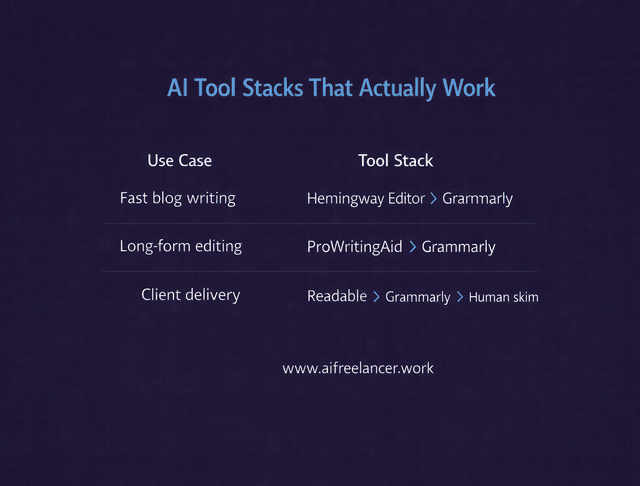
- Fast blog workflow: Hemingway Editor → Grammarly
- Long-form polish workflow: ProWritingAid → Grammarly
- Client delivery workflow: Readable (or Hemingway) → Grammarly tone check → final human skim
Case Studies: Streamlining Writing Processes with AI
Many freelance writers have found that using AI tools significantly increases productivity. For example, a HyperWrite user reported faster turnaround times and higher-quality drafts, leading to more satisfied clients. Another writer combined Grammarly and Hemingway Editor to streamline their proofreading process. This combination enhanced tone and readability, resulting in clearer, more engaging final drafts. These tools save time and elevate writing quality, making them indispensable for freelancers aiming to meet tight deadlines and maintain high standards. With AI tools, you can feel more productive and accomplished in your writing journey.
Final Thoughts
AI tools are transforming the writing landscape, making it easier for freelance writers to produce high-quality, engaging content. Using these tools ensures your writing stays consistent in tone and remains highly readable, enhancing your content’s effectiveness.
Experiment with different tools to find the ones that best suit your needs, then build a simple layered workflow so you get consistent results instead of random improvements.
Try one tool for tone and one tool for readability, run them in the same order each time, and keep yourself in charge of the final decisions. That is how you elevate your writing without bloating your process.
If you want a clear and practical way to use AI in your writing without losing your voice or adding friction to your workflow, visit my Amazon Author page. You will find straightforward guides created for freelance writers who care about quality, consistency, and control. Each resource is designed to help you write better, work faster, and build systems that hold up under real deadlines.
Frequently Asked Questions About AI Tools
AI tools are apps that use machine learning to analyze and improve text. They can flag grammar issues, suggest clearer wording, check tone, and highlight readability problems so your content is easier to understand and more consistent.
The best AI tools depend on what you need. For tone and readability, Grammarly, Hemingway Editor, and ProWritingAid are strong choices. Many writers pair a writing assistant for ideas with one of these tools for final editing.
Tools like Grammarly, ProWritingAid, and QuillBot can rewrite sentences, shorten wordy passages, and adjust style. Use them to generate options, then choose the versions that keep your intent and voice intact.
No. AI tools can speed up drafting and editing, but they cannot replace human judgment, lived experience, or voice. They work best as assistants for mechanics while you stay in charge of ideas and final decisions.
Start with a human draft to keep your ideas and voice clear. Then run it through a readability tool like Readable or Hemingway Editor to simplify structure and trim wordiness. Next, use a tone checker such as Grammarly or ProWritingAid to match the voice to your audience. Finally, review the suggestions yourself and accept only changes that maintain your intent and personality.

Florence De Borja is a freelance writer, content strategist, and author with 14+ years of writing experience and a 15-year background in IT and software development. She creates clear, practical content on AI, SaaS, business, digital marketing, real estate, and wellness, with a focus on helping freelancers use AI to work calmer and scale smarter. On her blog, AI Freelancer, she shares systems, workflows, and AI-powered strategies for building a sustainable solo business.

