

Both Google Scholar and Semantic Scholar provide powerful resources for in-depth exploration of academic research. These tools stand out for their broad access to scholarly literature, with Google Scholar excelling in accessibility and reach. Semantic Scholar leverages AI-driven features to refine and enhance search results. If you are deciding which one to use, the simplest approach is this: use Google Scholar for breadth and fast discovery, then use Semantic Scholar for deeper connections, smarter recommendations, and citation context. Maximize the potential of each platform effectively. For many researchers and writers, this is not optional. Knowledge workers spend about 20% of their time, roughly one full workday per week, just searching for and gathering information, so using smarter tools can have a real impact on productivity.
Everything I’ve shared here—and more—is in my book, available on Amazon. Click the link if you’re ready to level up.
Understanding Google Scholar’s Features
Google Scholar (URL: scholar.google.com/) actively streamlines the process of finding scholarly articles, theses, books, and court opinions. It supports comprehensive searches across disciplines and publication types, ensuring you are well-informed in your cross-disciplinary research. Research shows how central it is to academic work: studies indicate that the majority of researchers in the social sciences and humanities use Google Scholar as their primary search tool in the initial discovery phase.
Google Scholar simplifies your research process by offering convenient features. With Google Scholar, you can:
- Use Exact Phrasing and Keywords: Google Scholar’s search is straightforward but powerful. Enclose phrases in quotes for exact matches or add keywords to narrow your focus. For example, searching “machine learning applications in healthcare” can yield highly relevant results, especially with publication year filters.
- Access Multiple Versions of Articles: The same article might appear in various journals or databases. By clicking “versions,” you can view these and find free or alternative access to the content.
- Generate Citations Instantly: With Google Scholar, you can easily copy citations in formats like MLA, APA, or Chicago and even export citations to reference managers, such as Paperpile or EndNote.
Filters for publication date, language, and author names can further refine your search, saving you time and maximizing relevance.
Getting the Most Out of Semantic Scholar
Semantic Scholar, created by the Allen Institute for AI, adds AI-powered capabilities for analyzing vast amounts of literature. This tool doesn’t just search for keywords; it tries to understand the meaning behind your queries. By doing so, it can produce results that better align with the intent of your research topic. It has also grown into a major discovery platform in its own right—by the end of 2020, Semantic Scholar had indexed around 190 million papers and was serving about seven million monthly users, underscoring its scale and adoption in the research community.
Key features include:
- Semantic Search and AI-Powered Recommendations: Unlike traditional keyword search, Semantic Scholar’s AI interprets your query contextually. For instance, if you’re investigating “neural networks in natural language processing,” Semantic Scholar pulls in articles that connect neural networks specifically to NLP, even without explicit keyword matches.
- Citation Graph: Citation tracking on Semantic Scholar offers a dynamic way to visualize how ideas and studies interlink over time. Suppose you’re studying a foundational topic like cognitive behavioral therapy (CBT). In that case, you can trace its evolution, helping you spot influential papers or shifts in understanding.
- Semantic Reader: This unique feature enhances PDFs by providing definitions, contextual citations, and related articles. This enriched reading experience can help students and researchers bridge knowledge gaps faster when tackling new topics.
Google Scholar vs Semantic Scholar: Quick Feature Comparison
If you are searching “Google Scholar vs Semantic Scholar,” you are usually trying to answer one question: which tool gets me to the right papers faster for my specific task? This table summarizes the practical differences most researchers and writers care about.
Comparison Table
| What you need | Google Scholar | Semantic Scholar |
|---|---|---|
| Broad discovery across disciplines | Strong | Good, but more curated |
| Fast access to many versions of a paper | Strong | Mixed |
| Simple citation copy and exports | Strong | Basic |
| Context-aware results (semantic search) | Limited | Strong |
| Citation graph and paper relationships | Basic | Strong |
| AI recommendations for adjacent papers | Limited | Strong |
| PDF reading support | Limited | Strong with Semantic Reader |
Practical Tips for Using Google Scholar and Semantic Scholar Together
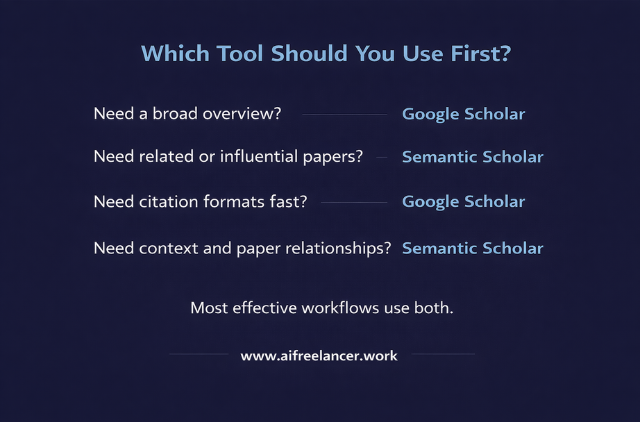
Each platform has unique strengths, so using both can enhance your research. Here are some ways to combine their capabilities:
- Start Broad, Then Narrow Down: Begin with Google Scholar if you need a broad overview of a topic. This search engine will return a mix of articles from various sources, including preprints and patents. Once you have a general sense, switch to Semantic Scholar to delve deeper into specialized content and trace connections between critical papers.
- Set Alerts on Google Scholar: For long-term projects, Google Scholar’s alert feature keeps you updated on new publications matching specific keywords; if you’re researching “genomics in cancer therapy,” set alerts for each key phrase to receive email notifications when new studies are published.
- Organize and Save Papers: Both platforms let you build a library of saved articles, but Google Scholar integrates better with reference managers. Use it to export BibTeX or RIS files to tools like Zotero, where you can organize and annotate for future reference.
- Leverage Semantic Scholar’s AI for Refinement: After finding general sources, switch to Semantic Scholar to use its AI-driven search. For example, suppose you’ve saved a list of articles on CRISPR in medical applications. In that case, Semantic Scholar’s recommendation engine will suggest closely related papers, ensuring you cover recent advancements or lesser-known research.
A repeatable workflow (broad to precise)
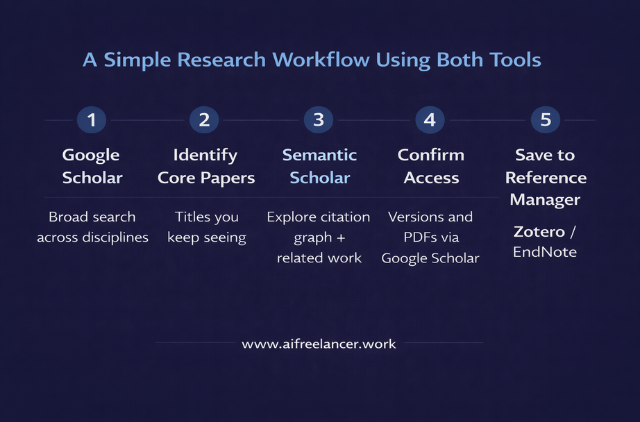
- Run 2 to 3 broad searches in Google Scholar to collect the “core” papers you keep seeing.
- Open those same papers in Semantic Scholar to explore the citation graph and recommended related work.
- Use Semantic Scholar to identify the most influential or highly cited items, then confirm access and versions back in Google Scholar.
- Save and organize final selections in your reference manager.
Overcoming Limitations
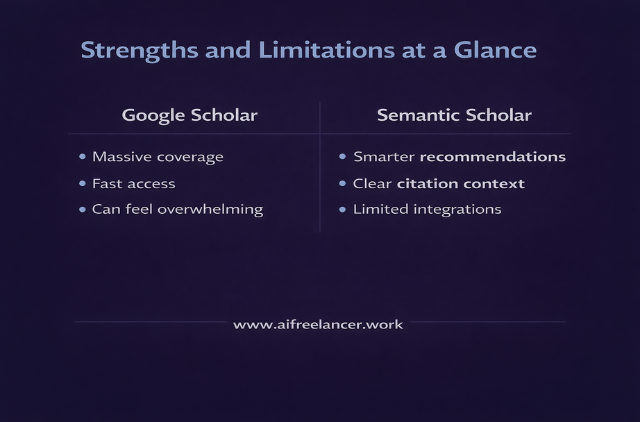
While both tools are robust, they have limitations. Google Scholar has a vast, but sometimes overwhelming, result pool, and its reliance on keyword searches may lead to lower precision. On the other hand, Semantic Scholar is limited to English-language papers and doesn’t support as many direct integrations with citation managers, which could require manual reference management for some users.
Despite these limitations, leveraging each tool’s strengths can make your research workflow smoother. Use Google Scholar’s advanced search options to create highly tailored queries and import the results into Semantic Scholar for more nuanced analysis—or pair them with AI writing platforms to turn your research insights into clear, publishable drafts more efficiently.
Final Thoughts
Both Google Scholar and Semantic Scholar offer distinct but complementary features, making them powerful allies in academic research. Whether starting a literature review, tracking citations, or exploring connected research topics, using these platforms together can streamline and deepen your research process. By combining Google Scholar’s broad accessibility and Semantic Scholar’s AI-driven depth, you gain the best of both worlds, enhancing both the scope and precision of your scholarly investigations.
If you want to see how these ideas translate into real, published work, visit my Amazon Author page. You will see my published books on research, writing workflows, and practical systems for knowledge work. Choose the title that matches what you are trying to do right now, and apply it directly to your process.
Frequently Asked Questions About Using Google Scholar and Semantic Scholar
Google Scholar is a broad academic search engine. Semantic Scholar also searches scholarly work, but adds AI features such as semantic search, citation graphs, and smarter recommendations.
It depends on your goal. Google Scholar is better for breadth and quick access; Semantic Scholar is better for focused, context-aware results. Most researchers benefit from using both.
Google Scholar is a discovery tool, not a source itself. It indexes many reputable journals and conferences, but you still need to check each paper’s publisher, peer review, and citations.
Yes. Semantic Scholar is free. You can search, read abstracts, view citation graphs, and save papers; full-text access depends on open access or your institutional access.
Use Google Scholar to scan widely and collect key papers, then switch to Semantic Scholar to map citations, explore related work, and refine your understanding of the topic.

Florence De Borja is a freelance writer, content strategist, and author with 14+ years of writing experience and a 15-year background in IT and software development. She creates clear, practical content on AI, SaaS, business, digital marketing, real estate, and wellness, with a focus on helping freelancers use AI to work calmer and scale smarter. On her blog, AI Freelancer, she shares systems, workflows, and AI-powered strategies for building a sustainable solo business.


Pingback: Data-Driven Writing: Analyzing Trends and Insights with AI - The AI Freelancer