

If you’re using AI to speed up your writing, you’ve probably collected a bunch of apps by now. Maybe you draft with ChatGPT, edit in Grammarly, plan content in Notion, and track deadlines in Trello. That sounds smart until it gets messy. Jumping between tools can slow you down. This is where AI tool integration becomes a game-changer. It connects your favorite tools so they work together rather than making more work for you.
Let’s walk through how to make these tools click into place so that you can write better, faster, and with less stress.
Everything I’ve shared here—and more—is in my book, available on Amazon. Click the link if you’re ready to level up.
Why AI Tool Integration Matters for Freelance Writers
Ever feel like your writing day slips away in a blur of tabs, tools, and tiny tasks? You’re not alone. As a freelance writer, it’s easy to get buried in the tech you use to stay productive. But when your tools start to slow you down instead of speeding things up, it’s time to rethink how they work together.
Most writers are already using AI in some form. According to Microsoft’s 2024 Work Trend Index, around 75% of global knowledge workers are now using generative AI, and usage has nearly doubled in just six months. That means the advantage isn’t just using AI anymore—it’s building AI writing workflows where your tools talk to each other and actually reduce friction rather than add to it.
At the same time, context switching quietly drains your time. Harvard Business Review found that the average digital worker toggles between apps and websites nearly 1,200 times per day, losing close to four hours per week just re-orienting after switching tools. That’s about five full workweeks a year lost to app-hopping.
AI tool integration helps you claw back that time.
How AI Tool Integration Streamlines Your Workflow
As a freelance writer, your time matters. You’ve got blog posts to draft, client briefs to follow, and revisions to deliver. When your tools connect, your workflow gets smoother. For example, when your AI writing tools integrate directly with your editing apps, you skip the need to copy-paste and switch screens.
You can use tools like Notion AI or Jasper to create a first draft, then pass it to Grammarly or Hemingway for clean-up. This is a streamlined AI workflow in action. You move from one step to the next without manual work slowing you down.
Cut Down on App Overload
It’s easy to fall into the trap of chasing every new writing tool. But using too many disconnected apps can create more problems. You might lose track of versions, miss deadlines, or repeat tasks.
When you focus on integrating AI tools, you reduce clutter. You stick with tools that support each other. That means fewer tabs, fewer logins, and fewer headaches.
Stay Focused, Not Frustrated
Jumping between apps breaks your focus. You lose your train of thought. That’s a real problem when you’re trying to write a 2,000-word article or finish a tight client deadline.
With integrated tools, you stay locked into your freelance writing workflow. One tool flows into the next. You don’t waste brainpower on hunting for files or remembering what app does what. That helps you stay in the writing zone longer and get paid faster.
Choosing the Right Stack for AI Tool Integration
Not all writing tools are created equal, and using the wrong mix can slow you down rather than speed things up. If you’ve ever felt overwhelmed by too many apps or frustrated by tools that don’t work together, you’re not alone. The right setup can make your workflow feel smooth and effortless, but it begins with selecting tools that align with your writing style and the AI writing workflows you want to build.
Pick Tools That Support AI Tool Integration Natively
Before you sign up for that new AI assistant or editing tool, check if it plays well with others. Tools that offer native integration or work well with platforms like Zapier are gold.
For example, Notion AI connects with Trello, Slack, and Google Calendar. Grammarly can plug into your browser, Word, and email. These tools support writing productivity without making you do the heavy lifting.
Look for apps that say things like “integrates with,” “works with,” or “connects to” on their websites.
Match Your Tools to the Writing You Do
Are you writing blog posts, social media captions, ebooks, or SEO articles? Different work needs different tools. A blog writer might love Jasper for quick drafts and SurferSEO for optimization. A book writer might prefer Sudowrite and Scrivener.
Think about where AI-powered writing processes can save you time. If you’re stuck on outlines, pick a tool that helps with structure. If you dislike editing, opt for one that corrects grammar and tone.
The key is not just having tools, but having the right tools for what you do most.
Start with a Simple, Scalable Stack
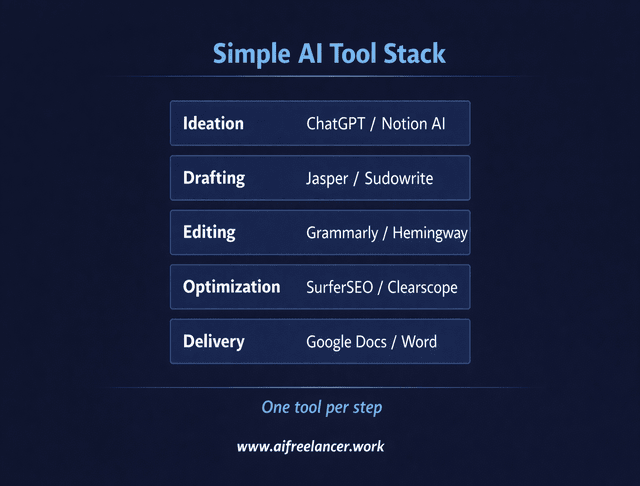
You don’t need ten apps. You need three or four solid ones that grow with you. Start small. Perhaps consider ChatGPT for drafting, Grammarly for editing, Notion for planning, and Google Docs for delivery.
Once you’re comfortable, you can add more. But always test how new tools integrate with your existing setup. Don’t let extra features distract you from writing.
Where AI Tool Integration Breaks (And Why It Matters)
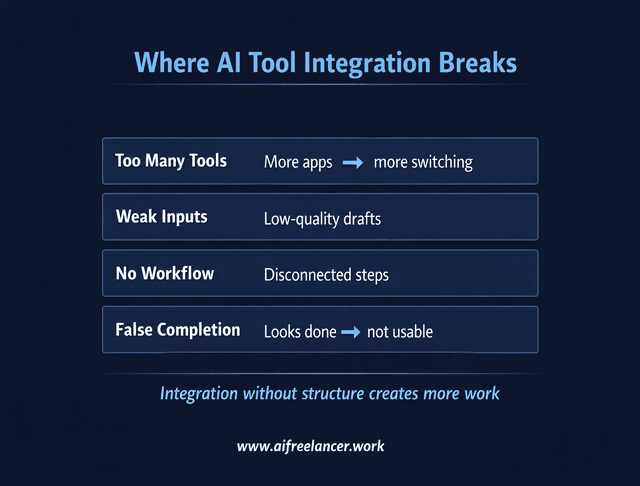
Most advice makes AI tool integration sound simple: connect your apps, and everything runs smoothly. In reality, this is where many workflows fall apart.
Disconnected tools don’t just slow you down. Poor integration creates hidden friction that shows up as rework, confusion, and unnecessary editing.
Here’s where things usually break:
- Too many tools: More apps mean more switching, not less
- Weak inputs: AI generates low-quality drafts that require heavy editing
- No clear workflow: Tools exist, but they don’t follow a logical sequence
- False completion: AI output looks finished, but isn’t usable
The biggest problem is not the tools. It’s how they’re used. If your workflow is unclear, integration will only make the chaos faster.
AI Output vs Editing Effort (The Real Time Cost)
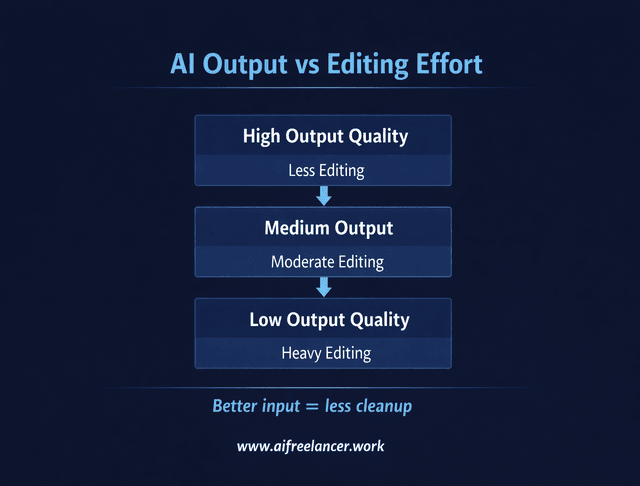
AI can either save you time or create more work. The difference comes down to output quality.
- High-quality output → Less editing
- Medium-quality output → Moderate editing
- Low-quality output → Heavy rewriting
Many writers assume AI saves time automatically. But if you spend more time fixing drafts than writing them, your workflow is broken.
Better inputs and better integration reduce editing effort. That’s where real productivity gains happen.
Building Smooth Workflows Through AI Tool Integration
You’ve got the right tools, but are they working together or working against you? A scattered system can slow you down more than it helps. This section shows you how to turn that mess into a smooth, connected workflow that makes writing easier.
Use APIs, Plug-ins, and Platforms to Connect Your Tools
If you’re not tech-savvy, the term “API” might sound scary. Don’t worry. Many platforms, such as Zapier and Make, make integration easy. You don’t need to code. You can drag and drop actions like: “When I finish a draft in Notion, send it to Google Docs.” Or “When I complete a blog post, I upload it to my portfolio.”
These tools enable you to link AI writing apps and automate tasks. That way, you can stay focused on what counts in writing great content.
Map Out Your Writing Flow for Better AI Tool Integration
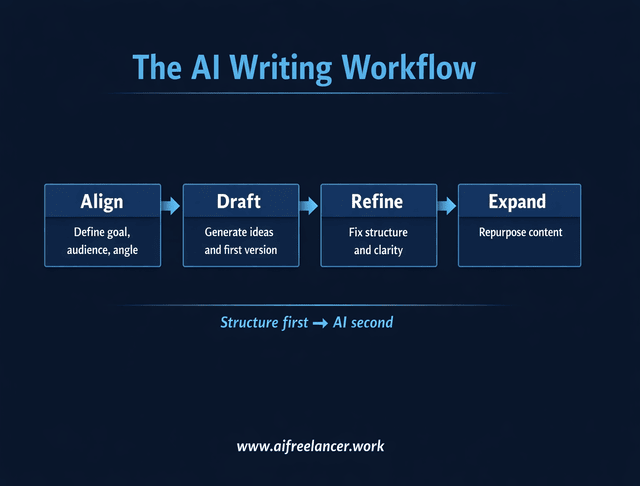
Before setting up tools, sketch your writing process. Where do ideas start? Where do you draft, edit, and submit your work? Label each step. Then, ask: Can AI help in this situation? Can I connect tools?
Use a simple structure to guide your workflow:
- Align: Define the goal, audience, and angle
- Draft: Generate ideas and first versions
- Refine: Fix structure, clarity, and tone
- Expand: Repurpose content into other formats
This is how you create a writing automation setup that fits your real work. It’s not about using more AI; it’s about using AI where it counts.
For example:
- Ideation: ChatGPT or Notion AI
- Drafting: Jasper or Sudowrite
- Editing: Grammarly or Hemingway
- Optimization: SurferSEO or Clearscope
- Delivery: Google Docs or Word
You can integrate each one into a clean workflow.
Test, Tweak, and Maintain Your System
Even the best system needs updates. Tools change. Features get added. Bugs pop up. Make it a habit to review your workflow every month or two.
Ask yourself:
- Are my tools still saving me time?
- Is anything slowing me down?
- Can I automate something new?
Recent research on AI tools and productivity shows that when workers actively integrate AI into their daily workflows—rather than using tools in isolation—they see significant productivity gains, especially in knowledge work. In other words, well-integrated AI doesn’t just feel smoother; it measurably boosts output.
Your automated content creation setup should always support your work, not add to your stress.
Scaling Smart with Evolving AI Tool Integration
You’ve built a solid writing routine. Clients are happy. Work is flowing in. But what happens when the pace picks up, and you’re juggling more than you can handle? That’s when your setup gets tested. If your tools can’t keep up, neither can you. This section shows you how to grow without burning out.
Plan for Advanced AI Tool Integration
Think long-term. If you plan to scale, take on more clients, publish a newsletter, or offer content packages, set up tools that can handle the increased workload.
That means tools with effective AI content optimization features, built-in analytics, or client-sharing options. It also means integrations that let you send content directly to platforms like WordPress, Google Drive, or Trello.
If your current tools don’t scale, you’ll hit a wall. So, build smartly from the start.
Stay Flexible as Tools Change and Improve
AI evolves fast. New writing tools drop every month. Some fade, some grow. Stay open to updates, but don’t chase every shiny object.
Follow trusted blogs, join freelance writing groups, or sign up for newsletters that share real tips. Keep an eye out for tool compatibility for writers, not just “cool features.”
The best writers aren’t the ones using the most tools. They’re the ones using a few tools well.
When AI Tool Integration Actually Saves Time
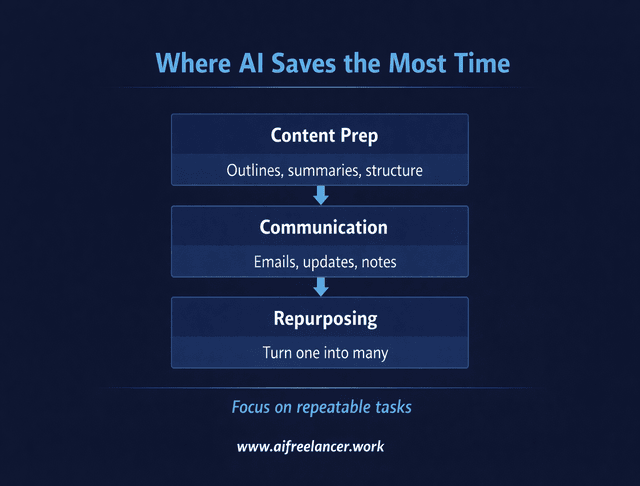
Not every task benefits from AI. Integration works best when applied to repeatable, structured work.
Use AI when:
- You need outlines, summaries, or drafts
- You’re repurposing content
- You’re handling repetitive writing tasks
Avoid AI when:
- You’re defining original ideas
- You’re shaping arguments or opinions
- You need a strong voice and nuance
AI should support your thinking, not replace it. The more strategic the task, the more human input it needs.
Use Integration to Multiply Your Output, Not Your Effort
AI should help you work smarter, not harder. A great integration setup lets you:
- Deliver more content with less effort
- Automate admin tasks like formatting and uploading
- Spend more time writing and less time clicking.
That’s the real power of AI tool integration. It’s not about doing more; it’s about doing better.
Final Thoughts
You don’t need to be a tech expert to get AI tools working together. You need a plan—one that starts with understanding your writing workflow, choosing tools that support each other, and connecting them through simple integrations. From there, refine as you grow so your system stays efficient instead of becoming another layer of friction.
With smart AI tool integration, you’ll spend less time managing tools and more time writing what matters. Let your tools communicate with each other, so your focus stays on clarity, structure, and output that actually serves your clients and your goals.
Ready to take your workflow further? Explore practical, no-fluff strategies inside the books on my Amazon Author page, where each one is designed to help you write faster, reduce revisions, and use AI without losing your voice. Find the system that fits your workflow and start turning your time into better output.
Frequently Asked Questions About AI Tool Integration
It’s the process of connecting your writing apps—like ChatGPT, Notion, Grammarly, Trello, and Google Docs—so work moves between them automatically, creating smooth AI writing workflows instead of copy-paste chaos.
They speed up brainstorming, outlining, drafting, and light editing so you spend less time on busywork and more time on strategy, voice, and client results.
A simple, reliable stack is often enough: an AI assistant (e.g., ChatGPT), an editor (Grammarly or Hemingway), a workspace (Notion or ClickUp), and a delivery tool (Google Docs or Word), with SEO or niche tools added only when needed.
Map your steps from idea to delivery, pick one main tool for each stage, then use plug-ins, extensions, or automations (like Zapier or Make) so drafts and tasks flow automatically from one step to the next.
Yes—too many tools can increase context switching, and unedited AI output can feel generic, so keep a lean stack, integrate only what you use, and always stay in charge of quality and final decisions.

Florence De Borja is a freelance writer, content strategist, and author with 14+ years of writing experience and a 15-year background in IT and software development. She creates clear, practical content on AI, SaaS, business, digital marketing, real estate, and wellness, with a focus on helping freelancers use AI to work calmer and scale smarter. On her blog, AI Freelancer, she shares systems, workflows, and AI-powered strategies for building a sustainable solo business.


Pingback: AI Productivity Tools: Customize and Optimize for Success - The AI Freelancer