
You’re not missing deadlines because you’re lazy. You’re missing them because you’re juggling eight clients, three “quick edits,” an urgent rewrite that wasn’t in scope, and two calls you didn’t plan for. Your brain is doing project management in addition to writing. That constant switching burns time and attention, and it also kills creative focus. According to research on interruptions and task switching, workers typically spend only about 12 minutes and 40 seconds on a task before being interrupted, and can take more than 25 minutes to return to the same work with full focus after the break — meaning that every “quick check” costs you big chunks of deep concentration. This is where AI task management becomes more than a buzzword. It becomes survival.
AI task management involves utilizing intelligent systems to capture incoming requests, prioritize what matters most, and automatically create a realistic schedule for you. Missing one deadline isn’t just “oops, I’ll do better.” It’s “I just shook a client’s confidence right before retainer renewal.” When you protect delivery, you protect future income. When you protect future income, you stop waking up wondering if next month’s expenses are covered.
Everything I’ve shared here—and more—is in my book, available on Amazon. Click the link if you’re ready to take the next step.
AI Task Management to Streamline Your Workflow
AI is not here to replace you. It’s here to get the chaos out of your head and into a system that runs in the background. Modern AI task managers act like lightweight project managers: they organize tasks, schedule work, and flag what needs to happen next so you’re not constantly re-planning your day. These systems can automatically generate to-do lists, set reminders, and rearrange your schedule as priorities shift, which keeps you from overlooking critical work.
AI can also kick back against the “work about work” problem — the coordination, updates, meetings, and tool-switching that steal attention from real output. According to Asana’s Anatomy of Work Index, knowledge workers spend roughly 60% of their time on work about work instead of the skilled work they were hired to do.
Here’s what that looks like in real life:
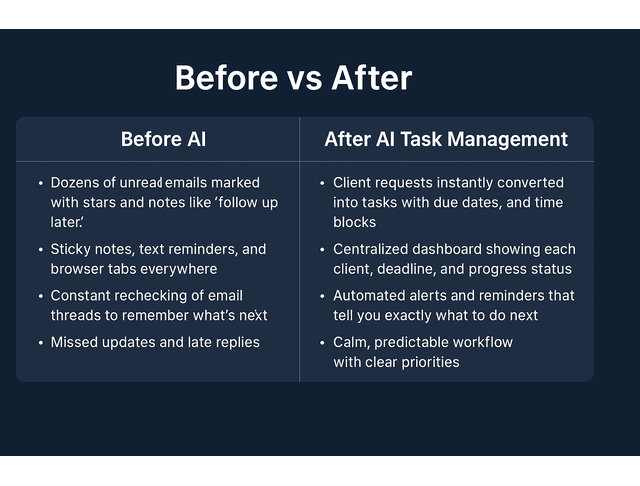
- Before: A client emails, “Can you update the intro and fix the stats?” You put a star on it, meaning to come back, and by 4 p.m., you’ve already context-switched four times, and you still haven’t touched it.
- After: The AI sees the request, creates “Revise intro + stats” as a task, tags it to that client, schedules 40 minutes at 10:30 a.m., and assigns it a same-day priority. You don’t rely on memory. You work what’s on deck.
Automate Daily Tasks for Better Focus
You lose hours every week to admin. Manually logging deliverables and updating calendars for every client. Writing “following up on this” emails. You can hand most of that to AI.
AI scheduling and productivity tools can automatically create tasks from emails or chat, assign due dates, and set reminders without you having to type it all in yourself. These tools also sync with your calendar, allowing you to adjust schedules when a rush job arises.
Quick win you can use today: forward client requests to one AI-driven task inbox. Let it translate those messages into “what needs to happen,” “how long it will take,” and “when you’ll do it.” You’ll stop scanning five apps to remember what you owe people.
How AI Task Management Simplifies Client Projects
Client work is messy: it involves different scopes, tone guides, and urgency levels. AI task management platforms enable you to group tasks by client, attach briefs and brand voice notes, and view status at a glance, ensuring that nothing falls through.
Some tools even draft quick status updates or progress summaries for clients, which helps you look organized without spending an hour writing “here’s where we are” emails.
When a client experiences you as someone who sends structured progress updates (“Draft delivered/awaiting feedback / next milestone Friday”), you stop looking like “a writer I DM when I need words” and start looking like “a content partner I can trust with a channel.” Trusted partners are the ones who get retainers. Retainers stabilize your income.
Once the requests are under control and clients know what’s happening, the next problem is your energy. You still have to write the thing.
Create a Writing Routine That Supports Flow
You have peak writing hours (usually the hours when you’re sharp and quiet). AI can protect that time.
Instead of scattering tasks across the day, AI can block high-focus windows for drafting and push shallow work (such as invoicing, file cleanup, and revisions) to lower-energy slots. This keeps you from burning your best mental hours on admin.
To make this work, identify when you draft the fastest with the fewest rewrites. That’s your prime block. Train the tool to “lock” that window for deep work so nothing else gets scheduled there unless you manually approve it. That one boundary alone can increase your output without requiring additional hours.
Prioritize Smarter with AI Task Management Tools
Most freelancers don’t struggle with doing the work. They struggle with choosing which job to do first. AI helps with that. AI prioritization systems rank your tasks by urgency, deadline pressure, and impact, not just what’s loud. They surface what matters before you even open your inbox. AI business tools can analyze urgency, deadlines, dependencies, and workload capacity to dynamically reorder your task list.
Score Deadlines and Payoffs Automatically
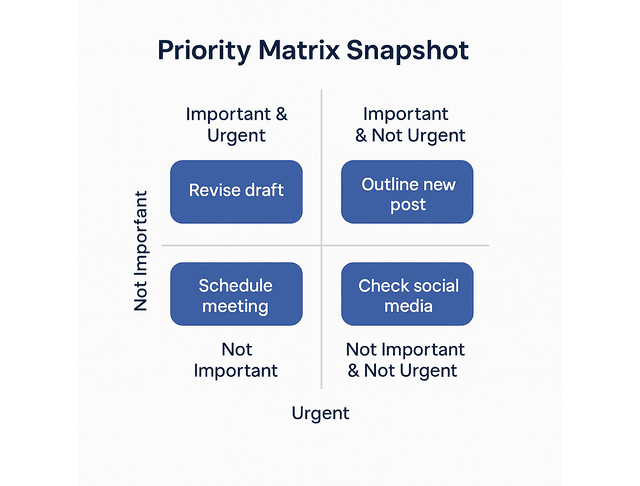
Not all tasks are equal. A $600 blog due tomorrow and a $50 social caption due today should not compete for the same hour.
AI can score tasks based on deadline, deliverable size, and revenue impact. That score becomes your action order. You work the list.
When you can see, in plain numbers, “This client gets priority every single morning but pays the least,” you have proof that your pricing is upside down. That is the evidence you use to justify raising your rate or restructuring the offer.
Balance Creative Work and Admin Tasks with AI Task Management
Burnout doesn’t usually come from writing. It comes from context switching.
AI helps you batch work. It can group related tasks (draft section, edit section, assemble final deck) and schedule them back-to-back instead of scattering them across the day. This reduces cognitive drag and keeps you in one mental lane longer, which is the fastest way to increase billable throughput without extending your hours.
Batching protects your focus. Capacity caps protect your calendar.
You can also set personal capacity caps. For example: “No more than 5 hours of high-focus work per day.” When you hit that ceiling, the system stops letting new “urgent” work land on that same day. It automatically pushes the lower-value or lower-dollar work to the forefront. This protects you from “Sure, I can do that today” autopilot, which is how most freelancers quietly torch their evenings.
Use Analytics to See Where Time Goes
Freelancers often waste time in areas they don’t bill, such as searching for files, chasing feedback, reformatting Google Docs, and waiting for approvals.
Some AI task managers and AI project management tools give you analytics: how long certain task types take, where work tends to bottleneck, and when you’re most overloaded.
That data helps you renegotiate scope, raise rates where the work always expands, and stop saying “yeah, I can take that today” when you’re already at capacity.
This is also how you have adult conversations with clients instead of apologizing. You can say, “Your revisions usually add two extra hours per piece. We can build that into the flat rate from now on, or we can narrow revision rounds.” You’re not complaining. You’re showing math.
Stay Ahead of Deadlines Through AI Task Management
Deadlines are what get you rehired. Miss one, and the client starts looking for backup.
Constant interruptions are a part of modern work life — research from Microsoft’s Work Trend Index shows employees are disrupted on average every two minutes during core work hours, racking up hundreds of pings per day between meetings, emails, and chats. AI task tools can automatically schedule work around meetings and other commitments, assign realistic due dates, and reschedule tasks you didn’t get to instead of letting them disappear.
Your on-time rate is not a vanity stat. It’s leverage. When you consistently deliver on the date you promised, you earn the right to ask for retainers, long-term agreements, and better terms.
Predict Workload Peaks Before They Hit
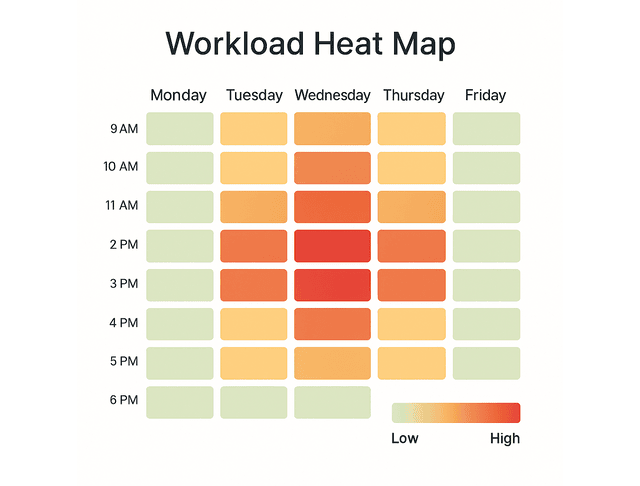
Most “last-minute emergencies” are actually slow-building pileups you didn’t see coming.
AI forecasting reviews what you’ve already booked, tracks how long similar work usually takes you, and notes which clients tend to revise heavily. It then warns you early, “Thursday is overloaded,” so you can adjust before you’re in over your head.
Here’s why that matters. A “Can you do this today?” Slack from a high-value client will always feel like a must-yes. When you get that request, the system can show you the cost in real terms: “Saying yes means pushing two low-revenue tasks into tomorrow and stealing from Friday’s revision buffer.” You’re not guessing. You’re making an informed business decision.
Reduce Late Deliveries with AI Task Management Alerts
Late work usually occurs because you forget a micro-deadline (such as outline approval, draft handoff, or revisions due), not the final hand-in.
AI sends nudges before those micro-deadlines slip. It will also warn you if you’re about to miss something and automatically reshuffle the rest of your calendar to absorb it, so you still hit client timelines.
When you deliver consistently, clients stop hovering. When clients stop hovering, they stop shopping your role around to “backup writers.” Quiet reliability is how you become the default choice.
Protecting deadlines isn’t just about when you write. It’s also about staying aligned with moving targets.
Sync All Clients and Devices Automatically
Scattered notes = dropped work.
AI-enabled task managers and calendar tools sync tasks, drafts, and due dates across desktop, phone, shared boards, and even client systems like Asana.
That means you always have the current version of what’s due, not last week’s version, and you don’t wake up to the panic of “Did you get my update?” This matters because “I didn’t see that update” sounds like an excuse to a client. When your system pulls in every update they make right away, you stop sounding reactive. You start sounding prepared.
Build Long-Term Stability Using AI Task Management
This is where it stops being “help me catch up” and becomes “help me build a business.” AI helps you build repeatable, reliable systems that make you look like an agency, even if it’s just you.
The bigger risk for freelancers right now is not AI replacing you. It’s clients assuming you are interchangeable. When you can show a structured process, predictable turnaround, and clean communication, you stop looking “replaceable.” You start looking essential. AI project management support, templates, and automated status updates all help you present that calm, professional reliability.
Design Reusable Workflows for Recurring Clients
If you write a weekly newsletter for a client, that workflow should not start from zero every week.
You can build a template that includes asset requests, drafting, edits, compliance review, final formatting, and delivery. AI can automate this workflow on a schedule, ensuring the process runs consistently every cycle.
That repeatable process is an asset. You can sell “newsletter ops” as a package, not just “I’ll write the copy.” Packages are easier to keep on retainer than loose deliverables.
Integrate Productivity Metrics into Your AI Task Management
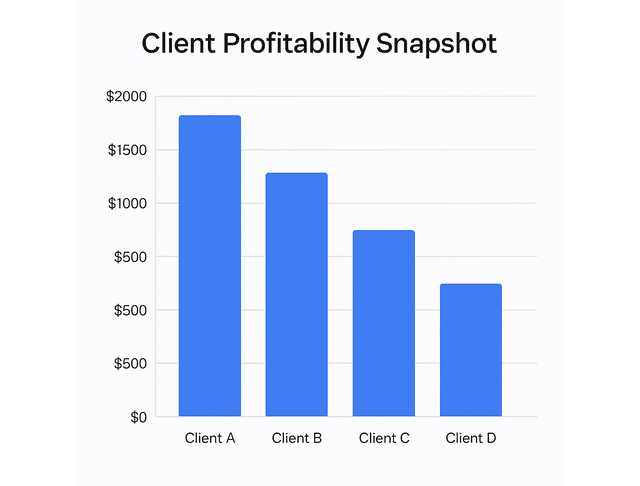
You can’t improve what you don’t measure.
Pull simple metrics: turnaround time per deliverable, revisions per client, hours per piece, total billed per client per month. AI can surface those numbers automatically and chart them so you can see who’s profitable, who’s scope-creeping, and where you’re underpricing.
This is also how you decide who to keep and who to phase out. Suppose one client eats 9 hours a week and resists any rate increase, while another pays more and rarely revises. In that case, you already know where to invest. You are not “firing a client.” You’re reallocating capacity to stability.
Scale Income Without Adding Hours
The endgame is not “do more work.” It’s “earn more from the work you already do.”
When AI handles task intake, prioritization, scheduling, reminders, follow-ups, summaries, and reporting, you can spend more of your paid hours on high-value writing work instead of unpaid coordination work. That lets you raise your floor without touching your ceiling.
Here’s a fast way to start, without rebuilding your whole workflow:
- Dump all open deadlines, drafts in progress, and promised revisions into the one AI task tool you plan to actually use.
- Assign realistic time blocks for each deliverable (not fantasy numbers, real ones).
- Let the tool auto-build for you over the next three days.
- Lock two high-focus blocks per day and don’t move them unless it’s high-dollar work.
- Use that map to tell any new client request, “Here’s when I can deliver.”
This alone moves you from reactive scrambling to controlled pacing.
Final Thoughts
Freelance writing stops feeling like constant panic the moment you stop managing it in your head and start running it from a system. AI task management gives you structure: clear priorities, realistic timelines, and early warning before you’re underwater. The point isn’t to become a robot. The fact is to buy back focus, protect your reputation, and build a writing business that runs clean.
- Reliable delivery replaces apology.
- One-off scrambles turn into steady, retained work.
- Instead of hoping clients return, you decide who earns a slot on your calendar.
If you want a step-by-step way to build that kind of system—without turning your workflow into a complicated tech project—check out my books on Amazon. They’re packed with practical templates, prompts, and simple setups you can copy to organize your tasks, protect your deadlines, and run the business side of freelance writing with less stress. Visit my Amazon Author page and pick the title that fits what you’re fixing right now.
Frequently Asked Questions About AI Task Management
AI task management uses intelligent systems to organize, prioritize, and automate tasks, schedule work, and generate reminders with minimal manual input. These systems can also adjust your plan in real time when priorities shift, so nothing gets missed.
AI looks at multiple factors at once—deadlines, workload, urgency, and impact—and ranks what you should work on first. This goes beyond “what’s due soonest” and helps you focus on work that actually moves your business forward.
Yes. AI can auto-schedule tasks around your commitments, warn you when you’re overbooked, and nudge you before milestones slip. Some tools even reschedule missed tasks to prevent them from falling through the cracks.
You should never paste confidential info into any system your client hasn’t approved. If a client shares private data (internal pricing sheets, unreleased product notes, customer feedback, or legal drafts), request permission before uploading any information. Protecting confidentiality helps maintain trust and ensures you stay on the contract.
Start with one AI task manager or AI project management tool that can prioritize tasks, generate schedules, and send alerts. Add time tracking and analytics next so you can see where your hours go and which clients are actually profitable.

Florence De Borja is a freelance writer, content strategist, and author with 14+ years of writing experience and a 15-year background in IT and software development. She creates clear, practical content on AI, SaaS, business, digital marketing, real estate, and wellness, with a focus on helping freelancers use AI to work calmer and scale smarter. On her blog, AI Freelancer, she shares systems, workflows, and AI-powered strategies for building a sustainable solo business.


Pingback: Team Communication Tools for Freelance Writers - The AI Freelancer