
You’re already stretched in one language. Your calendar is full, your draft queue never ends, and now there’s a new request on your plate: “Can we get this in Spanish too?” Or maybe you’re looking at your book or blog and thinking, If this were available in other languages, my audience could be so much bigger. The opportunity is real, but the extra workload feels impossible. This is where AI translation tools start to look less like a novelty and more like a practical way to extend your reach without doubling your hours.
The goal isn’t to hand everything over to a machine. It’s to build a workflow where translation becomes structured, predictable, and light enough to integrate into your existing writing system. To see what that looks like in practice, start with how these tools actually change your day-to-day writing.
Everything I’ve shared here—and more—is in my book, available on Amazon. Click the link if you’re ready to take the next step.
How AI Translation Tools Change Multilingual Writing for Solo Pros
You’re already doing everything you can to keep up in one language. Adding “go multilingual” to your mental to-do list can feel like a luxury you’ll never get to. The shift happens when you realise AI translation tools don’t ask you to write more; they help you do more with what you’ve already created—without turning your calendar upside down.
Why Multilingual Content Matters for Busy Writers and Creators
Multilingual content isn’t just a “nice to have” anymore. It directly affects whether people trust and buy from you.
A major study by CSA Research found that 76% of online shoppers prefer to buy products with information in their native language, and 40% will never buy from websites in other languages, according to its “Can’t Read, Won’t Buy – B2C” report.
If you write blogs, newsletters, landing pages, or books, that statistic should ring loud:
- The same core article can generate search visibility in multiple markets.
- One lead magnet can capture subscribers in multiple languages.
- A single book can turn into a small catalog of editions over time.
Instead of creating more content from scratch, you’re getting more mileage from what you’ve already built.
AI Translation Tools as a Drafting Partner, Not a Replacement
The safest and most effective way to use AI is to treat it as a drafting partner:
- Let the tool create a first-pass translation of your blog post, email sequence, or chapter.
- Then use your editing skills to check nuance, tone, and accuracy.
This balances speed and quality:
- AI handles structure and bulk translation.
- You bring context, judgment, and brand voice.
In practice, many solo professionals find that AI can handle around 70–80% of the heavy lifting, with human editing reserved for the final 20–30% where nuance and voice matter most.
This is exactly how many professional translators now work. Recent industry stats based on a ProZ survey show that around 88% of full-time translators use at least one computer-assisted translation (CAT) tool.
You’re not “cheating” by using AI. You’re working the way the industry already does—just tailored to your own business. But even when AI handles most of the draft, there are areas where you still need to be in the driver’s seat.
Where Human Context Still Beats Machine Translation
Even with strong systems, there are clear limits:
- Idioms, humor, and sarcasm
- Cultural references and local examples
- Highly specialized or regulated topics (finance, legal, medical, technical)
- Brand phrases, taglines, and key positioning lines
That’s why you still need:
- A quick human review for any public-facing translation
- A small style guide or glossary: preferred terms, phrases to avoid, tone notes
- Rules for when you’ll slow down and spend extra time (sales pages, book descriptions, high-stakes emails)
By “glossary” here, think of a simple list of key terms (product names, frameworks, jargon), and how they should always be translated, so the tool and any human editors stay consistent.
Think of AI as the engine and your editorial eye as the steering and brakes.
Choosing AI Translation Tools That Fit Your Freelance Workflow
The fastest way to hate translation is to bolt on a tool that fights the way you work. Copy-pasting between five tabs, wrestling with formats, and redoing broken layouts will kill your momentum quickly. Instead, the right AI translation tools should slide into your existing stack, supporting how you draft, edit, and publish so translation feels like one more smooth step, not a separate job.
Matching Tools to Your Use Case: Blogs, Books, and Thought Leadership
Not every tool is built for the same job. Before you sign up, ask what you actually need translated:
- Blogs and SEO content: A web or browser-based tool that lets you paste text or translate directly from your CMS.
- Newsletters and funnels: A tool that works nicely with your email platform or at least handles HTML formatting well.
- Books and long-form assets: Document-aware tools that keep headings, formatting, and basic structure intact.
You don’t need the most advanced or expensive option. You need the one that reduces friction in your existing workflow.
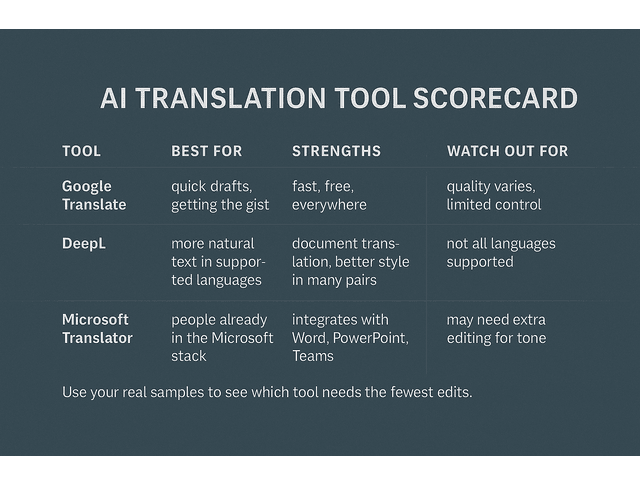
A few examples that many professionals test first:
- Google Translate: Fast, free, widely available; great for getting the gist or first drafts of simpler content.
- DeepL: Often praised for more natural-sounding translations in supported languages and for its document translation features.
- Microsoft Translator or similar tools: Handy if you already live in the Microsoft ecosystem (Word, PowerPoint, Teams).
You can test each of these with the same sample text and quickly see which one feels closest to your voice and needs.
Key Features to Compare: Languages, Integrations, Privacy, Support
When comparing AI translation tools, focus on a short list of essentials:
- Language coverage and quality: Does it handle your current and likely future language pairs?
- Integrations: Can it work with Google Docs, Word, WordPress, Notion, or your CMS?
- Glossaries and style features: Can you lock in key terms, brand names, and product names?
- Privacy and security: Important if you’re handling client drafts, customer data, or unpublished manuscripts.
- Collaboration: Does it make it easy to share drafts with editors or proofreaders?
Most tools offer a free tier or trial. Use those periods to translate real samples and see how much editing you actually need.
How to Evaluate Tone, Context, and Style with AI Translation Tools
A simple test can save you hours later:
- Take a real piece of your writing: a blog intro, sales page section, or book paragraph.
- Translate it into another language and then back to your original language.
- Compare:
- Is the meaning preserved?
- Does it sound like something you would naturally say?
- Is the tone (formal, neutral, conversational) still right?
For example, you might start with a sentence like, “This framework helps solo creators hit deadlines without burning out,” translate it to Spanish, then back to English. If you get something like, “This system assists independent creators to meet time limits without exhausting themselves,” you can immediately see what you’d keep and what you’d tweak for tone.
Repeat that with two or three tools. One of them will usually require fewer edits and feel closer to your voice. That’s your best candidate. Once you’ve seen how each tool handles your real samples, the next step is understanding what you’re trading off in terms of cost and risk.
Money, Quality, and Risk: Getting Real About AI Translation Tools
Every new tool promises speed and efficiency, but you’re the one who takes the hit if a clumsy translation damages your reputation. At the same time, turning down multilingual opportunities because you’re “too busy” has a cost you can’t see on a dashboard. This is where you need a clear view of what you gain, what you risk, and where to draw the line when using AI translation tools in your business.
Free vs Paid Machine Translation for Freelance Projects
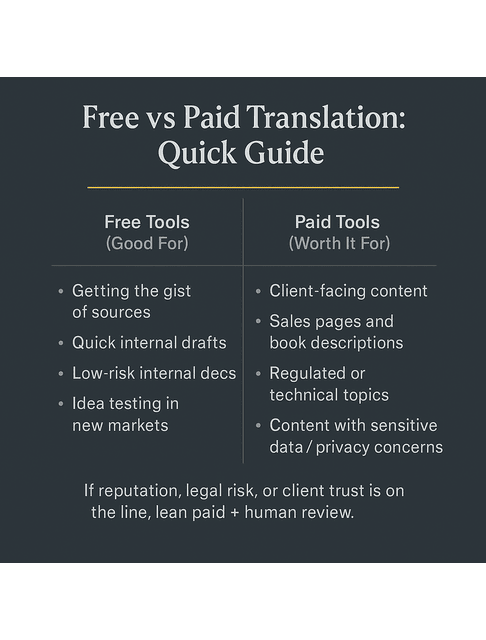
Free options are fine for:
- Getting the gist of sources in another language
- Quick internal drafts
- Low-risk internal documentation
For anything public or client-facing, paid plans can make a real difference:
- Better privacy and non-training modes for sensitive content
- Higher quality or domain-tuned models in some tools
- Features like glossaries, project management, and export formats
A “domain-tuned” model here simply means a version of the system that has been optimised for a specific field, like legal, medical, or technical content, so it handles that terminology more reliably.
On the business side, the market isn’t slowing down. Industry analysis from Grand View Research estimates that the global machine translation market will grow from about USD 978 million in 2022 to roughly USD 2.72 billion by 2030, at a CAGR of 13.5%.
That level of investment is a sign you’re not adopting a fad. You’re plugging into a growing infrastructure that many companies already rely on.
Balancing Human Editing and AI Translation Tools for Quality
You’ve already seen how effective it can be to let AI handle most of the draft and reserve your energy for targeted edits. The key is deciding which parts of a piece always deserve your closest attention—intros, CTAs, high-risk claims—and building your edit pass around those.
This setup lets you:
- Offer translation-adjacent services (e.g., “multilingual blog delivery” or “bilingual email sequences”).
- Test new markets for your own books or products without investing weeks of manual work.
- Maintain standards without burning out on line-by-line translations.
Red Flags: When Automation Can Hurt Your Brand or Credibility
You’ll know you need to slow down or bring in a specialist if you see:
- Inconsistent terminology within the same piece
- Mistranslated product names, numbers, or technical terms
- Content in regulated fields where a mistranslation could cause real harm
In those cases, AI is still useful—but as a starting point that a human expert must review, not as a publishing-ready solution. With those guardrails in place, you can finally use translation for what it’s best at: helping your work reach more people.
Using AI Translation Tools to Grow Income, Reach, and Authority
You don’t need a massive team or a big-budget localization department to show up in more than one language. You already have the assets—blogs, emails, frameworks, books—sitting in your archive, working hard in just one market. With a simple translation workflow, those same pieces can start bringing in new readers, clients, and opportunities in places you haven’t had time to reach yet.
Repurposing English Content for Localization and New Markets
If you already have a content library, translation can be a lever—not a burden.
You can:
- Translate your best-performing blog posts and update examples for the new audience.
- Turn a single lead magnet into multiple language-specific list builders.
- Test demand for a book in a new market by translating sample chapters, the description, and key emails first.
Localization—adapting your content to fit a specific culture and market, not just swapping words into another language—deserves the effort because the upside is real.
In other words: a thoughtful translation strategy can produce tangible returns, not just “nice engagement.”
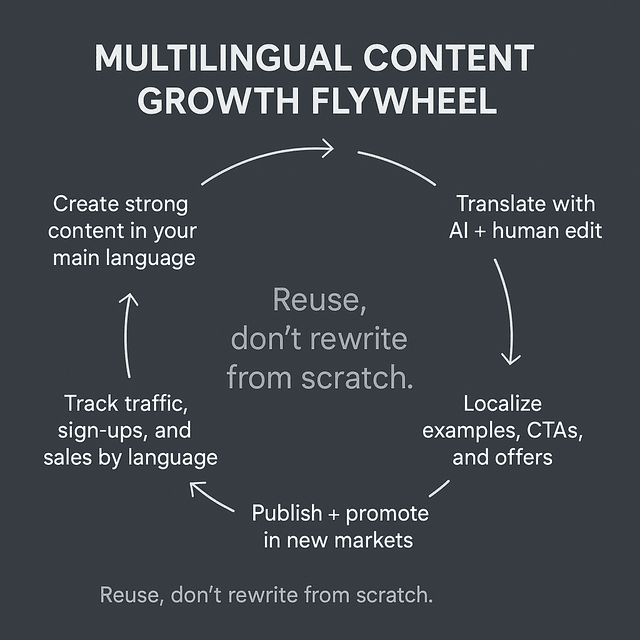
Sample Workflows for the Overloaded Producer, Authority Builder, and DIY Author
Instead of designing different systems per role, you can use one flexible pattern that works whether you write client content, build authority, or self-publish:
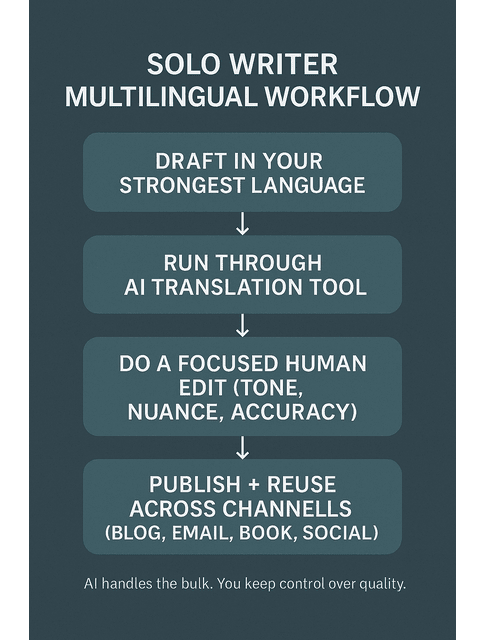
- Draft in your strongest language. Make it as good as you normally would.
- Send the piece through your chosen AI translation tool. Keep headings, bullets, and structure.
- Run a focused edit pass:
- Fix titles, intros, and CTAs first.
- Check any technical claims, numbers, and legal or financial statements.
- Smooth out obvious awkward phrasing.
- Use AI again for small assets:
- Meta descriptions
- Image alt text
- Social captions or promo emails in the new language
- Track performance by language: watch traffic, sign-ups, and sales to see which markets respond best.
This one system can serve a busy freelance writer, a consultant building authority across regions, and a DIY author turning one book into multiple editions.
Tracking Results from Multilingual Content with AI Translation Tools
To make translation worth your time, measure results:
- Website analytics: Are translated pages gaining traffic from new countries or regions?
- Email metrics: Do your translated opt-ins and nurture sequences convert?
- Sales and inquiries: Are book purchases, discovery calls, or project leads increasing from specific markets?
You don’t need a complex BI setup. A simple dashboard in Google Analytics, your email tool, and your book platform’s sales reports is enough to see which language versions deserve more investment.
Final Thoughts
Multilingual content used to mean one thing: either you hired a translator and waited, or you parked the idea indefinitely because you were too busy to deal with it. AI translation tools give you a third option—move faster, translate more, and still keep control over quality.
They won’t replace your judgment, and they shouldn’t. But they can turn:
- One strong article translated into multiple languages.
- One book into a set of editions that reach readers you could never speak to before.
- One writer’s bandwidth into a much wider presence, without demanding longer nights and more stress.
If you’re not sure where to begin, start small this month:
- Pick your best-performing blog post and translate it into one additional language, then lightly edit it.
- Translate one lead magnet or book description and update the CTAs for that market.
- Then watch what happens to traffic, subscribers, or sales.
The real shift isn’t just in technology; it’s in how you think about your existing content. Instead of constantly creating something new, you can start asking: Where else could this work, and how can I adapt it with the least friction possible? With a few simple rules and the right tools, translation becomes another repeatable step in your workflow—not another source of burnout.
Ready to scale your writing business with AI—without burning out?
Click the button to explore my full collection of books for freelancers, content creators, and authors.
Frequently Asked Questions About AI Translation for Multilingual Writing
Yes. Many AI translation tools can translate text or speech between languages, such as Google Translate and DeepL, which both use neural machine translation to generate translations in seconds.
An AI translator is software that uses artificial intelligence—usually neural networks—to understand a source text and generate an equivalent in another language. Modern AI translators aim to consider context, grammar, and sentence structure rather than just replacing words one by one.
ChatGPT can handle many translation tasks well, especially for general, non-specialized content, and it’s useful when you also need an explanation or rewriting. However, it is not a dedicated translation engine, and like other tools, it may struggle with highly technical, legal, or culturally sensitive material, so a human review is still recommended for high-stakes content.
AI is transforming translation work, but it’s unlikely to fully replace human translators. Industry reports and commentary note that AI is excellent for routine content and first drafts, while humans remain essential for nuanced, creative, and high-risk material where cultural context and subject-matter expertise are critical.
Yes. Several tools now support real-time translation of voice and text. Google’s live translation features on mobile and in some devices can translate conversations in dozens of languages, and various meeting platforms and hardware offer AI-powered live subtitles and speech translation.

Florence De Borja is a freelance writer, content strategist, and author with 14+ years of writing experience and a 15-year background in IT and software development. She creates clear, practical content on AI, SaaS, business, digital marketing, real estate, and wellness, with a focus on helping freelancers use AI to work calmer and scale smarter. On her blog, AI Freelancer, she shares systems, workflows, and AI-powered strategies for building a sustainable solo business.

