
If your week feels like a loop of research → draft → edit → repeat (with deadlines multiplying in the background), you don’t need another productivity hack. You need leverage. The right AI content writing tools can shave hours off the messy middle—first drafts, restructuring, tightening—so you spend your best energy where it actually counts: judgment, voice, and final polish.
This isn’t a “let AI write everything” post. It’s a writer-first system: small stack, clear guardrails, and a workflow you can repeat even on a busy week.
Quick Picks
If you want a small, sane starting stack, use this “best for” split that mirrors how writers actually work:
- Drafting / Ideation: ChatGPT, Claude (fast first passes, structure, variations)
- Editing / Clarity: Grammarly, QuillBot (tightening, clarity, grammar/style support)
- SEO Support (Optional): Clearscope (search-aligned coverage and on-page guidance, optional if you’re writing for search traffic—not just clients)
Mini-Reviews (So You Can Choose Fast)
ChatGPT (Drafting / Ideation)
Best for outlines, first-pass sections, transitions, and rewrites when you give it strong inputs (outline + voice anchor). Biggest watch-out: it can sound generic if you don’t provide constraints—and it can be confidently wrong on facts, so use the credibility guardrail.
Claude (Drafting / Ideation)
Best for long-form cohesion, cleaner tone, and smoothing messy drafts into readable sections. Biggest watch-out: it can still “helpfully” fill gaps you didn’t ask for—so keep it section-by-section and verify anything factual.
Grammarly (Editing / Clarity)
Best for tightening sentences, clarity improvements, and catching grammar/style issues when your brain is done for the day. Biggest watch-out: don’t accept every suggestion blindly—protect intentional voice choices (rhythm, emphasis, and phrasing).
QuillBot (Editing / Clarity)
Best for paraphrase options, sentence-level rewrites, and quick variations when you’re stuck on wording. Biggest watch-out: overuse can flatten your style—use it for targeted lines, not whole sections.
Clearscope (SEO Support — Optional)
Best for ensuring your draft covers what searchers expect (topic coverage and content optimization cues) without guessing. Biggest watch-out: don’t chase every term; use it to confirm coverage, not to stuff keywords.
Quick Comparison Table
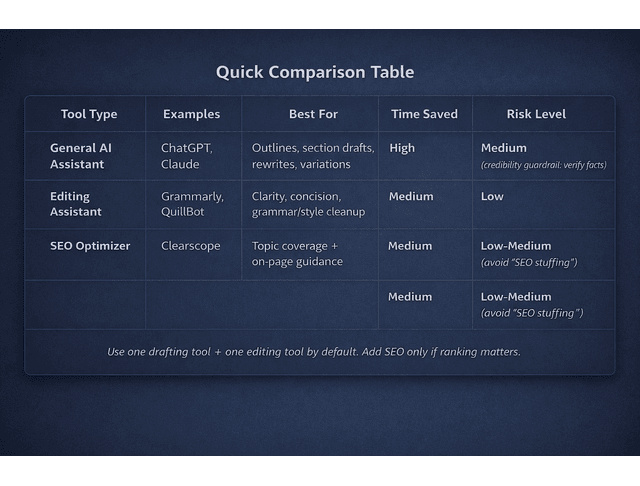
One-sentence rule: start with one drafting assistant + one editing assistant, and only add SEO tooling if ranking is part of the job.
Now that you have a small stack, here’s how to use it so it actually saves time (instead of creating more editing).
Everything I’ve shared here—and more—is in my book, available on Amazon. Click the link if you’re ready to take the next step.
AI Content Writing Tools and the Real Bottlenecks in Your Workflow
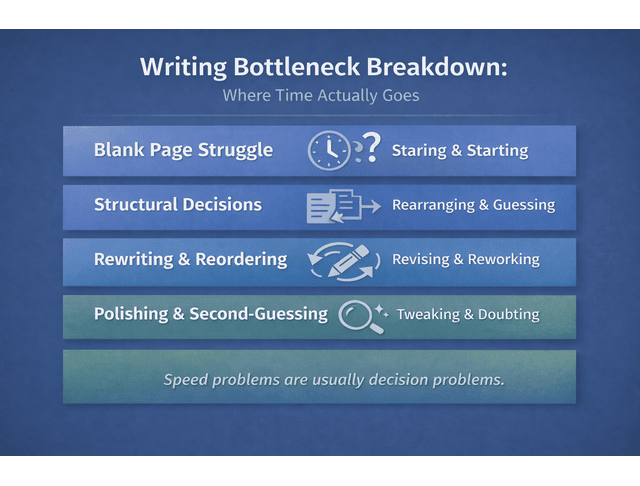
You’re not slow because you’re not skilled. You’re slow because writing work has invisible friction: switching tabs, second-guessing structure, rewriting the same sentence five ways, then doing “just one more pass” because it still doesn’t feel right.
The fastest writers don’t magically “type faster.” They reduce rework.
AI Content Writing Tools for First-Pass Drafts That Still Sound Like You
Think of AI as your first-pass engine, not your ghostwriter.
A strong first pass does three things:
- Gets words on the page fast (so you’re editing, not inventing from scratch)
- Creates workable structure (so you’re not rearranging sections for an hour)
- Reduces blank-page time (the most expensive minutes in your week)
This is where AI helps most:
- Intro options (pick one and rewrite in your voice)
- Transitions (the glue that costs time)
- Section drafts (one section at a time, not a full blog dump)
- Variations (tight, friendly, authoritative versions)
- “Angle exploration” (5 frames, choose the best)
This kind of productivity bump shows up when AI is used for support tasks (drafting help, restructuring, and iteration), not when it’s treated like autopilot. A widely cited productivity study by Nielsen Norman Group reported sizable performance improvements when professionals used generative AI for writing-related tasks (the headline number often quoted is 66% improvement across their case studies).
How to keep your voice: use a “Voice Anchor” you paste into prompts.
Voice Anchor (Copy/Paste)
- Tone: direct, calm, specific (no hype)
- Sentence style: short-to-medium, punchy transitions
- Avoid: clichés (“in today’s world”), vague filler, overconfident claims
- Prefer: concrete steps, honest caveats, simple examples
- Reader promise: faster drafts, cleaner edits, less mental load
This one addition can cut your editing time dramatically because the first pass is closer to what you would actually say.
The Hidden Cost of Context Switching and Decision Fatigue
A lot of writing time isn’t writing. It’s deciding:
- What goes first?
- Is this too long?
- Do I need a new section?
- Is this claim safe?
- How do I say this without sounding like everyone else?
That decision fatigue is why a 1,200-word post can take all day.
AI helps when you use it to reduce decisions, not replace thinking. Use it for:
- Structure choices
- Missing subtopics
- “Make this clearer” rewrites
- Alternative phrasing when your brain is fried
Try prompts like:
- “Suggest 3 structures for this topic. Pick the most scannable and explain why.”
- “List missing subtopics readers expect for this keyword. Don’t add fluff.”
- “Rewrite this paragraph in 3 tones: direct, warm, authoritative.”
You stay in control; AI just reduces the cognitive drag.
What “Better Output” Actually Means: Clarity, Specificity, and Proof
If you want content that ranks and converts, “better” usually means:
- Clearer claims
- More specific examples
- Fewer filler phrases
- Stronger proof points
AI can tighten and clarify, but you supply credibility.
A helpful reality check from Orbit Media’s blogger research (often referenced in industry roundups like HubSpot’s marketing stats) shows many marketers use AI for ideation more than full drafting—meaning professionals are leaning on AI as support, not autopilot.
Next, let’s get specific about the three stages where the right workflow saves the most time.
Where AI Content Writing Tools Save Time Without Losing Quality
Most writers lose time in three places: research sprawl, first drafts, and editing fatigue. Here’s how to get the time back without losing quality (or your voice).
Research Support That Doesn’t Create Hallucinations
AI can speed research if you keep it on a leash. Use it for:
- Topic discovery: “What are the common struggles with X?”
- Angle testing: “What’s a fresh frame that still matches intent?”
- Outline inputs: “What subtopics belong under each heading?”
What not to do: ask AI to invent facts and then publish them.
Credibility Guardrail (Use This Once, Everywhere)
- AI can summarize and structure your input
- You verify anything that could mislead readers
- If you can’t verify it, rewrite it as an opinion, remove it, or add a citation later
This single guardrail replaces repeated warnings and protects your reputation.
Draft Clean Sections Faster When AI Content Writing Tools Handle the First Pass
Here’s the fastest way to draft without losing control:
- Outline first (you decide the logic)
- Draft one section at a time
- Edit immediately while your intent is fresh
- Only then move to the next section
This avoids the trap of generating an entire article and spending longer fixing it than writing it yourself.
Mini Prompt Pack (Copy/Paste Defaults)
Angle + Outline
- “Here’s my topic and audience. Give me 5 angles that match commercial-informational intent (people want recommendations + enough detail to choose). Choose the best and explain why.”
- “Build a scannable outline with 4 H2s and 3 H3s each. Keep it practical and decision-helping.”
Section Drafting
- “Draft only H2 #2. Use my voice anchor. Include one example and a short checklist. Avoid clichés.”
- “Rewrite this section with tighter flow and clearer transitions. Preserve meaning.”
Editing
- “Tighten this by 20–30% without losing meaning. Remove filler and repetition.”
- “Flag any claims that need a source and suggest what kind of source would be credible.”
Repurposing
- “Turn this into a LinkedIn post: strong hook, 3 bullets, one takeaway.”
- “Create 5 short captions that each pull one idea from the post.”
Editing Workflows That Reduce Rework Instead of Adding Steps
Editing is where many writers burn out—because it’s mentally expensive.
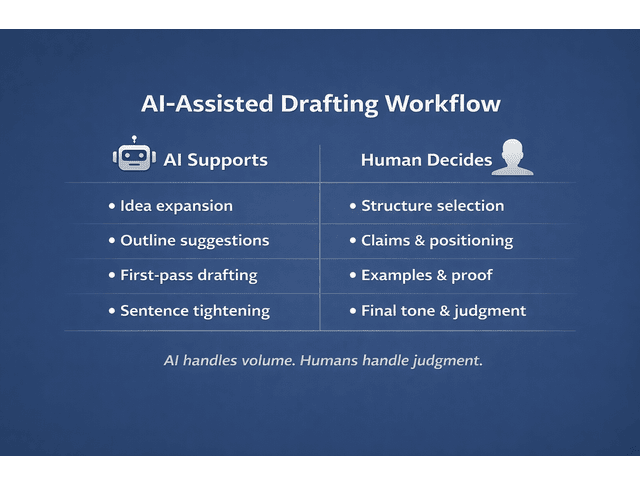
Use AI for mechanical edits:
- Remove redundancy
- Tighten long sentences
- Improve flow between paragraphs
- Turn messy lists into clean prose
- Rewrite “fluffy” lines into specific ones
Keep human control for:
- Opinions
- Examples
- Final claims and recommendations
- Voice choices (what you would actually say)
Quick Quality Checklist
- Does this sound like me?
- Is it specific?
- Is it true and verifiable?
- Is the takeaway obvious?
This kind of time savings is most common when AI is used for drafting + mechanical edits, not for “publish-ready” one-click writing. A frequently cited modern survey report from ITIF discusses reported time savings among generative AI users (including a stat often quoted as 20.5% saving 4+ hours per week among weekly users).
Before/After: What “De-Genericizing” Looks Like
Before (Generic AI-ish):
“AI writing tools can improve productivity by helping writers create content faster and more efficiently. They can generate ideas, draft text, and refine writing to save time.”
After (Publishable):
“When deadlines stack up, your real bottleneck isn’t typing—it’s the messy middle: outlining, transitions, tightening, and rework. Use AI for the first pass and mechanical edits, then spend your human energy on specifics: examples, proof, and a voice that doesn’t sound like everyone else.”
Why the “after” works:
- Names the real bottleneck (rework)
- Gives a clear division of labor (AI vs human)
- Replaces vague claims with concrete actions
How to Choose AI Content Writing Tools Without Tool Overload
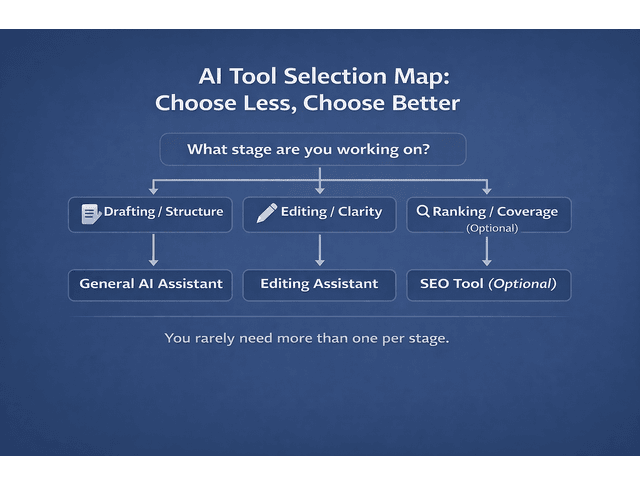
Tool overload is a productivity trap. You don’t need 12 subscriptions. You need one dependable workflow and a small stack that supports it.
Match Tools to Stages: Research, Drafting, Editing, Optimization
Instead of picking tools by hype, pick them by stage:
- Research/Planning: summarization, question expansion, outline inputs
- Drafting: section drafts, variations, restructuring
- Editing: clarity, concision, style consistency
- Optimization: readability checks, SEO guidance, formatting support
This instantly prevents “three tools doing the same job.”
A Simple Selection Rubric: Workflow Fit, Voice Control, and Reliability
When you’re evaluating any tool, ask:
- Workflow fit: Does it plug into how you already work?
- Voice control: Can it follow style notes and constraints?
- Reliability: Does it behave consistently across topics?
- Output quality: Useful structure or fluffy filler?
- ROI: Does the time saved justify the cost?
If you want “best for” buckets that match real reader intent, keep it simple:
- Best for fast drafts
- Best for editing/clarity
- Best for SEO support
- Best for repurposing
The Red Flags: Generic Tone, Repeated Phrasing, Overconfident Claims
Watch for:
- Generic tone and cliché phrases
- Repeated phrasing patterns across sections
- Confident facts without sources (use the credibility guardrail)
- SEO language that reads like a template
Fix it with fewer tools and stronger inputs:
- Provide a mini-brief (audience, goal, tone)
- Provide the outline
- Provide style examples
- Draft one section at a time
This is how you get speed without sounding like everyone else.
A Calm Publishing System Using AI Content Writing Tools
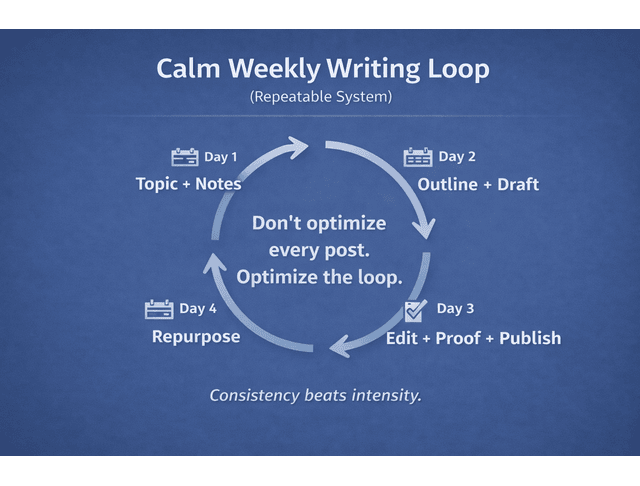
The goal isn’t to write more. The goal is to write more predictably—without emotional overhead.
Build a Default Weekly Loop You Don’t Have to Re-Invent
A calm workflow is one you can repeat even on a busy week:
- Day 1: pick topic + collect notes
- Day 2: outline + draft sections
- Day 3: edit + add proof + publish
- Day 4: repurpose into 2–3 short pieces
When you have a default loop, you stop renegotiating your calendar every week.
Use Guardrails: Voice Anchors, Style Notes, and “Must-Keep” Details
Guardrails keep AI output from flattening your voice.
Use:
- A voice anchor (tone + rhythm + do/don’t phrases)
- A “must-keep” list (your examples, your boundaries, your non-negotiables)
- A quality bar (“no vague claims,” “add steps,” “avoid filler intros”)
Prompt AI like a collaborator:
- “Draft this section using the outline and voice anchor. Keep it direct and specific. Include one example.”
Scale Output With a Repeatable Stack Built Around AI Content Writing Tools
Scaling doesn’t require more hours—it requires reuse:
- Turn one blog into a LinkedIn post, an email, and a short script
- Save your best prompts and outlines as templates
- Keep a swipe file of your strongest intros, transitions, and CTAs
Over time, your system compounds. Drafts get faster. Edits get lighter. Output stays consistent—even when your schedule isn’t.
Final Thoughts
Used well, AI content writing tools don’t replace your voice—they protect it. They reduce the heavy-lift parts of writing (first drafts, restructuring, tightening) so you can spend your energy on the parts that clients and readers actually pay for: judgment, clarity, and credibility. Start small, standardize your workflow, and treat AI like a first-pass partner—then let your human brain do the final, high-value work.
If you want a calmer way to write faster—without losing your voice—check out my books on Amazon. They’re built for working writers who need real systems: repeatable workflows, editing guardrails, and practical AI prompts you can use immediately.
Frequently Asked Questions About AI Content Writing Tools
The best tools depend on your stage. Most writers do best with one drafting assistant plus one editing tool, and only add SEO tooling if rankings matter.
They’re worth it when they reduce rework and save meaningful time—especially during drafting and editing support. (See the NN/g productivity research and ITIF time-savings report linked above.)
It can be if you publish text or ideas without proper attribution, skip verification, or treat AI output as “original research.” The safest approach is to use AI for structure and drafts, then add original examples, revise heavily, and cite sources for factual claims.
Google’s public guidance emphasizes usefulness and quality rather than the tool used. In practice, thin, generic, inaccurate content underperforms—no matter how it was produced.
Free tiers are useful for testing, but they often limit output or features. The best free option is the one that gives you the best first pass with the least rewriting—then upgrade only when you can feel the ROI.

Florence De Borja is a freelance writer, content strategist, and author with 14+ years of writing experience and a 15-year background in IT and software development. She creates clear, practical content on AI, SaaS, business, digital marketing, real estate, and wellness, with a focus on helping freelancers use AI to work calmer and scale smarter. On her blog, AI Freelancer, she shares systems, workflows, and AI-powered strategies for building a sustainable solo business.

