

If you’ve ever opened ten tabs on “how to use AI,” saved five prompt threads, and still felt like you didn’t actually learn anything, you’re not alone. AI communities for learning can fix that, but only if you use them the right way. Otherwise, they become another scrolling habit that drains time and confidence.
The real issue usually isn’t motivation; it’s missing structure. This guide is for freelancers and solo creators who want repeatable systems, faster output without burnout, and steady progress on real drafts, not more theory.
Everything I’ve shared here—and more—is in my book, available on Amazon. Click the link if you’re ready to take the next step.
AI Communities for Learning Solve the “Learn Alone” Problem
Here’s the pain point nobody says out loud: learning AI alone often turns into research-as-procrastination. You keep consuming, but you’re not converting learning into drafts, edits, or chapters.
Why Solo AI Learning Breaks Down for Writers and Creators
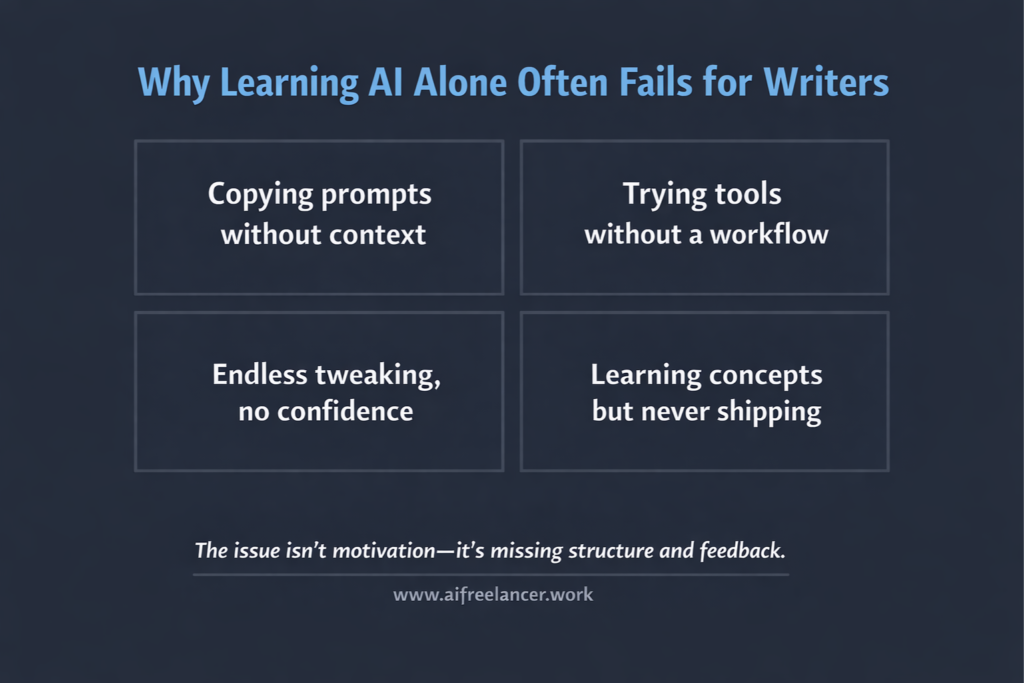
Solo learning fails for practical people because it’s missing the one thing that makes skills stick: feedback in context.
Common breakdowns look like this:
- You copy prompts without understanding when to use them.
- You try five tools and never build a workflow.
- You don’t know if your output is “good,” so you keep tweaking.
- You learn concepts but don’t ship anything.
What Writers and Authors Actually Need
You don’t need “more AI tips.” You need a learning environment that gives you:
- A clear path (what to do this week, not “explore endlessly”)
- Examples you can reuse (prompts, templates, workflows)
- Feedback that improves your output (not random opinions)
- Accountability that fits your life (lightweight and consistent)
What You Should Be Able to Do After 30 Days
If a learning community is working, you should be able to do things that show up in your calendar and your deliverables:
- Research faster without falling into rabbit holes
- Draft with clearer structure and less friction
- Edit without losing your voice
- Maintain consistent chapter or content progress
What Changes When Learning Becomes Shared
Collaborative learning isn’t magic. It’s mechanics: feedback replaces guessing, accountability creates momentum, and reusable workflows shorten the learning curve. The next section shows what that structure looks like when a community is designed to support real output.
That’s why cooperative learning has repeatedly shown positive outcomes in research. One meta-analysis reported that 54 articles yielded 121 findings, with positive effects on achievement and attitudes.
How AI Communities for Learning Create Structure, Not Noise
The best communities don’t feel like a chatroom. They feel like a system: prompts you can reuse, routines you can repeat, and examples you can model.
What “Structure” Means Inside AI Communities for Learning
In practice, “structure” looks like:
- Weekly themes (research week, outlining week, editing week)
- Prompt libraries and pinned templates
- Clear channels (questions, wins, critiques, resources)
- Searchable archives and summaries
This is the difference between learning and collecting resources. If you want a quick reference list of community styles and what they typically offer, DigitalOcean’s roundup provides a helpful overview of how learning-focused AI communities are typically positioned.
Why Structured Communities Outperform Self-Paced Courses
Courses are fine, until you hit the moment you need judgment: is this output good enough to send, did the AI change your tone, are you prompting wrong, or is the source material weak? That’s where people stall. Well-run communities compress that loop because you get answers faster, and you see how other people solve the same problems.
Research on online discussion forums supports the idea that participation isn’t just “engagement,” but is also tied to learning outcomes. One empirical study analyzed a dataset of 27,767 learners and found that increased forum participation (including mechanisms that encourage participation) was associated with better learning performance.
How AI Communities for Learning Replace Trial-and-Error
When you learn in public (even lightly), you stop treating every prompt like a one-off experiment. You start building a repeatable workflow.
A practical example for writers is posting your prompt and rough output, getting one clear constraint you missed (audience, tone, structure), revising the prompt once, then saving that improved version as a reusable template. Next time, you start from a proven base instead of reinventing the wheel. That shift, from improvising to reusing, is where the time savings come from.
Here’s what that can look like in the real world, short and simple.
Before (too vague): “Write a blog post about AI communities for learning.”
After (usable): Write a 1,200–1,500-word blog for freelance writers and DIY authors who feel overwhelmed learning AI alone. Use a workflow-first tone.
Include:
(1) decision checklist for choosing communities
(2) a 15-minute weekly participation routine
(3) safety guidance for client drafts
and (4) 5 FAQs.
Avoid hype. Use short paragraphs and practical examples.
Notice what changed: audience, constraints, deliverables, and safety. Communities help you see these missing pieces faster because someone will call out what’s unclear.
Choosing AI Communities for Learning Based on Your Workflow
Your goal is to find the group that makes your workflow smoother. Start by matching the community to your output goal and time constraints.
AI Community Types and What Each One Is Best For
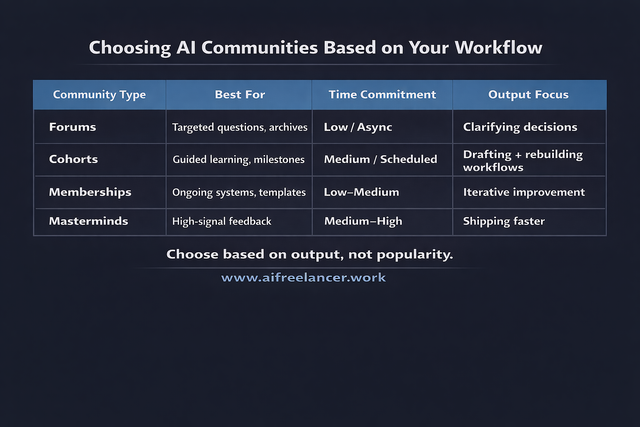
Use this as a quick filter:
- Forums: Best for searchable Q&A, long-lived threads, and learning from archives
- Cohorts: Best for guided progress, weekly milestones, and hands-on practice
- Membership communities: Best for ongoing systems, templates, and iterative improvement
- Masterminds: Best for high-signal feedback, accountability, and fast decision-making
To make that less abstract, here are quick “good fit” profiles you can picture.
A forum-style community is ideal if you want an archive you can search at 11 p.m. while you’re mid-draft, and you prefer asking targeted questions without attending live sessions. A cohort is best if you need a clear learning path and deadlines you didn’t have to invent yourself, especially if you’re rebuilding your writing workflow. A membership community works well if you want ongoing templates, prompt libraries, and gradual improvement without the pressure of a fixed start/end date. A mastermind is best if you want fast feedback from experienced peers and you’re comfortable showing work-in-progress to move faster.
Start by Defining Your Primary Outcome
Pick one primary outcome before you join anything: faster drafts, cleaner edits, or consistent chapter progress. That single choice prevents you from joining five communities and using none.
Decision Checklist for Evaluating AI Communities
Use this list before you pay, subscribe, or commit:
- Community type (forum, cohort, membership, mastermind)
- Learning mechanism (feedback, live sessions, async reviews)
- Signal quality (moderation, expert input, noise control)
- Time demand (daily chat vs weekly checkpoints)
- Output focus (ideas vs drafts vs finished assets)
A useful tell: in many online learning environments, participation is uneven. In the MOOC forum study above, the paper distinguishes instructor-required participation from voluntary participation and reports that design choices that increase participation can improve outcomes.
If you want a fast way to decide, use a simple scoring pass: rate each checklist item from 1 to 5, then circle your two deal-breakers (usually moderation/signal quality and time demand). A “great” community can still be wrong for you if it requires daily presence when your schedule only allows weekly check-ins.
AI Communities for Learning That Support Writers and Authors
If you write for clients or you’re drafting a book, prioritize communities that offer real prompt critique (not just prompt sharing), show how people move from idea to outline to draft, discuss voice-preserving edits, and support accountability through deliverables like weekly drafts, chapters, or posts.
If you’re drafting a book, look for communities that normalize the messy draft phase.
Using AI Communities for Learning to Turn Knowledge Into Output
This is where most people fail: they join a community and treat it like content. The win is treating it like a workflow tool.
How to Participate Without Losing Time
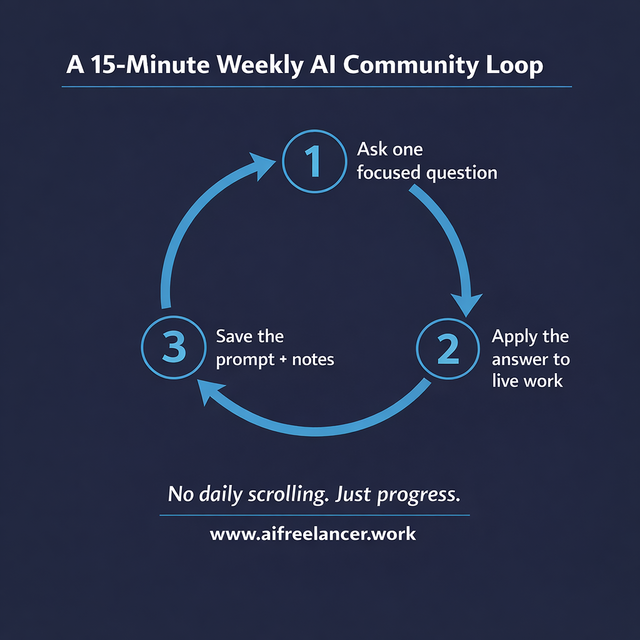
Think of participation as a 15-minute weekly loop, not daily scrolling.
A simple system that works for busy writers:
- One session to ask a question
- One session to apply the answer
- One session to archive the result (prompt + notes)
A Simple Participation Rule for Busy Professionals
If you do nothing else, do this:
- Ask one focused question per week
- Save one prompt or framework
- Apply one idea directly to live work
You’ll build a personal “proof library” of prompts you know work for your voice and your deliverables.
If you want your questions to get better answers faster, use templates that match your situation:
If you want a reusable system: “Here’s my workflow step (research/outline/draft/edit). Here’s the constraint (tone/voice/time/format). What’s the simplest prompt + checklist I can reuse weekly?”
If you’re under a deadline: “I have X deliverable due in Y hours. What’s the shortest workflow to get to a client-ready version without losing quality?”
If you’re drafting a book: “I’m stuck on this chapter outcome and structure. Here’s the chapter goal and current outline skeleton. What’s the next smallest revision that will unlock drafting?”
How to Learn Safely in AI Communities
If you write for clients or you’re drafting a book, be careful with what you share.
Good safety habits:
- Don’t paste sensitive client info, unpublished chapters, or proprietary research
- Share structures (prompt format, outline skeletons) instead of raw content
- Verify advice before adopting it as a workflow, especially tool recommendations and “one prompt to rule them all” claims
For writers, “share structures” can look like this: post your section headings, your intended reader outcome, and a 2–3 sentence summary of the paragraph you’re trying to write, then ask for a better prompt or a clearer structure. You get help without handing over client details or dumping a full unpublished chapter into a public space.
From Discussion to Delivery With AI Communities for Learning
Here are three output loops you can run—fast—without turning community learning into a second job:
- Client work loop: Research → community validation → outline → draft
- Editing loop: Editing → voice check → revision workflow
- Book loop: Book chapters → accountability post → next milestone
The point is momentum. If you leave a community session without a next action you can apply today, you just consumed.
Final Thoughts
AI communities for learning work best when you use them as a structure layer: faster feedback, clearer workflows, and fewer dead ends. If you’re trying to use AI to support your writing business or finish a draft faster, don’t look for the “most popular” group; look for the one that turns your learning into drafts, edits, and chapters you can ship.
If you want more workflow-first, writer-friendly systems like these, check out my books on my Amazon Author page; they’re built for freelancers and solo creators who want calmer output, better structure, and less wasted effort.
Frequently Asked Questions About AI Communities for Learning
You don’t need an advanced degree to start using AI well. Most people benefit fastest from hands-on practice: learning prompt basics, building simple workflows, and applying them to real tasks consistently.
Start with fundamentals (what AI can and can’t do), then practice on small projects. Joining a community helps because you can get feedback and see real use cases instead of learning in isolation.
It depends on your goals. Many people start with general-purpose AI tools for writing and reasoning, then expand into specialized tools as needed. The key is choosing tools that support your workflow and practicing with real tasks.
AI is used for personalized learning support, tutoring-style assistance, content generation, and feedback tools. It’s also used to support collaborative and interactive learning formats.
A practical path is to combine structured learning (courses or guided plans) with hands-on projects and community participation, so you can ask questions, get feedback, and improve faster through iteration.

Florence De Borja is a freelance writer, content strategist, and author with 14+ years of writing experience and a 15-year background in IT and software development. She creates clear, practical content on AI, SaaS, business, digital marketing, real estate, and wellness, with a focus on helping freelancers use AI to work calmer and scale smarter. On her blog, AI Freelancer, she shares systems, workflows, and AI-powered strategies for building a sustainable solo business.

