

If you are joining AI betas to speed up your writing workflow, learning how to give feedback on AI tools is not optional. Your feedback is not a “nice to have.” It is the shortest path to getting the features you actually need as a working freelance writer. Done well, feedback turns your daily friction (slow drafts, messy rewrites, awkward exports) into product fixes—sometimes within weeks, rather than “maybe someday.”
And the upside of the right tool is real. In Nielsen Norman Group’s review of three workplace studies, generative AI increased throughput by an average of 66% on realistic tasks. That is exactly why it is worth testing tools—and worth giving feedback that makes them better.
Testing provides evidence; evidence is what converts feedback into actionable fixes.
Everything I’ve shared here—and more—is in my book, available on Amazon. Click the link if you’re ready to take the next step.
Why “How to Give Feedback on AI Tools” Matters for Freelance Writers
Most betas are shaped by power users, internal teams, and developer assumptions. Freelance writers are different: you need reliability, voice control, and clean delivery—not clever demos.
Research backs the idea that AI helps most when it reduces blank page time and speeds up first drafts. An MIT working paper found that people using ChatGPT completed writing tasks faster and produced higher-rated output on average. Those gains show up when tools reduce real workflow friction—not when they simply generate more text.
When a beta tool misses the mark, your feedback can push it toward the outcomes you actually care about: fewer revision loops, faster research synthesis, and cleaner exports.
How to Give Feedback on AI Tools Without Sounding Like a Developer
You do not need technical language. You need clear, reproducible workflow feedback.
Start With the Job You Hired the Tool to Do
- “Turn a rough outline into a client-ready draft in my tone.”
- “Summarize 5 sources into a brief I can write from.”
- “Rewrite paragraphs without changing meaning.”
Describe the Exact Moment It Breaks Your Workflow
Keep it concrete:
- “The tool rewrites my claims, so I can’t trust it for client work.”
- “It loses headings when I export to Google Docs.”
- “It adds filler, and I spend longer editing than writing.”
Show the Expected Output in Plain English
- “Keep my subheads unchanged.”
- “Do not introduce new facts.”
- “Export as clean H2/H3 structure, no broken spacing.”
Add One Proof Point
- “This added 18 minutes per 1,000 words because I had to reformat.”
- “This created 3 factual errors in a 700-word section.”
- “This removed my brand voice markers.”
Mini Case Example: Bad vs. Strong Feedback
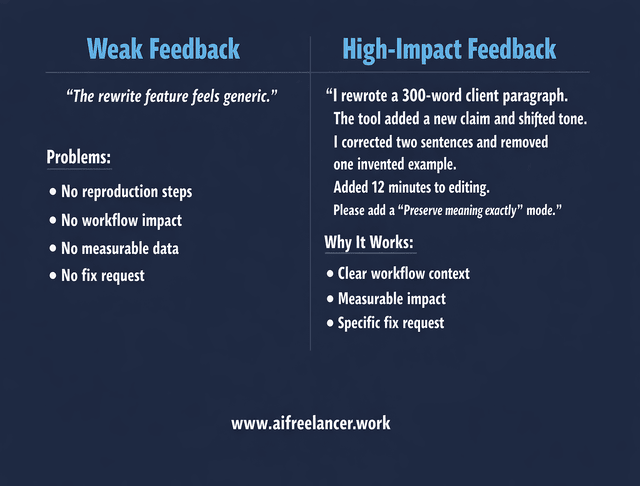
Weak feedback:
“The rewrite feature feels generic.”
Stronger feedback:
“I used the rewrite feature on a 300-word client paragraph. It added a new claim that was not in the original and shifted the tone to generic marketing language. I had to manually correct two sentences and remove one invented example, adding roughly 12 minutes to editing. Please add a ‘preserve meaning exactly’ mode.”
The second version gives developers something they can test and improve.
How to Give Feedback on AI Tools During Beta Testing (A Writer’s Checklist)
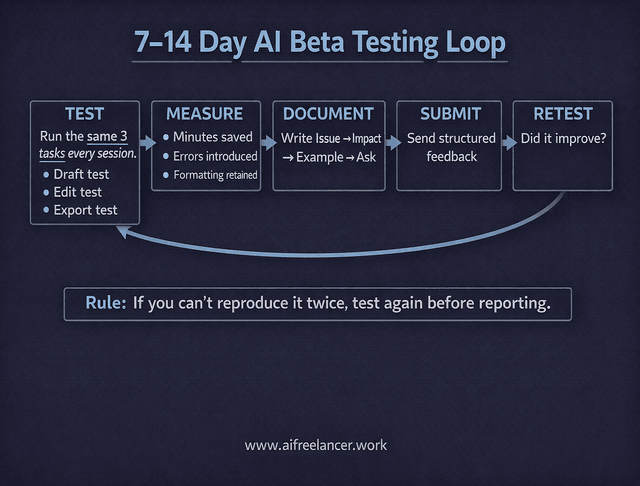
Use this as your repeatable beta loop for the next 7–14 days.
Run the Same 3 Tests Every Time
- Draft test: outline → draft (does it keep structure and voice?) Run the same outline twice on different days to check consistency.
- Edit test: tighten 3 paragraphs (does it preserve meaning?) Use a paragraph from your published work to test voice retention.
- Delivery test: export/share (does formatting survive?) Export to the platform you actually use (Google Docs, Word, CMS) and check heading levels.
Track Only What Matters to Your Workflow
- Minutes saved per deliverable (draft, edit, research brief)
- Number of corrections needed (facts, tone, formatting)
- “Would I trust this on a client deadline?” (yes/no)
Send Feedback as “Issue → Impact → Example → Ask”
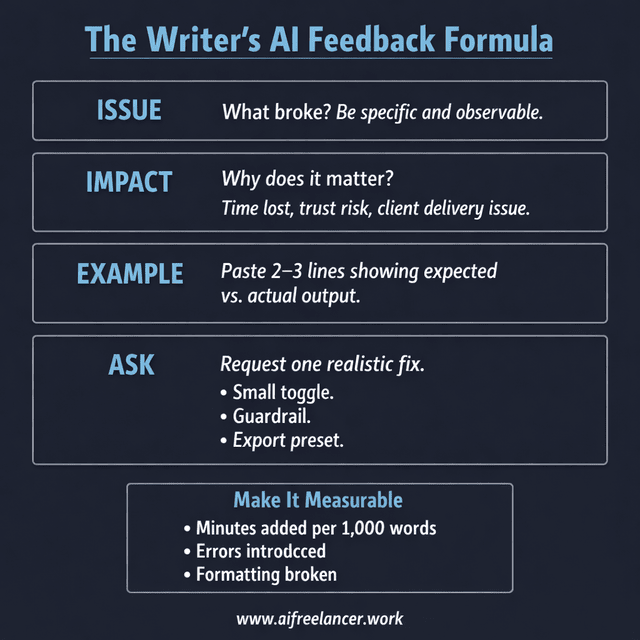
This is the same structure as above, just compressed into a format that product teams can triage quickly.
- Issue: “Export breaks headings.”
- Impact: “Client doc looks unprofessional; I spend time reformatting.”
- Example: “H2s become body text when exported to Docs.”
- Ask: “Please preserve heading levels in export.”
If you want to push product direction (not just bug fixes), add one line:
- “This would be a must-use tool for freelance writers if it solved X.”
When You Do Not See a Clear Feedback Channel
- Check the Help or Support section for a “Report a bug” form.
- Look inside the beta invitation email for a feedback link.
- Use the official support email and include “Reproducible workflow issue” in the subject line.
- If there is a community (Slack, Discord, forum), post a structured version of your Issue → Impact → Example → Ask.
If support replies with a generic response, resend your message with clearer reproduction steps and one measurable impact line (“Adds 20 minutes per 1,000 words”). Specific impact signals urgency.
How to Give Feedback on AI Tools That Actually Get Implemented
Here is what makes feedback a high priority inside product teams.
Include Clear Reproduction Steps
- “Open editor → paste outline → click Draft → export to Docs → headings lost.”
Clarify Frequency and Severity
- “Happens every time” beats “happened once.”
- “Blocks client delivery” beats “annoying.”
Make a Small, Realistic Fix Request
Avoid vague asks like “make it better.” Try:
- “Add a toggle: Preserve headings exactly.”
- “Add a warning: ‘This output includes new claims—verify facts.’”
- “Add export presets: Google Docs / Word / HTML.”
Attach One Clean Example
A short paste is enough. Keep it minimal, not a novel.
Because these tools iterate fast, clear user feedback is one of the few levers you control as a beta tester. Investment in generative AI has surged sharply in recent years, resulting in products that ship features quickly. Tools will continue to evolve—your advantage lies in shaping the ones you rely on.
Final Thoughts on How to Give Feedback on AI Tools
“How to give feedback on AI tools” is really about protecting your time. Betas are only worth it if they reduce friction in your real workflow—not just look impressive in a demo. When you give clear, writer-style feedback (workflow → break point → impact → fix), you help developers build tools that save you hours instead of creating more cleanup.
If you want more practical AI workflow frameworks built for freelance writers—including structured testing templates, decision matrices, and repeatable feedback systems—check my Amazon Author page for detailed workflow guides, testing templates, and workflow checklists you can apply immediately.
Frequently Asked Questions About How to Give Feedback on AI Tools
Use Issue → Impact → Example → Ask. State what broke, why it matters to your workflow, show one short example, and request one specific fix. If you cannot reproduce the issue twice, test again before submitting.
Include the tool/version, your exact prompt, expected vs. actual output, and 3–5 steps to reproduce. Add one measurable impact line, such as “Adds 20 minutes per draft.” Without reproducible steps, most bugs get deprioritized.
Send feedback immediately when you find a reproducible issue. For bigger workflow suggestions, test across at least three sessions over 7–14 days, so you are reporting patterns, not one-off glitches.
Quote the exact claim, label it unsupported, and provide the correct source or note that none exists. Explain the workflow risk (“Cannot publish to clients”). Ask for a guardrail like citations, uncertainty flags, or a strict “no new claims” mode.
Replace real names, numbers, and proprietary processes with placeholders. Never paste raw client documents into beta tools without reviewing their data retention policy. Describe the workflow impact instead of exposing confidential material.

Florence De Borja is a freelance writer, content strategist, and author with 14+ years of writing experience and a 15-year background in IT and software development. She creates clear, practical content on AI, SaaS, business, digital marketing, real estate, and wellness, with a focus on helping freelancers use AI to work calmer and scale smarter. On her blog, AI Freelancer, she shares systems, workflows, and AI-powered strategies for building a sustainable solo business.

