
You automate a repetitive task because you want fewer things to think about. Then the automation fails, produces something strange, or forces you to check every result manually. That is where AI process automation can become another source of work instead of a way to remove it.
The problem often starts long before the failure. The process itself does not have a clear trigger, action, and expected output.
Start with three questions: What starts the process? What should happen next? What result proves it worked? That gives you a simple framework: Trigger → Action → Output. Think of it as the minimum reliability layer. Once those three pieces work consistently, you can decide whether the process has earned more complexity.
Everything I’ve shared here—and more—is in my book, available on Amazon. Click the link if you’re ready to take the next step.
Why AI Process Automation Becomes Unreliable
An automation that works nine times out of ten may still demand your attention every time it runs. When you cannot trust the tenth run, you keep checking the other nine, which defeats part of the reason you automated the task in the first place.
AI process automation uses artificial intelligence as part of an automated business process. Unlike a basic rule that always performs the same predetermined step, AI can interpret text, summarize information, classify inputs, generate content, or make limited decisions before the workflow moves forward.
That flexibility is useful, but it also introduces variation. McKinsey’s 2025 global survey found that 88% of respondents said their organizations regularly used AI in at least one business function, yet nearly two-thirds had not started scaling AI across the enterprise.
That gap shows how different experimentation is from automation you can rely on day after day.
AI Process Automation Needs a Defined Beginning and End
Imagine you automate content repurposing. Every time you finish an article, AI turns it into several social posts. The workflow runs, five posts appear, and technically everything worked.
But what happens if two posts misrepresent the article, one invents a claim, and the remaining two sound nothing like you? You now have five finished outputs and still have to redo most of the work.
AI-driven workflows need clear boundaries around the input, action, and acceptable result. Outputs can vary, missing context can change the answer, and confident language can hide factual errors.
You can reduce that variation by using consistent input formats, specifying the fields or sections you expect in the output, and providing reference material when accuracy matters. For higher-risk tasks, define what the AI may use, what it must never invent, and what conditions should stop the workflow for review.
Complexity Creates More Automation Failure Points
Adding another app often feels like progress when an automation does not work properly. Sometimes it merely adds another place where the process can break.
Suppose your client-intake workflow collects form responses, sends them to an AI model, moves the summary into another application, creates a project record, sends three notifications, updates a spreadsheet, and routes the job according to several conditions. Every handoff now depends on another part of the system working properly.
McKinsey found that among 25 organizational attributes it tested, redesigning workflows had the strongest relationship with seeing EBIT impact from generative AI. Only 21% of respondents using generative AI said their organizations had fundamentally redesigned at least some workflows.
For freelancers and smaller businesses, the same idea applies. If the existing process is messy, automation can make the mess move faster.
Build AI Process Automation With Trigger → Action → Output
You do not need an enterprise process map to understand what your automation is supposed to do. You need a structure simple enough that you can spot the weak point when something goes wrong.
Trigger → Action → Output means defining what starts the automation, what the system must do, and what result proves the process completed successfully. Use that framework to set up a simple workflow before adding more automation layers, then add agents, integrations, or more complicated rules only when the process genuinely needs them.
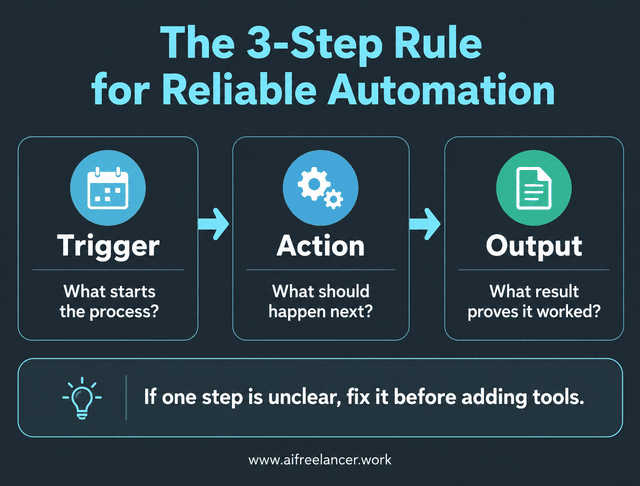
Trigger: Where Your AI Process Automation Starts
Every automation needs an unmistakable starting point. If you cannot identify the event that starts the workflow, troubleshooting becomes guesswork, and duplicate runs become harder to prevent.
A trigger might be a client submitting a form, an email reaching a specific inbox, a new file appearing in a folder, a record changing status, or a scheduled date arriving. The starting condition should be precise enough that the automation does not fire when it should not.
Instead of starting an automation whenever you receive an email, you might start it only when a message arrives at a designated client-intake address. Good workflow triggers help prevent duplicate runs, unwanted actions, and work triggered by incomplete information.
Action: Decide Exactly What the Automation Should Do
Once the trigger fires, define the work that should happen next. Avoid instructions as broad as process this information or handle this lead because vague actions make poor results harder to diagnose.
A new client form might trigger AI to extract the project type, deadline, deliverables, and special instructions before creating a brief. A finished article might trigger AI to generate draft social posts based only on the article’s content. A research document might trigger AI to extract statistics, claims, sources, and unresolved questions into structured notes.
Specific actions make errors easier to diagnose. AI also needs boundaries around what it may decide. You might allow it to summarize a client request while requiring you to approve pricing, deadlines, or scope changes.
Define the Output of Your AI Process Automation
Many unreliable workflows have a clear trigger and action but a vague finish line. The system does something, yet nobody has defined what a successful result should look like.
Your output should give you something observable or verifiable. It could be a document, database record, email draft, notification, status change, report, or approved content asset. Ask one question: What should exist, change, or happen when this automation succeeds?
Then look beyond technical completion. Suppose your content-repurposing workflow creates five posts exactly as instructed. The process completed, but if you spend 40 minutes rewriting them, it failed to deliver the time savings you wanted.
A useful output should be accurate enough to trust, usable enough to keep, and valuable enough to justify the automation. Another useful measure is whether you think about the task less after automating it. If the workflow saves a few clicks but still makes you remember, check, and supervise every run, the benefit is limited.
Use AI Process Automation Without Creating More Work
The easiest automation to maintain is usually the one whose purpose you can explain in a sentence. As workflows expand, that simplicity becomes easier to lose.
Microsoft’s 2025 Work Trend Index found that 80% of the global workforce reported lacking enough time or energy to do their work, while 46% of leaders said their organizations already used agents to fully automate workstreams or business processes.
That makes the quality of automation especially important. A system intended to reduce overload should not create another queue that needs constant supervision.
Start With One Repeatable Process
The temptation to automate everything often appears as soon as your first workflow starts saving time. Resist it until you know why the first one works.
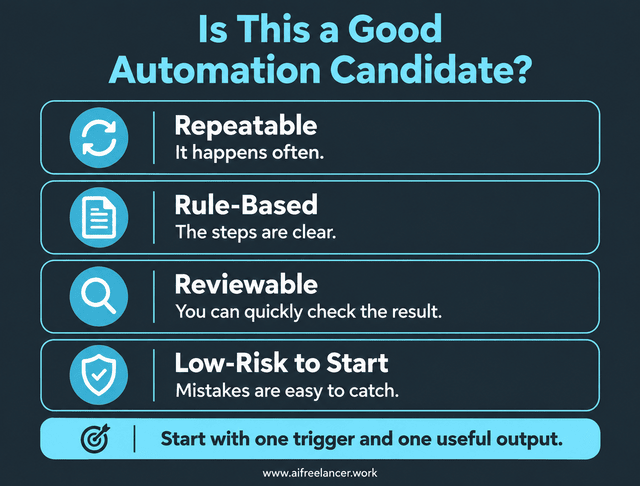
A useful test is to look for work that is repeatable, rule-based, and reviewable. It happens often enough to justify automation, follows rules you can explain, and produces a result you can quickly check.
Client intake, research organization, content repurposing, invoice reminders, lead capture, and routine follow-ups can all provide sensible starting points. Start with one trigger and one useful output whenever possible, especially when you are building the smallest automation system that actually removes work. That gives you a small system you can test and understand before you start connecting more steps.
Reduce Steps Before Adding More Tools
A broken automation does not automatically need another app. Sometimes it needs fewer moving parts and a clearer path from trigger to result.
Imagine your research workflow already sends material through three tools before producing your notes. Adding another AI summarizer might introduce another subscription, another transfer, and another possible formatting problem without improving the research.
Go back to Trigger → Action → Output. If one remains vague, fix that part of the workflow before expanding it. Fewer places to check and fewer handoffs to monitor can make a workflow more useful than another layer of automation.
Keep Human Review Where Judgment Matters
Full automation sounds efficient until a system makes a decision you would never have approved yourself. Human review can protect the parts of the process where context and judgment matter most.
Consider an AI-drafted client follow-up. The system might produce the message automatically, but you can still review the promises it makes, confirm the pricing, check the tone, and make sure the message reflects the client relationship before sending it.
The same principle applies to factual content, contracts, scope changes, and decisions that affect money, client expectations, or published claims. Let AI handle routine execution while you keep the final say where a mistake could have real consequences.
Know When Complexity Is Actually Necessary
Simple automation works well until the real process contains legitimate exceptions. At that point, extra logic can make the workflow more reliable.
A client onboarding process, for example, might need one path for complete submissions and another when required information is missing. More complex automation makes sense once the task repeats predictably enough that you understand which exceptions and fallback paths actually occur.
Add extra branches only when they solve a real exception you already understand.
Test AI Process Automation Before You Trust It
A workflow that succeeds once proves very little. Reliability appears when the process handles normal work consistently and responds sensibly when something goes wrong.
Testing also gives you confidence to stop watching every run. That is when automation starts giving you back attention instead of merely saving clicks.
Test the Happy Path First
Start with the most ordinary version of the task. Use a complete client form, a properly formatted document, or whichever clean input represents the workflow’s typical run.
Then confirm that the trigger fires, the intended action happens, and the expected output appears. Compare the result with the standards you already defined for a usable output.
You also need enough visibility to understand what happened during the run. A status field, confirmation message, saved output, timestamp, or error alert can help you see where the process stopped if something failed.
Test Exceptions and Failure Points
Clean inputs only show you the easiest version of your workflow. Real work brings incomplete forms, changed fields, failed integrations, duplicate triggers, and AI outputs that miss the mark.
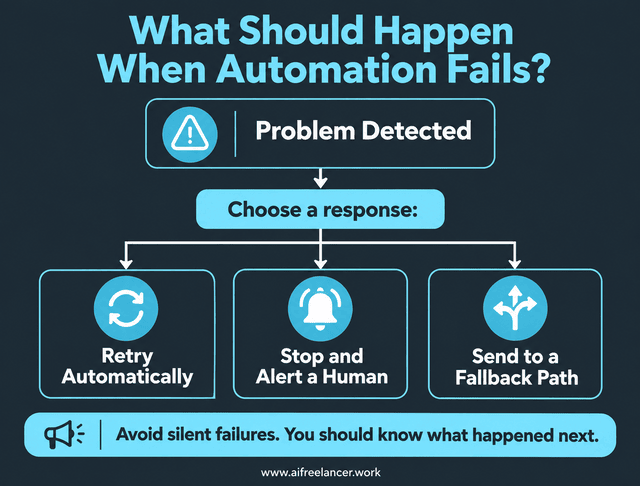
Test those situations deliberately. For each important failure, choose one of three paths:
- retry automatically
- stop and alert a human
- send the task to a fallback path
Suppose AI cannot create an acceptable client brief because the intake form lacks essential details. Continuing through the remaining workflow may create bad project records and misleading notifications, while a better system stops, flags the missing information, and sends the case for review. This is where designing automation for the days when things go wrong matters most, because silent or ambiguous failures are the hardest to catch.
The point is to avoid silent or ambiguous failures. You should know what happened and what happens next.
Review the Workflow as Your Process Changes
An automation can work perfectly when you build it and still become unreliable months later. Tools update, integrations change, form fields get renamed, prompts drift, and your own process may evolve. A weekly check to catch workflow drift before it becomes a bigger problem can help you spot issues after changes to a tool, template, data source, or business process.
Review important workflows after meaningful changes to a tool, template, data source, or business process. Make sure the trigger, AI step, and output still match the way you work.
The 3-Step Reliability Check
Complicated troubleshooting often starts with a simple question you skipped earlier. Before digging through integrations or replacing tools, return to the structure of the process.
Use this quick check whenever you build or troubleshoot automation:
- Trigger: What exactly starts the process?
- Action: What exactly should happen?
- Output: What result proves it worked?
If you cannot answer all three clearly, simplify the process before adding another step, integration, or AI tool. This is your minimum reliability layer. Once it works, you can add information sources, destinations, human checks, or conditional branches only when the workflow actually needs them.
What Is AI Process Automation?
AI process automation uses AI inside an automated workflow to handle tasks that require some interpretation, such as summarizing, extracting information, classifying requests, or generating content. The automation then moves that work through a defined process based on the rules you set.
What Is an Example of AI Process Automation?
A freelance writer could automate client intake. A submitted form triggers the process, AI extracts and summarizes the project requirements, and the workflow creates a structured project brief. The brief becomes the expected output, while unclear or incomplete requests can go to the writer for review.
How Is AI Process Automation Different From Traditional Automation?
Traditional automation typically follows predetermined rules. AI-powered automation can interpret less structured information and produce variable outputs. That flexibility allows it to handle tasks such as summarizing emails or classifying requests, but it also creates a greater need for validation and clear success criteria.
How Do You Know if an AI Automation Is Actually Reliable?
Test whether the correct trigger starts the workflow, the intended action occurs, and the expected output appears consistently. Then test realistic exceptions such as missing information, poor AI responses, duplicate triggers, and failed integrations. You should also have a visible alert or fallback when the process cannot continue safely.
Why Does an AI Automation Run Successfully but Still Produce Poor Results?
Technical completion only tells you that the workflow executed its steps. AI may still generate inaccurate, incomplete, badly formatted, or unusable output. Define the expected output before you automate the task, then judge the result against accuracy, usability, and the amount of manual correction still required.
Final Thoughts
AI process automation should take repetitive decisions and manual steps off your plate. If you constantly check whether it ran correctly, fix strange outputs, or trace failures across several apps, the workflow has started returning some of that work to you.
Trigger → Action → Output gives you a simple way to regain control. Start with one trigger and one useful output, then expand only when the process proves it needs more. A good automation should save more than clicks. It should also reduce how much you have to remember and check.
The best automation is the one you can trust enough to stop thinking about during normal work. That means fewer unnecessary checks, clearer failures, and more attention for the work that still needs your judgment.
If you want more practical ways to use AI to simplify your freelance workflow, improve your writing systems, and reduce unnecessary manual work, explore my books on my Amazon Author page.
Sources
- McKinsey & Company — The State of AI: How Organizations Are Rewiring to Capture Value — https://www.mckinsey.com/capabilities/quantumblack/our-insights/the-state-of-ai-how-organizations-are-rewiring-to-capture-value
- McKinsey & Company — The State of AI in 2025 — https://www.mckinsey.com/capabilities/quantumblack/our-insights/the-state-of-ai-2025
- Microsoft — 2025 Annual Work Trend Index: The Frontier Firm Is Born — https://blogs.microsoft.com/blog/2025/04/23/the-2025-annual-work-trend-index-the-frontier-firm-is-born/

Florence De Borja is a freelance writer, content strategist, and author with 14+ years of writing experience and a 15-year background in IT and software development. She creates clear, practical content on AI, SaaS, business, digital marketing, real estate, and wellness, with a focus on helping freelancers use AI to work calmer and scale smarter. On her blog, AI Freelancer, she shares systems, workflows, and AI-powered strategies for building a sustainable solo business.