

If you already use AI in your writing workflow, AI beta testing is not a tech curiosity. It’s a practical way to get early access to features that can reduce drafting time, tighten revisions, and help you build a smoother system before the wider market catches up.
Most articles on beta testing are written for product teams. This one is for freelance writers and self-publishers who care about outcomes: faster delivery, fewer revision loops, and more breathing room—without gambling with client work.
Everything I’ve shared here—and more—is in my book, available on Amazon. Click the link if you’re ready to take the next step.
Why AI Beta Testing Matters for Modern Writers
You don’t need another AI tool. You need fewer bottlenecks. If your drafts still take too long, revisions keep piling up, or research eats half your writing time, the problem might not be effort. It might be timing. AI beta testing gives you access to features before they become standard — which means you can fix workflow friction before everyone else even notices it.
That timing advantage matters because the wider market is adopting AI fast. In McKinsey’s global survey (March 2025), 78% of respondents said their organizations use AI in at least one business function (up from 72% in early 2024, and 55% the year before).
What AI Beta Testing Actually Means in Practice
AI beta testing is when a tool releases new features to a limited group before a full public rollout. You get access early, the company learns what breaks in the real world, and feedback influences what ships.
In practice, you’ll usually see two formats. A closed beta is invite-only and tends to come with more direct feedback channels. An open beta is available to anyone, typically through a waitlist, a “labs” program, or a feature toggle inside the tool. Either way, beta means the product is still moving. Features may change quickly, quality can swing from week to week, and you may be asked to share feedback through surveys, in-app prompts, or a community channel.
The key point: you don’t need to be technical to contribute. The value you provide is context—how the feature behaves under deadlines, client constraints, and real writing tasks.
What Writers Actually Get From Early Access
Early access isn’t just bragging rights. It’s access to capabilities while they’re still rare—and that can matter when your income depends on speed and consistency.
Beta access is often delivered through feature flags, invite waves, limited rollouts, or a preview “lab” inside the product. For writers, the real benefit is that you can adapt your workflow while the tool is still evolving. If you give useful feedback—specific examples, before-and-after workflow effects, and clear pain points—you can also influence what the tool becomes, especially if the team is actively listening.
Examples of Beta Features That Change Writing Workflows
Not every beta feature is meaningful for writers. The ones that matter tend to change throughput, not novelty.
For long-form writers and self-publishers, expanded context windows can reduce continuity problems across sections. Citation or research helpers can speed up source triage and reduce the “where did I put that?” tax. Voice and tone memory can cut down the time spent re-explaining your style to the tool. Better outline-to-draft behavior can reduce the ugly middle stage where structure collapses. And structural editing suggestions—clarity, redundancy, flow—can shrink revision cycles when they’re actually reliable.
Those features only matter if they translate into results. So the next section focuses on outcomes you can measure, not features you can admire.
The Workflow Advantage of AI Beta Testing
Early access only matters if it changes your output. The real question isn’t “Is this feature cool?” It’s “Does this make me faster, clearer, or more consistent?” When used strategically, AI beta testing becomes less about experimentation and more about measurable workflow upgrades.
Where Beta Features Create Measurable Leverage
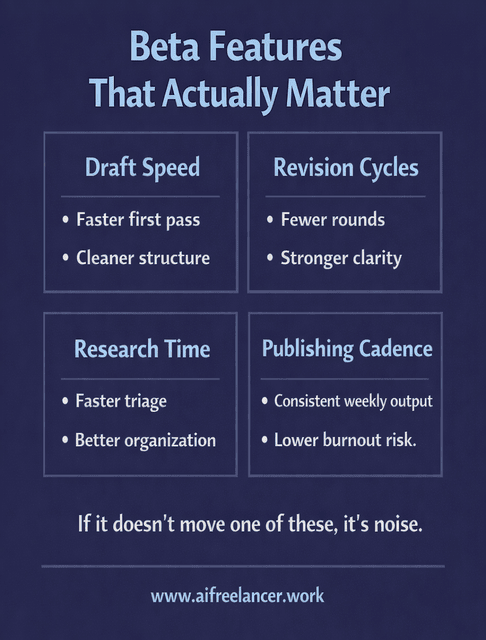
The most useful beta features usually improve one of four things: draft speed, revision cycles, research time, or publishing cadence. In real terms, that looks like producing a solid first draft faster, needing fewer cleanup passes before something is client-ready, finding and organizing sources more quickly, or maintaining consistent weekly output without burning out.
Measured productivity gains from AI assistance are real in other knowledge-work contexts, which supports your “measure the upside” framing. In a Stanford-backed working paper on a real workplace deployment, access to a generative AI assistant increased productivity by about 14% on average.
If a beta feature doesn’t move one of those levers, it’s not a workflow upgrade—it’s just more complexity.
Test → Measure → Integrate → Systemize
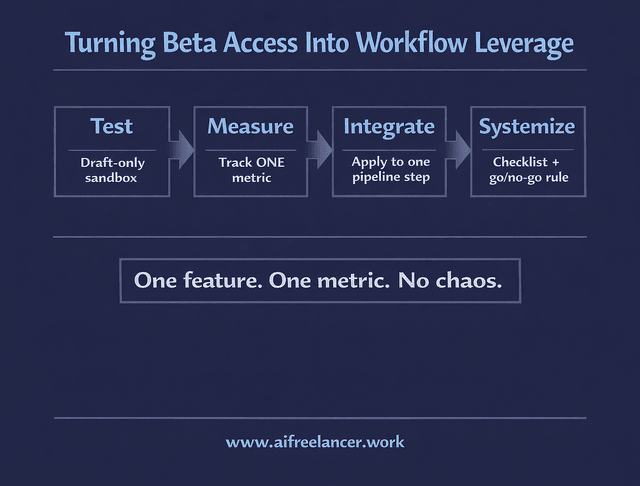
Treat beta access like a controlled experiment, not a full workflow overhaul.
Start by testing in a sandbox—draft-only, personal content, internal assets, or non-critical pieces—so you’re not relying on an unstable feature to meet a deadline. Then choose one metric to track. Don’t measure everything. Pick the one outcome you actually care about right now: time to first draft, number of revision rounds, research triage time, or turnaround time from brief to publish-ready.
If you see a real improvement, integrate the beta feature into just one step of your pipeline. Keep it narrow. For example, you might use a beta feature only for outlines, only for redundancy checks, or only for source triage. Once it works consistently, systemize it with a simple checklist and a go/no-go rule so you don’t second-guess every time you write.
This is how you capture upside-down without turning your workflow into a chaotic tool museum.
Beta User vs Public-Release User
The advantage isn’t just earlier access. It’s an earlier habit formation.
When you test features early and build a process around what works, you’re effectively locking in a better workflow before the feature becomes standard. Later, when everyone else adopts it, you’re not scrambling to adapt. You’re simply executing a system you already refined.
Micro-Scenarios (Writer-Realistic)
Here are realistic ways this shows up for writers without requiring huge leaps.
A mid-career writer uses early structural suggestions to reduce revision rounds from three to two on recurring blog work. A self-publisher uses expanded context limits to maintain chapter continuity, saving about 45 minutes per chapter setup by reducing restarts and re-briefing. A system-focused writer uses a beta citation tool to cut source triage time by around 25% on research-heavy drafts.
The point isn’t the exact numbers. The point is that beta testing can create measurable gains when you treat it like a workflow experiment, not a shiny object.
Risks of AI Beta Testing and How Writers Stay Safe
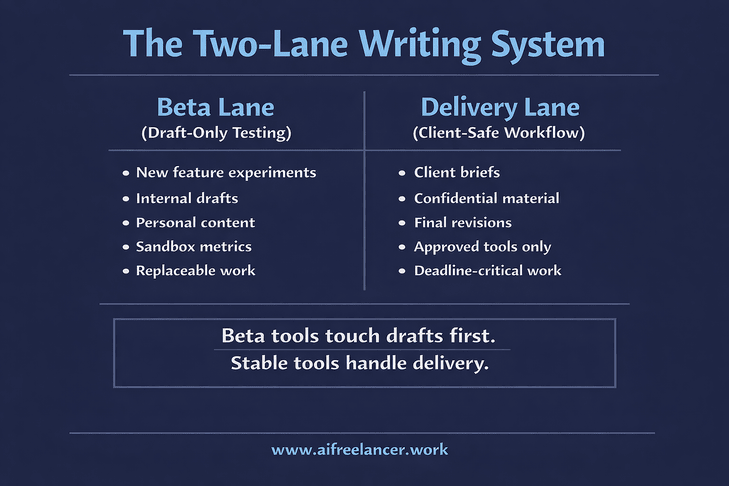
Early access comes with trade-offs. A feature that saves time this week could break next week. For freelance writers, the stakes are higher because deadlines and client trust are involved. The goal isn’t to avoid beta tools entirely. It’s to use them without letting instability touch your delivery work.
Reliability is about the tool. Privacy is about your obligations. You need to manage both.
Reliability Risks (What Can Break Mid-Project)
Beta tools can be unstable in ways that matter to writers. Bugs happen. Features can change mid-draft or mid-series. Output quality can swing as models or settings get adjusted. A tool that was perfect last week can suddenly feel off this week.
That’s why the “beta lane” concept matters. A beta lane is a draft-only testing track that stays separate from delivery work. If the feature breaks, you should be able to fall back to your stable workflow without losing a deadline.
Client Safety and Privacy Boundaries
For freelance writers, the bigger risk is not a bug. It’s accidentally treating a beta tool like a secure workspace.
Don’t upload sensitive client information into unknown beta environments. Use anonymized placeholders when testing. Keep client-critical delivery work in stable tools until you trust both reliability and data handling. The safest pattern is simple: beta tools touch drafts and internal content first, not final client deliverables.
This caution matches public sentiment about data handling. Pew Research Center found that 81% of U.S. adults are very or somewhat concerned about how companies use the data they collect about them.
When AI Beta Testing Is Worth It and When It’s Not
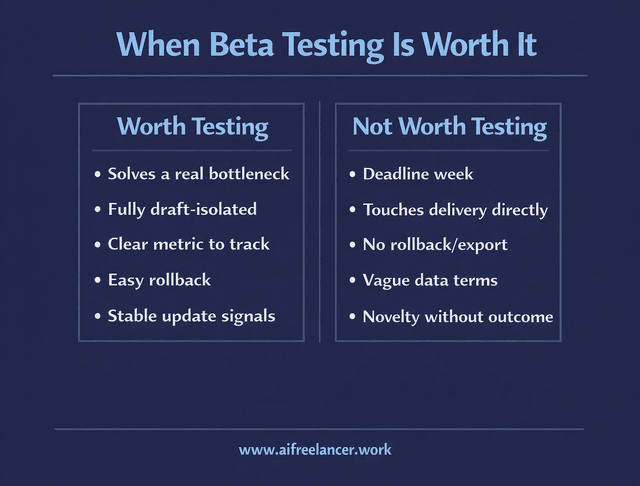
AI beta testing is worth it when it solves a bottleneck you already feel, when you can keep the experiment separate from delivery work, and when you can measure the upside with a single metric.
It’s not worth it during a heavy deadline week, when the beta feature touches your delivery process directly, or when adopting it would create rework if it changes suddenly. A quick gut-check helps: is this actually fixing a problem you have, or are you chasing novelty?
How to Find and Evaluate AI Beta Testing Opportunities
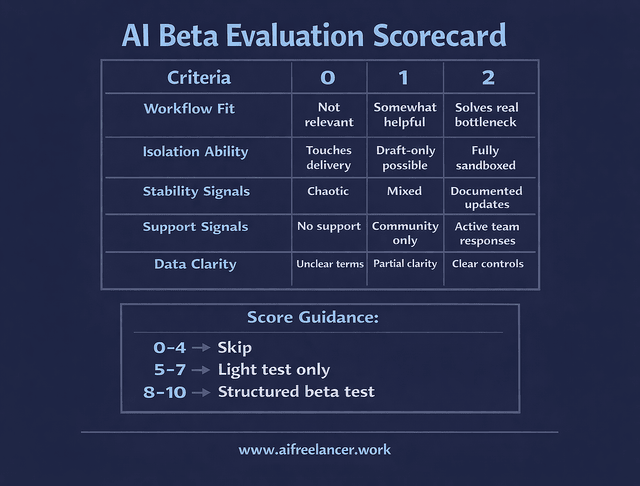
Not every beta deserves your attention. Some will improve your workflow. Others will quietly waste your time. The difference comes down to how you evaluate them. Instead of chasing every new release, you need a simple way to screen, test, and decide — quickly and without disrupting your system.
Where Writers Find Early Access Programs
Writers usually find betas through tool waitlists, feature preview pages, official communities (Discord or Slack), product update newsletters and changelogs, and creator programs or partner invites. The best opportunities often come from following a few tools closely rather than trying to track everything.
Good Beta vs Risky Beta (Fast Checklist)
A good beta usually feels structured. There’s a clear feedback path, visible responsiveness, and updates are documented. You can usually disable the feature if it’s not working (for example, by turning off a preview toggle), and the tool acknowledges known issues. You’ll also see clear data terms—what’s stored, what’s used for training, and what controls you have.
A risky beta feels vague and friction-heavy. Privacy language is unclear or missing. Support is absent. Changes break things without notes. There’s no export or rollback option (for example, no way to revert a draft experience or move content out cleanly). If you can’t safely exit, you shouldn’t enter.
How to Evaluate a Beta Before You Commit Time
Before you join an AI beta testing program, use a simple rubric. Score each item from 0 to 2 for a total out of 10.
Scoring Criteria
Workflow Fit
- 0 = Not relevant to what you write
- 1 = Somewhat helpful
- 2 = Solves a bottleneck you already feel
Isolation Ability
- 0 = Touches client delivery directly
- 1 = Can be kept draft-only
- 2 = Fully sandboxed and separate from delivery work
Stability Signals
- 0 = Chaotic changes, frequent breakage
- 1 = Mixed reliability
- 2 = Updates are documented, and behavior is predictable
Support Signals
- 0 = No visible support
- 1 = Community-only support
- 2 = Active team responses and feedback loops
Data Clarity
- 0 = Vague or unclear terms
- 1 = Partial clarity
- 2 = Clear controls and understandable data terms
Score Guidance
- 0–4: Skip it.
- 5–7: Test lightly on non-client work only.
- 8–10: Run a structured test in your beta lane and measure outcomes.
Turning AI Beta Testing Into a Competitive Advantage
The competitive advantage comes from discipline. One beta at a time. A separate beta lane from your delivery lane. Clear metrics. Quick exit when it doesn’t help.
The second layer of advantage is reuse. The fastest writers aren’t just using tools—they’re building assets: prompt packs, checklists, templates, and a house style that can be applied across clients and books. Beta testing becomes valuable when it helps you systemize those assets sooner and execute with less friction.
Final Thoughts: Early Access as Strategic Leverage
AI beta testing is worth doing when it produces measurable workflow gains without putting client delivery at risk. Treat it like a controlled system upgrade: test one feature, measure one metric, and only keep what earns a permanent place in your process.
A clean next step is simple. Pick one beta. Run a seven-day draft-only test. Track one metric. Decide whether it becomes part of your workflow—or gets dropped without guilt.
If you want deeper, step-by-step AI writing systems designed specifically for freelancers, explore my full collection of workflow guides and books on my Amazon Author page. They break down practical frameworks you can apply immediately—without burning out or chasing every new tool release.
Frequently Asked Questions About AI Beta Testing
AI beta testing is early access to new AI features before they’re released to everyone. For writers, the real point isn’t reporting bugs—it’s checking whether a new feature improves your workflow in a measurable way (faster drafts, fewer revisions, quicker research). If the feature doesn’t move a metric you care about, it’s not a workflow upgrade.
Start with tools you already use, because you’ll spot what’s “new” faster, and you won’t waste time learning a whole platform just to test a feature. Look for waitlists, “Labs” or preview toggles inside the app, official Discord/Slack communities, and update emails or changelogs. Once you’re in, participate like a pro: test one feature, keep notes on what changed, and send feedback that includes the writing task you used it for and what outcome improved or broke.
It can be safe if you treat betas like a separate lane from client delivery. Test with anonymized drafts, remove client identifiers, and avoid pasting confidential material into tools with unclear data terms. A simple rule is: beta tools can touch drafts and internal work first; client delivery stays in stable tools until the beta has proven reliable and your privacy boundaries are clear.

Florence De Borja is a freelance writer, content strategist, and author with 14+ years of writing experience and a 15-year background in IT and software development. She creates clear, practical content on AI, SaaS, business, digital marketing, real estate, and wellness, with a focus on helping freelancers use AI to work calmer and scale smarter. On her blog, AI Freelancer, she shares systems, workflows, and AI-powered strategies for building a sustainable solo business.

