
You’re doing everything “right” as a freelance writer—delivering client work, pitching, posting on socials when you remember—and your marketing still feels like it’s going nowhere. You know you should be emailing your list, posting consistently, updating your site, and staying visible… but there’s only one of you. That’s where AI marketing tools stop being a shiny trend and start becoming a survival strategy.
Recent surveys show that nearly 88% of marketers now use AI in their daily work, with most relying on AI writing and research tools to plan, draft, and optimize content. This isn’t a future skill—it’s already a baseline in modern marketing, which means using these tools isn’t about jumping on a trend; it’s about keeping up with how the industry now runs.
Used well, they take the weight of repetitive, data-heavy tasks off your plate—social scheduling, email automation, SEO research, CRM follow-ups—so you can focus on the parts only you can do: your voice, your ideas, your client relationships.
This guide is for freelance writers and solo creators who want simple, realistic ways to use AI in their marketing without turning their business into a tech project.
This guide shows you how to plug AI into your social media, email, website, SEO, CRM, and networking in a way that actually fits a solo writer’s reality.
Everything I’ve shared here—and more—is in my book, available on Amazon. Click the link if you’re ready to take the next step.
Master Social Growth with AI Marketing Tools
Social media shouldn’t feel like a second job. If you’re posting on impulse and hoping something lands, you’re wasting energy. With the right AI marketing tools, you can batch content once, schedule it, and let your social presence grow quietly in the background.
The Power of Scheduling Tools: Buffer & Hootsuite
Posting “when you feel like it” is the fastest way to disappear from your audience’s mind. Tools like Buffer and Hootsuite are practical examples of AI social media scheduling tools that let you sit down once, plan a week or month of posts, and let the system handle the rest.
Add AI on top, and these tools become much more than calendars:
- Use AI assistants (ChatGPT, Jasper, etc.) to batch ideas, hooks, and caption variations for different platforms.
- Let your scheduler suggest optimal posting times based on engagement, so you don’t have to guess.
- Turn one blog post or newsletter into a week of social snippets with AI summarization instead of rewriting everything from scratch.
You stay visible without needing to “be online” all day.
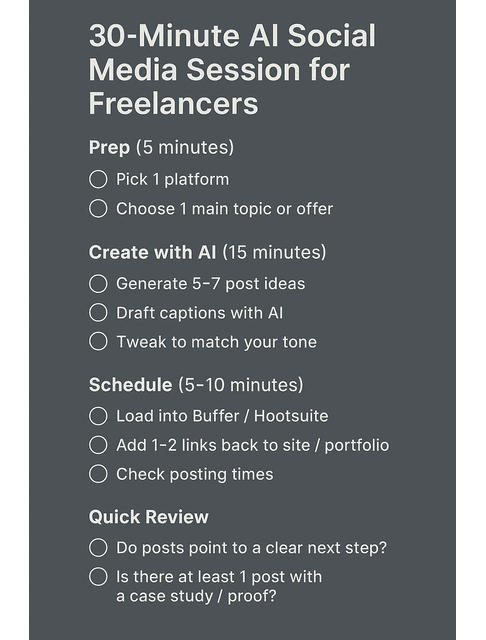
Quick-start workflow: your 30-minute AI-powered social block
- Pick one platform (often LinkedIn for B2B clients).
- Ask your AI assistant for 5–7 post ideas and draft captions based on your latest blog, case study, or offer, then tweak the language so it sounds like you.
- Load everything into Buffer or Hootsuite, schedule across the week, and add 1–2 links back to your site or portfolio so posts don’t just “perform”—they funnel attention.
This isn’t just theory—teams that integrate AI into their marketing see a 44% increase in productivity and save an average of 11 hours per week through automation and smarter workflows. For a solo freelancer, that’s often the difference between “barely keeping up” and feeling like your marketing finally has breathing room.
Run this once a week, and you’ll look consistently present without daily effort. To make this easier to follow each week, use this simple 30-minute AI social checklist.
Once your posting cadence is under control, the next question is: what can you share regularly without spending hours hunting for links?
AI Content Curation for Social Media
Finding content to share can eat an entire afternoon if you let it. AI-driven content discovery and AI content curation for social media tools help you:
- Surface relevant articles, videos, and threads based on your niche and audience interests.
- Group links into themes (e.g., “AI writing tactics,” “freelance business systems,” “content marketing tips”) so your feed feels intentional rather than random.
- Draft a quick commentary that goes beyond just dumping links—you’re adding your own take and positioning yourself as a guide.
You become a trusted curator instead of a stressed-out content machine.
Building a Strong Online Presence with AI Marketing Tools
Your online presence is the first thing potential clients check. If you want to build a strong online presence with AI, AI marketing tools can quietly upgrade how you show up:
- Analyze which posts actually lead to profile visits and inquiries, not just likes.
- Use AI copy assistants to refresh your LinkedIn About section, website bio, and service pages so they tell a clear, unified story about what you do.
- Build a simple “style guide” prompt to help AI tools consistently match your tone and positioning, avoiding a generic tone.
Over time, that consistency—across LinkedIn, your site, and email—makes you easier to trust and easier to hire.
Beginner metrics to watch (social)
You don’t need a full analytics deep dive. Start with:
- Profile visits: shows whether posts are compelling enough to make people click through.
- Link clicks: tells you if people are taking action (e.g., visiting your portfolio or services page).
If both stay flat, change your hooks and add clearer CTAs (e.g., “See the full case study here →”).
Simplify Email & Website Strategy with AI Marketing Tools
Email and your website are where serious clients decide to hire you—or leave. Most freelancers never get consistent with either because client work eats up the day. AI marketing tools help you automate key emails and test small site changes, so both keep improving without stealing your writing time.
Email Marketing Automation with AI Marketing Tools for Freelancers
Email feels like “one more channel” until you automate it. Modern email platforms now include AI email marketing automation features for subject lines, copy suggestions, and send-time optimization, so you can:
- Build a simple 3–5 email welcome sequence that runs automatically whenever someone joins your list.
- Use AI to draft first-pass emails (welcome, nurture, soft pitch) and then edit for nuance and personality.
- Let the system A/B test subject lines and calls to action to see what actually gets opened and clicked.
Instead of writing every email from scratch, you’re tuning a machine that works while you’re busy writing for clients.
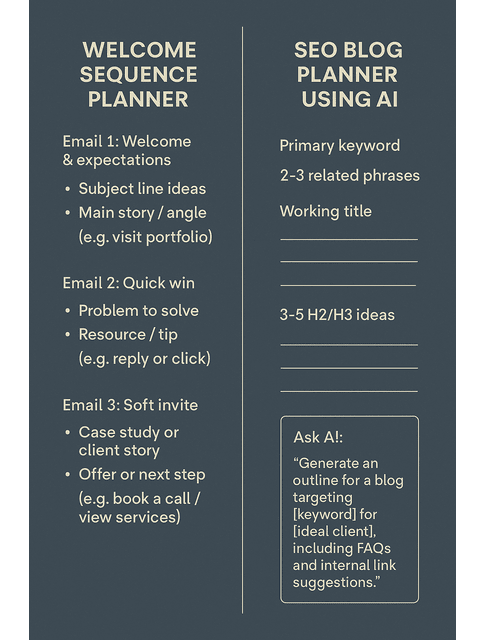
Example: your first 3-email welcome sequence
- Email 1 – Welcome & expectations: who you are, who you help, what they’ll get from your emails.
- Email 2 – Quick win: a short tip, checklist, or resource that solves a common pain point for your ideal clients.
- Email 3 – Soft invite: a brief case study + invitation to see your portfolio or book a call.
The payoff is significant. Email continues to deliver some of the best results in digital marketing, producing $36–$44 in ROI for every $1 spent. Even better, automated email sequences often outperform one-off blasts by a huge margin—some analyses show they can deliver returns up to 30× higher over time. A simple welcome sequence becomes one of the highest-value assets in your entire system.
Use AI to draft each email, then tighten and personalize the stories and examples so they feel true to you. If you want a simple way to see your welcome sequence and next SEO post on one page, use this quick planner.
Personalization & Segmentation in Email Campaigns
Personalization isn’t just adding a first name to the greeting. With AI-powered email personalization and segmentation and broader AI for email marketing, you can:
- Group subscribers by behavior (who clicked your portfolio, who reads your AI content, who engages with pricing posts).
- Send targeted offers—like a content strategy audit only to subscribers who keep opening your marketing tips.
- Use AI to generate slightly different angles for different segments (e.g., SaaS founders vs. course creators) without having to start from scratch.
You get more relevance with less manual slicing and dicing.
Optimizing Your Website with AI: A/B Testing & UX Tools
You don’t need a full rebrand; you need small, data-backed improvements. AI A/B testing tools for websites and related AI tools for improving user experience can:
- Run simple A/B tests on headlines, CTAs, and hero copy to see what produces more inquiries.
- Provide heatmaps and scroll maps that show where visitors drop off on your services page.
- Suggest layout tweaks—like moving your “Book a Call” button higher or simplifying your navigation—based on behavior data.
Combine this with clear copy, and you turn your site from a static brochure into a quiet, always-on sales assistant.
- Quick definitions
- A/B test: Show version A to some visitors and version B to others, then keep the version that gets more of the result you want (e.g., form fills).
- Heatmap: A visual map that shows where people click and move their mouse on a page, so you can see what’s drawing attention.
Once your site is clearer and easier to use, the next step is getting more of the right people actually to find it—that’s where SEO comes in.
Boost SEO with AI Marketing Tools
SEO is how new clients who’ve never heard of you discover your work. Tools for AI keyword research for SEO and AI-driven content optimization make the research and optimization side much less intimidating:
- AI keyword research:
- Start with a simple phrase like “freelance blog writer” or “AI content writer.”
- Ask your AI assistant or SEO tool for related long-tail keywords and common questions.
- Pick one primary keyword and 2–3 associated phrases for each blog post.
- AI content optimization:
- Paste your draft and ask AI which topics, questions, or FAQs are missing based on the top results.
- Add answers to those questions, plus internal links to your services or related posts.
- Simple content cluster:
- Choose one main topic (e.g., “AI tools for writers”) as a pillar page.
- Use AI to map out 3–5 supporting posts (e.g., AI blog workflow, AI editing tools, AI ideation).
- Cross-link these posts so search engines and readers see the structure.
If you want to stay ahead of AI in digital marketing trends and predictions, this kind of SEO work is what keeps your content discoverable as tools and search behavior evolve.
Beginner metrics to watch (email, website, SEO)
For email:
- Open rate: Are subject lines and sender name compelling?
- Click-through rate: Are people clicking to your site or portfolio?
For website/SEO:
- Contact form submissions/discovery calls booked: basic proof that your site is working.
- Top landing pages: which posts or pages bring in the most visitors? Create more content with similar themes or formats.
If open rates are low, test new subject lines with AI assistance. If clicks are low, tighten your CTAs and make the “next step” obvious.
Strengthen Client Relationships Using AI Marketing Tools
Winning a client is hard; losing them to disorganization is easy. When you track projects in your head and guess on follow-ups, things slip. AI-powered CRMs and automations give you a simple system. Hence, every lead, proposal, and check-in happens on time, even in your busiest weeks.
- Quick definitions
- CRM (Customer Relationship Management): A system that stores all your leads, clients, projects, and communication in one place.
- Lead scoring: A way to rank leads (e.g., warm, hot, cold) based on their actions so you know who to follow up with first.
Client Relationship Management: AI CRM Tools (HubSpot CRM & Salesforce Einstein)
Juggling multiple clients in your head works—until it doesn’t. AI CRM tools for freelancers like HubSpot CRM and Salesforce Einstein help you:
- Track every lead, project, and proposal in one place.
- Automatically log emails and calls so you can see the full context before your next check-in.
- Use AI to score leads, predict which contacts are “warm,” and surface suggested next actions.
This is AI for small business marketing in practice: fewer dropped opportunities, more organized follow-ups, and a clearer view of your pipeline.
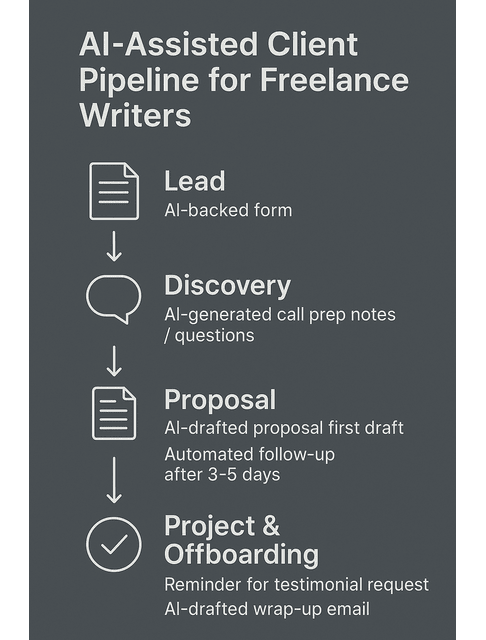
A simple freelance pipeline (and where AI fits)
Think of your client journey in four basic stages:
- Lead: Someone fills out a form, messages you, or is added manually.
- Discovery: You exchange details, maybe have a call.
- Proposal: You send scope, pricing, and timeline.
- Project & offboarding: you deliver the work and wrap up.
AI can:
- Auto-create deals when a lead completes your form.
- Remind you to book or prepare for discovery calls.
- Trigger proposal follow-up emails 3–5 days after sending.
- Schedule testimonial requests and “check-in” emails after a project ends.
Here’s a simple visual of how AI can support each stage of your client pipeline.
AI Marketing Tools for Client Communication and Follow-Ups
Most freelancers lose work quietly—by not following up. With AI in your stack, you can set up automated follow-ups and reminders that help you enhance client communication with AI:
- Trigger gentle follow-up sequences after sending a proposal (check-ins, value-add resources, deadline reminders).
- Set automatic reminders to ask for testimonials 2–4 weeks after project completion.
- Use AI to draft polite, on-brand follow-up emails so you’re never staring at a blank reply box wondering what to say.
You stay top-of-mind without feeling spammy or relying solely on your memory.
The Future of Client Engagement: AI Chatbots & Predictive Journeys
Client expectations are shifting fast. AI in digital marketing is already reshaping how businesses respond to leads and nurture relationships:
- AI chatbots for client engagement can answer basic questions about your services, pricing, and process while you’re offline.
- Predictive analytics can flag leads who are “cooling off” and drop them into a re-engagement sequence.
- Simple rules—like sending a resources email if someone views your portfolio twice—can run automatically.
You don’t need all of this on day one. But understanding where client engagement is heading helps you choose tools that won’t feel obsolete in a year.
Beginner metrics to watch (client relationships)
Start simple:
- Number of open deals/leads: who’s currently in conversation with you.
- Follow-up completion rate: how many proposals or leads got at least one follow-up?
If you see lots of leads with no follow-up, build a small automation to fill that gap.
Grow Your Network and Future-Proof with AI Marketing Tools
Your best opportunities often come from your network, not cold pitches. The problem is staying visible without spending hours in DMs and events. AI marketing tools can surface the right communities, flag useful webinars, and remind you to follow up. So your network grows steadily while you stay focused on client work.
Joining AI-Enhanced Writer Communities & Maximizing Your Network
You don’t have to navigate all of this by yourself. AI-enhanced writer communities and creator spaces can shave months off your learning curve and show you how to tap into AI communities to expand your network.
- Learn real-world prompts, workflows, and tool stacks other freelancers use with paying clients.
- Swap feedback on sales pages, pitches, and lead magnets built with AI support.
- Share what’s working in your niches—SaaS, coaching, e-learning, etc.—so everyone moves faster.
Pair that with AI-powered networking tools that remind you to check in with key contacts, and your network becomes more active without you constantly “working the room.”
Concrete starting moves:
- Join one AI-focused creator or writer community and one niche client community (e.g., SaaS, online education).
- Use AI to summarize long discussion threads so you can catch up quickly.
- Save your best prompts and systems and share them—this is how you become visible in the group without spamming.
Networking Events & Webinars with AI
Finding events worth your time is a job in itself. AI search and recommendation systems can point you toward AI-powered networking events and webinars that actually match your niche:
- Surface relevant webinars, summits, and workshops for your niche instead of generic marketing events.
- Summarize event pages, agendas, and speaker lists so you can quickly decide whether it’s worth attending.
- Help you prep smarter by drafting questions to ask or outreach messages to send before and after an event.
You show up more prepared—and more aligned with the rooms where your ideal clients actually are.
As you meet more people and see what’s working for them, collaborating with other AI users becomes the natural next step.
Collaborating with Other AI Users & Knowledge Sharing Communities
The freelancers who will thrive in the next few years won’t be the ones who know the most tools; they’ll be the ones who learn in public and iterate fast. Collaboration and AI-first knowledge sharing and community support around AI marketing tools can look like:
- Co-creating offers with designers, strategists, or developers who also use AI (e.g., a bundled “content + funnel + automation” package).
- Running small workshops or webinars together to educate clients about AI-assisted content and marketing.
- Sharing case studies and prompts with a trusted group to help everyone improve their systems.
As AI continues to reshape digital marketing, your community becomes one of your strongest assets.
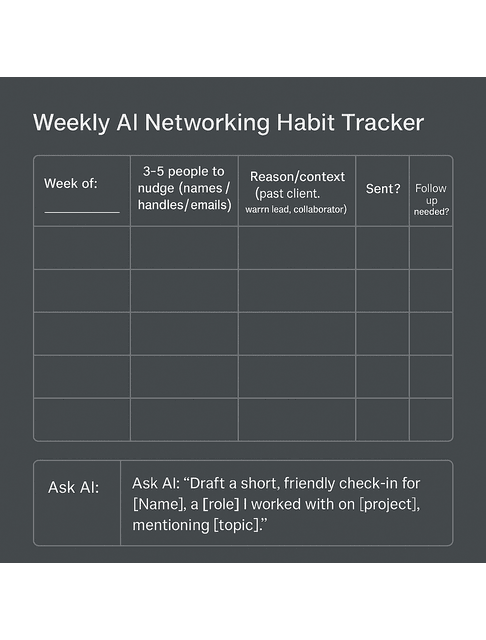
Quick-start workflow: one AI-powered networking habit
Once a week:
- Ask your AI assistant to summarize your recent conversations and clients.
- Pick 3–5 people to nudge (past clients, warm leads, collaborators).
- Use AI to draft short, context-aware check-ins (“Saw this article and thought of you”).
- Send, log in to your CRM, and move on.
That alone keeps your network warm without draining your focus. To make this habit easy to stick to, use a simple weekly networking tracker like this.
Final Thoughts
You don’t need a dozen platforms or a full-blown funnel. You need a few carefully chosen AI marketing tools that take care of routine work while you do yours: writing, thinking, and serving clients.
Start with the area that hurts the most right now—social consistency, email, SEO, or follow-ups. Pick one tool, build one simple workflow, and give it a month. Then add the next layer. Step by step, you’ll move from “I’m always behind on my marketing” to “my business runs on systems that support me even on my low-energy days.”
Suppose you want more step-by-step workflows, prompts, and real examples of how to apply these ideas in client work. In that case, you can explore my books on AI-powered freelancing and content systems on my Amazon author page.
Frequently Asked Questions About AI Marketing Tools for Freelancers
AI marketing tools use artificial intelligence to automate and improve marketing tasks. They handle social scheduling, email campaigns, SEO research, content optimization, lead scoring, and chatbots, reducing repetitive work while improving targeting and performance.
You can use AI in digital marketing to generate ideas and drafts, personalize emails, analyze website performance, run A/B tests, manage leads in a CRM, and predict which messages will convert. In practice, that might mean using AI to draft newsletters, surface strong blog topics, schedule posts at optimal times, and trigger follow-up emails automatically.
For most small and solo businesses, yes. AI helps marketers save time, work more efficiently, and make better data-driven decisions—benefits that matter even more when you don’t have a team. Even one or two tools (for email and social, for example) can reclaim hours each week and make your marketing more consistent.
There’s no single perfect tool because every freelancer’s bottleneck is different. Some need an AI-powered email to clear their inbox, others get more from social schedulers like Buffer or Hootsuite, AI-driven SEO tools, or CRMs like HubSpot or Salesforce. The key is to map your workflow, pinpoint the real friction points, and choose tools that directly address them rather than chasing every shiny new app.
AI is powerful for pattern recognition, automation, and first drafts, but it doesn’t replace your judgment, experience, or voice. The most effective setup is a partnership: AI handles data analysis, ideas, and repetitive tasks while you own the strategy, refine the message, and build real client relationships.

Florence De Borja is a freelance writer, content strategist, and author with 14+ years of writing experience and a 15-year background in IT and software development. She creates clear, practical content on AI, SaaS, business, digital marketing, real estate, and wellness, with a focus on helping freelancers use AI to work calmer and scale smarter. On her blog, AI Freelancer, she shares systems, workflows, and AI-powered strategies for building a sustainable solo business.

