

Deadlines pile up quickly in freelance writing. One project needs research, another needs a full draft, and a third is stuck in editing. Hours disappear between reading sources, organizing notes, and polishing sentences. Many writers end up working late, not because the writing itself is difficult, but because the process around it takes too long. This is where AI tools for freelance writers can make a meaningful difference.
Instead of replacing the writing process, these tools help streamline the stages that usually slow writers down. Research becomes easier to organize, outlines form faster, and editing becomes less exhausting. When used thoughtfully, AI can turn a scattered writing routine into a clear workflow that helps freelancers move from idea to finished article with less friction.
Everything I’ve shared here—and more—is in my book, available on Amazon. Click the link if you’re ready to take the next step.
Why AI Tools for Freelance Writers Work Best Inside a Workflow
Many freelance writers begin experimenting with AI the same way they test any productivity tool. They open a chatbot for brainstorming, install a grammar assistant for editing, and maybe try a research summarizer along the way. The result often feels more complicated than helpful because the tools are used in isolation rather than as part of a system.
When writers jump between research tabs, drafting windows, editing tools, and scattered notes, the technology becomes another layer of distraction instead of a productivity tool.
The Common Mistake of Collecting AI Tools for Freelance Writers Without Changing the Process
Many freelancers experiment with several AI tools but still feel overwhelmed because their workflow remains chaotic. They jump between research tabs, drafting windows, editing tools, and client notes without a clear sequence. When tools are used randomly, they often add friction instead of removing it.
The Difference Between a Tool Stack and a Writing System
A tool stack is simply a collection of apps. A writing system connects tools to the stages of the writing process so that each one solves a specific problem. Instead of guessing which tool to use at any moment, writers move through a defined sequence.
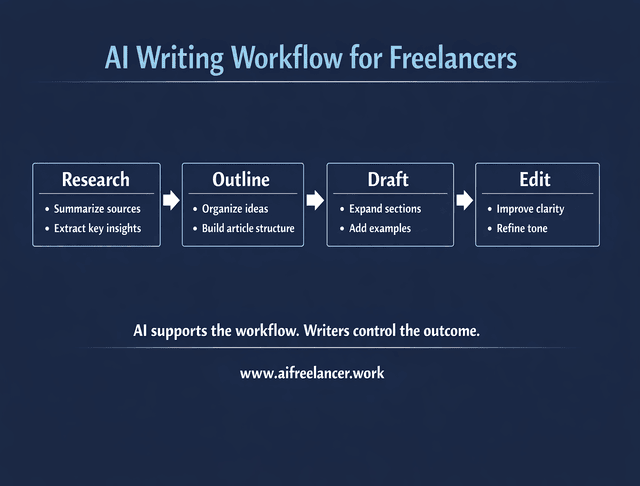
A clear sequence might look like this:
- research and idea gathering
- outlining and structure
- drafting and expansion
- editing and refinement
This structure helps writers move through projects with less hesitation and fewer context switches. Research into generative AI productivity highlights why this matters. A study from the National Bureau of Economic Research found that professionals using generative AI for writing tasks completed work about 40% faster while improving output quality by roughly 18%.
How Structured Workflows Reduce Cognitive Load for Busy Writers
Freelancers manage multiple deadlines, clients, and topics simultaneously. When the workflow becomes predictable, writers spend less mental energy deciding what step comes next. Instead of constantly switching between tasks, they move through a sequence that supports focus and momentum.
Example of a Freelance Writing Workflow Supported by AI Tools for Freelance Writers
Consider a freelance writer preparing a 1,500-word blog post for a SaaS client. Instead of opening dozens of tabs and manually copying notes, the writer collects three credible sources and asks an AI assistant to summarize the key insights. From those summaries, the writer extracts the most important ideas and groups them into potential article sections.
The workflow might look like this:
- Research → summarize 3–5 sources with an AI assistant
- Outline → convert key insights into section headings
- Draft → expand each section using AI-assisted prompts
- Edit → refine clarity and run readability checks
This structured approach reduces context switching and allows the writer to move from research to draft more efficiently while maintaining control over the ideas and structure.
Research Becomes Faster With AI Tools for Freelance Writers
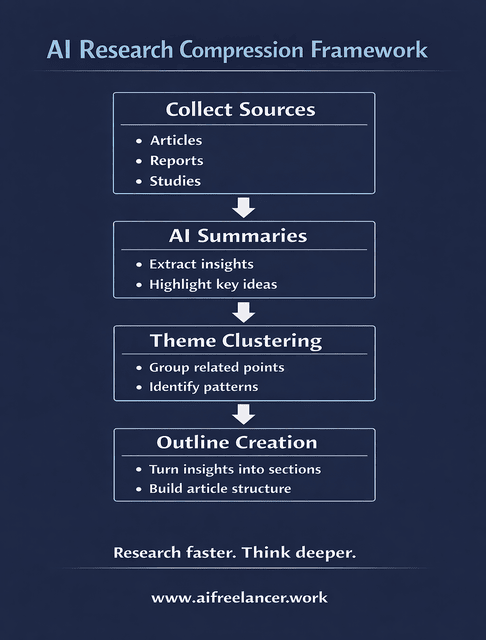
Research often consumes the largest portion of a freelance writer’s time. Finding credible sources, extracting useful insights, and organizing information into a usable outline can take longer than writing the article itself. Without a clear system, research easily expands into dozens of open tabs and scattered notes.
AI-powered research assistants help compress this stage by quickly surfacing key information from large amounts of content.
Stop Rereading the Same Sources
Writers often read multiple reports, blog posts, and studies before drafting. AI tools can summarize these materials quickly, helping writers understand the key points before diving deeper into the sources. This reduces the time spent scanning long documents and helps writers identify the most relevant insights faster.
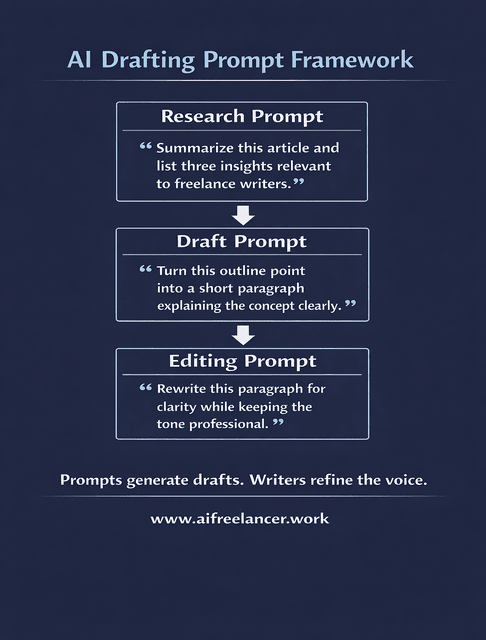
Example research prompt:
“Summarize the key findings from this article and list three insights relevant to freelance writers.”
Find an Article Angle Before You Start Outlining
Once research begins, writers often explore several angles before deciding on an article’s structure. AI assistants can suggest possible directions based on early findings, which allows writers to evaluate multiple approaches before committing to a structure.
Turn Scattered Notes Into Usable Themes
Research notes are often scattered across tabs, documents, and bookmarks. AI tools can help group ideas and cluster related concepts into themes so writers can see how different insights connect.
Spot Missing Information Early
AI-assisted analysis can highlight areas where supporting evidence may be missing. Writers can then fill those gaps before starting the draft, preventing major revisions later and strengthening the article’s credibility.
Organizations emphasize that readers increasingly expect well-supported, evidence-based information online. Reliable research strengthens credibility and helps writers build trust with their audience.
Convert Research Into a Structured Outline for Client Work
Once research notes are grouped into themes, the next step is turning those themes into a logical article structure. Writers decide which ideas become main sections, which points support each section, and how the argument progresses from introduction to conclusion. The result is an outline that guides the drafting stage.
Turning Outlines Into Drafts Without Losing Your Voice
Even when the research is complete and the outline is clear, many writers hesitate when facing the first paragraph. Drafting is the moment when ideas must turn into sentences, and the blank page can slow momentum.
AI writing assistants help reduce that friction by giving writers a starting point they can reshape and refine.
Expand Outlines Into Rough Paragraphs With AI Tools for Freelance Writers
Instead of starting from scratch, writers can expand outline sections into rough paragraphs. These early drafts provide a starting point that the writer can revise, reorganize, and strengthen with examples and insights.
Start Writing Without Staring at a Blank Page
Prompts based on the outline help writers begin quickly. For example, a writer might ask an AI assistant to explain a concept in three sentences or summarize a section based on outline notes.
Example drafting prompt:
“Turn this outline point into a short paragraph explaining why AI speeds up research for freelance writers.”
AI Tools for Freelance Writers That Support Faster Drafting
Tools like ChatGPT or Claude can expand ideas, suggest transitions, or help writers explain complex points more clearly.
Research from MIT Sloan suggests that generative AI tools can improve productivity for knowledge workers when used as collaborative assistants rather than autonomous writers.
Keep Your Writing Voice During AI-Assisted Drafting
Freelance writers usually treat AI-generated text as raw material. They rewrite sections, replace generic phrases, add examples from research, and adjust tone so the final article sounds like their own work.
Example Drafting Workflow for Freelance Content Projects
A practical drafting sequence might include:
Outline section → generate initial paragraph with an AI assistant → refine language → add examples → adjust tone
For instance, if a section heading is “How AI speeds up research,” a writer might ask an AI assistant to produce a rough explanation. The writer then rewrites the paragraph, adds supporting evidence, and adjusts the tone so the final version matches their voice.
Editing and Refinement With AI Tools for Freelance Writers
Once the draft exists, the writer’s job shifts from generating ideas to strengthening them. Editing determines whether the article reads clearly, flows logically, and meets professional standards.
AI editing tools help accelerate this stage by highlighting issues that writers might miss during manual review.
Catch Awkward Phrasing Quickly
Editing tools can flag sentences that feel clumsy, overly long, or difficult to follow. Writers often become too familiar with their own drafts, which makes it harder to notice small issues after reading the same text multiple times. AI-assisted editing tools help identify these weak spots by highlighting passive constructions, wordy phrases, and sentences that are harder to read.
Once these sentences are flagged, writers can revise them into clearer and more direct language. Simplifying complex wording, shortening long sentences, and removing unnecessary filler can significantly improve readability. This process helps ensure that the final article communicates ideas clearly and keeps readers engaged from one paragraph to the next.
Improve How Sections Connect
Even when individual paragraphs are strong, an article can still feel disjointed if the transitions between sections are weak. AI editing tools can analyze how paragraphs flow together and highlight areas where ideas shift too abruptly or repeat unnecessarily.
This feedback allows writers to add stronger transitions that guide the reader smoothly from one point to the next. For example, a brief linking sentence can clarify how one section leads into another or reinforce the main argument of the article. Improving these connections strengthens the overall structure of the piece and helps readers follow the logic of the content without confusion.
Reduce Editing Fatigue During Long Projects
Editing large pieces of content can be mentally exhausting. After spending hours researching and drafting, writers may struggle to maintain the same level of attention when reviewing the text. This fatigue increases the chances of overlooking small errors or unclear sentences.
Automated editing feedback can reduce this burden by highlighting potential issues automatically. Instead of manually scanning every sentence for grammar or readability problems, writers can focus on improving the clarity and strength of their ideas. This approach makes the editing process more efficient and helps maintain consistent quality throughout long articles or multi-section projects.
A Practical Editing Loop Supported by AI Tools for Freelance Writers
Many writers follow a structured editing sequence:
- First pass: Review structure and logical flow
- Second pass: Improve clarity and readability
- Third pass: Refine tone and consistency
Use Readability Analysis to Strengthen the Final Article
Research from the Nielsen Norman Group shows that readers often scan online content rather than reading every word. Clear structure and concise writing help readers absorb information quickly.
AI readability tools can highlight overly complex sentences, helping writers simplify language and improve comprehension.
Example editing prompt:
“Review this paragraph for clarity and suggest a clearer version while keeping the tone professional.”
Designing a Custom Writing System With AI Tools for Freelance Writers
If writing projects constantly feel slow or chaotic, the real issue is usually the process rather than the tools. Designing a repeatable workflow allows writers to approach each assignment with the same structured method.
Map AI Tools for Freelance Writers at Each Stage of Writing
A simple system might look like this:
Research → summarize sources
Outline → organize ideas
Draft → expand sections
Edit → refine clarity
Review → finalize readability
Choose a Small AI Stack That Actually Helps
Too many tools often create confusion. A smaller set of reliable tools usually performs better than a large collection of disconnected apps.
A basic stack might include:
- research assistant such as ChatGPT or Claude
- drafting assistant for expanding outlines
- editing assistant such as Grammarly
Match the Workflow to How You Write Best
Some writers prefer drafting quickly and editing later, while others refine each section as they write. The workflow should support the writer’s natural habits.
Decision Rules for Choosing AI Tools for Freelance Writers
- If you are exploring ideas or messy research, use a conversational AI assistant.
- If you are expanding structured notes, use a drafting assistant.
- If the draft is finished, switch to editing tools for grammar and clarity.
Build Consistency Into Every Writing Project
When the workflow stays consistent, writers spend less time deciding how to start and more time improving the quality of their work.
Mistakes Freelancers Make When Adopting AI Writing Tools
Even with a structured system, writers can still run into problems if AI tools are used carelessly. Understanding these mistakes helps prevent workflow issues before they affect the final output.
Treating AI Output as a Finished Draft
One of the most common mistakes is assuming that AI-generated text is ready to publish. AI can produce readable paragraphs quickly, but those paragraphs often contain generic phrasing, weak transitions, or claims that need verification.
Freelance writers still need to revise the draft carefully. This usually includes tightening sentences, adding examples, adjusting tone, and confirming facts from reliable sources. Treating AI output as a starting point rather than a finished article ensures that the final content reflects the writer’s voice and meets professional standards.
Switching Between Too Many Tools During One Project
Another common problem is experimenting with too many AI tools at once. Writers may open several platforms for research, drafting, rewriting, and editing, hoping to find the best combination. Instead of saving time, this often creates constant context switching.
Every time a writer moves between tools, the flow of the project slows down. Notes become scattered, prompts are repeated, and sections may be rewritten multiple times. A smaller set of tools used consistently is usually more effective. When each tool supports a specific stage of the workflow, writers can move through projects with fewer interruptions.
Ignoring the Editing Stage Because the Draft Looks Polished
AI-generated drafts often appear clean at first glance. Sentences are grammatically correct, and paragraphs seem organized, which can create the illusion that the article is already finished. In reality, many AI drafts still need structural editing.
Sections may repeat ideas, transitions may feel weak, and the overall argument may lack a clear progression. Skipping the editing stage can leave these issues unresolved. A proper editing pass should focus on structure first, then clarity and tone. This ensures that the article reads smoothly from beginning to end.
Letting AI Dictate Structure Instead of Guiding It
AI tools are good at generating outlines and suggesting article structures, but they do not fully understand the goals of a specific project. If writers rely entirely on AI-generated outlines, the result can feel generic or disconnected from the audience’s needs.
Freelancers should remain responsible for shaping the argument of the article. This means deciding what the reader needs to learn, what order the ideas should follow, and which examples support the main point. AI can help generate options, but the writer should always choose the structure that best serves the topic and audience.
How These Mistakes Affect Writing Quality and Client Trust
When these mistakes accumulate, the final content can lose clarity and credibility. Articles may contain vague explanations, repetitive ideas, or unsupported claims. Over time, clients notice these issues.
Freelance writers build long-term relationships through reliability and quality. Delivering thoughtful, well-edited work helps clients trust that their content represents their brand professionally. Using AI responsibly—while maintaining control of the writing process—helps freelancers protect both their reputation and their client relationships.
How AI Quietly Improves a Writer’s Craft Over Time
When writers avoid these mistakes and follow a consistent workflow, the benefits extend beyond productivity. AI tools can gradually improve how writers approach their craft.
Faster Research Creates More Time for Deeper Thinking
When research becomes more efficient, writers can shift their focus from gathering information to interpreting it. Instead of spending hours opening dozens of tabs and manually extracting notes, AI tools can help summarize key insights and surface relevant ideas more quickly. This allows writers to reach the stage where they can evaluate arguments, compare perspectives, and decide which points are most valuable for their readers.
With more time available for analysis, writers can strengthen the quality of their content. They can connect ideas more thoughtfully, identify patterns in the information they find, and develop clearer explanations. This deeper level of thinking often leads to stronger arguments and more meaningful insights within the final article.
Structured Drafting Improves Long-Form Organization
AI-assisted outlines can make a significant difference when working on long-form articles. Instead of drafting randomly or building the article section by section without a clear structure, writers can begin with a detailed outline that maps the flow of the piece from introduction to conclusion.
This structure helps maintain logical progression throughout the article. Each section supports the main topic, and the transitions between sections become easier to manage. As a result, long articles feel more cohesive and easier for readers to follow, which improves both clarity and overall readability.
Feedback From AI Editing Tools Sharpens Writing Habits
Editing tools do more than correct grammar or spelling mistakes. They often highlight patterns in a writer’s style, such as sentences that run too long, repeated words, or transitions that are unclear. Over time, this feedback becomes a learning tool rather than just a correction tool.
As writers notice these recurring patterns, they begin to recognize them while drafting. This awareness helps them write clearer sentences from the start and reduces the amount of editing required later. In this way, AI editing tools can gradually improve a writer’s habits and strengthen their overall writing style.
AI Tools for Freelance Writers as a Long-Term Writing Partner
Rather than replacing writers, AI works best as a supportive companion within the writing process. It can assist with research, help generate early drafts, and provide feedback during editing. However, the writer remains responsible for shaping the argument, verifying information, and ensuring the final piece reflects their voice and expertise.
Over time, this collaboration can help writers build more efficient workflows. By reducing repetitive tasks and supporting different stages of writing, AI tools free up mental space for creativity and critical thinking. Used thoughtfully, they become a practical partner that helps freelancers maintain productivity while continuing to develop their craft.
Final Thoughts
Freelance writing involves far more than crafting sentences. Research, outlining, drafting, and editing all compete for time and attention. When these stages lack structure, even experienced writers can feel overwhelmed by the workload.
That is why many professionals are exploring AI tools for freelance writers as part of a broader writing system. Used thoughtfully, these tools help streamline research, accelerate drafting, and simplify editing without replacing the writer’s expertise.
If you want to explore practical ways to integrate AI into your writing process, you can find more guidance in my books and resources on my Amazon Author page.
Frequently Asked Questions About AI Tools for Freelance Writers
Most freelance writers use AI in three places: research, drafting support, and editing. A common setup looks like this:
Research + planning: ChatGPT or Claude to summarize sources, surface key points, and turn notes into a draft outline. Some writers also use Notion AI to organize research inside their workspace.
Draft support: ChatGPT or Claude to expand outline sections into rough paragraphs, generate transition ideas, or rewrite clunky sentences more cleanly.
Editing + polishing: Grammarly (or similar tools) to catch grammar issues, tighten wording, and improve clarity. Readability checks help you spot overly long sentences that make online readers drop off.
The best “tool list” is the one that matches your workflow stages. If research is the bottleneck, prioritize a research assistant. If editing drains you, prioritize an editing tool that helps you tighten quickly.
Yes, and the safest way to do it is to treat AI as support, not a substitute for your judgment. Clients pay freelance writers for things AI cannot reliably do on its own:
choosing the right angle for a specific audience and goal
writing with brand voice and positioning
making accurate claims and citing credible sources
adding human insight, examples, and experience
shaping a persuasive structure instead of producing generic text
To protect your value, keep ownership of the thinking. Use AI to reduce busywork, then make the final writing sound like you—clear, specific, and intentional.
AI helps you write faster by shortening the slowest parts of the job: research, outlining, and first-draft momentum.
Here’s a practical way it speeds up real projects:
Research compression: summarize long sources and extract key takeaways instead of reading every word.
Outline acceleration: turn the takeaways into a structured outline, so you’re not figuring out structure while drafting.
Draft momentum: expand each outline section into rough paragraphs so you’re revising instead of starting from scratch.
Faster edits: flag awkward sentences and repetition so your editing passes are more targeted.
A good rule: let AI help you move from “idea” to “rough draft” faster, then you spend your time on what raises quality—structure, voice, and examples.
They are reliable as assistants, but not as final decision-makers. AI tools can:
produce decent first drafts
help you clarify confusing sentences
speed up organization and outlining
catch grammar and tone issues
But they can also:
misunderstand sources or “fill in gaps” incorrectly
generate confident-sounding claims without proof
write generic content that feels bland or off-brand
For professional work, the safe approach is:
Use AI to generate options (summaries, outlines, draft paragraphs).
Verify all claims and sources yourself.
Rewrite heavily for voice, accuracy, and structure.
Do a final readability pass before delivery.
Used this way, AI improves speed without risking credibility.
Writers keep their voice by treating AI output like a rough assistant draft—not publish-ready writing. A simple process that works:
Feed AI your structure, not your voice. Use it to organize and expand ideas, not to “sound like you.”
Rewrite introductions and transitions yourself. These are the most “voice-heavy” parts.
Swap generic phrases for your natural wording. If a sentence feels like something you would not say, rewrite it immediately.
Add your examples and opinions. Voice comes from specificity: what you’ve seen, what you recommend, what you avoid.
Do a final consistency pass. Read the article out loud or skim for tone shifts. If parts feel robotic, tighten them.
A useful habit: keep a small “voice checklist” (your typical sentence rhythm, preferred terms, and tone rules). After AI helps you draft, you align the entire piece with that checklist before sending it to a client.

Florence De Borja is a freelance writer, content strategist, and author with 14+ years of writing experience and a 15-year background in IT and software development. She creates clear, practical content on AI, SaaS, business, digital marketing, real estate, and wellness, with a focus on helping freelancers use AI to work calmer and scale smarter. On her blog, AI Freelancer, she shares systems, workflows, and AI-powered strategies for building a sustainable solo business.

