

If you’re already drowning in deadlines, “continuous learning” can feel like a cruel suggestion because you can’t even finish your current work without stealing time from rest or marketing. And when AI keeps changing, the pressure gets louder: learn faster or fall behind. That’s why AI upskilling has to be practical and calm. Not a new hobby. A small upgrade loop that makes writing easier.
The urgency is real, but it’s not a reason to panic. Employers expect major skills disruption through 2030, with the World Economic Forum reporting that 39% of workers’ core skills are expected to change by 2030. And AI adoption is already mainstream: McKinsey’s global survey found 65% of respondents say their organizations are regularly using generative AI.
What follows is a writer-friendly way to keep up, without burning out.
Everything I’ve shared here—and more—is in my book, available on Amazon. Click the link if you’re ready to take the next step.
AI Upskilling: Why Continuous Learning Now Matters
Here’s the uncomfortable truth: you don’t get exhausted because you “can’t write.” You get exhausted because every piece requires too many decisions, topic, angle, structure, phrasing, tone, polish, and you’re making those decisions under time pressure.
That’s why AI upskilling isn’t about collecting tools. It’s about reducing decision load and tightening your process, so your work is repeatable.
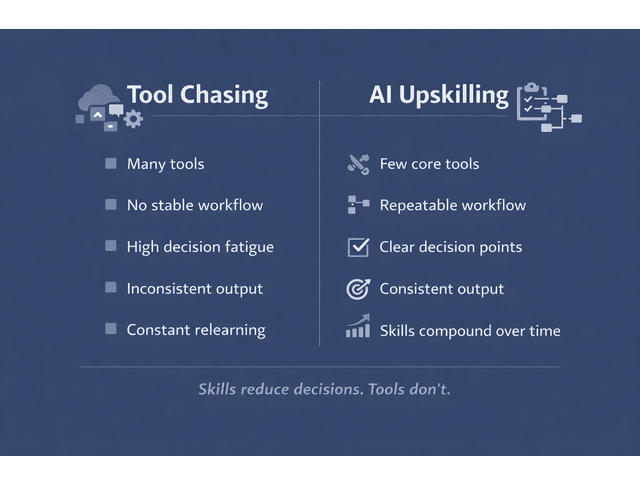
The Workload Trap: Deadlines, Admin, and Decision Fatigue
When your workflow isn’t stable, you pay for it twice: Once during drafting and again during editing. The draft drags because the structure isn’t locked early. Then editing drains you because the first draft is trying to be final.
A common scenario: What could’ve been a clean 90-minute draft turns into a four-hour spiral because you’re rewriting sections that should’ve been decided at the outline stage.
AI Literacy Vs Tool Hype: What “Skills” Actually Mean
AI literacy is less about knowing features and more about directing output with constraints, then judging whether the result fits your goal. The skills that transfer across tools stay the same: prompt clarity, constraints, iteration control, source awareness, and tone control.
This is why tool-hopping rarely solves the real problem. If you can’t consistently get a usable outline from Tool A, switching to Tool B won’t magically fix the underlying process.
Upskilling Vs Reskilling: Choosing the Right Path
Upskilling improves what you already do: Writing faster, editing lighter, repurposing more easily, and publishing consistently. Reskilling is a role shift (for example, moving into content ops, SEO strategy, or AI workflow consulting).
A simple decision rule: If you want better delivery inside your current services, upskill. If you want a new lane or offer, reskill. For most working writers, upskilling starts with a weekly loop you can repeat without adding more hours.
One more reason this matters: LinkedIn reports that by 2030, 70% of the skills used in most jobs will change, with AI as a catalyst. In other words, the “baseline” for professional work is moving.
So the goal isn’t “learn everything.” It’s to build a learning loop that fits into real client work and pays you back in time and energy.
Build a Calm, Continuous Learning Loop With AI Upskilling
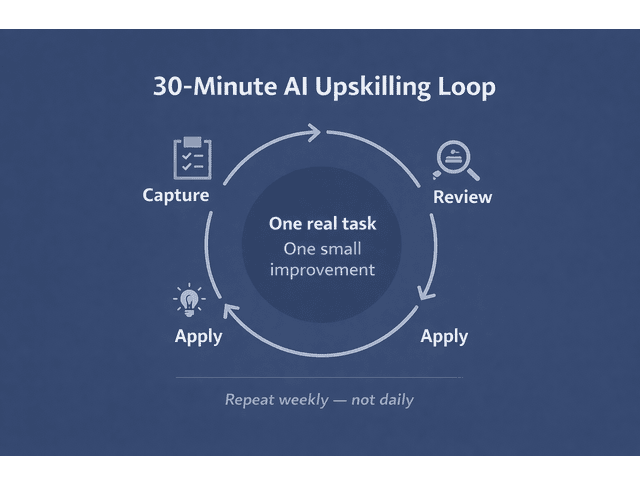
Instead of a big plan, you need a small loop, one that fits inside a real week and upgrades real work.
AI Upskilling in 30 Minutes: Weekly Micro-Sprints
Think of a micro-sprint as a 30-minute timebox where you improve one tiny part of your workflow on a real draft. One week, you tighten outlining. Another week, you refine intros. Another week, you standardize transitions. This keeps learning grounded and immediately useful.
If you want a calm progression: start with structure prompts (brief → angles → outline), then move to editing passes, then add repurposing. You’re building layers, not chasing updates.
Capture → Apply → Review: The Simplest Learning Cycle
This cycle works because it’s small and measurable. Capture one prompt and one example output worth saving. Apply it to the next draft with clear constraints (audience, tone, length, format). Review it quickly by asking: did it save time, did it match your voice, and did it reduce edit load? Then adjust one variable, not five, so you don’t turn learning into chaos.
Here’s a worked example you can steal as-is:
You’re writing a client blog, and you keep stalling at the outline stage.
You capture one outline prompt that produces a usable structure (not a full draft). On your next assignment, you run the prompt using the client’s audience, goal, and offer, and you force the assistant to give you only H2s/H3s plus one-line bullets per section (so you don’t “skip ahead” into drafting). After that draft, you review two outcomes: your time-to-outline dropped from 40 minutes to 15, and your intro still took too long. Next week’s micro-sprint becomes “intro formulas that match my voice,” not “change tools.”
Create a Prompt Library and Swipe File for Reuse
A prompt library is just “what worked” saved in a way you can reuse. A swipe file is “how you say things” saved in a way that protects your voice. Together, they reduce reinvention.
If you want to make this repeatable, these three prompts cover the basics. Edit the bracketed parts once, then reuse.
Prompt 1 — Brief + Outline (Structure-First)
You are my writing assistant. Create a structure-first outline only.
- Topic: [TOPIC]
- Audience: [AUDIENCE]
- Goal: [GOAL]
- Angle: [ANGLE]
- Tone: [TONE]
Constraints:
- Output ONLY: H2s + H3s
- Under each H3, add 1–2 bullet points with what to cover
- No intro, no conclusion, no full paragraphs
- Keep it practical and non-hype
Prompt 2 — Rewrite in My Voice (Voice-Protected)
Rewrite the text below in my voice.
Voice rules:
- 3–5 rules from my voice card]
- Avoid clichés and filler
- Keep sentences clean and direct
Do NOT:
- Add new claims or stats
- Change meaning
- Make it longer
Text:
[PASTE TEXT]
Prompt 3 — Repurpose from Sections (Not a Full Rewrite)
Repurpose the content below into:
- 3 LinkedIn posts (different hooks)
- 1 short email (150–200 words)
- 5 takeaway bullets
Constraints:
- Use only the ideas already present (no new claims)
- Keep the tone consistent
- Make each LinkedIn post a distinct angle
Content:
[PASTE SECTION OR FULL BLOG]
This is enough to stop “starting from scratch” every time.
The Skills Stack for Writers Using AI Upskilling
The goal isn’t to make AI write for you. The goal is to make AI handle the parts that cause friction, so your judgment and voice can stay focused where they matter.
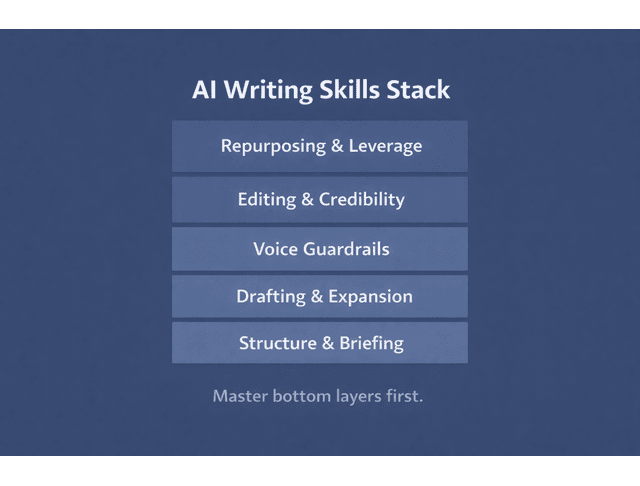
Outline Faster: Briefs, Angles, and Structure-First Drafting
Outlining is the highest-leverage skill because it prevents rewrites. A usable brief locks the audience, the promise, the angle, the proof points, and the CTA. Once that’s clear, drafting becomes assembly instead of improvisation.
In practice, AI can help you generate a few angles quickly, expand one into a clean outline, and draft sections in the order you choose. You stay in control, but you stop staring at a blank page.
Protect Your Voice With AI Upskilling Guardrails
Voice drift happens when prompts are vague. The fix is a “voice card”—a short set of rules your assistant has to follow: tone, do/don’t, favored phrases, and sentence rhythm.
Here’s a simple voice card example (make it sound like you, not like this template):
Sample Voice Card
- Tone: Calm, direct, practical; no hype
- Default style: Short-to-medium sentences; vary rhythm
- Do: Use specific examples; name the next step
- Don’t: Use clichés (“game-changer,” “unlock,” “revolutionary”)
- Preference: Clear headings, clear takeaways, no fluff
Then you add constraints that prevent generic output: draft plainly, avoid clichés, keep sentence length varied, and no hype. This turns “AI-assisted writing” into “voice-protected drafting.”
Editing Workflow: Clarity Passes, Fact-Checking, and Tone Control
Editing is lighter when it’s done in passes instead of a messy all-at-once polish. The most useful passes are structure, clarity, voice, and credibility—and tone is protected inside the voice pass.
Here’s what that looks like in practice. You might decide to move the “how-to” section ahead of the definitions so readers get the map first. Next, trim unnecessary qualifiers and keep the sentences direct. Then swap out generic phrasing for the way you naturally explain things, which keeps the tone consistent. Finally, verify stats, names, and claims and delete anything you can’t support.
AI can help with clarity and flow, spotting repetition, tightening paragraphs, and offering alternatives. But credibility still needs your eyes, especially for claims, numbers, names, and anything that implies certainty.
This matters because work expectations are shifting quickly. When AI use becomes normal, your edge isn’t “I used AI.” It’s “I used AI responsibly and shipped better work faster.”
Turn Results Into Leverage Through Consistent AI Upskilling
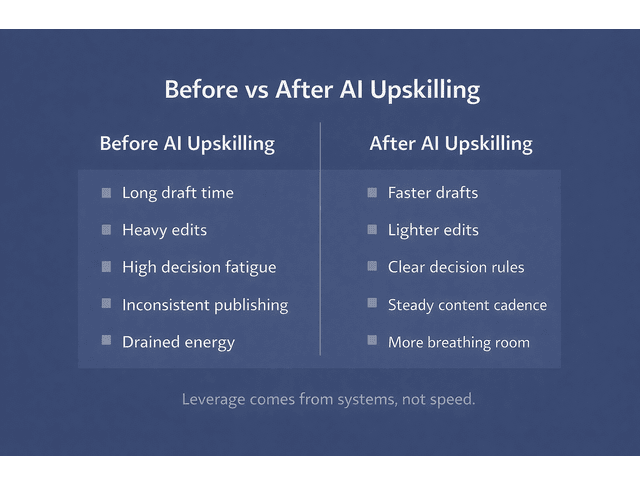
The point of improving your workflow isn’t just speed. It’s leverage: more calm delivery, more consistent marketing, fewer late-night spirals.
Quality Control: Checklists, Definition of Done, and Revision Rules
Writers burn out in the final 10%. A “definition of done” prevents endless tweaking because it tells you when the piece is complete.
Keep it practical: a final structure check, a proof-point check, a CTA check, and a read-through. By this point, voice and credibility should already be handled in their passes. QC is just the final gate. Then add a revision rule that protects your time—limited revision cycles so you don’t polish forever.
Content Repurposing: Posts, Emails, and Reusable Content Blocks
Consistency gets easier when you stop treating every post as brand-new writing. Build one core piece, then repurpose it into smaller outputs. Your swipe file supports writing inputs (hooks, transitions, CTAs). Your reusable content blocks support publishing outputs (post formats, email structures, short “teaching” sections). Different purpose, same calm effect: less reinvention.
If repurposing usually melts your brain, start with one rule: repurpose from sections, not from memory. Take a single H2 section and turn it into one post. Then do it again tomorrow. That’s how a consistent content cadence becomes possible.
Track One Signal at a Time to Prove ROI With AI Upskilling
Track one signal for 2–4 weeks, so the win is obvious. The cleanest signals are time-to-first-draft, edit time, revision rounds, publish cadence, or lead inquiries. Pick the one that matches your goal, and let small proof build momentum.
Final Thoughts
AI upskilling works best when it’s small, repeatable, and attached to real writing because that’s how you get the compounding benefits without the burnout. Start with one micro-skill, protect your voice with a simple voice card, and measure progress with one signal at a time. You’ll feel it quickly: fewer stalled drafts, lighter edits, and a steadier rhythm that gives you breathing room again.
Want a calmer way to write faster without losing your voice? Explore my books on AI writing workflows, editing systems, and sustainable productivity on my Amazon Author Page. choose the one that fits what you need most right now.
Frequently Asked Questions About AI Upskilling
AI upskilling is learning the skills needed to understand, work with, and apply AI tools effectively, regardless of your role.
Start with role-first learning: pick one repeatable work task (like outlining or editing), practice it in a weekly micro-sprint, save what works, and improve one variable at a time.
Upskilling improves performance in your current role; reskilling prepares you for a different role.
Not for most knowledge-work applications of AI. Many roles can start with AI literacy and practical application, while coding becomes more important if you’re moving into technical AI development.
Use constraints and examples: create a short voice card, feed a few samples, and instruct the tool to follow your tone rules while avoiding generic phrasing then do a voice pass as part of editing.

Florence De Borja is a freelance writer, content strategist, and author with 14+ years of writing experience and a 15-year background in IT and software development. She creates clear, practical content on AI, SaaS, business, digital marketing, real estate, and wellness, with a focus on helping freelancers use AI to work calmer and scale smarter. On her blog, AI Freelancer, she shares systems, workflows, and AI-powered strategies for building a sustainable solo business.

