

Staying ahead of the curve is essential in today’s fast-paced freelance writing world. But the real challenge is no longer whether to use AI—it’s deciding which tools are actually worth your time and how to use them without losing your voice. One empowering way to stay competitive is by leveraging AI writing assistants. Used well, these tools put you in control, helping you work faster, improve content quality, and reduce the mental load that comes with constant deadlines.
This blog explores the top AI writing assistants you need to know, along with how writers actually use them in real workflows, so you can confidently choose the best fit for your needs.
Across the industry, AI is no longer a fringe experiment. Recent surveys show that around 90% of content marketers plan to use AI to support their content efforts in 2025, which means these tools are quickly becoming part of the standard writing toolkit rather than an optional add-on.
Everything I’ve shared here—and more—is in my book, available on Amazon. Click the link if you’re ready to level up.
Understanding AI Writing Assistants
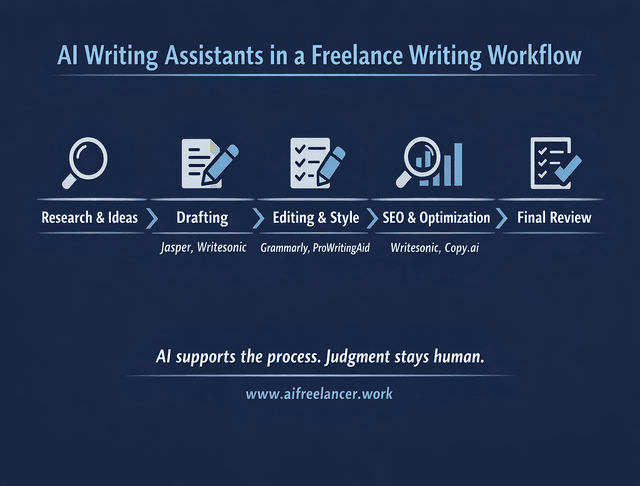
AI writing assistants are tools designed to aid in the writing process. They use advanced algorithms to provide suggestions, correct errors, and generate content. Using AI writing assistants primarily enhances efficiency, saves time, boosts content quality, and sparks creativity. They streamline your writing process, enabling you to focus on creating compelling content.
Benefits of AI Writing Assistants
Efficiency and Time-Saving
AI writing assistants reduce the time spent on editing and proofreading by offering real-time suggestions as you write. For many freelance writers, this means fewer stops, cleaner drafts, and less back-and-forth during revisions. Studies show that about 87% of marketers who use AI for content report improved productivity, which mirrors what many writers experience once these tools are integrated into a consistent workflow.
Improved Content Quality
These tools help improve your writing by offering suggestions for better word choices, sentence structure, and even tone adjustments.
Enhanced Creativity and Idea Generation
AI writing assistants can help generate starting points, outlines, or alternative phrasing when you’re stuck. Rather than replacing creative judgment, they act as a thinking partner. Around 81% of creators report that AI helps them produce content they would not have created otherwise, reinforcing AI’s role as a support system rather than a substitute.
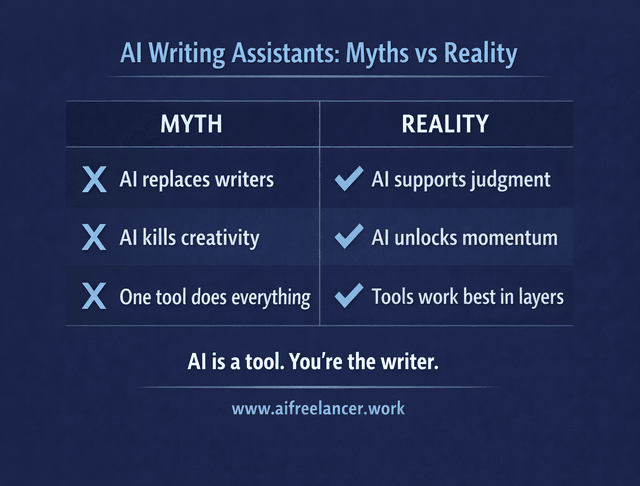
Despite their benefits, misconceptions remain. AI writing assistants are often misunderstood as replacements for human writers, but in practice, they function best as tools that support and extend your existing skills.
Top AI Writing Assistants You Need to Know
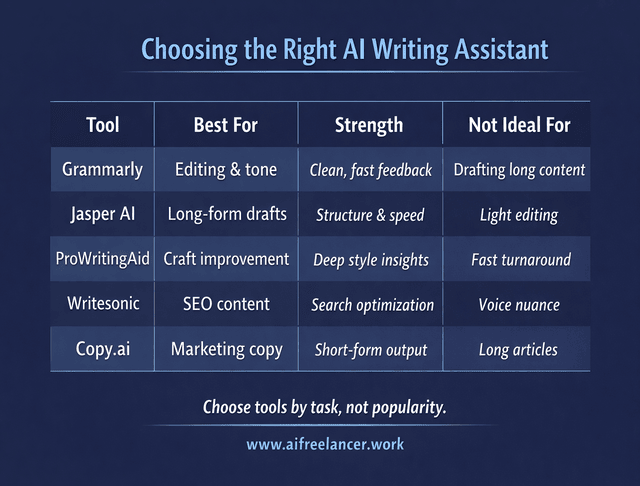
Grammarly
Key Features:
- Robust grammar and spell-checking capabilities
- AI-powered tool GrammarlyGO for generating ideas, rewriting text, and adjusting tone
- Available on numerous platforms, including Android, iOS, macOS, Windows, and web browser extensions
Pros and Cons:
- Pros: Easy to use, real-time editing suggestions, broad platform compatibility
- Cons: Limited free version, advanced features require a subscription
Best Use Cases:
- Basic editing and enhancing writing quality across different platforms
- Ideal for freelance writers needing help with grammar, punctuation, and style adjustments
Jasper AI (formerly Jarvis)
Key Features:
- Content generation templates for blog posts, social media content, and more
- Continuous learning capabilities to improve content quality
- Supports multiple content formats
Pros and Cons:
- Pros: Versatile, continuously improving, supports long-form content generation
- Cons: Can be expensive, requires some learning to use effectively
Best Use Cases:
- High-quality, long-form content creation
- Generating diverse types of content for different platforms
ProWritingAid
Key Features:
- Combines grammar checking, style editing, and writing insights
- Provides detailed reports on writing style
- Offers suggestions for improvement
Pros and Cons:
- Pros: Comprehensive editing tool, in-depth style reports, helpful for refining writing craft
- Cons: The Interface can be overwhelming, and slower processing for large documents
Best Use Cases:
- In-depth editing and refining the writing style
- Perfect for writers looking to improve their overall writing quality
Writesonic
Key Features:
- Generates SEO-optimized content
- Offers over 80 writing templates for various content types
- Supports multiple languages
Pros and Cons:
- Pros: User-friendly, versatile, supports international writers
- Cons: Some templates can produce generic content, and higher-tier features require a subscription
Best Use Cases:
- Creating SEO-optimized articles, social media posts, and product descriptions
- Ideal for freelance writers needing diverse content types
Copy.ai
Key Features:
- Specializes in creating marketing copy
- Suggests a range of templates for diverse content classes
- Supports multiple languages
Pros and Cons:
- Pros: User-friendly interface, variety of writing templates, support for personalized content creation
- Cons: Can be less effective for long-form content; subscription required for advanced features
Best Use Cases:
- Writing marketing and advertising content
- It is perfect for producing engaging social media posts and product descriptions
These AI writing assistants offer myriad features to enhance your writing process. Whether you need help with grammar and style, content generation, or SEO optimization, there’s a tool that can meet your needs. Their versatility allows you to adapt and be flexible in your writing tasks, maximizing your writing potential.
How to Select the Appropriate AI Writing Assistant
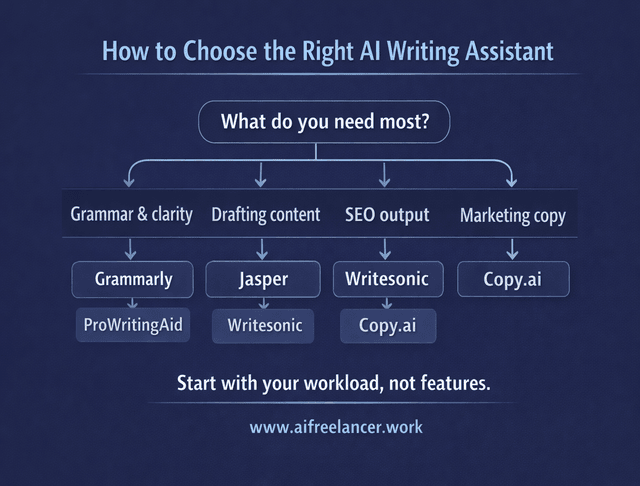
Selecting the right AI writing assistant can significantly enhance your writing process and productivity. Before choosing, it’s worth mapping the tool to your actual workload rather than chasing features.
Identify Your Writing Needs
The first step is to clearly identify your specific writing needs. Consider the writing you do most frequently and what areas you need the most assistance with. Common needs include:
- Grammar and Spell Check: Essential for ensuring your writing is error-free.
- Content Generation: Useful for creating new articles, blog posts, or social media content.
- SEO Optimization: This is important if you’re writing content that needs to rank well on search engines.
- Style and Tone Adjustments: This helps maintain a consistent voice and tone in your writing.
- Creative Writing Assistance: This is for generating ideas, developing plots, and creating characters in fiction writing.
Compare Features
Once you have identified your needs, compare the features of different AI writing assistants. Key features to look for include:
- Grammar and Spell Check: Tools like Grammarly provide real-time corrections and suggestions in this area.
- Content Generation: Jasper AI and Writesonic offer robust capabilities, including templates for various content types.
- SEO Tools: Writesonic and ProWritingAid offer features to help optimize your content for search engines.
- Style and Tone: GrammarlyGO and ProWritingAid can help you refine the tone and style of your writing.
- Creative Writing: Tools like Sudowrite specialize in assisting with creative writing tasks.
Consider Pricing
Free plans can handle basic tasks, but paid plans usually make sense once AI becomes part of your weekly workflow. Evaluate subscriptions based on how often you write, not just word limits.
- Free Plans: Many AI writing tools, such as Grammarly and Rytr, offer free versions with basic features sufficient for fundamental writing tasks.
- Subscription Plans: Paid plans often offer more advanced features and significant usage limits. For example, Jasper AI offers tiers based on the number of words generated per month.
- One-Time Payments: Some tools, like Wordplay, offer lifetime access with a one-time payment, which can be cost-effective in the long run.
Take Advantage of Trial Periods
Most AI writing assistants offer trial periods or money-back guarantees. Use these opportunities to test the tool’s capabilities before committing to a subscription. During the trial period, focus on:
- Ease of Use: Is the interface user-friendly? Can you navigate the tool easily?
- Effectiveness: Does the tool effectively address your writing needs? Are the suggestions helpful and accurate?
- Integration: Can the tool work seamlessly with your current writing platforms, like Google Docs or Microsoft Word?
Read User Reviews and Feedback
Reading user reviews and feedback can give you valuable insights into how effective and reliable an AI writing assistant is. Consider the following sources:
- Online Reviews: Websites like G2, Capterra, and Trustpilot offer reviews and ratings from users who have used the tools.
- Social Media and Forums: Platforms like Reddit and Facebook groups often discuss AI writing tools, providing real-world experiences and recommendations.
- Professional Reviews: Tech blogs and review sites frequently compare AI writing assistants and highlight their pros and cons.
Choose the AI writing assistant that best fits your needs and enhances your writing potential.
Tips for Maximizing the Use of AI Writing Assistants
To fully leverage the potential of AI writing assistants, it’s crucial to integrate these tools seamlessly into your writing workflow. Here’s how you can make the most out of them:
Integrate AI Tools into Your Writing Workflow
AI tools are most effective when assigned specific roles. For example, one tool for drafting and another for editing helps avoid muddy outputs and keeps your voice consistent.
- Identify Key Tasks: Determine which parts of your writing process could benefit from AI assistance. This could be grammar and spelling checks, content generation, or SEO optimization.
- Set Up Efficient Workflows: You might use one tool for initial drafts and another for editing. Integrate these tools into your workflow. For example, start with Jasper AI to generate content ideas and then use Grammarly to edit and polish.
- Automate Repetitive Tasks: AI can handle repetitive tasks such as formatting and keyword placement, freeing up your time for more creative work.
Use Multiple Tools for Different Aspects
Different tools excel at different stages. Pairing content generation with strong editing support often produces the best results.
- Grammar and Style Checks: Tools like Grammarly and ProWritingAid are excellent for correcting grammar and style. They help ensure your content is polished and professional.
- Content Generation: Jasper AI and Writesonic produce high-quality content rapidly, making them ideal for crafting blog posts, social media content, and marketing copy.
- SEO Optimization: Writesonic and Copy.ai are well-suited for crafting SEO-optimized content. They offer features to help you incorporate keywords effectively and enhance your content’s search engine ranking.
Maintain Your Unique Writing Style
AI should assist, not overwrite, your voice. Reviewing and adjusting outputs is essential to maintaining consistency and authority.
- Customize AI Suggestions: Many AI writing assistants allow you to adjust tone and style settings. Customize these settings to align with your preferred writing style.
- Review AI-generated Content: Always review and tweak AI-generated content. Make adjustments to ensure it reflects your voice and maintains consistency with your existing content.
- Add Personal Touches: Use AI tools to start your writing process, but ensure the final content captures your style and resonates with your audience.
Stay Updated with the Latest AI Writing Technologies
New features appear regularly. Periodic experimentation helps you stay efficient without constantly switching tools.
- Follow Industry News: Keep up with the latest developments in AI writing tools by following industry news and updates from AI companies.
- Participate in Webinars and Workshops: Attend webinars, workshops, or online courses on AI for writing. These can provide insights into new features and best practices.
- Experiment with New Features: Regularly explore new features and tools introduced by AI writing assistants. Experimentation can help you find innovative ways to enhance your writing process.
Combine AI Tools for Optimal Results
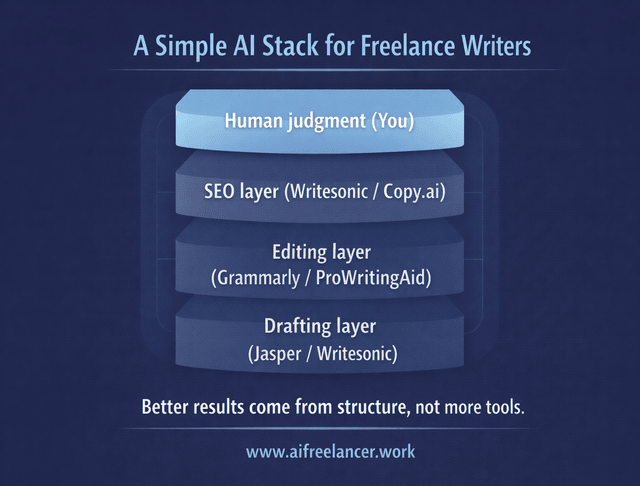
Draft with one tool, refine with another. This layered approach mirrors how experienced writers already work.
- Pair Content Generation with Editing: Use Jasper AI to create initial drafts and Grammarly to refine the text. This combination ensures your content is both engaging and error-free.
- Mix SEO and Grammar Tools: Integrate Writesonic for SEO optimization with ProWritingAid for grammar and style corrections. This approach can enhance both the visibility and quality of your content.
By integrating AI writing assistants into your workflow, using multiple tools, and staying up to date with the latest advancements, you can maximize their benefits and significantly enhance your writing efficiency and quality. These strategies will help you harness AI’s full potential, allowing you to focus on creating compelling, original content that stands out.
Final Thoughts
AI writing assistants are valuable tools for freelance writers who want to work more efficiently without sacrificing quality or voice. When chosen thoughtfully and integrated into a clear workflow, these tools can meaningfully improve both output and consistency. The advantage comes not from using more AI, but from using it with intention.
Ready to turn AI from “interesting” into something you actually use every week? Head to my Amazon Author page for practical books built for freelance writers who want faster drafts, cleaner edits, and a repeatable process.
Frequently Asked Questions About AI Writing Assistants
An AI writing assistant is a tool that helps you draft, edit, and polish text. It checks grammar, spelling, clarity, and tone, and can generate ideas, outlines, or rough drafts from your prompts.
Yes. They help you write and edit faster, reduce proofreading time, and spark ideas—so you can handle more projects and deliver consistent quality.
No. They’re great at pattern-based tasks like drafting and error-checking, but they don’t understand nuance, strategy, or audience needs the way you do. The best results come from humans in charge, AI in support.
Yes. Many tools offer free plans or trials with basic grammar checks and limited generation—enough to test how AI fits your workflow before upgrading.
Clarify what you need most (editing, content generation, SEO, brainstorming), then compare tools by features, ease of use, integrations, and price. Use free trials to see which one feels best in your day-to-day work.

Florence De Borja is a freelance writer, content strategist, and author with 14+ years of writing experience and a 15-year background in IT and software development. She creates clear, practical content on AI, SaaS, business, digital marketing, real estate, and wellness, with a focus on helping freelancers use AI to work calmer and scale smarter. On her blog, AI Freelancer, she shares systems, workflows, and AI-powered strategies for building a sustainable solo business.


Pingback: AI Writing Platforms: The Complete Guide for Modern Writers - The AI Freelancer