

When your workload is heavy, AI can feel like one more thing to figure out: another tab, another tool, another half-working prompt. If you’ve been trying to make it all click on your own, the benefits of joining an AI community are straightforward: you learn faster, you waste less time experimenting, and you build a calmer workflow by borrowing what already works instead of reinventing it.
Online learning is now normal (not niche). In the U.S., the National Center for Education Statistics reports that the share of undergraduates enrolled in at least one distance education course rose from 36% in 2019 to 75% in 2020, and was 61% in 2021. The point isn’t university; it’s that learning sticks when you have support, shared practice, and fewer dead ends. Communities work the same way: they don’t replace learning; they make it easier to keep learning long enough to see results.
Everything I’ve shared here—and more—is in my book, available on Amazon. Click the link if you’re ready to take the next step.
The Benefits of Joining an AI Community When Your Workload Is Heavy
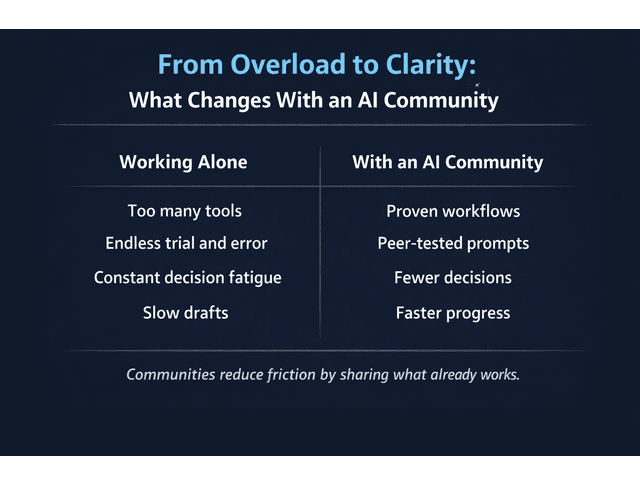
When you’re under pressure, the real cost isn’t just time. It’s the mental drag of constantly deciding what to try next and wondering if you’re wasting your energy on the wrong approach.
How Shared Knowledge Shortens Research and Experimentation Time
A good community compresses your learning curve because you’re not starting from zero. You’re seeing what others tested, what failed, and what they changed to make it usable.
A beginner-friendly way to use this immediately is to search the community for the exact bottleneck you have today (not a future “someday” goal). For example:
- turning a messy brief into an outline
- getting from outline to draft without stalling
- editing faster without losing voice
Then commit to one workflow you found and run it once before you go hunting for alternatives.
Mini example (what this looks like in real life): You’re stuck rewriting intros. Instead of opening five articles and reinventing your approach, you search “intro framework” in the community, find a thread with a proven structure, run it on your draft, and save the best version as a reusable template. The win isn’t the intro; it’s the pattern you can reuse next week.
Benefits of Joining an AI Community to Reduce Decision Fatigue
Decision fatigue shows up as tiny delays that pile up: choosing tools, choosing prompts, choosing an editing method, choosing what to keep or rewrite. Communities reduce that load by giving you defaults; simple sequences that other people have already pressure-tested.
One clean way to use communities for decision fatigue is to borrow defaults first and personalize later. If you’re tired, you don’t need the perfect workflow. You need a workflow you can follow.
Learning Faster Through Curated Threads, Peer-Tested Prompts, and Real Project Examples
Real examples beat theory. When you see the exact prompt, the output, and the revision notes, you learn what actually changes the results.
That lines up with what research often shows about peer-based learning. One peer-assisted learning meta-analysis (PubMed Central) analyzed 13 studies involving 2,003 students and found that peer-assisted learning improved outcomes compared with traditional teacher-led passive learning. You don’t need the academic framing; just the practical takeaway: structured feedback and shared practice speed up skill-building.
Use this prompt skeleton to get more consistent drafts without spiraling into endless prompting:
- Role: “You are an editor who writes in a clear, human voice.”
- Goal: “Draft a section that explains [topic] for beginners.”
- Constraints: “No hype. Short sentences. Keep my tone: practical and calm.”
- Context: “Here are my notes: [paste notes]. Here is the intended reader: [one line].”
- Output format: “Write 1 short intro paragraph + 3 subpoints in full prose.”
Save it once. Reuse it whenever you draft.
The Benefits of Joining an AI Community as a System, Not a Social Space
If you treat a community like a feed, it becomes noise. If you treat it like a searchable library, it becomes leverage.
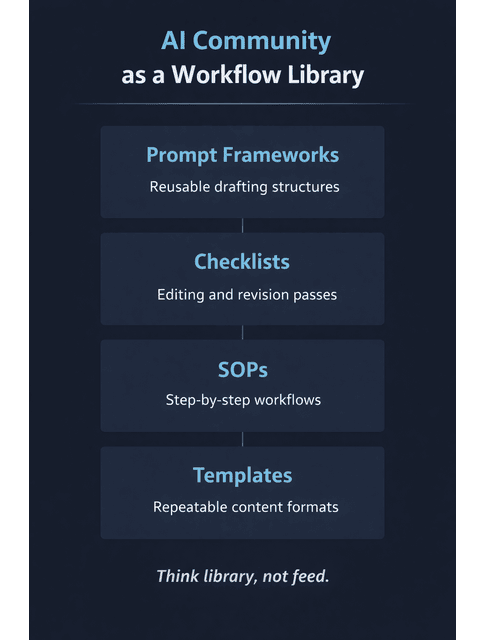
Communities as Living Libraries of Prompts, Frameworks, Sops, and Templates
This is where communities quietly beat random tutorials. You’re not just collecting tips; you’re collecting building blocks you can reuse.
What’s actually worth saving (especially as a beginner):
- prompt frameworks (role + constraints + example + output format)
- editing checklists (what to fix first, second, third)
- lightweight SOPs you can follow when tired (brief → outline → draft → edit)
- templates for common outputs (intros, section structures, revision passes)
You don’t need a giant system. You need a small setup that still works on busy weeks.
Why the Benefits of Joining an AI Community Favor Repeatable Systems
Repeatable systems are what turn “AI helps sometimes” into “AI helps consistently.”
Communities favor them because you’ll notice patterns across different people’s workflows. When multiple members independently use similar steps, like outlining first, constraining tone, and doing a human final pass, that’s a signal you can trust.
Evaluation Frameworks: Spotting What Works Before You Turn It Into a Checklist or SOP
Not everything shared in a community deserves a place in your workflow. A simple filter prevents you from adopting shiny ideas that add friction.
Use this evaluation test:
- Does it create a clear output (outline, section draft, edit pass)?
- Does it preserve voice (or can you add constraints to protect it)?
- Does it save time after the first learning run?
- Can you use it again next week without needing a reset?
Use these signals to decide what to adopt and what to skip. Green flags mean it’s likely to be repeatable and beginner-friendly. Red flags mean it’ll probably create more work than it saves.
Green flags
- includes an example prompt + example output
- shows a simple sequence (Step 1 → Step 2 → Step 3)
- works with one tool you already use
Red flags
- requires juggling multiple tools before you even see output
- no examples, just claims
- “perfect results” language with no constraints or context
If it passes, convert it into a short checklist or SOP and move on.
Practical Benefits of Joining an AI Community for Independent Publishing
Publishing solo is where the process can feel endless: structure, drafts, edits, confidence dips, restarts. Communities help because they make progress visible and give you feedback before you burn a week going in the wrong direction.
This applies whether you’re publishing blog posts, lead magnets, ebooks, or book chapters, anything long enough to require consistency.
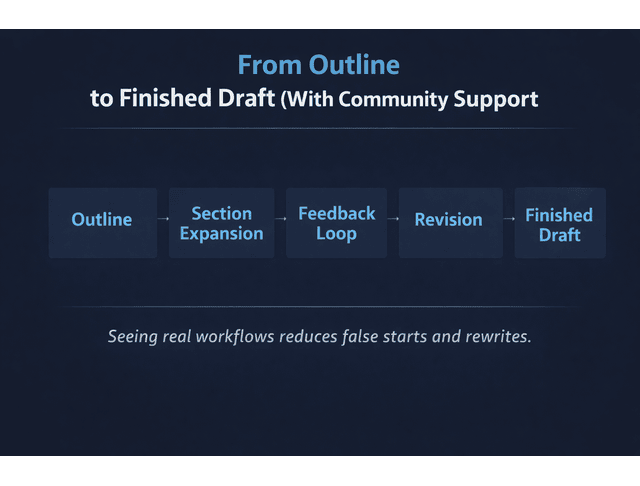
Seeing Drafting Workflows in Action: From Outline to Finished Sections
Plenty of people can outline. The hard part is turning outlines into finished sections again and again.
When you see other people’s drafting workflows, you learn things that aren’t obvious from tool tutorials: how they expand a section without bloating it, how they handle transitions and pacing, and how they revise AI-sounding text into something human. If you’re building long-form content, this “watch it done” effect is a shortcut to consistency.
Feedback Loops That Reduce False Starts, Rewrites, and Stalled Drafts
False starts usually happen because you don’t get any signal until you’ve already written too much. Communities create lightweight feedback loops so you can adjust earlier.
That can look like sanity checks on structure, “this section feels thin” callouts, clarity reviews (“I got lost here”), and voice checks (“this reads generic: add an example or a stronger point of view”). Even if you ask for feedback occasionally, it can prevent the biggest time-wasters: rewrites caused by avoidable structural mistakes.
Benefits of Joining an AI Community When You’re Building Content Solo
When you’re building solo, the community becomes an “external brain” you can borrow: structure when you’re tired, reassurance when you’re stuck, and momentum when you’re tempted to quit. You don’t need to be active every day. You just need a reliable place to pull a signal when your process starts wobbling.
How the Benefits of Joining an AI Community Translate Into Real Output
Joining a community doesn’t automatically change your results. Output comes from capture and follow-through, turning what you learn into a workflow you can run on demand.
Turning Community Insights Into Calmer, Repeatable Writing Workflows
This is the main conversion step: you take what works and make it yours.
A simple workflow pattern you can build from community examples is: outline prompt → section expansion prompt → edit checklist → final human polish. Keep it small, then refine it as you go. The goal is a workflow you can trust when energy is low.
Using Communities to Capture Ideas and Apply Them Later, Not as a Source of Distraction
Distraction happens when you scroll for novelty. Use communities for retrieval, not entertainment.
A beginner-friendly capture approach is to save 1–2 threads per week that solve a problem you actually have, tag them by workflow step (research, outlining, drafting, editing), and keep a single “prompt + checklist” document where you paste the best ones. That way, the community becomes a tool you consult, not a place that steals your attention.
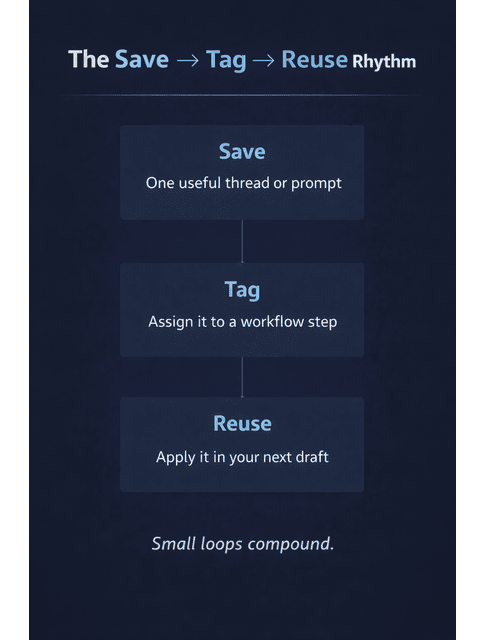
Applying What You Learn Through a Lightweight Weekly Participation Rhythm (Save → Tag → Reuse)
A simple weekly rhythm keeps the benefits without the overwhelm:
- Save one useful thread or prompt
- Tag it to one workflow step
- Reuse it in the next draft you write
AI is becoming mainstream enough that the “keep learning” part matters. DigitalOcean’s Currents February 2025 research reports that 49% of respondents had used AI for business use in November 2023, and a year later 79% said their organization is integrating AI in some form. Your advantage isn’t chasing every update. It’s steadily improving your process with small loops you can sustain.
Final Thoughts
The benefits of joining an AI community aren’t about being more social. They’re about reducing friction: fewer dead ends, clearer systems, faster drafts, and better confidence, especially when your workload is heavy, you want structure, or you’re building content solo.
If you treat an AI community like a searchable workflow library (not a feed), it becomes a quiet support layer behind your work. Over time, that’s what turns AI from “extra effort” into a calmer way to keep shipping.
If you want practical, beginner-friendly systems you can use immediately, workflows, checklists, and “keep your voice” editing methods, browse my books on my Amazon Author page.
Frequently Asked Questions About the Benefits of Joining an AI Community
You get a place to ask questions, get feedback, find collaborators, and stay current with tools and trends, while learning from what others are building.
Yes, especially if the community is well-moderated and practical. Beginners benefit most from examples, templates, and feedback, not “tool hype.”
Choose based on your goal (learning, workflows, publishing, feedback). Look for searchable archives, clear rules, and members sharing real workflows you can replicate.
No. Many people get value by searching, saving, and reusing proven threads. A small weekly rhythm (save → tag → reuse) is enough to see progress.
By sharing voice-preserving prompt patterns and editing methods, you can copy, then refine, so you speed up drafting while keeping your writing style consistent.

Florence De Borja is a freelance writer, content strategist, and author with 14+ years of writing experience and a 15-year background in IT and software development. She creates clear, practical content on AI, SaaS, business, digital marketing, real estate, and wellness, with a focus on helping freelancers use AI to work calmer and scale smarter. On her blog, AI Freelancer, she shares systems, workflows, and AI-powered strategies for building a sustainable solo business.

