

If you’re searching for the best AI tools 2026, you’re probably not looking for another giant list of apps. You’re trying to stop the quiet bleed: the tabs you never revisit, the half-finished drafts, the research spiral, the endless “polish later,” and the admin work that eats the hours you meant to spend on billable output. The real problem is not that there are too few tools. It’s that most people don’t have a workflow strong enough to make any tool feel worth paying for.
This guide is built to fix that. You’ll get a clear shortlist, deeper tool reviews, integration patterns that actually hold up in real work, and guardrails for privacy, budget, and learning curve.
How to Use This Page Fast
- For a quick answer, go to the Tool Comparison Tables.
- For a deeper dive, read Content Creation & Writing Tools.
- For automation workflows, go to Integration Deep-Dives.
- For sensitive client work, read Privacy & Security.
- For choosing a tier, start with Budget Considerations.
Everything I’ve shared here—and more—is in my book, available on Amazon. Click the link if you’re ready to take the next step.
How We Selected and Tested the Best AI Tools 2026
Most “best tools” roundups fail because they grade tools like gadgets instead of operations. The right question is not “Which tool is smartest?” It’s “Which tool consistently produces usable output with the least friction inside a real workflow?”
That matters because AI is no longer niche. Microsoft and LinkedIn’s 2024 Work Trend Index reported that 75% of knowledge workers use AI at work. McKinsey’s 2024 global AI survey reported 65% of respondents said their organizations are regularly using generative AI, nearly double the share from 10 months earlier.
So the baseline has shifted. The advantage now comes from how you use tools together, not whether you use them.
We prioritized tools that support real work without creating new headaches, measured across output quality (accuracy, clarity, voice control), speed and reliability, learning curve and UI friction, integration ecosystem, cost-to-output value, and privacy posture (covered in depth in Privacy & Security). This guide is written for professional writers, freelancers, small teams, and non-technical operators who still need system-level results. We also avoided “top 50 tools” padding, copied feature lists, and repeated mini-reviews everywhere on the page.
Tool Comparison Tables for the Best AI Tools 2026
If you’re overwhelmed, this section is your pressure valve. The goal here is to help you shortlist fast, not to convince you with paragraphs.
Choose by outcome: research and answer-finding, drafting and rewriting, editing and style control, knowledge base and documentation, automation and handoffs, meetings and follow-ups, and design assets and visuals.
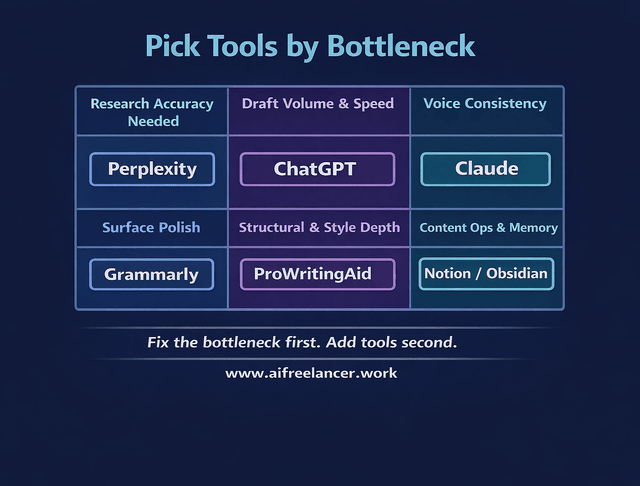
If you want the simplest “start here” logic, the fastest way is to pick one core assistant you can draft and revise daily, then add one editor or research tool that removes your biggest bottleneck, then add one automation or knowledge base layer so your work stops disappearing into scattered files.
Quick Picks
- Best all-around core assistant for writers: ChatGPT
- Best longform voice smoothing: Claude
- Best source-backed research layer: Perplexity
- Best final polish layer: Grammarly
- Best structural/style analysis for longform: ProWritingAid
- Best workflow container for content ops: Notion
- Best personal knowledge base for compounding notes: Obsidian
- Best for turning audio/video into drafts: Descript
Keep this rule in mind as you shortlist:
- Pick tools based on your workflow bottleneck (research, drafts, editing, admin), not popularity.
Now that you’ve shortlisted 2–4 tools, move to the reviews to confirm fit and see when to skip.

Content Creation & Writing Tools
Here’s the promise of this section: each tool gets one clear review, so you do not keep rereading the same information in five different places.
ChatGPT
ChatGPT is a strong “generalist core” for writing workflows when you need ideation, outlining, structured rewrites, and fast iteration across different content types. It performs well as the center of a stack because it can take inputs from research tools, kick out usable drafts, and help you revise with clear constraints.
Best for: outlines and first drafts, revision passes (tightening, clarity, structure), turning messy notes into clean deliverables, and building reusable templates for your workflow. Its biggest strengths are versatility, prompt-following when your instructions are specific, and the ability to help you standardize repeatable systems (checklists, SOPs, content templates).
Limitations matter most when your workflow requires strict citation-first writing (use a research tool that anchors claims to sources, then draft from that) or when you’re editing long documents for voice consistency (you may prefer a tool optimized for longform continuity). Choose a plan based on whether you use it daily for production work. For setup, work in sections, not full-document “one-pass” prompts, and standardize your inputs: goal, audience, constraints, and a small voice sample.
- Best for: turning rough notes into a clean brief, generating section-by-section drafts, tightening and restructuring without rewriting from scratch
- Choose this if: you want one tool that can cover drafting + revision across many content types
- Skip this if: you need a strict source-first research layer without adding a separate research tool
Claude
Claude is often chosen when you care about maintaining a consistent voice across longer content and when you want a calmer, more editorial style in rewrites. It can be especially useful when your work involves longer documents, internal style rules, and nuanced tone.
It’s a strong fit for voice consistency across longform, cleaner rewrites that preserve meaning, and policy-sensitive writing where you want fewer wild leaps. The main “when to skip” scenarios show up when your workflow depends on fast, iterative micro-passes (pick the tool you personally iterate fastest in) or when you need real-time web sourcing (pair with a dedicated research tool). Setup is straightforward: provide 2–3 short voice anchors and a tight do-not list.
- Best for: smoothing long drafts without tone drift, rewriting for voice while preserving meaning, and editorial cleanup that feels less mechanical
- Choose this if: your biggest pain is voice consistency across long-form
- Skip this if: your workflow depends on fast micro-iterations more than long-form coherence
Gemini
Gemini fits best when your work benefits from tight integration across Google’s ecosystem and when multimodal inputs matter. If your workflow already lives in Google Docs, Drive, and Gmail, it can reduce friction.
This is most valuable when it replaces app switching rather than trying to replace your full writing pipeline. If you rely on a specific editorial voice system built elsewhere, consider using Gemini as a supporting tool rather than your main drafting engine.
- Best for: Google-centric workflows, quick drafting inside Docs/Drive flows, reducing app switching when your work already lives in Google
- Choose this if: your writing workflow is already deeply tied to Google tools
- Skip this if: you’re trying to standardize a voice system across clients in a different tool
Perplexity
Perplexity is a practical choice when you want research that stays anchored to sources and when you want fast, source-backed overviews before you write. It’s invaluable when you need citations and you want to reduce unsupported claims.
It shines when your content is research-heavy, and you want to build briefs quickly. If your writing is mostly from your own expertise and you rarely cite sources, you may not need it daily. The best setup habit is simple: capture sources as you go and move them into your knowledge base so you stop re-researching the same topic every month.
- Best for: building source-backed briefs fast, answering “what’s true?” before drafting, reducing unsupported claims in client work
- Choose this if: your content needs citations or you write in regulated/accuracy-sensitive niches
- Skip this if: you rarely cite sources and your writing is mostly from your own expertise
Grammarly
Grammarly is still a strong “language polish” layer when you want quick clarity improvements, consistency, and fewer surface-level errors across client deliverables. It shines as a final pass, not as a drafting engine.
Treat Grammarly as quality control: draft and revise first, polish second, and keep human judgment last. If your writing is highly stylized, configure it carefully so it doesn’t flatten your voice.
- Best for: last-pass clarity cleanup, reducing small errors that undermine credibility, polishing proposals and client deliverables fast
- Choose this if: you ship work frequently and want reliable quality control
- Skip this if: your writing is highly stylized and you don’t want any “standardization” pressure
ProWritingAid
ProWritingAid fits when you want structural feedback, repeated pattern detection, and deeper style-level analysis. It’s often more useful for long-form and revision-heavy writing.
Use it after the first draft, not during messy drafting. If you mostly write short-form, it can be more tool than you need.
- Best for: longform structural signals, repetition/pattern detection, style-level revision support beyond basic grammar
- Choose this if: you write long-form and want systematic editing feedback
- Skip this if: you mainly write short-form and your edits are already light
Notion
Notion is not a “writing tool” so much as a workflow container. If your content work is scattered, Notion helps you store briefs, sources, drafts, checklists, and client systems in one place.
Notion is most useful when it becomes the home for repeatable pipelines: briefs and sources live there, drafts link out to Docs, and final assets and checklists return to Notion. The setup that holds up is boring on purpose: start with one database (“Content Pipeline”), then add templates only after you repeat the workflow successfully.
- Best for: a single home for briefs/sources/drafts, content pipelines, reusable templates that make delivery consistent
- Choose this if: your work is scattered and you need one system to run content operations
- Skip this if: your current file + docs setup is already stable and fast
Obsidian
Obsidian is ideal when you want a personal knowledge system that is fast, local-first, and designed for linking ideas over time. It’s especially helpful if you do research-heavy writing and want your notes to compound.
If you want one shared team workspace, Notion may fit better. If you want a personal library that gets smarter every month, Obsidian is worth it—especially when you build a consistent tagging system early.
- Best for: compounding research notes, linking ideas across projects, a local-first personal knowledge base
- Choose this if: your advantage comes from long-term thinking and reusable notes
- Skip this if: you need a shared team workspace more than a personal knowledge system
Descript
Descript is a practical pick when your writing workflow includes audio or video, especially interviews, podcasts, or content repurposing. It helps you turn spoken content into usable text assets.
If you rarely work with audio or video, you do not need it. If you do, it can collapse an entire “transcribe → pull highlights → draft” phase into something you can repeat quickly.
- Best for: interview-to-article pipelines, repurposing audio/video into written assets, collapsing transcription + draft prep time
- Choose this if: you routinely turn recordings into publishable writing
- Skip this if: your work rarely involves audio/video inputs
Keep detailed tool descriptions and “when to skip” in one place only (Tool Reviews hub).
Common Mistakes in Using the Best AI Tools 2026
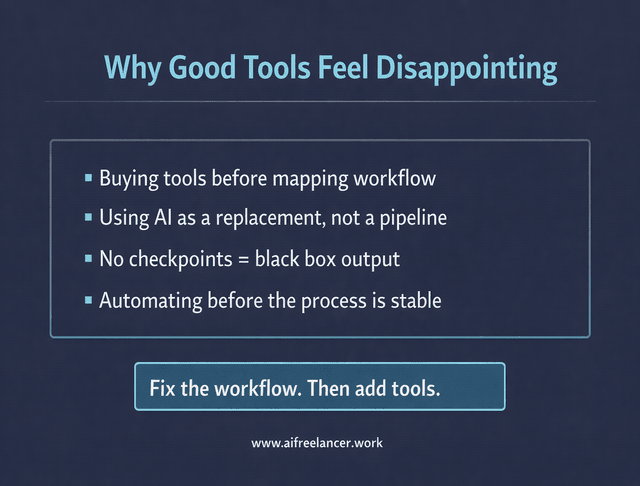
If AI tools feel disappointing, it’s often because the workflow is unstable. These mistakes are what make good tools look mediocre.
The first mistake is buying tools before mapping your workflow. If you cannot describe your current process in five steps, adding tools only adds noise. The second is using AI as a replacement instead of a pipeline. Tools work best when they take a specific role: research, draft, edit, polish, route, archive. The third is having no checkpoints, which turns everything into a black box and forces you to either over-trust the output or rewrite it anyway.
The learning curve deserves one honest statement: expect the first month to feel slower. That is normal. You are building a repeatable process, not collecting hacks. This is also why automating too early is a trap—automation locks in what you already do, and if your process is messy, automation scales the mess.
One rule to remember:
- Expect a 30-day learning curve and plan for it once (don’t spread “getting started” advice everywhere).
Privacy & Security in Using the Best AI Tools 2026
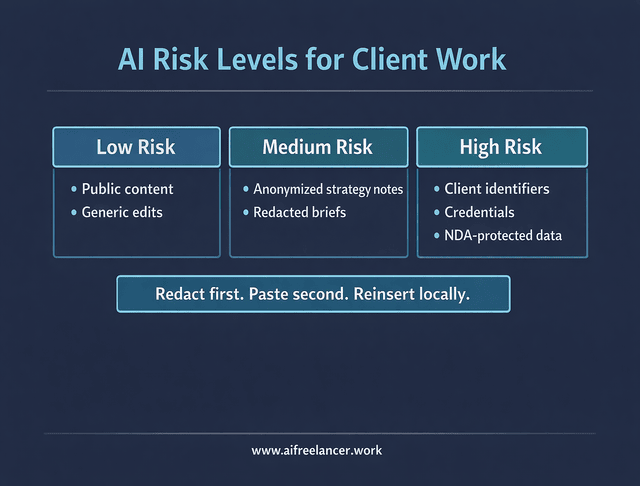
You do not need paranoia. You need a consistent boundary.
What Not to Paste Into the Best AI Tools 2026
- Client identifiers
- Private credentials
- Sensitive contract data
- Anything under strict NDA without clearance
Use a simple risk model. Low risk is public-facing content and generic edits. Medium risk is client-specific strategy notes that you anonymize. High risk is confidential identifiers, credentials, private datasets, or regulated information.
A redaction workflow that holds up is to replace anything identifiable with placeholders before you paste it anywhere:
- Replace names, companies, products, locations, and URLs with placeholders like [CLIENT], [COMPANY], [PRODUCT], [LOCATION], [LINK].
- Replace exact numbers tied to a client with ranges or placeholders like [BUDGET RANGE] or [METRIC].
- Remove signatures, email addresses, phone numbers, and internal file paths.
- Keep only the context the tool needs to do the job, then reinsert specifics locally during your final human pass.
- Keep privacy rules centralized: don’t paste identifiers, credentials, sensitive contracts, or NDA content without clearance.
- Handle privacy with risk tiers (low/medium/high) and a simple redaction workflow.
Budget Considerations
If a tool costs money but removes a recurring bottleneck, it is not an expense. It’s rent for a better process. The mistake is buying tools that overlap.
Think in tiers: free/minimal spend (good for testing and light use), starter (one core assistant plus one editor or research layer), professional (a complete pipeline that reduces rework), and team (shared systems and governance). Use one ROI framework and stop doing calculator theater for every tool. Track time saved by category, reduction in revision rounds, and avoided errors. Upgrade when you consistently hit the ceiling of your current tier; downgrade when you notice overlap or unused features.
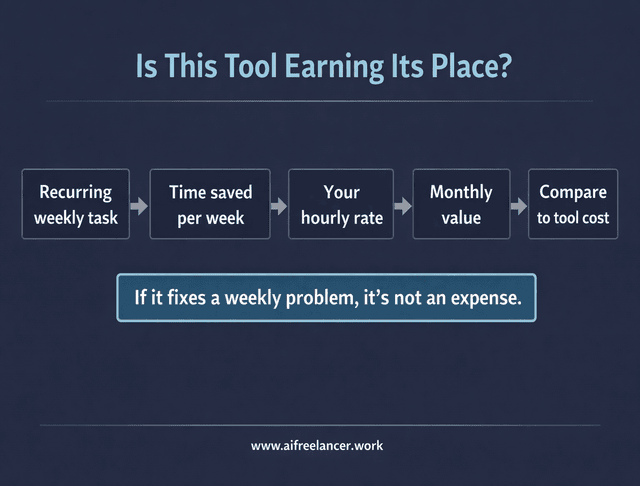
If you want practical thresholds, use your real workload as the gate. As a rule, paid tools make sense when the tool removes a recurring block that shows up every week, not once a month.
- If you publish or deliver writing weekly, the starter tier usually becomes worth it faster than you expect because it reduces rework.
- If you spend multiple hours per week on editing and cleanup, an editing layer can pay off even if you only ship a few pieces.
- If client revisions routinely exceed two rounds, a tighter drafting + checkpoint process often saves more than any single “better” tool.
Once you’ve decided it’s a weekly problem, here’s how to sanity-check the spend without turning the post into a spreadsheet. Pick a single workflow you repeat and calculate it once:
- Identify one recurring task (example: outlining + first draft).
- Estimate conservative time saved per week (example: 1 hour/week).
- Multiply by your rate (example: $50/hour).
- Compare that value to your monthly tool cost.
- If the value consistently exceeds the cost, the tool is earning its place in your stack.
- Keep pricing in only two places: tool reviews (detail) + comparison table (quick reference).
- Use budget tiers by totals (free/starter/pro/team) and one ROI framework, not repeated ROI math per tool.
Integration Deep-Dives for the Best AI Tools 2026
If you are copying and pasting the same information more than twice, you have earned automation. This section is where automation belongs, not scattered across every tool review.
Automation works best when it routes and formats, not when it makes decisions without review. Safe automations include routing, formatting, reminders, logging, task creation, file naming, and handoffs. Risky automations are the ones that move client-sensitive content through third-party apps without guardrails or publish without checkpoints.
Zapier fits when you want quick, reliable automation without building a technical project. Make fits when you want more control and more complex branching. Either way, the workflows that matter are the ones that remove repetitive friction: research capture into a knowledge base, research-to-draft handoffs with checkpoints, editorial pipelines, meeting notes into tasks and follow-ups, lead intake routing, and content repurposing pipelines.
Here is one complete automation walkthrough (one example, end-to-end) that works for writers without getting fancy:
- Trigger: You save a research link (bookmark, starred email, or a saved item in your reading app).
- Action: The link is added to your knowledge base (Notion or Obsidian inbox note) with a date, topic tag, and client/project tag.
- Action: A summary brief is generated (key takeaways + relevant quotes + “how to use this”).
- Review point: You approve or edit the brief in your knowledge base before it’s used in a draft.
- Output: Approved briefs are moved into a “Draft Queue” so your next writing session starts with ready inputs, not a blank page.
- Start with routing and logging before generation or publishing.
Workflow Examples
This is where the guide becomes real.
Workflows:
- Research-to-Article Pipeline – Best for writers producing weekly content who need a repeatable way to move from sources to publishable drafts without rework.
- Client Delivery + Revision Control – Best when approvals, feedback loops, and revision rounds are part of your reality and you need tighter checkpoints to protect scope and timelines.
- Admin Automation – Best for freelancers who feel like they spend most of the day doing “work about work” and want to reduce coordination, tracking, and follow-up overhead.
In all three, the structure stays consistent: keep checkpoints where quality decisions happen, and route outputs into a system you can reuse.
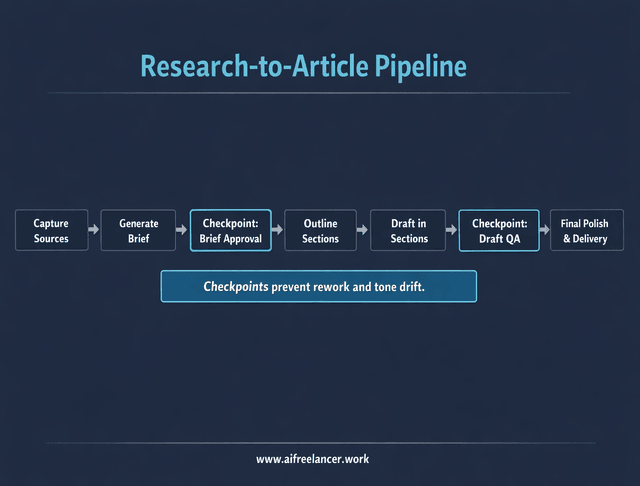
Research-to-Article Pipeline
- Step 1: Capture sources into your knowledge base with tags (topic + project).
- Step 2: Generate a brief (angle, key points, claims to verify, and what to ignore).
- Step 3: Checkpoint: Brief approval (confirm the angle and scope before drafting).
- Step 4: Build an outline with section-by-section intent (what each section must accomplish).
- Step 5: Draft in sections, not one long prompt (reduce tone drift and rework).
- Step 6: Checkpoint: Draft QA (clarity, structure, and claims that need citations).
- Step 7: Final polish (language cleanup, formatting, and deliverable packaging).
Client Delivery + Revision Control
- Step 1: Turn the client request into a one-page brief (goal, audience, voice, constraints).
- Step 2: Checkpoint: Outline lock (client or internal approval before drafting).
- Step 3: Draft with a consistent template (intro promise, section hooks, proof, next step).
- Step 4: Run one structured edit pass (structure, then style, then surface polish).
- Step 5: Checkpoint: Pre-delivery QA (requirements met, no missing sections, no stray claims).
- Step 6: Deliver with a revision plan (what counts as revisions, what needs a new brief).
- Step 7: Archive the final version plus the brief so the next project starts faster.
Admin Automation for Freelancers
- Step 1: Standardize intake (one form or email template that collects what you need).
- Step 2: Auto-create a project record (client, scope, due date, and next action).
- Step 3: Auto-generate a checklist (brief → outline → draft → QA → delivery).
- Step 4: Checkpoint: Weekly review (confirm priorities and deadlines once per week).
- Step 5: Auto-route files to folders with consistent naming.
- Step 6: Auto-log completed deliverables (so you can track output and time sinks).
- Use workflows as proof: same tools, different outcomes—weekly content, client delivery, or admin relief.
Emerging Trends in the Best AI Tools 2026
The biggest shift is not “smarter text.” It’s packaging. Tools are becoming workflow layers, not just chat boxes.
What’s changing is the move toward integrated experiences: assistants that sit inside your documents, research layers that keep citations visible, automation that routes content between systems, and more emphasis on governance as organizations try to control how AI is used. What’s not changing is human judgment, workflow design, and trust. If a tool makes your work harder to verify, harder to control, or harder to deliver consistently, it will not feel like progress.
What this changes in tool selection is simple. You should favor tools that reduce app switching, preserve your inputs (briefs, notes, sources), and make review checkpoints easy. You should be cautious about stacks that look powerful but make your work harder to verify, especially when you’re writing for clients.
If a tool makes review harder, it’s not productivity—it’s risk.
Final Thoughts in Choosing the Best AI Tools 2026
The best AI tools 2026 are the ones you can use consistently without losing your voice, your time, or your standards. If your stack feels heavy, it’s not a tool problem. It’s a workflow problem.
Start small: pick one core tool that matches your bottleneck, run it daily inside one repeatable pipeline, and only add a second tool when the first one is already paying for itself in saved time or reduced rework. Don’t chase the perfect stack. Build a stack you can actually repeat under deadlines.
- Final setup rule: one workflow, one outcome, one measurement to prevent tool overload.
If you want a clearer way to choose tools and turn them into a workflow you can actually repeat under deadlines, visit my Amazon Author page. You’ll find practical guides for writers and freelancers who want better drafts, cleaner edits, and systems that hold up in real client work.
Frequently Asked Questions About the Best AI Tools 2026
It depends on the phase of work. Many writers use ChatGPT as the general drafting and iteration engine, then use Claude for long-form coherence and voice consistency. A simple rule that holds up is: research and rapid iteration in your core tool, long-form smoothing in your voice tool.
The best stack depends on your bottleneck. When drafts are the problem, start with one core assistant and one editor. For research accuracy and citations, add a research-first tool before drafting. When admin drag is the issue, add automation only after your writing pipeline is stable.
AI can replace parts of the process—summarizing, rewriting, basic editing, repurposing—but it does not replace accountability, judgment, positioning, and truth-checking. For client and professional work, your value is the decision-making that turns words into outcomes.
For most people, “best free” means “the one you’ll use daily.” Start with a tool that helps you draft and revise consistently, then add an editing layer when you’re shipping work regularly. Free tools are great for learning and light output; they break down when you need consistent quality under deadlines.
Choose by job-to-be-done. For source-backed research, start with a dedicated research layer. When draft volume is the bottleneck, use a core assistant. For cleaner, more consistent output, add an editing layer. Then build a simple pipeline with checkpoints and measure one outcome (time saved, fewer revisions, or faster delivery).

Florence De Borja is a freelance writer, content strategist, and author with 14+ years of writing experience and a 15-year background in IT and software development. She creates clear, practical content on AI, SaaS, business, digital marketing, real estate, and wellness, with a focus on helping freelancers use AI to work calmer and scale smarter. On her blog, AI Freelancer, she shares systems, workflows, and AI-powered strategies for building a sustainable solo business.

