

You are not losing income because you are lazy. You are losing it because time slips through gaps you cannot see. The best time tracking software turns those gaps into proof of your work, giving you control over focus, hours, and income. That matters because interruptions are expensive: UC Irvine research found it takes about 23 minutes and 15 seconds to fully return to a task after an interruption.
Freelance writers rarely miss deadlines on purpose. You juggle briefs, edits, interviews, and invoices while trying to remember when the timer started. The fix is not more willpower. The fix is a simple workflow that pairs AI with a reliable time tracker, allowing you to capture billable hours, protect your focus, and send clean invoices every week. In this guide, you will set up a simple tracker, connect light automations, capture every minute without breaking focus, and choose a tool that fits your stack.
Everything I’ve shared here—and more—is in my book, available on Amazon. Click the link if you’re ready to take the next step.
Why the Best Time Tracking Software Matters
You cannot charge for what you do not record. AI business tools can make invisible work visible, so you finally get paid for the hours you spend writing, revising, and researching. And “invisible work” is more common than people admit: McKinsey estimated that interaction workers spend nearly 20% of the workweek just searching for internal information or tracking down colleagues.
Quick Definitions
AI timers observe the context of your work, such as active apps, open documents, and calendar events, and then propose a time entry that you approve with a single click. You remain in control of what gets billed. Time blindness is the common experience of losing track of how long you have been working when you switch between research, drafting, and email. If you think a draft took one hour and your tracker shows two hours and fourteen minutes, that difference is a result of time blindness at work.
First Run in Five Minutes
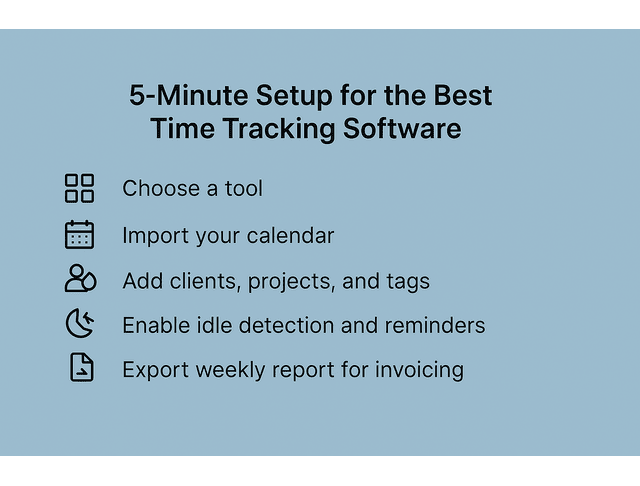
Choose one tool and use it for two weeks. Import your calendar so meetings and interviews appear automatically. Create one project for each client and a small set of tags such as Research, Draft, Edit, Meeting, and Admin. Enable idle detection and reminders to capture gaps, and receive a gentle reminder when you forget to start. At the end of the week, export a report grouped by client and project and use it as your invoice draft.
Time Blindness vs. Billable Reality
Time blindness hides real effort. Research spills across tabs, PDFs, and call notes. Without structure, you remember the final draft and forget the two hours you spent finding sources. Put your work into clear categories so each block of time lands where it belongs. When you read industry reports for a piece, tag that time as Research for the client.
When you answer client questions about a draft, tag that block as Admin-Client and decide whether to include it on the invoice. Match your categories to the way you actually work, and your timesheets show reality instead of guesses. Once your categories align with your workflow, protect your focus so that those categories fill themselves.
Focus Protection With AI Timers
Focus is fragile during writing sessions. AI timers protect it by reducing the number of times you have to think about recording. Auto-start begins capturing when you open a designated writing app. Smart prompts ask, after a meeting ends, whether to log that time to the relevant client. If you schedule a deep-work block for a case study draft, the timer starts when you open your document and reminds you to review and tag that block when you close it. Your attention stays on the paragraph, not on the timer.
AI Workflows With the Best Time Tracking Software
Manually logging hours disrupts creative flow. When AI handles tags, reports, and reminders, you keep writing while your system quietly tracks every billable minute.
Plug-And-Play Automations
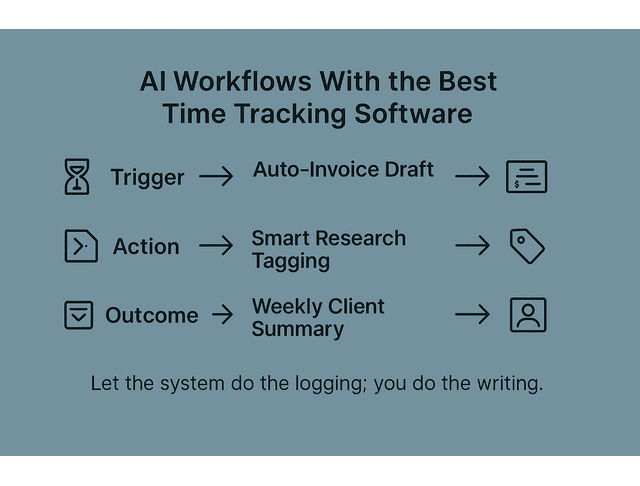
When you approve a time entry, the system rounds it to the nearest quarter hour, creates a draft invoice in your accounting tool, and sends a short confirmation so you can review and send it later. You avoid manual totals and spreadsheets. When a window title contains a Google Docs link or the word ‘interview’, the tracker proposes the Research tag. When a file path includes a ‘Client Edits’ folder, it proposes the Edit tag. You approve the suggestion and keep writing. Every Friday afternoon, the system collects the week’s entries per client, drafts a short progress note such as “Draft complete; edits scheduled for Tuesday,” and emails it to you for review before sending.
Automate Tags With the Best Time Tracking Software
Automatic tagging is the antidote to messy timesheets. Begin with a few rules and expand only when you see a pattern. Tag anything that contains “outline,” “brief,” or “deck” as Draft, tag documents in a Research directory as Research, and tag Zoom or Google Meet events as Meeting. Keep the system simple enough that you can approve suggestions in a few minutes each day.
Mini Short-List by Use Case
Pick based on the one friction you feel most: forgetting timers, needing invoicing in the same app, or watching budgets inside a project manager. Toggl Track is a good starting point for solo writers who want simple timers and robust reports. Clockify works well if you collaborate with another writer or a virtual assistant and enjoy a free tier that covers the basics. Harvest is helpful when you prefer to create invoices inside the same app and track expenses for the same client. Timely is valuable when you often forget to start the timer because it drafts entries based on your activity history. Everhour is a fit when you price by budget or estimate and need alerts as you approach limits.
Zapier, Notion, ClickUp: Centralize Time and Tasks
Many writers keep tasks in a project manager and time data in a different system. Connecting them removes duplicate work. A simple setup can automatically push approved time entries into Notion, so each client page displays the total hours for the week. Another setup can create a ClickUp task comment that lists time spent on the task since the last check-in. A final setup can post a Monday morning summary to your own Slack channel. Hence, you see what needs billing without opening multiple apps. Each connection eliminates duplicate steps and provides a single source of truth. This matters because communication overhead is real: McKinsey estimated that interaction workers spend about 28% of the workweek managing email.
Capture Every Minute With the Best Time Tracking Software
Distractions do not only cost words. They also cost untracked minutes that never appear on an invoice. Smart timers, browser summaries, and AI audit trails ensure that every call and click lands in the right place. If you take a quick client call that lasts eleven minutes, the call appears on your calendar, and the tracker proposes an entry for that client.
Micro-case. After enabling idle detection and calendar sync, a writer recovered about forty-two minutes per day and reduced underbilling by roughly eighteen percent in two weeks. The gain came from previously unrecorded short gaps, such as ad-hoc calls, source verification, and file preparation.
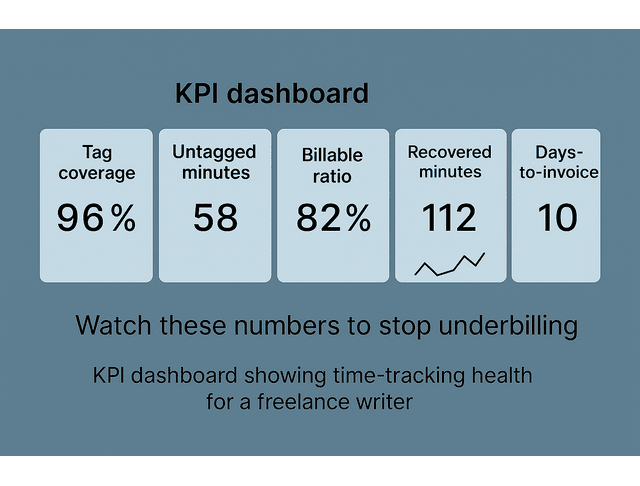
Track these KPIs weekly:
- Tag coverage refers to the number of entries that contain a valid tag.
- Untagged minutes deliver the quickest cleanup win.
- The billable ratio indicates the percentage of your week that generates revenue.
- Recovered minutes show how much time idle prompts save.
- The average number of days to invoice indicates how quickly you convert work into cash.
Idle Detection, Calendar Sync, Browser Summaries
Idle detection monitors periods when your keyboard and mouse are inactive and prompts you to select an action for the gap. You can discard it or attach it to the session you left. Calendar sync pulls meetings and interviews into the tracker, allowing you to assign them to the correct client. Browser summaries collect the titles of active tabs so you can see whether the time belonged to research, admin, or a specific draft. Together, these features convert the messy middle of your day into clean entries.
Tag Schema You Can Copy
A small, consistent set of tags keeps your reviews fast and efficient. Billable tags can include Research, Draft, Edit, Meeting, or Interview, and Admin-Client. Non-billable tags can consist of Admin-Business, Marketing, and Learning. If the client requests the work or it directly affects the quality of the deliverable, mark it as billable. If it serves your business or helps with skill building, mark it as non-billable. When in doubt, add a brief note so you can decide by the Friday review.
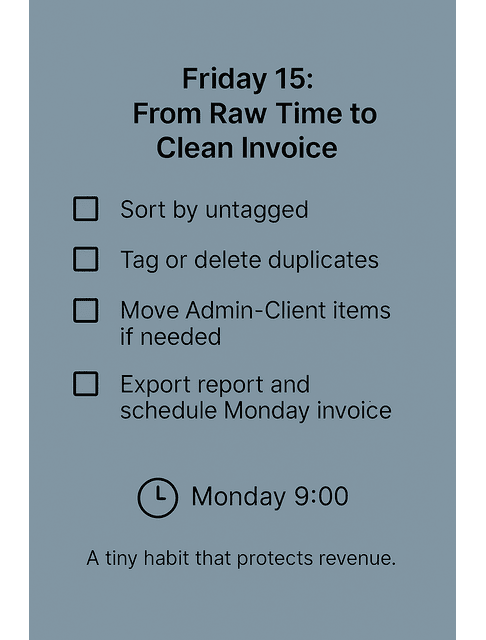
Friday 15: From Raw Time to Clean Invoice
Spend fifteen minutes at the end of the week to close the loop. Open the weekly view and sort by untagged entries. Then, add the correct tags while the tasks are still fresh in your mind. Remove duplicates that appear when you move between apps quickly. Review Admin-Client items and move them to the billable side if they were necessary for the deliverable. Export the report, create a draft invoice, and schedule it to send on Monday morning. This brief ritual keeps your queue light and turns a week’s worth of work into a Monday-ready invoice.
Verify Research, Calls, and Edits in the Best Time Tracking Software
Verification is a simple context that prevents confusion later. Attach a short note to a research block, such as “Sources: Deloitte 2025 report, page 14” or “Interview with Maya Reyes for case study section.” Link the draft or Google Doc in the description when possible. When a client asks where time went, you can point to the entry and its supporting notes without having to search through your files.
Common pitfalls and fixes. Set a five-minute daily check to review and approve AI suggestions before logging off. Keep your tag list lean, with seven or fewer tags, and merge look-alike tags every month. Turn on budget alerts at 70% of hours so you can warn the client and reset expectations before you exceed your budget.
Choose the Best Time Tracking Software: Pricing, Privacy, Integrations
Choose based on your workflow rather than on a feature checklist. If you forget timers, consider using an AI capture tool as an alternative. If you send many small invoices, favor built-in billing. If you run strict budgets, favor project manager integrations.
30-Second Picker: Match Your Stack
Toggl Track is a straightforward pick for solo writers, connecting to your calendar and Notion through tools like Zapier with both free and paid tiers; Clockify gives small teams a strong free start and ties into ClickUp and common browser add-ons with affordable upgrades as needs grow; Harvest bundles time tracking with invoicing and expenses and plugs into QuickBooks and Xero to make one-system billing easier; Timely auto-captures activity to draft entries for you, which helps if you often forget to start the timer; Everhour shines for budgets and estimates, letting you watch project limits inside Asana and ClickUp.
Privacy and Client Transparency for the Best Time Tracking Software
Privacy is easier when you set clear expectations. Control data ownership at the account level and decide what is shared by default. Clear scripts prevent confusion and set expectations before billing starts.
Client Transparency: Starter Lines You Can Use.
- “I use automated timers that log applications and calendar events, and I approve entries before billing.”
- “Reports show totals and tags, not the content of private documents.”
- “If you prefer summaries only, I can share weekly totals without screenshots.”
Price Snapshot and Upgrade Path
Start with a free plan if you work alone and do not need advanced reporting. Upgrade when the hours you recover are worth more than the monthly fee. If a paid plan costs $10 and your tracker helps you capture one extra billable hour at $50, the upgrade pays for itself. Add modules such as invoicing or budgeting only when your workflow benefits from keeping everything in one place.
Final Thoughts
You already do the work. Now make sure you receive credit for all of it. When you anchor your week to the best time tracking software, AI turns effort into structure, structure into earnings, and your schedule into something predictable. Select one tool, complete the five-minute setup, and send your first AI-assisted invoice by the end of this week.
If you want a step-by-step guide for setting this up without trial and error, explore my books on my Amazon Author Page. They walk you through practical AI workflows, tool setups, and real freelance scenarios so you can turn tracked time into paid work—consistently and with less friction.
Frequently Asked Questions About the Best Time Tracking Software
The best choice is the one you will use every day. Look for simple timers, calendar sync, and clean reports that match the tools you already use.
Yes. Many trackers offer a free tier that includes projects, tags, reports, and basic reminders. Start there and upgrade when the recovered hours justify the cost.
hey record active applications, document titles, and calendar events, and then propose entries for your review and approval. You can edit titles, change tags, and decide what becomes billable.
It is best to keep screenshots off by default. Share totals and tags, request written consent if screenshots are required, and limit the tool’s capabilities to prevent the exposure of private information.
Tag work that improves the draft as Research. Use Admin-Client for scheduling, feedback, and handoffs. Add a brief note, conduct a Friday review, reclassify any non-billable items, and then invoice.

Florence De Borja is a freelance writer, content strategist, and author with 14+ years of writing experience and a 15-year background in IT and software development. She creates clear, practical content on AI, SaaS, business, digital marketing, real estate, and wellness, with a focus on helping freelancers use AI to work calmer and scale smarter. On her blog, AI Freelancer, she shares systems, workflows, and AI-powered strategies for building a sustainable solo business.


Pingback: AI Productivity Apps: Minimize Distractions and Stay Focused - The AI Freelancer