
AI writing assistants have revolutionized how we write, offering tools that enhance grammar, style, and overall readability. But the real question most writers are trying to answer is simple: what’s the best writing assistant for your workflow—quick, everyday writing, or deeper, long-form editing?
Choosing the best writing assistant is crucial for producing high-quality content efficiently. This blog will compare Grammarly and ProWritingAid, two leading AI writing assistants, to help you decide which suits your needs best.
Everything I’ve shared here—and more—is in my book, available on Amazon. Click the link if you’re ready to level up.
Understanding the Best Writing Assistant Features
Grammarly’s Features
Grammarly provides real-time grammar and spell-checking, making it ideal for writers who need immediate feedback. Its advanced punctuation and style suggestions help refine your writing, ensuring clarity and coherence. Grammarly integrates seamlessly with numerous platforms, including web browsers, email clients, and social media platforms, enhancing its usability across different writing contexts. For example, Grammarly’s Chrome extension allows for real-time corrections in Google Docs, Gmail, and other online platforms. Today, it’s used by over 40 million people and tens of thousands of organizations worldwide, including teams at most Fortune 500 companies, underscoring its widespread trust as a go-to writing assistant.
Grammarly’s advanced AI algorithms catch basic spelling and grammar errors and identify and correct more complex issues. They offer nuanced suggestions that help improve sentence structure, word choice, and overall writing tone. This tool is especially advantageous for non-native English speakers or anyone aiming to improve their writing skills quickly. Grammarly’s ability to detect contextual errors, such as incorrect word choice and stylistic inconsistencies, makes it a comprehensive tool for maintaining a professional, polished writing style.
Grammarly also offers a user-friendly interface that simplifies the editing process. Users can efficiently address and correct their writing issues with its intuitive dashboard and easy-to-navigate features. The tool’s integration capabilities extend to Microsoft Office Suite, making it accessible for users who prefer writing in Word or Outlook. Moreover, Grammarly’s mobile keyboard app ensures users can maintain high writing standards across all their devices, making it a versatile writing assistant.
ProWritingAid’s Features
ProWritingAid generates detailed reports that thoroughly analyze different elements of your writing. This detailed feedback is precious for writers who want to understand and improve their writing style. The reports cover a range of metrics, including grammar, style, readability, and vocabulary usage. This holistic approach helps writers identify areas for improvement and refine their overall writing technique.
One of ProWritingAid’s standout features is its style analysis. This tool evaluates sentence structure, word choice, and overall readability, providing suggestions for clarity and coherence. For example, it can identify overused words, passive voice, and vague language, offering alternatives to make your writing more engaging and precise. This makes it an excellent tool for writers looking to elevate the quality of their work, from casual blog posts to complex research papers.
ProWritingAid, the Best AI Writing Assistant for Versatility, adds support for more writing tools, including Microsoft Word, Scrivener, and Google Docs. This seamless integration allows writers to use ProWritingAid’s powerful editing features within their preferred writing environment. Professional writers benefit significantly from ProWritingAid’s detailed feedback and integration with various platforms. Whether working on a novel, a research paper, or any other document, ProWritingAid helps improve writing quality. Its compatibility with professional writing software such as Scrivener and Microsoft Word makes it even more versatile, allowing you to refine your writing seamlessly across platforms.
Comparing Grammarly and ProWritingAid: The Best Writing Assistant for Different Needs
Best AI Writing Assistant for Grammar and Style
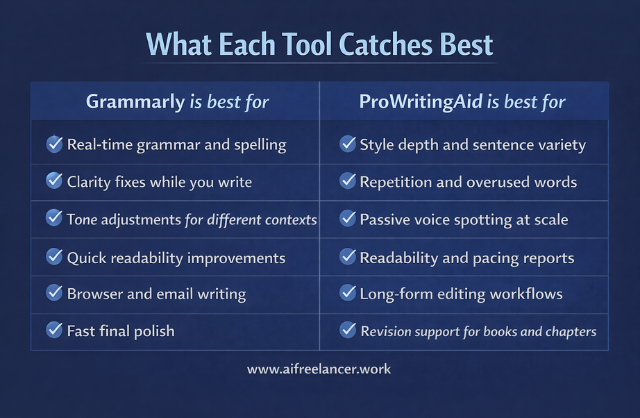
Grammarly and ProWritingAid offer robust grammar and style correction capabilities, making them valuable tools for writers to improve their work. Grammarly is renowned for its clean interface and user-friendly experience, which makes it particularly accessible to beginners. It provides instant suggestions and corrections, significantly speeding up the writing process. This immediate feedback helps writers quickly identify and rectify errors, enhancing productivity.
Grammarly’s seamless integration with platforms such as Google Docs and Gmail enables real-time corrections across different writing environments. Its intuitive design ensures users can easily navigate the tool without a steep learning curve. This feature-rich tool further enhances convenience by detecting tone, enabling writers to adjust their style to fit various contexts.
In contrast, ProWritingAid offers more customization options and detailed reports. While this might be overwhelming for new users, it is invaluable for experienced writers seeking an in-depth analysis of their work. ProWritingAid’s reports cover readability scores, passive voice, and overused words, providing a comprehensive overview of a writer’s strengths and weaknesses. This depth of feedback can help professional writers refine their style and produce higher-quality content.
While Grammarly’s simplicity and ease of use make it ideal for casual writers, ProWritingAid’s detailed analytical tools cater to those requiring a thorough critique and customization. This comparison helps you understand which writing assistant aligns better with your writing needs.
Best AI Writing Assistant for Detailed Feedback
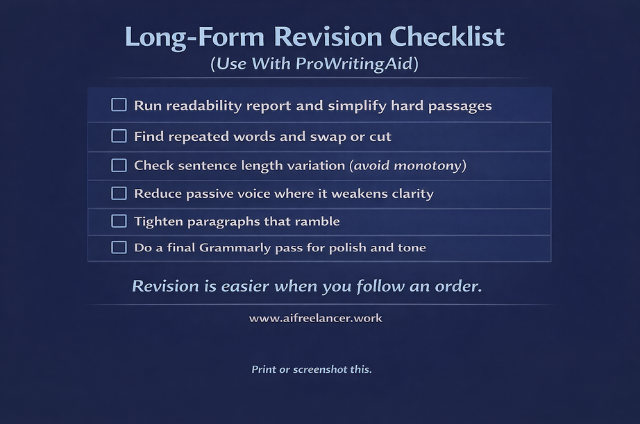
ProWritingAid stands out in providing detailed feedback on your writing. Its reports cover a wide range of metrics, including readability scores, passive voice usage, and overused words, offering a comprehensive overview of your writing’s strengths and weaknesses. These metrics help writers identify areas for improvement, such as simplifying complex sentences, reducing redundancy, and enhancing clarity. For instance, ProWritingAid’s readability analysis can pinpoint difficult passages, while its style reports highlight issues like repetitive phrases and inconsistent tense usage.
While Grammarly provides valuable insights, its reports are less detailed than those of ProWritingAid. Grammarly focuses more on immediate, practical corrections that enhance readability and tone. Its suggestions are easy to implement and geared towards improving the overall flow of your writing. Also, Grammarly includes a plagiarism checker in its premium plans, a feature ProWritingAid offers only as a paid add-on. This makes Grammarly a more comprehensive tool for ensuring originality in your work.
In summary, while ProWritingAid excels at detailed, analytical feedback suited for thorough editing, Grammarly offers a streamlined, user-friendly approach that balances readability improvements with convenience and additional features such as plagiarism checking.
Which is the Best Writing Assistant for You?
Best AI Writing Assistant for Casual Writers
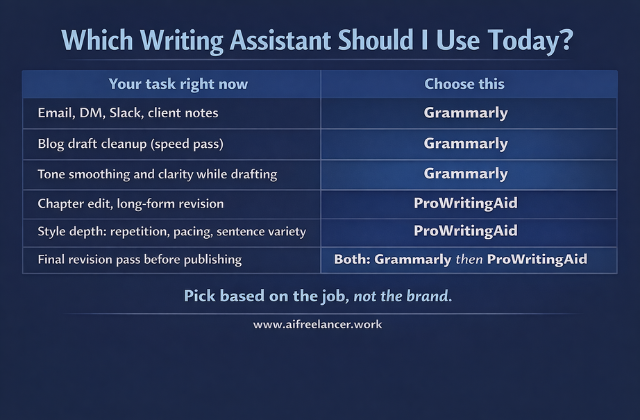
Casual writers might find Grammarly a better option because of its simplicity and ease of use. Real-time corrections and seamless integrations with everyday writing platforms make quick edits and informal writing tasks, like emails and social media posts, incredibly convenient. Grammarly’s intuitive interface ensures that even those with minimal technical skills can use its features effectively to enhance their writing. This design, combined with its ability to provide instant feedback, makes Grammarly an ideal tool for those who need efficient, accessible writing assistance across casual and professional contexts.
Best AI Writing Assistant for Professional Writers
Professional writers might find ProWritingAid more suitable due to its extensive analytical tools and customization options. It provides:
- Deeper insights into writing style and structure.
- Making it ideal for editing longer.
- More complex documents.
Professional writers might find ProWritingAid more suitable due to its extensive analytical tools and customization options. It provides deeper insights into writing style and structure, making it ideal for editing longer, more complex documents. ProWritingAid provides detailed reports on readability, passive voice, and sentence length, helping writers refine their work. Additionally, its ability to integrate with professional writing software like Scrivener and Microsoft Word enhances its functionality, making it a versatile tool for professional content creation and editing. This comprehensive support helps elevate professional writing to a higher standard.
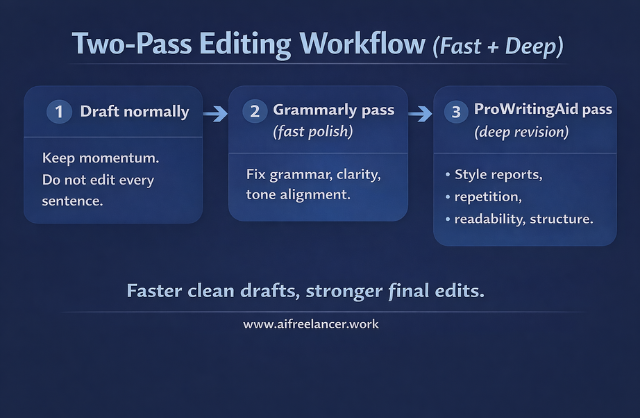
If you want the best writing assistant for everyday writing, choose Grammarly. If you want the best writing assistant for long-form revision and style depth, choose ProWritingAid. Many writers ultimately use both: Grammarly for fast polishing, ProWritingAid for deeper revision passes.
Final Thoughts
Both Grammarly and ProWritingAid are potent tools, each with unique strengths. Grammarly’s user-friendly interface and real-time feedback make it the best writing assistant for casual and everyday use. ProWritingAid’s detailed reports and advanced analysis tools make it the best writing assistant for professional and long-form writing. Ultimately, the best way to choose is to try both tools and see which aligns better with your writing needs. Whether you’re a casual blogger or a professional author, finding the right writing assistant can significantly enhance your writing process and output.
If you want a clearer way to decide when to use tools like Grammarly or ProWritingAid—and how to integrate them into a real writing workflow—visit my Amazon Author page. You’ll find practical guides for writers who want better drafts, cleaner edits, and systems that actually hold up under deadlines.
Frequently Asked Questions About the Best Writing Assistant
For most writers, the best writing assistant is the one they’ll actually use daily. Grammarly usually wins here because it’s simple, fast, and works almost everywhere you write.
If you want quick fixes for grammar, spelling, and tone, Grammarly is often the best writing assistant. If you wish to delve deeper into style reports and structural analysis, ProWritingAid is stronger.
For books, reports, and research papers, ProWritingAid is often the best writing assistant. Its detailed reports and integrations with Scrivener and Word make it ideal for serious editing.
For emails, social posts, and light blogging, Grammarly is usually the best writing assistant. It gives instant, easy-to-understand suggestions without overwhelming you.
If you write regularly, yes. Grammarly Premium is best if you want advanced tone checks and plagiarism detection; ProWritingAid Premium is better if you care more about deep style and readability analysis.

Florence De Borja is a freelance writer, content strategist, and author with 14+ years of writing experience and a 15-year background in IT and software development. She creates clear, practical content on AI, SaaS, business, digital marketing, real estate, and wellness, with a focus on helping freelancers use AI to work calmer and scale smarter. On her blog, AI Freelancer, she shares systems, workflows, and AI-powered strategies for building a sustainable solo business.


Pingback: AI Writing Platforms: The Complete Guide for Modern Writers - The AI Freelancer