
When you are already tired from client deadlines or your own projects, nothing drains you faster than fixing bad translations line by line. You paste a paragraph into a tool, hit translate, and then spend the next 20 minutes rewriting awkward phrases so they do not embarrass you in front of clients or readers. That is the real question behind Google Translate vs DeepL: which one actually helps you work faster without wrecking your voice or your reputation?
If you do not want to overthink it, a simple starting rule is this: use Google Translate when you need a quick understanding in almost any language, and use DeepL when it supports your language and the content is client-facing or sales-related. The rest of this guide just helps you refine that rule so it fits your workflow.
This guide walks through how each tool fits into a real content workflow, from research and drafting to editing and publishing. You will see where each translator shines, where it stumbles, and how to plug the right one into your system so translation becomes one smooth step instead of another time sink.
Everything I’ve shared here—and more—is in my book, available on Amazon. Click the link if you’re ready to take the next step.
Google Translate vs DeepL in Your Everyday Workflow
What matters most is whether what comes out of the tool will be usable or whether it will fight you. At the pace you work as a freelance writer, consultant, creative, or DIY author, you cannot afford a translator that adds more friction than it removes.
Speed and Convenience When You’re Juggling Low-Risk Text
For quick, low-risk tasks, Google Translate usually wins on convenience. When you want to understand a comment in another language, skim an article, or translate a short email, it is often already in front of you. It is built into Chrome, Android, Google Docs, Gmail, and many other tools, so you rarely have to open a separate app.
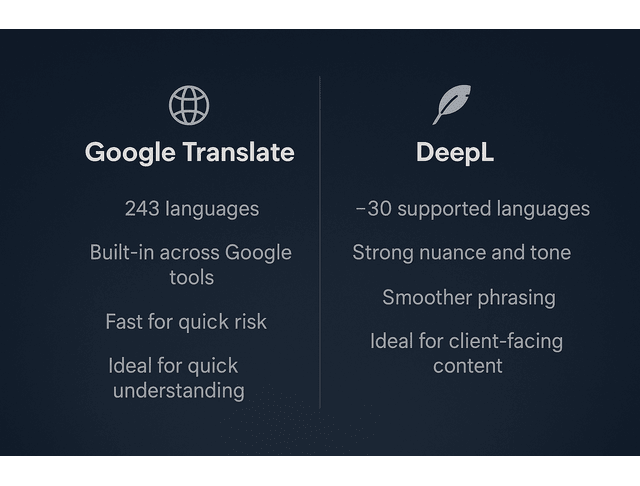
Google also supports an enormous range of languages. In June 2024, Google announced its largest expansion ever, adding 110 new languages to Google Translate and bringing total support to 243 languages.
That kind of coverage means that for everyday “I just need to understand this” translation, Google Translate is hard to beat.
DeepL is also fast, but it is more focused. As of 2024–2025, DeepL supports a bit over 30 languages, primarily European plus a few major Asian languages like Japanese and Chinese.
You typically open DeepL on purpose via a dedicated tab, desktop app, or integration. For low-stakes text where you simply want the gist and might be hopping across lots of languages, Google’s ubiquity and coverage make it the natural first stop. When the language is in DeepL’s supported set, and you care about phrasing, DeepL becomes more attractive.
Accuracy Shifts Based on Language Pairs and Context
Speed is obvious; accuracy shows up later, when you are editing. Several studies and industry surveys point in the same direction: DeepL often produces more natural and idiomatic translations in its supported languages, while Google Translate’s quality varies more across language pairs.
A 2021 study led by researchers at UCLA Medical Center evaluated Google Translate on 400 emergency department discharge instructions. They found that the tool accurately conveyed the overall meaning in 82.5% of cases, but accuracy varied by language from 55% to 94%.
Those numbers are impressive for a free consumer tool, but they also highlight why you cannot blindly copy-paste translations into client-facing work. The remaining 17.5% can contain serious errors, depending on the language and context.
DeepL, by contrast, has built its brand on quality. In 2024, DeepL released results from blind tests using its next-generation translation model, reporting that language experts preferred DeepL’s translations 1.3 times more often than Google Translate, 1.7 times more often than ChatGPT-4, and 2.3 times more often than Microsoft Translator.
You do not need to remember any of these numbers. The practical takeaway is simple: for many European language pairs, DeepL usually gives you a smoother, more human-sounding starting point, while Google Translate is more variable but covers far more languages.
Google Translate vs DeepL at the End of Client-Ready Drafts
At the end of a project—when you are finishing a blog post, polishing a sales page, or tightening a book description—your tolerance for awkward phrasing is essentially zero. A clumsy or misleading sentence does not just cost you time; it can make you or your client sound less competent or trustworthy.
In that final stage, many writers and agencies now lean towards DeepL when the language pair is supported. Because DeepL often preserves nuance and tone better, you start your editing pass from something that already feels closer to a human voice. You still revise, but you fix less.
Google Translate still has its place at the end of a draft. If DeepL does not support the target language, Google may be your only practical option. It also works well as a second opinion. Translating your target-language text back into your source language with Google Translate can expose meaning that drifted along the way.
The simplest way to think about it is this: Google is your all-terrain vehicle that can go almost anywhere; DeepL is your precision tool that gives better performance on a known track.
When Google Translate vs DeepL Strengths Actually Matter
On some days, your bar is low. You just want a translation that is not terrible. But there are specific points in your workflow where the difference between Google Translate and DeepL really changes the amount of editing you have to do, the stress you feel, and the risk you run with client work.
Editing Load Drops When Translations Sound Natural
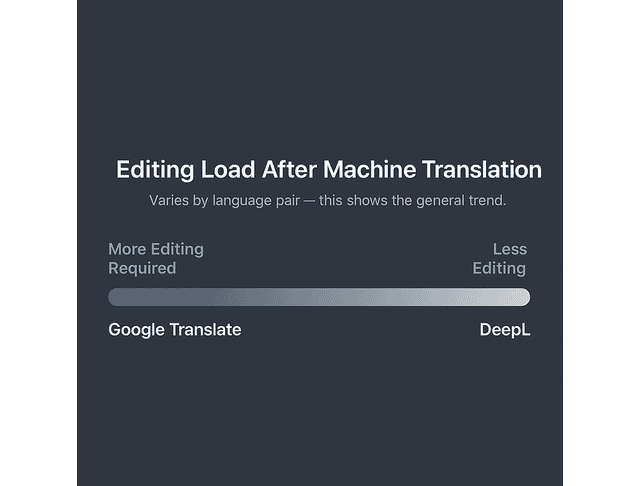
If you have ever edited a translation that technically makes sense but reads like it was written by a very stiff robot, you know how draining that work can be. Post-editing—the time you spend fixing what the machine produced—is where machine translation either pays off or becomes a time sink. Every awkward sentence you rewrite is a small tax on your attention.
Multiple comparisons of machine translation engines have found that DeepL often requires less post-editing than Google Translate for European language pairs and professional content. For example, the localization platform Centus summarizes several studies and finds DeepL ahead of Google Translate in most linguistic categories, with especially large gaps in areas like idioms.
When you translate client-facing copy—web pages, reports, lead magnets, book sections—the difference between “some editing” and “a lot of editing” is usually the difference between finishing on time with energy left, and finishing exhausted. For a beginner, it is enough to notice this pattern: if you keep finding yourself rewriting every other sentence from Google Translate in certain languages, that is a hint to try DeepL for those projects instead.
Google Translate vs DeepL for Research Notes and Outlines
During research, your needs are different. You are not trying to publish perfect wording; you are trying to understand ideas accurately. You want to capture key facts, quotes, and angles from sources in other languages.
Here, Google Translate’s massive language coverage is beneficial. You can drop almost any article, blog post, or PDF passage into Google Translate and get a version that is easy enough to read. That makes it a great triage tool when you are working across many markets and languages.
DeepL is more helpful when your main sources are in its supported languages and you know certain passages will end up as quotes, paraphrased sections, or key data points in your work. Running those crucial paragraphs through DeepL first often gives you a cleaner, more precise starting point, which then feeds directly into your outline and draft.
A practical pattern is to use Google Translate to scan and filter large amounts of material, and then rely on DeepL for important sections that will surface in published content.
Privacy, Reliability, and Protecting Client Trust
If you handle sensitive material—contracts, financial documents, internal memos, or health-related content—privacy and data handling matter as much as translation quality.
DeepL Pro positions itself strongly on this front, emphasizing that text submitted via paid accounts is not used to train models and is deleted after translation, with data processed on EU-based servers under strict privacy rules.
Google Translate’s free web and app versions, on the other hand, fall under Google’s general consumer terms. For enterprise-grade privacy, you are expected to use Google Cloud Translation, configure it correctly, and rely on Google Cloud’s data-processing policies.
If you are just starting and translating blog posts, basic marketing copy, or your own content, you probably do not need to worry about Cloud APIs or complex setups yet. For highly confidential content, though, the safest path is a paid plan with explicit data protection, clear agreements, and a written policy on what can and cannot be sent to machine translation. Whatever you decide, turn that decision into a simple rule so you do not improvise under pressure.
How Google Translate vs DeepL Fit Different Types of Content
Not all content carries the same weight. A quick social caption does not have the same stakes as a book description or a high-converting landing page. Your choice of translation tool should match the risk and impact of the piece you are working on.
Blog Posts, Sales Pages, and Book Descriptions You Refine Daily
When you translate long-form or revenue-focused content—blog posts, sales pages, book blurbs, nurture sequences—you care about persuasion, clarity, and voice, not just factual accuracy. The copy has to feel like you, or like your client’s brand.
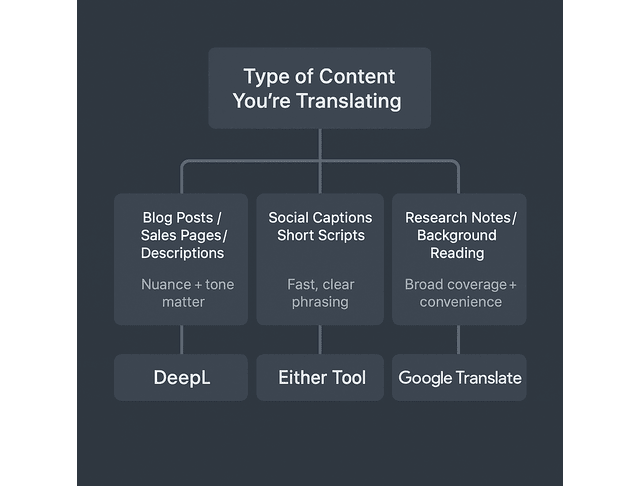
For these kinds of assets, DeepL is usually the stronger starting point in supported language pairs. Reviews from translation companies and content platforms consistently report that DeepL produces more natural phrasing, better handling of idioms, and a more consistent tone for European languages. Translators and reviewers at sites like Linguise and Centus, for example, repeatedly call DeepL the “superior choice for translations that require high accuracy and precise language nuances.”
Google Translate still plays a role, particularly when you are researching foreign-language competitor pages or market materials. You can use it to understand the landscape and then write your final copy in your main language. For the final translation into another language, DeepL plus human editing tends to give a better result, as long as the language pair is covered.
Social Captions and Scripts That Need Quick, Clean Phrasing
Social content is more forgiving. The lifespan of a caption or a short script is short, and what matters most is that the message is clear and aligned with your brand.
If you are working primarily in a couple of major languages that DeepL supports and you want your captions to feel as natural as possible, DeepL can serve as your default and save a bit of editing time. If you are replying to comments, translating DMs, or posting in a mix of many languages, Google Translate’s broader coverage and integration with your browser and phone will keep your process lighter.
No matter which engine you use, give public posts a quick read. One last pass is often enough to catch any phrasing that feels off.
Translation Workflows: Google Translate vs DeepL at the Start
You can bring machine translation into your process at different stages: early in research, midway through drafting, or at the end, before publication. Where you place it changes what matters most.
At the start of a project, you may translate foreign articles to understand a topic, convert notes into your main language so you can outline, or test how an idea looks in a second language. At this stage, you are mainly feeding your thinking, not creating finished copy. Google Translate is ideal here if you are scanning many sources across different languages. DeepL can be useful when your early translations will heavily shape the structure and tone for a smaller number of languages.
Later in the process, near the end, you are translating copy that will go live. That is when DeepL’s more natural output (for supported languages) and your own editing habits have the biggest impact on quality and stress levels.
By being deliberate about where and why you translate, you lower the odds of having to rip apart a draft because you chose the wrong tool at the wrong time.
Building a Simple Translation System With Google Translate vs DeepL
The goal is not to memorize every feature of both tools. The goal is to make a few clear decisions, so you do not have to rethink translation every time you touch a multilingual project. Once those decisions are part of your system, you just follow your own rules.
Choose Your Default Tool and Set Your Tone or Glossary Presets
Start by defining your defaults for common scenarios:
- For “any language, quick gist,” you can choose Google Translate as your standard. It will cover almost everything you encounter and integrate into your browser and phone.
- For “supported languages, client-facing content,” you can choose DeepL as your standard so your first draft in the target language is as natural as possible.
If you rely on DeepL frequently, set up its extra options. Many language pairs offer formal and informal tone settings, which matter if you are switching between corporate communication and consumer-facing content. DeepL’s glossary features let you lock in preferred translations for brand names, product terms, or technical phrases so the tool stops changing them.
If you are new to these tools, you can ignore glossaries and tone at first. Start with basic copy-paste translations and simple edits. Once you feel comfortable, these extra features are just bonuses that make your work more consistent.
Create a Lightweight Checklist That Keeps Your Process Consistent
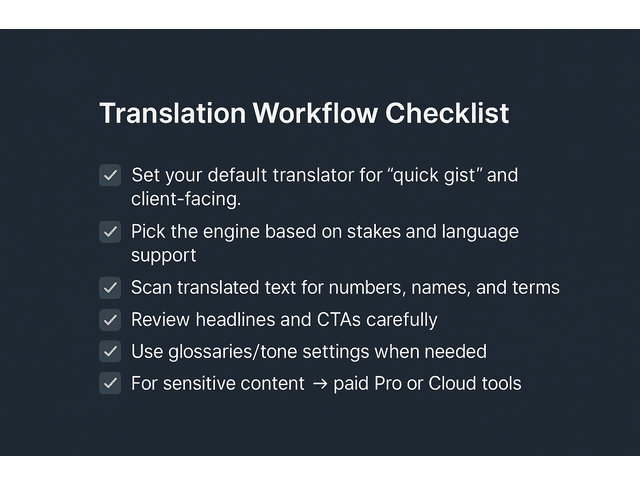
Instead of trusting your memory, write a simple checklist for any piece of content that involves translation. For example:
- Clarify the goal of the translation. Is this for internal understanding, a working draft, or something that will be published?
- Pick the engine based on that goal. Use Google for broad coverage and quick reading; use DeepL when nuance and style matter in a supported language pair.
- Run the translation and immediately scan it for obvious issues such as numbers, dates, names, URLs, and technical terms.
- Read key sections slowly, especially headlines, subheads, calls to action, and any promises or instructions.
- If something feels off, either adjust it yourself or, for high-stakes content, ask a native speaker or trusted reviewer to confirm.
That checklist does not need to be long. The main purpose is to give you a reliable sequence so the quality of your translated work is not dependent on how tired you are.
When to Upgrade Google Translate vs DeepL to Pro Plans
The free versions of Google Translate and DeepL cover a surprising amount of ground for solo professionals. If you are translating short passages manually and the content is not especially sensitive, you may never need to pay.
Paid plans become relevant when translation is no longer a side task and becomes part of your core service or infrastructure. If you are localizing websites, processing large numbers of documents, or handling confidential material, it makes sense to move to tools with clear business-grade guarantees.
An API is simply a way for your website or app to “talk” to a translation service automatically in the background. If that sounds too technical, you can safely ignore it until you reach a point where clients or developers ask you about automating translations. A useful rule is that once translation starts to generate revenue directly or touches sensitive data routinely, it is time to look at Pro or Cloud options instead of relying only on free consumer interfaces.
Final Thoughts
When you strip away the branding, Google Translate vs Deepl comes down to three practical questions: how many languages you work in, how polished the output needs to be, and how much editing capacity you actually have in a week. Google Translate gives you reach, integration, and fast meaning in hundreds of languages, which is perfect for research, low-risk text, and wide multilingual coverage.
DeepL gives you nuance and smoother, more natural drafts in a smaller set of languages, which is ideal for client-facing content, books, and sales copy where your voice and credibility are on the line. In real life, the best answer is rarely to pick one tool forever; it is to choose sensible defaults for your main scenarios, use each translator where it is strongest, and bake those choices into a simple workflow so translation stops feeling like a gamble and becomes a quiet, reliable part of how you work.
If you want more practical workflows like this—systems that protect your time, reduce creative strain, and help you deliver high-quality work faster—you’ll find them in my books. You can check them out on my Amazon Author page.
Frequently Asked Questions About Google Translate and DeepL
Often yes, for supported language pairs where tone and nuance matter. Google Translate still wins on language coverage and everyday convenience, so a simple rule stands: DeepL for quality, Google Translate for reach.
For many European language pairs, DeepL is generally more accurate and natural, especially with idioms and tone. Google Translate can be very good, too, but its quality varies more by language.
Google Translate supports hundreds of languages, while DeepL covers roughly 30–33. Choose Google Translate if you work in many or rarer languages, and DeepL if you stay within its list and care more about how the text sounds.
Both offer free tiers. Google Translate is fully free for everyday use, while DeepL’s free plan has limits and paid Pro options for heavier or professional workloads.
Use caution with any free translation tool for sensitive content. Keep Google Translate for low-risk text, and use paid options like Google Cloud Translation or DeepL Pro plus human review for contracts, financials, medical data, and internal strategy.

Florence De Borja is a freelance writer, content strategist, and author with 14+ years of writing experience and a 15-year background in IT and software development. She creates clear, practical content on AI, SaaS, business, digital marketing, real estate, and wellness, with a focus on helping freelancers use AI to work calmer and scale smarter. On her blog, AI Freelancer, she shares systems, workflows, and AI-powered strategies for building a sustainable solo business.

