

If your week is already packed with deadlines, edits, and client messages, the last thing you need is another tool to “learn.” You need leverage. How to get early access to AI tools is not about collecting apps. It is about getting access to workflow upgrades early enough to test them calmly, build a repeatable system around them, and reduce the drag that keeps your writing days longer than they should be.
That matters because the upside is real when the tool is well-suited for the task. Nielsen Norman Group found that, across three studies, generative AI tools increased business users’ throughput by 66% on realistic tasks.
Everything I’ve shared here—and more—is in my book, available on Amazon. Click the link if you’re ready to take the next step.
Why How to Get Early Access to AI Tools Matters for Your Workflow
Early access pays off when it removes friction from the same bottlenecks that keep you overloaded: slow research synthesis, drafts that stall, and editing loops that eat your energy. The point is not to be first. The point is to build a workflow that stays stable while tools evolve.
One reason writers care is that speed and quality can move together. MIT reported results from a study where access to ChatGPT reduced completion time by 40% and increased output quality by 18% (as measured by independent evaluators).
How to Get Early Access to AI Tools Without Disrupting Client Work
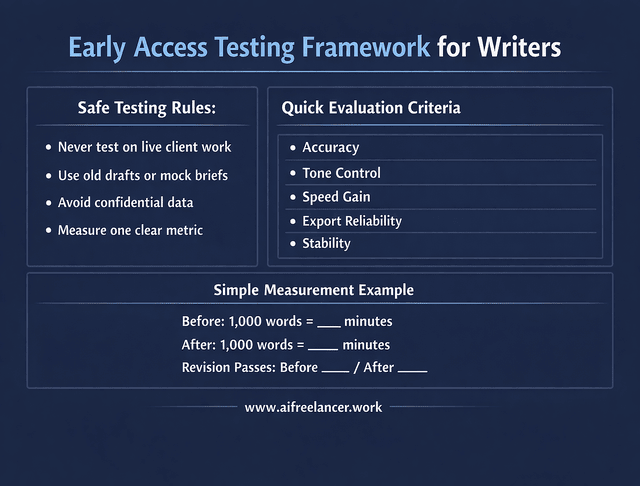
Treat beta tools like a lab, not your production pipeline. Keep client work on your stable stack, and test early-access tools on safe material: an old draft, a public topic, a mock brief, or your own marketing content. That way, if the tool changes behavior, rate-limits, or quietly drops a feature, your deliverables do not suffer.
Do not paste confidential client information into unreleased tools unless you have explicit permission and understand the platform’s data handling. If you are unsure, test with neutral or synthetic material.
Keep your evaluation focused. You are not writing a review. You are deciding whether this tool deserves a place in your workflow.
Quick Test Criteria (use this every time):
- Accuracy: Does it invent facts, quotes, or citations?
- Tone control: Can it stay in your voice without sounding generic?
- Speed gain: Does it reduce time or add steps?
- Export reliability: Can you move outputs cleanly into your writing setup?
- Stability: Does it behave consistently across a normal week?
To measure impact clearly, track one simple metric before and during the test. For example, time how long it takes you to outline and draft 1,000 words with your current process. Then test the early access tool for the same task over several sessions. Compare minutes per 1,000 words or number of revision passes. If the difference is negligible, the tool has not earned integration.
What Early Access Improves in a Writing Workflow
When early access is worth it, you notice it in the parts of writing that usually feel heavy: faster research synthesis, outlines that click sooner, fewer revision passes, and easier repurposing from one core piece into multiple formats. It also helps you adapt earlier to workflow changes, so you are not scrambling when a tool updates and your system breaks.
Where to Find How to Get Early Access to AI Tools Opportunities
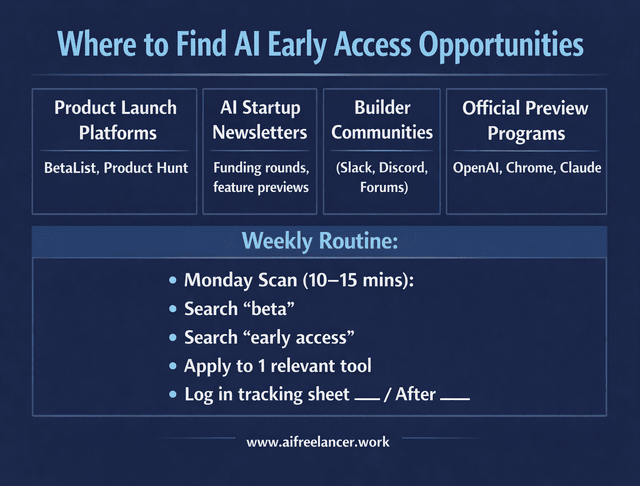
Early access is rarely random. Most people who get in consistently are not lucky. They are in the right channels, watching the right signals, and applying with a clear use case.
Platforms That Regularly Offer How to Get Early Access to AI Tools
Start where early-stage tools and feature previews get announced: product launch platforms, builder communities, newsletters from AI startups, and official early preview programs. For example, Chrome runs an Early Preview Program specifically to test in-progress, unreleased AI APIs with feedback.
You will also see tool-specific waitlists and beta invites shared inside user communities. The OpenAI Community has threads where users compare what seems to influence early feature access, which reflects how common phased rollouts are.
As you browse these channels, the goal is not to remember everything. It is to capture only what is worth testing.
When tracking opportunities, keep your system simple. Use one spreadsheet with columns for tool name, source, relevance to your workflow, date applied, status, and notes.
Signals of Legitimate Early Access
Not every “waitlist” leads to a product. Legitimate early access usually includes visible release notes or changelogs and clear terms, including NDA language when relevant. It should also show a real company footprint with identifiable founders, documentation, and a structured onboarding sequence. Clear privacy language and data handling policies are essential before you ever consider professional use.
How to Use These Platforms Effectively
Once a week, run a short scan, save what is relevant, then stop. Search terms like “beta,” “early access,” “waitlist,” “private preview,” or “labs.” Follow founders and product accounts that post limited invites. Keep discovery time capped at 10 to 15 minutes. More browsing rarely equals better tools.
If you want a simple weekly routine, use this: on Monday, scan one launch platform and one community channel for “beta” or “waitlist,” save anything credible to your sheet, and apply to one tool that fits your writing workflow. Then you stop and move on with your work.
A Step-by-Step System for How to Get Early Access to AI Tools
Many teams want testers who understand their own workflows. If you make it clear how you will use the tool and what feedback you will provide, your acceptance odds increase.
Before Applying (Assets to Prepare)
Have ready a one-paragraph use case describing what you write and what you want to improve. Summarize your current tool stack and identify the specific friction point you are targeting. Define success for the test in measurable terms, such as time saved or reduction in revision passes.
Sample Beta Application Structure
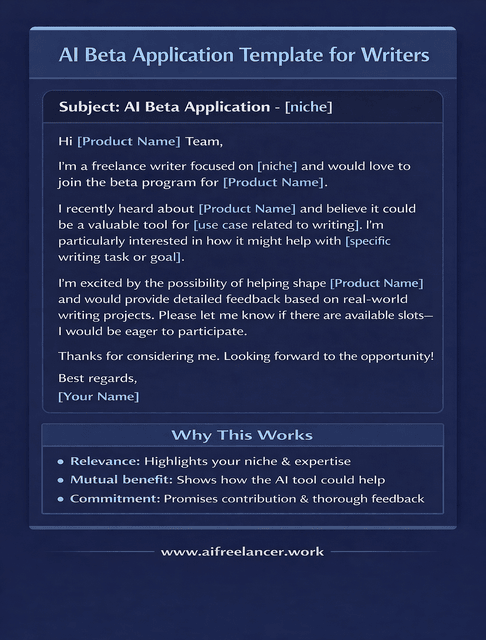
You can adapt a structure like this:
Hello, I’m a freelance writer focusing on long-form blog content and authority guides.
I plan to test your tool specifically for research synthesis and outline generation.
My current workflow includes [your tools], and my main friction point is reducing research time without sacrificing accuracy.
I can provide structured feedback on output quality, usability, and workflow integration within a two-week window.
This keeps your application practical and aligned with the product’s goals.
Increasing Your Odds When Applying for How to Get Early Access to AI Tools
Acceptance often depends on usefulness, not enthusiasm. Demonstrate that you match the intended user profile and that you can provide structured, actionable feedback.
A simple feedback format teams appreciate looks like this:
Issue observed:
Steps to reproduce:
Expected outcome:
Actual outcome:
Impact on workflow:
Suggested improvement (if applicable):
If you follow up, do so once, politely, after a reasonable waiting period.
Microsoft and LinkedIn’s 2024 Work Trend Index reported that 75% of knowledge workers use AI at work. When adoption is this widespread, teams prioritize testers who provide signal and clarity.
Turning How to Get Early Access to AI Tools Into a Repeatable Advantage
Early access can help you. It can also intensify your workload if you join too many programs and start managing tools instead of writing. Harvard Business Review has noted that AI can increase the pace and intensity of work rather than automatically reducing it.
The goal is disciplined experimentation, not endless experimentation.
Adoption Decision Framework for Early Access Tools
Set a clear decision window of 7 to 14 days. After that, choose: Keep, test longer with limits, or kill.
Keep, Test Longer, or Kill (after 7–14 days):
- Time saved per task
- Quality improvement
- Stability and reliability
- Learning curve
- Integration compatibility with your existing workflow
Integration Checklist (After a Keep Decision)
If you choose to keep the tool, define exactly where it fits in your workflow, what it replaces, what additional step it introduces, and how you will review its impact after two weeks. If you cannot measure the benefit after that period, do not build it into your default process.
When Not to Pursue How to Get Early Access to AI Tools
Skip early access during delivery crunch periods, when data policies are unclear, when an NDA restricts how you work with clients, or when you are already testing too many tools at once. Limit yourself to one or two concurrent beta tests to prevent cognitive overload.
Final Thoughts
If you want more stability, speed, and breathing room, how to get early access to AI tools is a practical workflow move, not a tech hobby. Keep discovery focused, test safely, measure impact, and integrate only what genuinely reduces friction.
If you want more practical systems like this, visit my Amazon Author page to explore books and resources designed to help you build smarter writing workflows with AI.
Frequently Asked Questions About How to Get Early Access to AI Tools
How can I get early access to AI tools?
Most AI tools offer early access through a waitlist, a beta signup form, or an invite-only program. Your best move is to apply with a specific use case, not a vague “I want to try it.” Mention what you do (freelance writing), what part of your workflow you want to improve (research, outlining, editing, repurposing), and how you will test it. After you apply, watch your email for onboarding steps and confirm access quickly, because some invites expire or fill up fast.
How do I become a beta tester for AI software?
You become a beta tester by joining official beta programs and proving you can give useful feedback. Start with the product’s website or announcement channels, then fill out any forms completely. If the tool has a community (Discord, Slack, forum), participate lightly and professionally so the team recognizes your name. When you get access, test the tool in a controlled way and send feedback that is easy to act on: what you tried, what happened, what you expected, and why it matters to your workflow.
What is an AI early access program?
An AI early access program lets a limited group use a tool or feature before it is released to the public. Companies do this to find bugs, learn how people actually use the product, and improve the experience before a wider launch. Early access is not always stable. Features can change, disappear, or behave differently week to week. Treat it as a testing period, not something you should immediately rely on for client-critical work.
Are beta AI tools safe to use for client work?
They can be, but you need boundaries. Beta tools are more likely to change suddenly, produce inconsistent output, or have unclear data handling compared to mature tools. The safest approach is to test on non-sensitive material first, such as old drafts, public topics, or a mock client brief. If you ever plan to use a beta tool with client content, check the tool’s privacy and data policies, avoid sharing confidential details, and get explicit permission when required. When in doubt, keep beta tools out of live client delivery.
Do you have to pay for AI beta access?
Often, no. Many companies offer betas for free because they want testers. However, some early access is tied to paid plans, premium tiers, or limited trials, and pricing can change after launch. Before you invest time building a workflow around a beta tool, confirm what happens when it leaves beta: will the feature stay free, move behind a paywall, or require an upgrade? If the future cost is unclear, treat the tool as “nice to test” rather than “core to rely on.”

Florence De Borja is a freelance writer, content strategist, and author with 14+ years of writing experience and a 15-year background in IT and software development. She creates clear, practical content on AI, SaaS, business, digital marketing, real estate, and wellness, with a focus on helping freelancers use AI to work calmer and scale smarter. On her blog, AI Freelancer, she shares systems, workflows, and AI-powered strategies for building a sustainable solo business.

