

If you’ve tried to learn AI “the right way,” you already know how it usually goes. A course gets opened, a dozen tool links get saved, and a few tutorials get watched. Then a deadline hits, energy drops, and the whole plan quietly collapses. If you’re searching for how to learn AI faster, you’re not asking for more information. You’re asking for a way to stop bleeding time and start getting real results without adding more mental load.
Everything I’ve shared here—and more—is in my book, available on Amazon. Click the link if you’re ready to take the next step.
Why How to Learn AI Faster Is a Process Problem, Not a Tool Problem
Most people don’t get stuck because they picked the wrong AI tool. They get stuck because every tool adds decisions, and decisions are expensive when you’re already overloaded.
A useful reality check: AI is no longer optional at work. Microsoft’s 2024 Work Trend Index reports that roughly three out of four knowledge workers now use AI in some form. That means the real advantage doesn’t come from access. It comes from using it efficiently. In the same Work Trend Index findings, 90% of users say AI helps them save time.
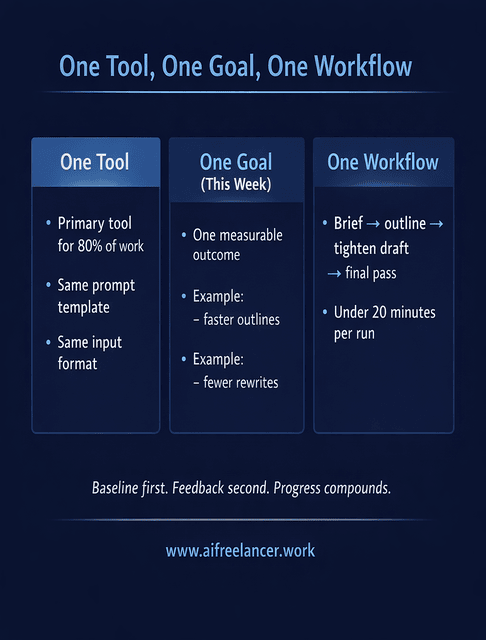
Speed comes from narrowing the field and stabilizing your setup. The fastest learners usually do three things consistently:
- One primary AI tool for 80% of their work
- One learning goal for the week
- One workflow they repeat, even if it’s imperfect
When those three are in place, learning stops feeling scattered.
To make this practical, define each piece so you don’t overcomplicate it. “One learning goal” should be a single outcome you can test this week, like “draft outlines faster” or “reduce rewrite time on intros.” “One workflow” should be a short, repeatable sequence you can run in under 20 minutes, such as brief → outline → tighten the draft → final pass. “One primary tool” just means you keep a consistent brief format and reuse the same prompt template long enough to improve.
Most people reverse the order. They optimize tools first, chase features, and only later try to build a workflow. By then, they’re exhausted. Once you can spot the friction, the fix becomes straightforward.
What Usually Breaks Attempts at How to Learn AI Faster
The breakdown points are predictable, especially when time and focus are already stretched.
Learning AI alone slows feedback and compounds mistakes. When you work in isolation, you don’t know whether the issue is your prompt, your input, or your expectations. You keep adjusting everything at once and never stabilize.
A few patterns show up again and again: people collect tutorials but never apply them, restart workflows instead of refining them, or abandon a setup the moment results aren’t perfect.
The fastest way to recover is not more learning. It’s a reset:
- Pause new learning
- Pick one real task
- Run the same workflow three times to establish a stable baseline
- Capture what changed
Baseline first, feedback second. Repeatability creates consistency. Feedback accelerates improvement after the process is stable. Here’s the repeatable workflow to use for those three runs.
A Practical Framework for How to Learn AI Faster Through Real Work
Here’s the shift that changes everything: stop treating AI as something you learn before work. Learn it inside the work you already have to do.
To keep this concrete, imagine one task you already face regularly, such as turning brief or rough notes into a first-pass outline. That single task becomes your training ground.
How to Learn AI Faster by Tying Learning to Tasks You Already Have to Finish
Choose a task that already exists in your workload. You are not adding work; you are redirecting how it gets done. Use AI for one step of that task, not the entire thing. This keeps your thinking engaged and your learning grounded.
Here’s what that looks like in action, using the same “brief → outline” task every time.
Example brief (what you already have, even if it’s messy): “Write a 1,500-word blog post for freelancers on how to learn AI faster. The audience is busy, overwhelmed, and wants structure. Include a framework, avoid hype, include 3 research stats, and end with a CTA.”
A reusable prompt structure (same prompt, new inputs): “You are my writing assistant. Create a detailed blog outline from the brief below. Requirements: practical steps, calm tone, no hype, focus on reducing decisions, and using real work. Provide H2/H3 structure and note where a repeatable workflow appears. Brief: [paste brief].”
If the outline comes back generic, tighten the constraints: “Include a repeatable 5-step loop. Add a mini example. Add a section on what to ignore. Keep it readable for someone with low time and low energy.” You’re learning constraint design here, which is one of the highest-leverage AI skills you can build. That one adjustment teaches you more than starting over with a new tool.
Repeat the Same Workflow Instead of Chasing New Techniques
Run the same prompt structure on similar inputs. When you reuse a workflow, you start to notice patterns: what the model handles well, where it needs guidance, and what inputs actually matter.
Capture What Works So You Don’t Relearn It Next Time
This is where most progress compounds. When you save prompts with short notes about what improved the output, you’re building a personal workflow library instead of starting from zero every time.
Improve One Step at a Time Instead of Rebuilding Everything
If the output feels off, resist the urge to scrap the whole process. Adjust one part. For example, refine only the introduction of an outline prompt until it consistently produces a clear opening, then move on.
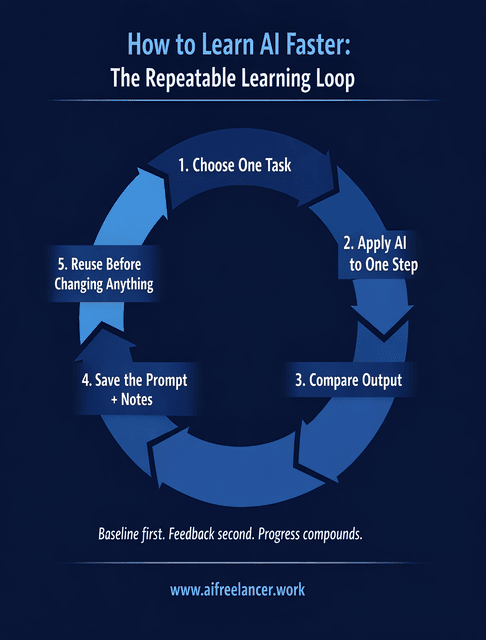
A simple repeatable learning loop looks like this:
- Choose one task
- Apply AI to one step
- Compare output
- Save the prompt and notes
- Reuse before changing anything
You can tell the loop is working when you see less hesitation, fewer rewrites, and clearer first drafts.
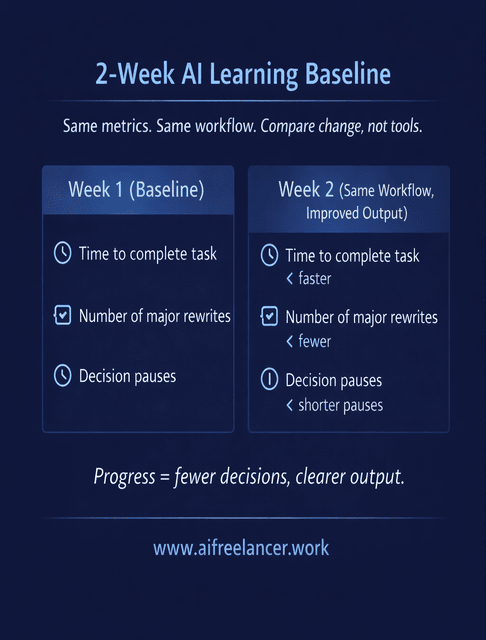
To make the progress visible, run a tiny two-week measurement. Week 1 is your baseline: time the task starts to finish, and note how many major rewrites you do. Week 2, run the same task with the same workflow and track the same two numbers. If you want one extra signal, count decision points: how many times you stopped to decide “what should I do next?” The goal is fewer pauses, not perfection.
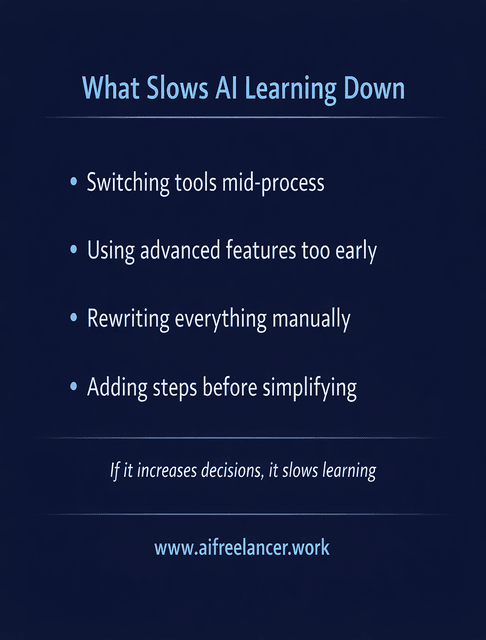
To keep progress clean, it also helps to know what to ignore. Switching tools mid-process slows improvement because your prompts and inputs never stabilize. Advanced features can wait until your baseline workflow is reliable. Manual rewrites are fine, but if you’re rewriting everything, you’re skipping the iteration that actually teaches you. Adding steps before simplifying the current step usually creates more friction, not better output.
Google’s own guidance reinforces this approach. Their documentation on generative AI stresses that helpful, original outcomes matter more than the method used to create them.
How Shared Context Helps You: How to Learn AI Faster Without Burnout
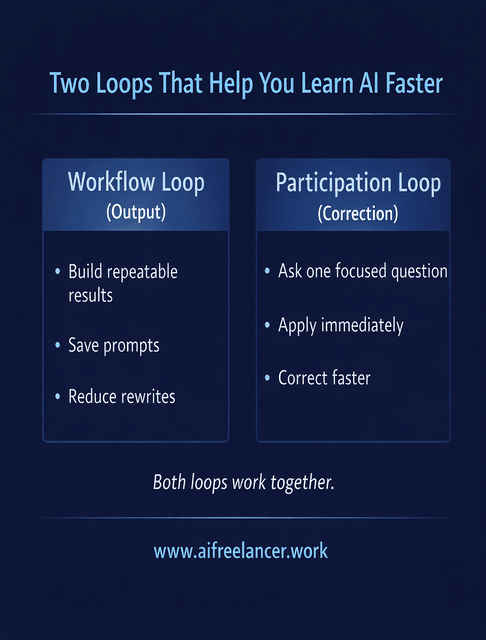
Once you’re running a stable workflow, shared context becomes a speed multiplier. Learning alongside others in AI communities reduces guesswork and shortens the distance between mistake and correction.
This matters because adoption is already widespread. McKinsey’s global AI survey found that about two-thirds of organizations are now using generative AI regularly, nearly double the share from the year before. When everyone is learning in real time, feedback matters.
Shared examples reduce thinking time. Seeing how others structure prompts, define constraints, or evaluate output gives you reference points instead of forcing you to invent everything from scratch.
Feedback loops shorten the learning curve when you want to learn AI faster. Instead of iterating alone, you get faster course correction and clearer signals about what actually works.
To keep it practical, a focused question tied to a live task should look like this: “I’m turning a brief into an outline. The outline is accurate but too generic. What constraint or prompt tweak will force more specificity without making it longer?” That question gives context, defines the problem, and makes the answer easy to apply immediately.
Output-focused feedback is also simpler than people think. It means you ask for comments on the result, not vague opinions. For example: “Does this outline have a clear promise in the intro, distinct section purposes, and a repeatable framework? If not, point to the exact section that fails and what it’s missing.” This keeps feedback actionable and shortens the iteration cycle because it tells you what to change next.
Boundaries are what prevent burnout. You don’t need daily AI practice sessions. You need a bounded system that fits real life.
A low-time participation loop is often enough:
- Ask one focused question tied to a live task
- Apply the answer immediately
- Turn the outcome into a reusable snippet or checklist
This loop is different from your personal workflow loop. Your workflow loop builds repeatable output. The participation loop helps you correct faster when you hit a stuck point.
Final Thoughts
If you’re serious about how to learn AI faster, the answer isn’t more tools, more courses, or more hours. It’s a calmer setup built around one repeatable workflow, real tasks, and fast feedback. When learning is embedded in work, AI stops feeling like another responsibility and starts acting like support.
If you want to go deeper into workflow-first systems, structured AI use, and calm productivity, you’ll find my books and guides on my Amazon Author page. They’re designed to help you turn this approach into a repeatable way of working, not another short-lived experiment.
Frequently Asked Questions About How to Learn AI Faster
The fastest approach is learning through real tasks. Pick one workflow, apply AI to it repeatedly, save what works, and refine one step at a time instead of restarting.
Yes. Many practical AI skills stem from the structure of prompts, the quality of input, and workflow design, rather than programming.
Not for applied AI use in writing, consulting, or content work. Python is useful for building models, but it is not required to get value from AI tools.
With a focused workflow and real application, useful baseline skills can develop in weeks. Scattered learning often takes much longer with less payoff.
For most people with limited time, hands-on practice wins. Courses help, but progress comes from applying what you learn immediately.

Florence De Borja is a freelance writer, content strategist, and author with 14+ years of writing experience and a 15-year background in IT and software development. She creates clear, practical content on AI, SaaS, business, digital marketing, real estate, and wellness, with a focus on helping freelancers use AI to work calmer and scale smarter. On her blog, AI Freelancer, she shares systems, workflows, and AI-powered strategies for building a sustainable solo business.

