

Writing takes effort. Even when you know what to say, it’s easy to get stuck on how to say it. That’s where AI steps in to enhance your writing process. Many tools today can help improve your tone, simplify your sentences, and make your ideas flow better. This is your guide if you’re looking for ways to write faster, edit smarter, and sound more confident. You’ll discover how tools that improve writing with AI can sharpen your skills and support your voice without taking it over.
Let’s start by looking at how these tools can help speed up your writing process and break through creative blocks.
Everything I’ve shared here—and more—is in my book, available on Amazon. Click the link if you’re ready to level up.
Improve Writing with AI Tools That Support the Process
Writing can often feel slow and frustrating, especially when faced with a blank page. However, this section shows how AI writing platforms and other intelligent tools can empower you to write faster, stay focused, and turn rough ideas into clear, confident drafts. With AI, you can take control of your writing process and keep your momentum going.
A recent MIT study found that generative AI tools—like ChatGPT—improved both the speed and the quality of writing tasks, giving users a measurable productivity lift.
Understand How Tools That Improve Writing with AI Actually Work
AI writing tools use natural language processing (NLP). That means they study patterns in how we use words. These tools don’t just look for typos. They understand sentence structure, tone, and intent. When you type, the AI scans your words in real time, suggesting better grammar, smoother flow, or sharper phrasing. It’s like a super-fast editor working in the background.
Speed Up Drafting and Revisions with AI Support
With an AI tool at your disposal, you can save countless hours. Whether outlining a blog post or refining a rough paragraph, AI can help you reach your point faster. Need a headline? Just ask the tool. Unsure about a rewording? Let the tool suggest a clearer version. You no longer have to stare at a blank page, wondering what to write next. AI keeps your writing process efficient and your momentum strong.
Break Through Blocks with Tools That Improve Writing with AI
Writer’s block slows everyone down. But AI can push you forward. It can suggest the next sentence, offer synonyms, or rephrase awkward lines. Even a simple prompt can help spark a fresh idea. When you’re tired or stuck, it gives you a starting point to keep going without losing time. Once your ideas are down, the next step is ensuring they sound right.
Improve Writing with AI Tone and Voice Enhancements
Your tone shapes how readers feel about your message. This section shows how smart tools can help you match the right tone, stay consistent, and avoid confusing shifts.
Adjust Tone Easily Using Tools That Improve Writing with AI
Different audiences need different tones. You wouldn’t write a business report like a text message. AI tools help you shift your tone with just a click. Do you want your writing to sound more friendly? More formal? More persuasive? Choose a tone setting or prompt the AI, and it will tweak the style to match your goal.
Keep Your Voice Steady Across Every Paragraph
It’s easy to start strong and drift off-style later. That’s where AI helps. It watches for shifts in tone or style and brings you back in line. If your intro sounds casual but your middle turns stiff, the tool flags it. This keeps your writing consistent from start to finish.
Spot and Fix Unintentional Tone Changes
Tone mistakes can confuse readers. If you start seriously and suddenly joke, the message might feel off. AI points out those shifts and suggests a better transition or adjustment. That way, you stay clear and aligned with your purpose. Beyond tone, your writing must flow smoothly and be easy to follow.
Improve Writing with AI Readability and Flow Features
Clear writing isn’t only about grammar. It’s also about making your ideas easy to follow and understand for any reader.
Rewrite Complex Sentences with Ease
Not every sentence needs to be long. Sometimes, we try to sound smart and end up sounding confusing. AI tools help you trim down complex phrases and replace them with simple, strong ones. You still say the same thing in a way that’s easier to read. That’s how you hold your reader’s attention.
Smooth Out Paragraph Flow with Better Transitions
Choppy writing feels rough to read. AI can fix that. It suggests using transition words or reordering your thoughts so that one idea naturally leads into the next. This creates rhythm. Your writing flows better. And your readers stay focused.
Write for More People with AI Accessibility Features
Good writing needs to be clear and inclusive. AI helps you spot jargon, hard-to-read words, or overly complex phrases. It also checks your readability score to know if your writing fits your audience. This matters when writing for the public, students, or international readers. AI helps you meet them where they are. As your writing gets clearer, it also helps to improve your skills over time.
Improve Writing with AI Feedback and Skill Growth
Getting helpful feedback can turn a rough draft into something great. This section shows you how to use smart tools to strengthen your writing and grow your skills over time.
Fix Grammar and Style in Real Time
Most tools that improve writing with AI offer instant grammar and style fixes. As you write, you get alerts for punctuation errors, wordy phrases, and tense issues. Instead of doing a full edit later, you improve along the way. It saves time—and makes your final draft cleaner.
Grammarly’s own research shows that access to AI writing assistance leads to a 20% reduction in writing errors, with users producing 30–70 fewer mistakes per day depending on the app they’re writing in.
Learn from the Edits to Improve Long Term
AI doesn’t just fix mistakes. It teaches. Most tools explain why they make a suggestion. The more you use the tool, the more you notice your habits. You’ll start catching errors before the AI does. That builds your skills and your confidence.
A 2024 study found that students using Grammarly showed a clear reduction in grammatical errors and reported a noticeable improvement in writing quality over time—proof that AI can strengthen long-term writing skills, not just surface-level edits.
Use AI Suggestions, But Keep Your Voice
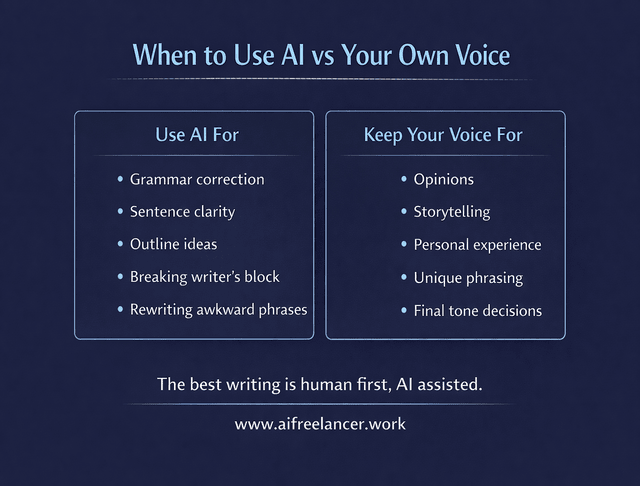
The best writing sounds like you, not a machine. So don’t take every AI suggestion. Review each one. Ask yourself, “Does this help my message?” Keep the edits that improve clarity, tone, or grammar. Skip the ones that change your style. Use AI as a helpful partner, not a replacement for your voice. It’s there to enhance your unique voice, not change it.
Best AI Tools That Help Improve Writing
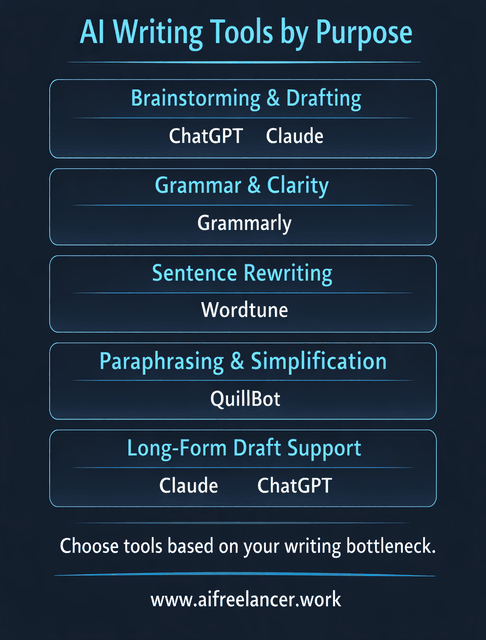
Several AI tools are widely used by writers to improve clarity, tone, and grammar. Each tool focuses on different parts of the writing process.
- ChatGPT: Useful for brainstorming ideas, rewriting paragraphs, outlining articles, and overcoming writer’s block.
- Grammarly: One of the most popular AI writing assistants for grammar correction, tone adjustments, and readability improvements.
- QuillBot: Helpful for paraphrasing sentences, simplifying complex writing, and restructuring paragraphs.
- Wordtune: Designed for rewriting sentences in different tones while keeping the original meaning.
- Claude: Often used for drafting long-form content, summarizing material, and refining complex explanations.
These tools work best when used together as part of a writing workflow rather than relying on one tool alone.
A Simple AI Workflow to Improve Your Writing
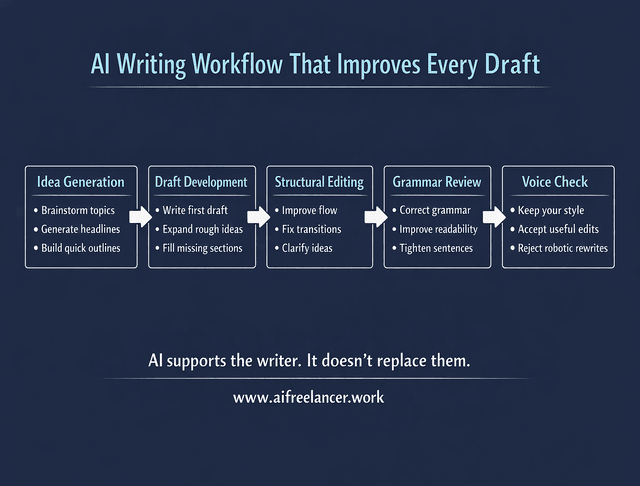
Instead of relying on AI randomly, many writers benefit from using it at specific stages of the writing process.
- Idea Generation: Use AI to brainstorm topics, headlines, or outlines.
- Draft Development: Write the first draft yourself while using AI for suggestions and expansions.
- Structural Editing: Ask AI to review paragraph flow, clarity, and transitions.
- Grammar and Style Review: Use tools like Grammarly to catch punctuation and grammar errors.
- Final Voice Check: Review the AI suggestions and keep only the edits that match your personal writing style.
Using AI this way keeps the writer in control while allowing technology to handle repetitive editing tasks.
Final Thoughts
Writing doesn’t have to feel overwhelming. Tools that improve writing with AI exist to support you, not replace you. They help you write faster, fix mistakes earlier, and stay focused on your message. AI can be your sidekick if you want a clearer tone, better sentence flow, or help to keep consistent. Try a few tools and find the ones that work best for you. Keep writing in your voice, with a little smart help to guide you.
If you want to go deeper into using AI without losing your voice as a writer, explore the guides on my Amazon Author page. I share practical frameworks, workflows, and tool strategies designed specifically for freelance writers who want to work faster while maintaining quality.
Visit my Amazon Author page to see my books on AI-powered writing workflows and discover systems you can start using in your own writing process today.
Frequently Asked Questions About How to Improve Writing With AI
AI can turn rough ideas into outlines, suggest clearer wording, fix grammar and punctuation, and flag clunky or confusing sentences. Used well, tools that improve writing with AI speed up drafting and editing so you can focus on your ideas, not just the mechanics.
Yes—if you stay in control. It’s fine to use AI for grammar checks, rewrites, or brainstorming as long as you review everything, keep your own ideas, and follow any rules from your school, client, or employer.
Draft in your own words first, then ask AI for targeted help like “shorten this,” “make this clearer,” or “smooth this transition.” Accept only suggestions that still sound like you and reject anything that feels generic or off-brand.
AI tools can catch typos, tense shifts, missing words, wordy sentences, repetitive phrasing, and tone issues. Many also highlight readability issues and suggest simpler, sharper alternatives to make your message easier to follow.
No. AI is great for a fast first pass, but it doesn’t fully replace a human editor’s judgment or the growth you get from writing often. The best approach is practice, your own judgement, and AI as a smart helper to polish what you’ve already written.

Florence De Borja is a freelance writer, content strategist, and author with 14+ years of writing experience and a 15-year background in IT and software development. She creates clear, practical content on AI, SaaS, business, digital marketing, real estate, and wellness, with a focus on helping freelancers use AI to work calmer and scale smarter. On her blog, AI Freelancer, she shares systems, workflows, and AI-powered strategies for building a sustainable solo business.


Pingback: AI Writing Tools for Content Creation: Jasper and Writesonic - The AI Freelancer