

You sit down to write, open your research tab, and suddenly you are drowning in open articles, half-finished outlines, and “I’ll sort this later” notes. The draft you thought would take two hours ends up eating your entire day. You know AI could help, but most explanations aim at engineers, not freelance writers who want a smoother workflow. This is where natural language processing for beginners comes in. You do not need to code, build models, or read academic papers. You only need to understand what NLP is doing under the hood so you can use the right tools for research, outlining, editing, and idea generation without losing your voice.
Research backs up how quickly this “tab spiral” happens. UC Berkeley HR, citing research from UC Irvine, reports that people average 12 minutes 40 seconds on a task before being interrupted and it takes 25 minutes 26 seconds to return to the same task.
Everything I’ve shared here—and more—is in my book, available on Amazon. Click the link if you’re ready to take the next step.
Natural Language Processing for Beginners for Freelance Writers
You keep hearing about NLP, but every explanation seems written for engineers, not people who live in Google Docs and client briefs. This section translates natural language processing into plain language so you can see exactly how it fits into your day-to-day writing work.
Natural Language Processing for Beginners vs Other AI Buzzwords
If you are new to AI terms, it can feel like a storm of jargon: machine learning, deep learning, neural networks, generative AI. Natural language processing (NLP) is a subset of AI that deals with human language.
In plain terms, NLP is what lets tools read, analyze, and generate text in ways that feel useful to you as a writer. When you ask ChatGPT to summarize an article, when you use Grammarly to fix tone and clarity, or when you let an SEO tool cluster keywords into topics, you are already working with NLP basics, even if the interface never uses the term.
Other buzzwords plug into this:
- Machine learning is how the models learn patterns from massive amounts of text.
- Deep learning and transformers are architectures that enable modern language models to become smarter and more fluent.
- Generative AI is the layer that actually writes, rewrites, or expands text.
For your day-to-day freelance work, you do not need to keep all of these perfectly straight. It is sufficient to know that NLP converts messy language into structured information that our tools can actually act upon.
To make this real, imagine a client sends you a long, chaotic Notion page as a brief. You paste it into an AI assistant and ask, “Extract the main goals, target audience, and key points from this, then propose a clear outline for a 1,500-word blog.” The tool does more than shorten the text. It utilizes NLP to identify intent, topics, and relationships, allowing you to shape a workable structure instead of starting from scratch. If you have ever stared at a “brain dump” doc wondering where to begin, you already know the gap this kind of NLP support can close.
NLP Basics for Client-Ready Content
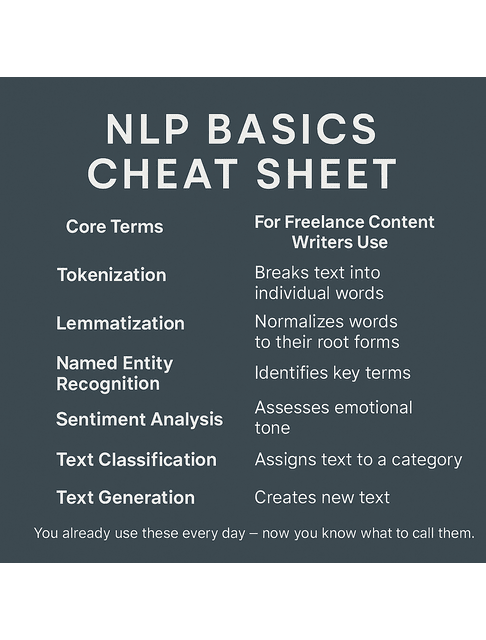
As a freelance writer, you care less about algorithms and more about outcomes: better drafts, faster turnaround, stronger pitches. Here are a few core NLP ideas in everyday language, with practical uses you can actually try:
- Tokenization: The tool breaks text into small units (words, subwords, sentences) so it can work with them.
- Practical use: Ask, “Rewrite this paragraph at a grade 7 reading level without losing the main point,” and let the tool adjust sentence length and word choice.
- Text classification: The tool assigns labels to each piece of text, such as “positive,” “negative,” “how-to,” or “product review.” Those tags then drive tasks like sentiment analysis and content categorization.
- Practical use: Paste 30 customer reviews and ask, “Label each review as positive, neutral, or negative and list the top three recurring complaints.”
- Entity recognition: The tool spots names, brands, locations, and topics in your text. Helpful for research, fact checks, and briefs.
- Practical use: Paste a competitor’s landing page and ask, “Identify all brands, features, and benefits mentioned, then summarize the positioning in 5 bullets.”
- Summarization: The tool condenses lengthy content into shorter, yet still meaningful versions.
- Practical use: Feed an industry report and ask, “Summarize this in 7 bullets for a busy founder who needs to know what changed this year.”
- Semantic search: Instead of matching exact keywords, the tool looks for related meaning. This powers smarter research and idea generation.
- Practical use: Store your client documents in a note app with AI search, then ask, “Find everything related to pricing objections,” and let the tool surface relevant passages even if the word “pricing” does not appear.
You do not have to call these out by name with clients, but knowing they exist helps you select the right tools and explain what you can do with them. It also makes troubleshooting easier when the results appear incorrect.
Everyday Tools That Quietly Use NLP
You already rely on NLP examples without noticing:
- Email and document tools that suggest replies or rewrite sentences for clarity
- SEO tools that group keywords, analyze topics, and suggest headings
- Chatbots and virtual assistants that turn vague prompts into structured responses
Seeing these as applications of natural language processing makes one thing clear: you are not adding something totally new to your workflow. You are upgrading the tools you already touch every day.
Here is a simple way to spot NLP in action. The moment a tool reads your text, assigns structure or labels, and then provides a more organized output, it is utilizing some form of natural language processing.
Now that you have a clearer picture of what NLP does, it becomes easier to see how it manifests in the projects that clients already pay you for.
Client Projects Using Natural Language Processing for Beginners
Clients already expect you to deliver faster, smarter content, even if they never mention AI in the brief. Here, you will see how natural language processing quietly powers research, topic selection, and strategy so you can raise your rates without stretching your hours.
Blog and SEO Briefs Shaped by NLP Insights
On content projects, NLP can quietly handle the grunt work that normally eats your time:
- Turning a messy client brief into a clean outline
- Grouping related keywords and topics into logical sections
- Suggesting headings that match how people actually search
This speed-up is not just anecdotal. In a peer-reviewed study on ChatGPT used for writing tasks, average completion time decreased by 40% and output quality increased by 18%.
For example, you can paste a long research doc into an AI assistant and ask:
“Group these ideas into four main sections and list bullet points for each, for an SEO blog on [topic].”
Behind the scenes, the model uses text mining and topic modeling techniques to cluster ideas. You see a clear structure that speeds up your drafting.
You can also use NLP tools to:
- Extract key questions from forums and SERPs
- Generate NLP examples you can adapt for your article
- Identify missing subtopics in a draft before you submit it
This transforms your research phase from a chaotic mess of tabs into a more controlled and repeatable system.
A simple workflow might look like this:
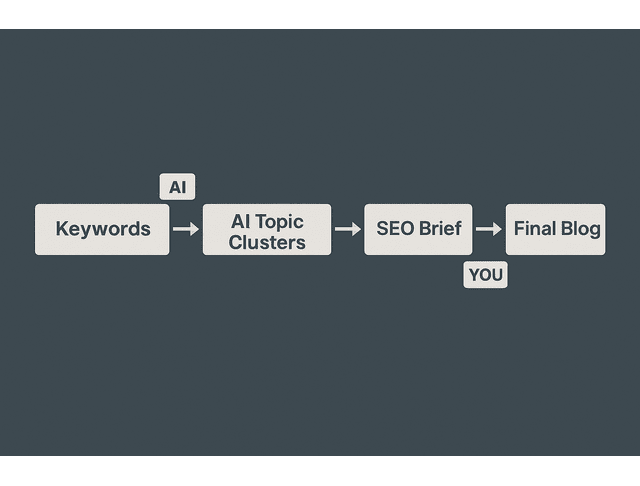
- Paste the client’s keyword list into an AI assistant and ask, “Cluster these keywords into 5 to 7 blog topics with suggested H2s for each.”
- Take the clusters you like and say, “Draft an SEO brief for Topic 1 that includes search intent, target audience, and five key questions to answer.”
- Use that brief as your blueprint and layer your own research, stories, and examples on top of it.
You still own the thinking. NLP does the sorting and grouping that would normally eat an afternoon.
How Clients Ask for Natural Language Processing for Beginners Skills
Most clients will not say, “We need a writer who understands natural language processing.” They say things like:
- “Can you work with AI tools to speed up drafts?”
- “We want content that is optimized but still human.”
- “We use ChatGPT or other AI tools internally. Are you comfortable with that?”
This is where your natural language processing for beginners knowledge becomes a subtle advantage. You can reassure them that you:
- Use AI responsibly as a drafting and research assistant
- Keep human judgment and voice in charge
- Understand how tools interpret topics, keywords, and intent
You do not need to oversell the technical part. Framing NLP as part of your AI-powered content process is enough.
You might say in a proposal, “I use AI and NLP tools for research, clustering, and first-pass outlines, then I take over for the actual writing and voice. This keeps the content fast, accurate, and tailored to your audience instead of sounding like generic AI text.”
Pitching AI-Powered Content Services
Once you feel more confident with NLP-driven tools, you can pitch more strategic offers, such as:
- Content audits that use AI to flag thin, repetitive, or outdated pages
- Topic maps built from keyword lists and competitor content
- Repurposing long assets into social posts, newsletters, and FAQs with AI support
You might describe this as:
“I use AI and natural language processing tools to speed up research and structure, then I handle the actual writing and final judgment. You get higher quality work in less time, without generic AI noise.”
Clients care about outcomes: better content, faster delivery, fewer revisions. NLP supports those results without turning you into a technician.
To make this concrete, imagine a simple AI-assisted content audit offer:
- You collect 20 to 30 of the client’s existing articles.
- You run them through an AI assistant with prompts like, “Identify overlapping topics, outdated advice, and opportunities to merge or expand these posts.”
- You flag which posts to update, which ones to combine, and where to build new pillar content.
You can then quote a follow-up project to execute those updates. NLP becomes the engine that surfaces patterns quickly, while you focus on judgment, rewriting, and strategy.
Workflow Around Natural Language Processing for Beginners
Introducing a new tool into your process without a plan can create more chaos. This section shows you how to build a simple, repeatable workflow where NLP handles the heavy, repetitive language tasks and you stay in charge of voice and structure.
Map Your Writing Steps for AI Support
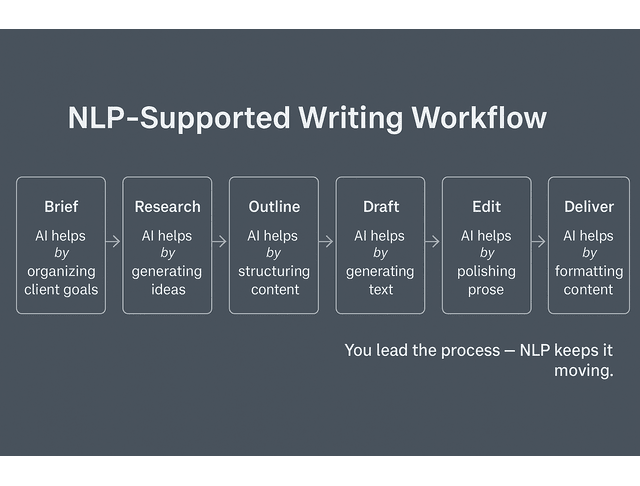
Before adding more tools, examine how you actually work. A simple writing workflow might look like:
- Receive a brief or create your own idea
- Research and collect sources
- Outline
- Draft
- Edit and optimize
- Deliver and archive
Now ask at each step: Where can natural language processing help without taking over?
Here is what that might look like for a single blog project:
- Research phase: Paste three articles into an assistant and ask, “Summarize each in 5 bullets and list any statistics or claims I should fact-check.”
- Outline phase: Share your notes and say, “Turn these into an outline with H2s and H3s for a 1,500-word blog aimed at [audience].”
- Drafting phase: Take one section at a time and prompt, “Expand this bullet list into a rough paragraph in a neutral, professional tone. Leave space for me to add examples.”
- Editing phase: After you revise the draft, ask, “Highlight any sentences that feel unclear or repetitive and suggest cleaner alternatives.”
You are still the one steering the piece. NLP keeps the work moving, rather than letting you stall at a blank page.
Here is a quick snapshot of how this might play out across a normal day: you spend your first hour turning client briefs and research into AI-assisted outlines, your next stretch drafting with the help of expanded bullets and summaries, and your final block tightening language and structure with grammar and style tools. You end the day with real progress instead of feeling like you spent it chasing scattered notes.
Beginner-Friendly NLP Tools for Writers
You do not need to learn to code or touch Python to get real value from NLP. You can start with tools that already fit into your writing routine, then give each one a simple, specific job:
- ChatGPT or similar assistants to summarize sources, shape outlines, and suggest alternate phrasing
- Grammar and style checkers to clean up sentences and adjust tone
- SEO platforms that group related keywords, surface questions, and hint at useful subtopics
- Note and research tools that tag your material, pull quick summaries, and help you find what you saved weeks ago
Think of each tool as a teammate, not a replacement. Give each one a clear, narrow job: maybe one app turns long PDFs into a short, five-point summary; another pulls out related questions and long-tail keywords from your research; a third scans your draft for tone and reading level before you send it to a client. When you start this way—one job per tool—you stay in control and still get meaningful help from NLP instead of feeling buried in new apps.
You can also create simple rules for yourself so your tools never take over the whole process:
- Always start with your own working title and angle before asking for help.
- Ask for bullet points or outlines first, not full drafts.
- Never paste AI text directly to the client without adding your own edits, examples, and checks.
These guardrails keep you in the lead and keep the content aligned with your standards.
Content Calendar With Natural Language Processing for Beginners
Your content calendar can also benefit from NLP-driven support. You can use AI to:
- Generate topic ideas from your niche keywords
- Group ideas into themes for each month
- Identify content gaps compared to competitors
For example, you can feed a list of your recent posts into an AI assistant and ask:
“Identify 10 new topic ideas for freelance writers using AI tools, based on what I have not covered yet.”
The tool uses semantic analysis and topic detection to suggest new directions. You still evaluate what fits your brand and audience, but the heavy lifting of idea generation happens automatically.
You can then follow up with, “Organize these 10 ideas into a 4-week content calendar with two posts per week. Include a suggested primary keyword and content type for each.” In a few seconds, you have a draft calendar that you can tweak instead of building everything from nothing.
Grow With Natural Language Processing for Beginners
AI should protect your energy, not push you closer to burnout. In this final section, you will learn how to scale your income, track your gains, and keep learning NLP in a way that supports a sustainable freelance career.
Use AI to Cut Burnout, Not Add Work
If you are not careful, AI can make your days feel heavier instead of lighter. You start rereading every paragraph it suggests, fixing awkward phrasing, and juggling a stack of apps that all overlap. A better approach is to keep just a few tools, decide exactly what each one is for, and treat their suggestions as drafts that you approve or reject, rather than instructions that you have to follow.
Think of NLP as a way to protect your attention. It handles repetitive language tasks, allowing you to conserve your creative energy for structure, voice, and strategy.
A simple check is to ask yourself, “Did this tool save me time or just create more to clean up?” If you regularly feel that you are fixing AI instead of using it, narrow your prompts and reduce the number of tasks you delegate to it, keeping only the ones that clearly lighten your load.
Track Time Saved and Quality Gains
One way to prove to yourself (and future clients) that NLP helps is to track simple metrics:
- How long does a typical blog take vs now
- How many revision rounds do clients usually need
- How often clients comment on clarity, structure, or speed
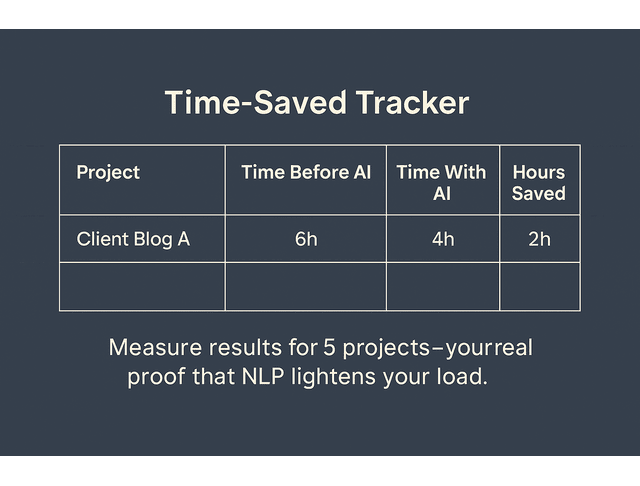
You do not need a complex dashboard. Even a simple note like “Before AI: 6 hours per blog. After: 4 hours, same or better quality” is enough to show that NLP in your workflow is paying off.
Time savings like this show up in broader data, too. A St. Louis Fed analysis reports that generative AI users saved time amounting to 5.4% of their work hours in the previous week, or roughly 2.2 hours in a 40-hour work week.
You can create a quick tracking table in a spreadsheet with three columns: Project, Time Before AI, Time With AI. Log the first five or ten projects where you consciously use NLP for research or outlining. If you save 1 to 2 hours per project, that adds up to 8 to 10 extra hours a month that you can use to pitch, build your own assets, or take a break.
Over time, you can connect those hours to revenue. For example, if you free up 10 hours and use them to book one more mid-range blog package, NLP is no longer just a neat trick. It becomes part of your business case.
Plan Your Next NLP Learning Steps
You do not need to master everything at once. A realistic path looks like:
- Get comfortable using AI assistants for summarization and outlining.
- Learn basic NLP terms to understand the tools available better.
- Experiment with more advanced features, such as semantic search, topic clustering, or sentiment analysis, as your confidence in these tools grows.
You can treat this as a tiered roadmap:
- Level 1: Use AI to summarize sources, outline drafts, and suggest alternative phrasings.
- Level 2: Use topic clustering, content audits, and idea generation for clients.
- Level 3: If you ever want to collaborate with developers or data teams, learn basic NLP concepts more deeply so you can discuss features and constraints.
Most freelance writers can stay at Levels 1 and 2 and still see a significant shift in how light their work feels.
Final Thoughts
You do not need to become a data scientist to benefit from natural language processing for beginners. You only need to understand what it can do for you as a freelance writer: shorten the time from brief to outline, reduce research overload, and protect your energy for the parts of the work that actually require your judgment and voice.
Begin with small steps. Give AI one or two simple tasks while maintaining high standards, and let NLP handle the repetitive work quietly. As you continue to refine your process, you’ll develop a workflow that feels easier, sharper, and more sustainable than doing every step individually.
If you want a practical, no-hype guide to building these kinds of AI-supported workflows into your freelance writing life, explore my books on Amazon. They walk through real examples, repeatable systems, and clear standards you can apply immediately. Visit my Amazon Author page to see which book fits where you are right now and start working with AI in a way that actually protects your time and energy.
Frequently Asked Questions About Natural Language Processing for Beginners
Natural language processing sits in the part of AI that deals with real, everyday language. Think about what happens when you drop a long article into a summarizer and get a handful of clear bullet points back—the system has picked out the key sentences and ideas for you. As a freelance writer, that means you can skim a dense report, pull out what matters, and turn it into working notes in minutes instead of losing half your day to reading.
Think of NLP like a very fast reader that also knows how to sort and reshape what it sees. It breaks down text into manageable chunks, identifies patterns using machine learning, and then provides you with something useful—a summary, a label, or a direct response. Under the hood, it employs techniques such as tokenization, part-of-speech tagging, and neural networks to comprehend meaning and context. However, what you notice is simple: your tools can rewrite, reorganize, and tag your words by simply following the instructions you type in.
For writers, the most useful applications include summarizing research, generating outlines, improving grammar and style, exploring content ideas, and organizing large volumes of text. NLP also drives chatbots, sentiment analysis, and text classification, which teams rely on in marketing, customer support, and content strategy projects. When you use these tools effectively, you deliver better work faster without sacrificing your voice.
No. Many modern NLP tools provide simple interfaces, browser apps, and integrations in the platforms you already use. Coding becomes helpful only if you want to build custom solutions. As a freelance writer, you can get substantial value from natural language processing using no-code tools and AI assistants.
You can talk about results instead of technology. For example, you might say, “I use AI to speed up the research and outlining, then I handle all the writing and editing so the content still sounds like you.” That way, the client hears clear benefits, such as faster turnaround, consistent quality, and a voice that still feels like their brand.

Florence De Borja is a freelance writer, content strategist, and author with 14+ years of writing experience and a 15-year background in IT and software development. She creates clear, practical content on AI, SaaS, business, digital marketing, real estate, and wellness, with a focus on helping freelancers use AI to work calmer and scale smarter. On her blog, AI Freelancer, she shares systems, workflows, and AI-powered strategies for building a sustainable solo business.


Pingback: AI-Generated Content for Freelancers: Start Smart Ship Fast - The AI Freelancer