

You’re not missing deadlines because you’re lazy. You’re missing them because you’re juggling ten client threads across five apps. Slack pings you at midnight, one client prefers email, and another sends revision notes through Google Docs comments. The chaos burns your focus before you even start writing. Research on information workers has found it can take around 23 minutes to fully resume an interrupted task—which is exactly what constant pings and app-switching do to your writing day. This is where team communication tools powered by AI stop being “nice to have” and start being your new foundation.
Freelance writers don’t just create content. You manage projects, clients, and expectations. When you bring AI into tools like Slack and Microsoft Teams, they become more than chat platforms. They become workspace managers that track updates, organize files, and free your brain to focus on creative work.
Everything I’ve shared here—and more—is in my book, available on Amazon. Click the link if you’re ready to take the next step.
Team Communication Tools That Simplify Freelance Collaboration
If you waste even 30 minutes a day digging through messages for one update, that’s over two hours a week lost. That’s time you could have billed or used for pitching. It adds up fast when you consider that knowledge workers can spend nearly 20% of their time just searching for internal information or tracking down what they need. With AI business tools and an AI-driven organization, those hours come back.
How AI Streamlines Client Chats and File Sharing
AI can automatically tag and categorize client messages, ensuring you always know where to find the latest feedback or asset. Instead of searching through channels, type a simple command: “Show latest revisions from [client name].” AI finds them instantly. For example, in Slack, you can use tools like Notion AI or ChatGPT plugins to fetch content directly from threads.
Keeping Deadlines Visible With Smart Channels and Alerts
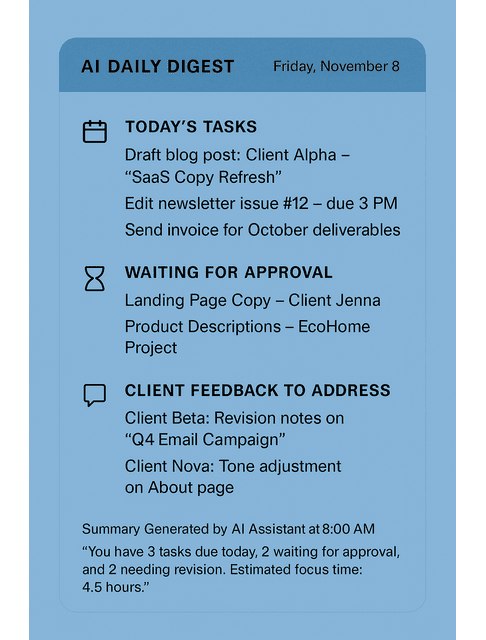
Utilize integrated reminders and AI-powered notifications to automatically surface approaching deadlines, eliminating the need for manual tracking. A quick summary message can tell you what’s due today, what’s waiting for approval, and what’s ready to invoice. Many writers set up a daily digest message every morning with three bullets: today’s tasks, waiting items, and client feedback to address.
Integrating Team Communication Tools Into Project Boards
Connect Slack or Teams to project boards like Trello or ClickUp. When a client says “Approved,” AI automation moves the task card to “Ready to Invoice.” The fewer clicks you make, the smoother your workflow feels. You can trigger these automations through built-in integrations, such as Zapier or Make, to connect your chat, boards, and files without needing to code. These tools link apps for you, so when a client approves something in chat, your project board updates automatically.
Team Communication Tools in Slack: Automate and Organize Work
Slack isn’t just for chatting. It’s a workspace that keeps your freelance projects in motion. When you pair it with AI automations, it sorts, filters, and manages tasks before you even notice a problem.
Auto-Sorting Client Messages With AI Filters
Set up AI filters to distinguish between new client requests and casual chatter. This keeps your workspace clean and helps you respond to urgent messages first. Slack’s Workflow Builder can tag or route messages that include keywords such as “urgent” or “revision needed,” and place them into a priority channel so you don’t miss them. You can also connect Slack to a tool like Zapier, which can take those same tagged messages and send them to other apps, like adding a task in Trello or ClickUp.
How Slack Bots Handle Routine Follow-Ups With Team Communication Tools
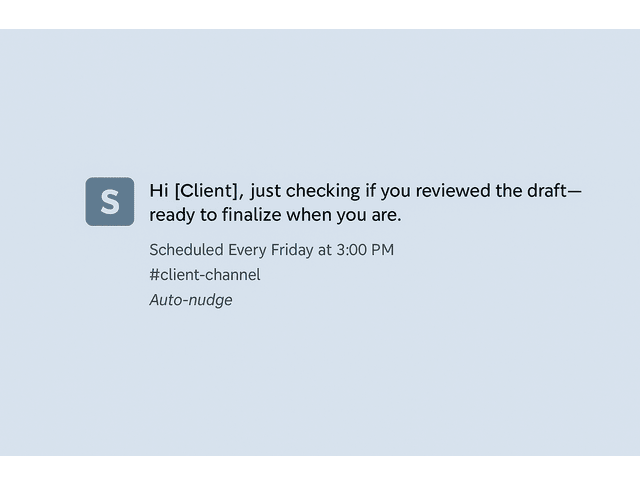
Tired of chasing clients for approvals or missing files? Configure bots to send gentle nudges automatically.
“Hi [Client], just checking if you reviewed the draft. Ready to finalize when you are.”
You look reliable without having to type the same message ten times. A simple automation: every Friday at 3 PM, Slack posts “Anything pending review before Monday?” to your client channel. It keeps things moving without requiring you to chase updates manually.
Quick Wins: Templates for Scope Clarifications and Status Updates
Automation keeps projects moving. Templates keep them from getting messy in the first place.
Save time with prebuilt message templates. AI can personalize them based on tone — firm, friendly, or neutral — so that every update sounds professional and on-brand.
Example:
“Before I start, I want to confirm this includes two blog posts (1,200 words each) and one round of revisions. Please confirm before I proceed.”
Templates like this prevent confusion and scope creep. Both are silent drains on your freelance time.
Elevate Microsoft Teams With AI-Enhanced Team Communication Tools
If Slack feels like a creative hub, Microsoft Teams acts like your digital office. It keeps projects structured, synced, and documented. This is especially useful when you work with corporate clients.
Syncing Teams With Word and OneDrive for Seamless Delivery
Link your writing drafts directly to your Teams channels. Clients can comment, approve, or suggest edits right in the file, and AI keeps version history clear so you never lose track of which draft was final. When invited as a guest, you’ll usually receive access to a shared folder or a dedicated channel. Use that to store your deliverables instead of juggling email attachments.
Automating Client Brief Reviews and Approvals
AI assistants can read through briefs, highlight missing details, and flag contradictions before you begin writing. That saves you from having to rewrite half a project later. Microsoft’s Copilot or ChatGPT integrations can summarize a client’s brief and create a checklist of missing information before you even type the first line.
Real-Time Coediting With Team Communication Tools
Teams allows simultaneous editing. You and the client can work on the same document and resolve wording in real-time, which speeds up the approval process. After a working session or video call, Teams can generate a recap of changes made, key feedback, and next steps, so you don’t have to take notes while you’re talking. Those recaps also create a clear audit trail of who asked for what. That protects you on deliverables and scope.

Choosing the Best Team Communication Tools for Your Freelance Workflow
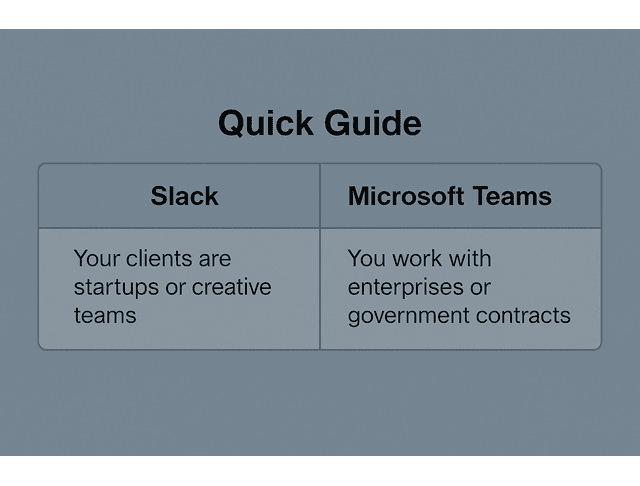
Not every freelancer needs both Slack and Teams. The best setup fits your clients ‘ work style and capacity to automate. The goal isn’t to adopt more software. It’s to design a system that lets you create without chaos.
Comparing Features: Slack vs. Microsoft Teams for Freelancers
Slack is lightweight and flexible. Teams are structured and formal. If you handle agency clients, Teams keeps things aligned with corporate systems. For small-business clients or creative brands, Slack keeps collaboration fast and casual.
Balancing Automation and Authentic Communication
Let AI handle routine updates, but keep your personal tone for key interactions. Clients still want to feel that you’re present and professional, not robotic. For example, let bots send reminders, but personally deliver milestone updates or strategy notes.
Future-Proofing Your Process With AI and Smart Collaboration Platforms
AI is getting more proactive. Soon, you’ll get a nudge that says, “You promised draft one by Thursday. Do you want me to send a status update to Jenna?” You won’t have to remember who needs what. The system will prompt you before small delays turn into missed deadlines, and it will help you stay ahead of client expectations without living in your inbox. Harvard Business Review cites a McKinsey analysis estimating that the average professional spends about 28% of the workday reading and answering email.
Final Thoughts
Start simple: pick one recurring pain point, such as chasing approvals or missing deadlines, and automate that specific task. Once you see how much focus you reclaim, you’ll never go back to doing everything manually. The right team communication tools will protect your time, enhance client satisfaction, and make your workflow more efficient. Start small, experiment with integrations, and let your systems handle the busywork while you focus on the writing.
If you want a ready-to-use playbook for building these systems faster, check out my books on my Amazon Author Page. You’ll find practical templates and step-by-step workflows you can copy, adapt, and plug into your own setup so your tools handle the busywork and you can stay focused on writing.
Frequently Asked Questions About Teem Communication Tools
Slack is flexible and quick for small teams, while Microsoft Teams is structured and integrates tightly with Microsoft 365. Freelancers often prefer Slack’s speed. Corporate clients rely on Teams for document control and formal workflows.
No, but knowing both makes you easier to hire. Most creative clients use Slack. Larger companies use Teams. Familiarity with each saves onboarding time and demonstrates your ability to adapt.
AI assistants can summarize chats, extract tasks, send reminders, and update boards automatically. You stay organized and responsive without having to reread long message threads. Always review summaries before acting. That cuts review time without losing accuracy.
Yes. Many companies invite freelancers into specific Teams channels for briefs, calls, and shared documents. It’s a professional and secure space for client work, often serving as the default for enterprise clients.
Both are secure when configured properly. Teams offers enterprise-level control. Slack provides flexibility. Limit third-party app access to protect client data. If an unreleased draft leaks early, that client may never book you again.

Florence De Borja is a freelance writer, content strategist, and author with 14+ years of writing experience and a 15-year background in IT and software development. She creates clear, practical content on AI, SaaS, business, digital marketing, real estate, and wellness, with a focus on helping freelancers use AI to work calmer and scale smarter. On her blog, AI Freelancer, she shares systems, workflows, and AI-powered strategies for building a sustainable solo business.


Pingback: Best Time Tracking Software: Bill Faster With AI - The AI Freelancer