

Are deadlines piling up? Clients waiting? Brain fried? If you’re a freelance writer, you need a smarter way to work fast. AI workflow integration gives you that edge. It’s not about replacing your creativity. It’s about cutting down on grunt work so you can write more, stress less, and still meet every deadline.
You’re about to learn how to work smarter, not harder. Let’s start with the basics: what these tools do, why they matter, and how to use them without losing your creative spark.
Everything I’ve shared here—and more—is in my book, available on Amazon. Click the link if you’re ready to level up.
AI Workflow Integration Basics: What It Is and Why It Matters
You’re already doing it all: writing, editing, emailing, pitching, planning. But what if parts of that routine could run on autopilot without losing your personal touch? That’s where smart tools come in. They’re not here to take over your job; they’re here to take the pressure off.
This section explains what AI workflow integration actually means in a freelance writing business, why it matters now, and how to use it without losing the human judgment that makes your work valuable.
What AI Workflow Integration Means for Freelance Writers
AI workflow integration means bringing AI into the tasks you already do so your process runs faster and with less friction. Instead of opening a separate tool now and then for random help, you make AI part of the way you research, outline, draft, edit, organize, and communicate.
Think of it this way: AI is most useful when it supports a workflow, not when it becomes the workflow. You still decide the angle, shape the message, and make the final call. The tool simply helps you move through repeatable steps with less drag.
How AI Workflow Integration Supports Your Daily Writing Workflow
AI tools help you speed through repetitive tasks, such as outlining articles, organizing your to-do list, or drafting client emails. That means less time juggling and more time writing.
Picture this: you drop a blog topic into Jasper or Copy.ai. In seconds, you get a headline, structure, and draft. You polish, personalize, and hit publish. Or use Grammarly to clean up grammar and tone in minutes, not hours.
It’s like having a digital assistant who never takes a break and always works quietly in the background, making your day easier while you stay in control.
Why Now Is the Perfect Time to Start
You don’t need fancy software or tech skills to try AI tools. Most of them, such as Notion AI, ChatGPT, and Copy.ai, are straightforward to use and offer free plans to get you started.
Many freelance writers already utilize AI productivity tools to brainstorm ideas, automate emails, and expedite research—and they’re part of a much bigger shift. Microsoft’s 2024 Work Trend Index found that 75% of global knowledge workers now use generative AI at work, with usage nearly doubling in just six months. These tools are no longer fringe; they’re becoming the default.
Even one good tool can save you hours each week. The sooner you start, the faster you lighten your load and focus on what pays.
What AI Can’t Do (and Why That’s a Good Thing)
AI can’t think like you. It doesn’t understand brand voice, storytelling flow, or client needs. It won’t pitch a new idea, solve a complex brief, or land a referral. That’s your job, and no tool can replace it.
And that’s a win. You get to keep what makes your work unique while AI handles the tasks that slow you down. You’re still the writer. The tools help you get there faster.
A Simple AI Writing Workflow That Actually Works
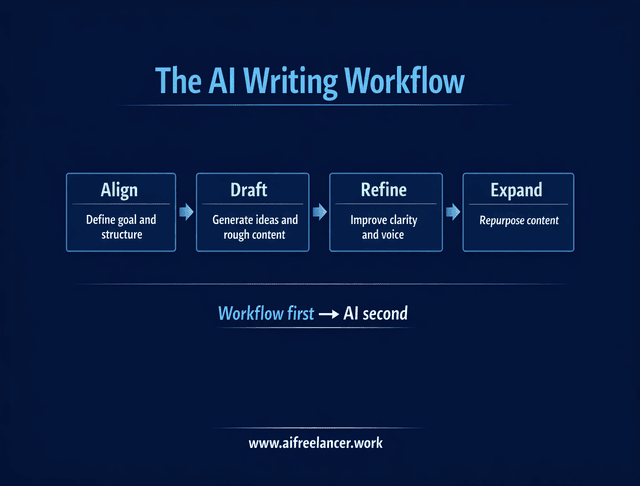
Before you choose more tools, get clear on where AI fits in your process. Most freelancers do better with a simple workflow than a big stack of apps. One practical approach is to think in stages: align, draft, refine, and expand.
Align
This is where you define the goal, audience, format, and angle before any drafting happens. AI can help you clarify the brief, turn messy notes into structure, and suggest content directions. What it should not do is decide the strategy for you.
Draft
Once the direction is clear, AI can help generate rough intros, article structures, social captions, email drafts, and supporting ideas. This stage is about momentum, not perfection. You move faster because you are starting from something instead of from zero.
Refine
This is where human input matters most. AI can tighten grammar, suggest transitions, summarize long passages, or flag awkward wording. But you still control clarity, tone, and logic. This is the stage that keeps your work from sounding generic.
Expand
After the core piece is done, AI can help turn it into other useful assets. A blog post can become a LinkedIn post, client newsletter, caption set, email teaser, or content brief. This is where AI workflow integration starts saving serious time because one finished piece can do more work for you.
Planning for AI Workflow Integration Without Overwhelm
Ready to bring AI into your workflow, but don’t want a tech meltdown? You don’t need a full system reboot; you need smart, simple moves. Start with what’s slowing you down, fix it with the right tool, and build from there.
This section shows you how to ease in, stay in control, and make your day easier, not messier.
Pick tools that match your workflow needs
Start by identifying what’s eating your time. Are you spending hours rewriting emails, planning posts, or juggling deadlines? These are the moments where AI can be particularly helpful.
If writing takes forever, tools like Jasper or Copy.ai can generate rough drafts or content ideas. If you miss deadlines or get lost in task lists, tools like Reclaim or Motion can organize your calendar and priorities for you. For editing, Grammarly or Hemingway can tighten your writing in seconds.
Look for tools that feel easy to use. You want something that fits into your existing workflow, not something that adds extra steps. The best workflow automation solutions handle repeatable, rule-based tasks, such as scheduling, email follow-ups, or content formatting, freeing up your mental space.
To begin, create a brief list of tasks that feel repetitive or frustrating. Then match each to a single tool that solves the issue. That’s your entry point.
Start small with your AI workflow integration rollout
Don’t try to automate everything at once. Start with just one task. Choose something low-risk and high-annoyance, like writing social media captions or summarizing blog content.
Try using ChatGPT to generate a client update email. Or let Copy.ai create a first draft of a blog intro for you. Then refine the results to sound like you. That’s how you build trust in the process by staying involved.
This slow-and-steady method reduces pressure while giving you quick wins. Once you see the results, you’ll be more confident adding other tasks over time. It’s all about building habits that stick.
Build around one workflow, not a pile of tools
A common mistake is collecting tools before fixing the process. That usually creates more tabs, more logins, and more confusion. Start with one workflow you repeat often, such as writing blog posts, sending client updates, or repurposing content for social media.
Then ask where AI can remove friction inside that workflow. Maybe it helps outline faster, clean up rough drafts, summarize research, or turn a finished article into promotional posts. That approach gives you a usable system instead of a random set of apps.
Train your team for a smooth transition
Even if you’re mostly solo, you may collaborate with clients, virtual assistants, or other freelancers. If AI tools touch shared workflows, it’s worth looping in the people involved.
Keep it simple. Walk them through how the tool works and why you’re using it. Share prompts or templates you’ve already tested. Offer a few clear examples of how it improves your workflow.
A good AI adoption strategy includes clear communication, realistic expectations, and human checkpoints. Whether it’s internal or client-facing, make sure everyone feels supported and involved. That’s how you get real buy-in without confusion or resistance.
Optimizing Your AI Workflow Integration with the Right Tools
Once you’ve eased in and chosen the right tools, it’s time to make them work for you every single day.
Are your AI tools ready? Now, it’s time to put them to work. The goal: cut the clutter, save your brainpower, and get more done in less time. Whether you’re flying solo or collaborating with clients, these tools can crush busywork, boost communication, and help you level up your workflow fast.
Automate time-wasting tasks like a pro
Start by handing off the tasks that drain your time and are time-consuming to repeat every day. Think about things like replying to routine client emails, formatting invoices, renaming files, or pulling links from content briefs.
Instead of spending 30 minutes writing a status update, let ChatGPT create a first draft in seconds. Use Grammarly to refine your writing quickly and effectively. Or rely on Trello’s AI-powered automation to move tasks between boards based on status.
These are perfect examples of automating tasks with AI; you’re not giving away control, just clearing the clutter. And the payoff can be huge: a major workplace survey from the Adecco Group found that AI is saving workers an average of one hour per day, time they can reinvest in creative or higher-value work. Start small and track which tasks give you the most time back.
Use AI where freelancers lose the most time
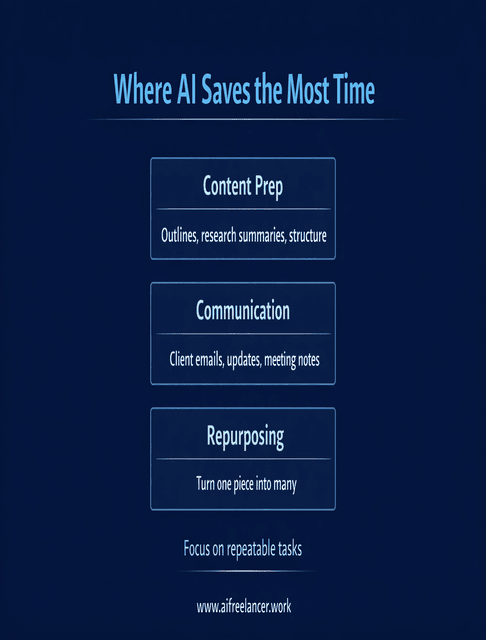
For freelance writers, the biggest gains usually come from three areas: content prep, communication, and repurposing. Content prep includes outlining, summarizing research, and turning notes into structure. Communication includes client updates, follow-ups, and meeting summaries. Repurposing includes turning one article into posts, emails, or shorter assets.
These are strong use cases because they are repeatable, necessary, and easy to review. You are not handing over high-stakes creative decisions. You are speeding up the support work around them.
Use AI to improve team collaboration
Even if you’re a solo freelancer, chances are you work with someone, a client, editor, assistant, or project manager. AI can smooth that process by helping you stay clear, fast, and on point.
Need to update a client after a meeting? Use Notion AI to summarize notes and highlight key takeaways. Do you want to follow up on action items from a Slack thread? Try a Slack bot that pulls those for you.
These tools don’t just save time. They reduce misunderstandings, expedite response times, and keep projects moving forward. That’s where AI tools for professionals shine: less time chasing feedback and more time creating.
Track your AI workflow integration results and refine
Once AI is part of your process, it’s important to check what’s working. Don’t just assume a tool is helping; measure it.
Did using AI shave off time from content creation? Are edits happening faster? Are you communicating more clearly with clients? Jot down a few weekly notes or use a simple time-tracking app, such as Toggl, to compare how long tasks used to take.
Look at one metric: time saved, speed to delivery, or fewer back-and-forths with clients. If a tool isn’t pulling its weight, replace it. This is how you refine your system and make AI workflow integration work better over time, not messier.
Real Examples of AI Workflow Integration for Freelance Writers
Blog writing workflow
Use AI to turn a topic into possible angles, outline the article, generate a rough intro, and summarize research notes. Then step in to shape the argument, improve flow, and bring in your voice. This works best when AI handles the setup and you handle the substance.
Client communication workflow
After a call or project update, use AI to summarize notes, draft a recap email, and pull out next steps. You review, personalize, and send. This shortens admin time without making communication feel robotic.
Content repurposing workflow
Once a blog post is finished, use AI to turn it into a LinkedIn post, a short email, a few social captions, or a content brief for future related pieces. This is one of the easiest ways to get more value from work you have already completed.
Avoiding Common Pitfalls in AI Workflow Integration
AI tools can level up your writing game or wreck your workflow if you’re not careful. Chasing every shiny new app? That’s burnout waiting to happen, and relying on automation without clear AI writing workflows? You risk losing your voice, your edge, and even your clients’ trust.
Let’s break down the most common mistakes freelancers make with AI and how to dodge them like a pro.
Don’t overload yourself with too many tools
New tools pop up every week, each promising to “revolutionize your workflow.” But piling on too many creates confusion and slows you down.
Stick to a one-tool-per-task rule. Use one for writing (like Jasper or ChatGPT), one for editing (like Grammarly), and one for planning or scheduling (like Motion). If a tool doesn’t save you time, reduce stress, or improve output within two weeks, cut it.
Jumping between platforms kills your momentum. A lean setup helps you stay focused and consistent. Simplicity beats novelty in every stage of AI workflow integration.
Keep the human touch where it matters
AI can assist with drafting, outlining, summarizing, and formatting. But your voice, ideas, and judgment? That’s all you.
Let AI write a rough intro, but you write the headline. Allow it to list five blog ideas, but you choose the one that fits your client’s audience. Creativity, tone, and storytelling remain yours.
People want content that connects, and only a human can deliver that. Don’t lose what makes you valuable by letting AI do the parts that need heart, not just logic.
Prioritize data privacy and ethical practices
Some tools store, analyze, or even train on the content you give them. That means you need to be smart about what you share, especially if you work with clients.
Avoid uploading confidential drafts, outlines, or briefs to public AI tools unless they offer a private, secure mode of operation. Read privacy settings carefully. Tools like Notion AI, for example, provide options to turn off training on your content.
Be upfront about AI use when needed. If a client receives a draft that is partially generated by AI, disclose this. Staying ethical fosters trust, protects your work, and builds a stronger long-term reputation.
A solid AI adoption strategy includes data care, transparency, and human review, not shortcuts.
Don’t let AI create more editing than it saves
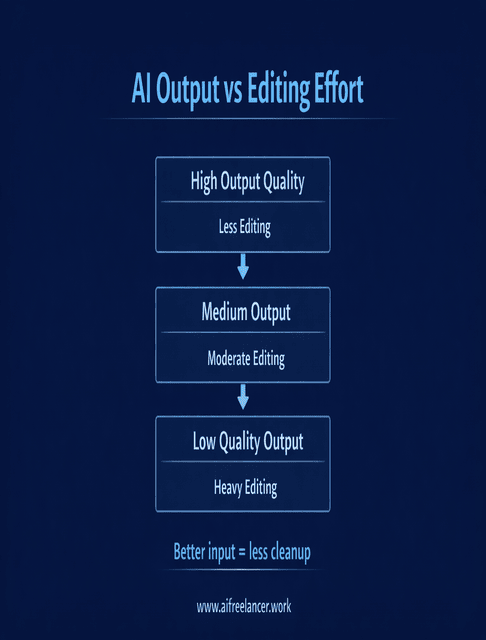
Faster output is not always better output. If a tool gives you generic drafts that take longer to fix than to write yourself, it is not helping your workflow. The goal is not to produce more words. The goal is to reduce effort while protecting quality.
This is why AI workflow integration works best when you use it for structure, support tasks, and repeatable process steps. When you rely on it too heavily for core thinking, the editing load usually comes right back.
How to Start with AI Workflow Integration This Week
If you want to make progress without overcomplicating things, keep it simple. Pick one repetitive task that annoys you, choose one tool to support it, and test it in one real project. Then review the result. Did it save time? Did it improve clarity? Did it create more editing work than it removed?
If the answer is yes, keep it. If not, change the setup and test again. That is how useful AI workflows are built. Not by downloading everything at once, but by solving one real problem at a time.
Final Thoughts
You don’t need to be a tech whiz to use AI tools or spend hours learning them. You need to start by choosing one task to simplify, picking a single tool, and testing it in a real project before expanding gradually. As you build from there, you’ll save time, write better, and stay in control. That’s not just smart; that’s next-level freelancing.
If you’re serious about writing faster without losing your voice, my books break down the exact workflows behind it—what to use, when to use it, and how to stay in control while AI does the heavy lifting. Browse my author page on Amazon, choose the one that fits where you are right now, and start building a writing system that actually works in real freelance projects.
Frequently Asked Questions About AI Workflow Integration
It’s the process of plugging AI tools into specific steps of your writing process—like research, outlining, drafting, or editing—so routine tasks run faster while you stay in charge of ideas, structure, and final voice.
They speed up repetitive work: turning briefs into outlines, summarizing sources, drafting emails, or suggesting edits. That frees your time and energy for higher-value tasks like strategy, storytelling, and client communication.
It can if you copy outputs verbatim. To avoid that, treat AI as a first-draft partner: use it for structure and raw text, then rewrite, add examples, and layer in your tone so the final piece still sounds like you.
Start with low-risk, high-annoyance tasks: brainstorming ideas, creating outlines, summarizing research, drafting routine emails, or repurposing content. These wins build trust in your AI writing workflows without touching your most creative work.
Not at the beginning. One solid general tool (like a chat-style AI) plus an editor (like Grammarly or a similar checker) is enough to start. Add more only when a clear gap emerges—such as in project management, scheduling, or SEO optimization.

Florence De Borja is a freelance writer, content strategist, and author with 14+ years of writing experience and a 15-year background in IT and software development. She creates clear, practical content on AI, SaaS, business, digital marketing, real estate, and wellness, with a focus on helping freelancers use AI to work calmer and scale smarter. On her blog, AI Freelancer, she shares systems, workflows, and AI-powered strategies for building a sustainable solo business.


Pingback: AI Tool Integration: Boost Workflow for Freelance Writers - The AI Freelancer