

You sit down, ready to write, but administrative work eats your first hour. You chase invoices, tidy up drafts, check for late payments, and rack your brain trying to remember who asked for “just a tiny tweak.” By the time you finally face the blank page, your concentration already feels worn down. This is where AI productivity tools can quietly change the way you work.
You do not need to become a tech expert or overhaul your entire system. You only need to hand off the repetitive, low-value tasks that keep stealing time from your best writing. Imagine sending all last month’s invoices in ten minutes instead of an hour, or seeing your whole week laid out clearly before you say yes to anything new. By the end of this article, you will know how to use AI to fix three parts of your day: client admin, project chaos, and your limited focus time. You will also learn how to utilize those gains to grow sustainably.
Digital distraction has a measurable cost. Research discussed by the American Psychological Association, featuring attention researcher Gloria Mark, notes that after an interruption, it can take around 25 minutes to fully return to the original task.
Everything I’ve shared here—and more—is in my book, available on Amazon. Click the link if you’re ready to take the next step.
AI Productivity Tools for Easier Client Admin
Client admin is often where freelance writers lose the most energy. Invoicing, tracking payments, and logging expenses can drain the time you need for billable work. This is one of the places where AI business tools can make an immediate difference. A few simple AI tools can turn this part of your workflow into a quick routine instead of a weekly headache.
Set Up Smart Invoicing and Payment Reminders
Instead of building every invoice from scratch, use AI invoicing software or smart billing features inside tools like PayPal, Stripe, or dedicated invoicing apps.
You can:
- Save standard services, rates, and payment terms.
- Generate invoices from simple prompts such as:
- “Create an invoice for Client A: 2 blog posts at $200 each, due in 15 days.”
- Set automatic reminders that send polite follow-ups when an invoice is overdue.
Late payments also create a hidden time tax. Intuit QuickBooks research found that 65% of businesses reported spending an average of 14 hours per week on administrative tasks related to collecting payments.
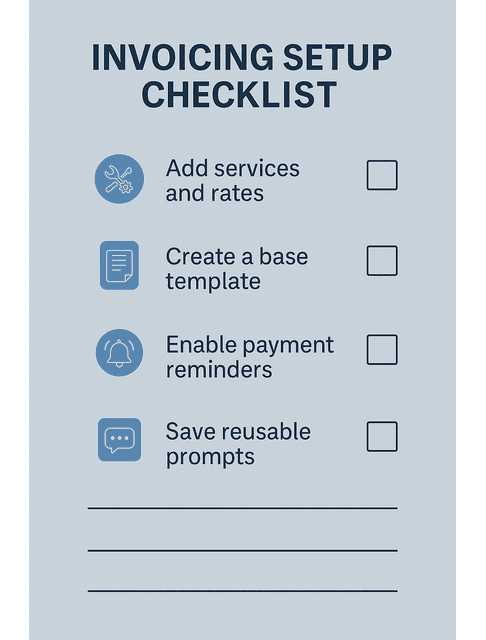
To make this real, you can follow a simple setup sequence:
- List your most common services and packages, along with their standard rates.
- Create a base invoice template that incorporates your logo, brand colors, and payment terms.
- Enable reminders so the tool sends a follow-up after a specified number of days, such as 7 or 14.
- Save a reusable prompt like: “Draft an invoice for [client] for [project], include due date in 15 days and a friendly note of thanks.”
You can also ask AI inside the tool to help with wording:
- “Draft a polite reminder for an invoice overdue by 7 days. Keep it friendly, three sentences max.”
- “Summarize this month’s invoices by client and total amount so I can see who pays the most and who is late.”
You are not trying to pressure clients, but rather creating a steady, low-stress system where you send invoices promptly, follow up on time, and avoid wasting mental energy worrying about cash flow.
AI Productivity Tools That Generate Clean, Branded Invoices
Plenty of invoicing tools now include ready-made templates and basic AI support for layout and copy. You can drop in your logo, select your brand colors, and save a standard template, ensuring every invoice looks consistent.
Then you only need to change the client name, services, and amount. The tool formats everything into a clean PDF and stores a record for your files. Over time, this consistency makes you look more professional. It helps clients trust that you run a serious business, not a hobby.
You can also store different invoice templates for other offers, such as retainers, one-off strategy calls, or long-form content packages. This keeps everything fast and consistent, even when your services vary.
Log Income, Expenses, and Taxes Without Spreadsheets
If you hate spreadsheets, you are not alone. Instead of maintaining complex files, use bookkeeping apps that categorize transactions and create basic reports for you.
Many of these tools can:
- Pull in payments from PayPal, Stripe, or your bank.
- Suggest categories for income and expenses.
- Generate simple profit and loss summaries for your accountant.
Go one step deeper by setting up categories that reflect real freelance life, such as software subscriptions, domain and hosting, design assets, courses, coworking, contractors, and travel. You can also tag certain items as “Quarterly Taxes” or “Retainer Client” so you can see how much of your income is stable and how much goes to tax obligations.
You stay in control, but the software does the sorting. This makes it easier to see which services generate the most revenue and which tools or subscriptions are quietly eroding your profit.
Tidy Your Projects with AI Productivity Tools in the Background
Once your money flow feels calmer, the next big stressor is project chaos. Tasks often reside in note-taking apps, emails, and sticky notes. You remember requests while brushing your teeth and hope you will not forget them by morning. AI-enabled task management tools help you turn scattered information into clear plans.
Turn Messy To-Do Lists into Clear Project Plans
Start by picking one central place for your tasks. This can be an AI task manager like ClickUp, Notion, Motion, or any tool you find intuitive.
Paste in your messy to-do list or the latest email thread. Then ask the tool to:
- Extract tasks from the text.
- Group them by client or project.
- Add deadlines based on the dates mentioned in the message.
What felt like a wall of text becomes a structured list: “Draft outline,” “Write first draft,” “Revise based on comments,” and “Prepare social captions.” You can then drag and drop tasks into the days you can realistically handle them.
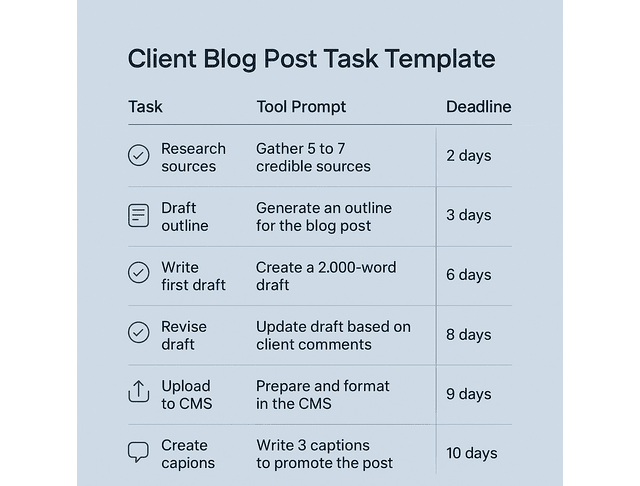
To make it even more concrete, imagine a single blog post project for a retainer client. From one brief, your tool can create tasks such as:
- Research 5 to 7 credible sources.
- Draft outline and send for approval.
- Write a 2,000-word first draft.
- Revise after client comments.
- Upload to CMS and format.
- Create three social media captions to promote the post.
A quick prompt, such as “Turn this client brief into a six-step task list with due dates over the next 10 days,” can create this structure in seconds.
Use Automation to Group Tasks by Client and Deadline
Most project management tools now include some level of automation or AI workflow automation.
For example, you can:
- Automatically tag any task with “Client B” if their name appears in the description.
- Move tasks with due dates within three days into a “Priority” view.
- Create recurring tasks for monthly retainers or regular content plans.
You can also tie email and tasks together. A simple rule, such as “When an email contains the phrase ‘brief attached,’ create a task called ‘Draft outline for [Client]’ with a due date in three days,” stops that brief from vanishing in your inbox.
See Your Weekly Workload Before You Say Yes
Scope creep and overbooking often begin with a simple ‘yes’. Before agreeing to new work, you need a clear picture of the week ahead.
Your AI-powered planner can:
- Display how many hours you’ve already committed.
- Highlight the days on your calendar that are already fully booked.
- Estimate how long similar tasks have taken you in the past.
Time disappears in search and switching, too. McKinsey has noted that knowledge workers spend roughly 20% of their day searching for and gathering information, which is exactly the kind of drag a clean system and smarter tools reduce.
You can also establish simple capacity rules for yourself. If you know a long-form article takes you about five focused hours, and you have room for only two of those a week, your planner can flag whenever you schedule more than that. A glance might show that you are already at 10 hours of heavy drafting and 5 hours of meetings before you even add new pitches.
When you see your capacity on a calendar or simple dashboard, you are more likely to negotiate deadlines or decline projects that do not fit. This is how you protect both your schedule and the quality of your writing.
Protect Your Writing Time Using AI Productivity Tools
Your writing time is your most valuable asset. If you let notifications, emails, and “quick checks” leak into that block, your best ideas suffer. AI can help you defend that window without needing to be online all the time.
Block Focus Sessions and Auto-Silence Low-Priority Pings
Use time-blocking tools, calendar assistants, or focus apps that integrate with your browser and phone. Set a daily or weekly writing block and tell the tool:
- Which apps to mute
- Which notifications can still come through in emergencies
- When the focus session starts and ends
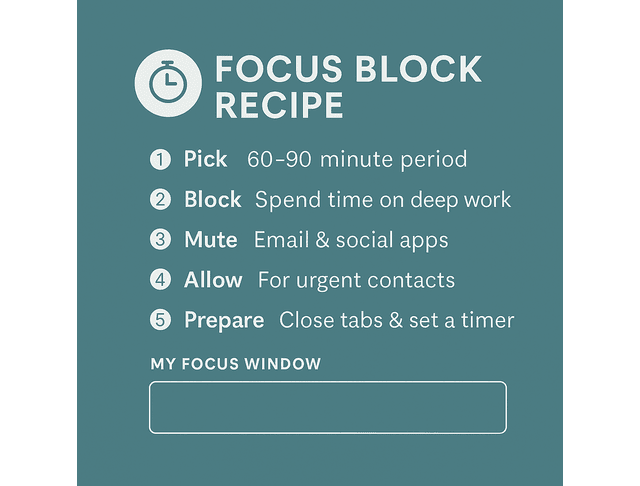
You can design a simple focus block recipe:
- Choose a 60 to 90-minute window when your brain feels sharpest
- Schedule it on your calendar as “Client work” or “Deep writing”
- Set your focus app to mute email, messaging apps, and social media during that time
- Allow only urgent channels, such as a single client, Slack, or phone calls from family
- Before you start, close unrelated tabs, open your outline, and launch a basic timer
During this window, your environment supports deep work. You are not relying on willpower. You are letting your tools enforce the quiet that your best writing needs.
Ask AI Productivity Tools to Batch Admin Between Drafts
Admin tasks are inevitable, but they don’t need to interrupt your workflow every ten minutes. Instead of checking email constantly, use tools that:
- Collect new messages and comments in the background.
- Summarize them at set times.
- Suggest short replies or next actions.
You can schedule two or three short admin blocks between drafts, then let the tool present everything in a quick digest. A typical flow might look like this:
- Connect your email and project tools to a summarizer.
- Ask it to generate a digest at 11 a.m. and 4 p.m. each weekday.
- Have it group items into “Urgent,” “This week,” and “FYI.”
- Request suggested reply drafts, such as “Write a 3-sentence reply confirming receipt of the brief and promising a draft by Friday.”
This keeps your attention anchored in the work without losing track of client communication.
Use Time-Tracking Apps to Spot Energy Drains
Time tracking is not about squeezing more minutes from your day. It is about seeing where your energy leaks.
Use a simple tracker to label your time as:
- Deep work (writing, revising, outlining).
- Admin (invoicing, email, scheduling).
- Overhead (tool setup, learning, context switching).
After a week or two, review the patterns. If you notice two hours a day vanish into email, that is a clear place to bring in automation or smarter workflows. If drafting takes significantly longer for certain types of projects, you can adjust your pricing or process accordingly.
Then decide what to change:
- If context switching appears in many small blocks, try grouping similar tasks into one batch and check whether the total decreases next week.
- If a certain type of project consistently takes 50 percent more time than expected, consider adjusting your rate for that format or limiting the number of projects you accept.
This type of data helps you make informed, calm decisions about what to keep, what to delegate to AI, and what to discard completely.
Plan Sustainable Growth with AI Productivity Tools
Once your admin, projects, and focus time are under control, you can use AI to plan for growth in a way that does not burn you out. The goal is not to cram more into your week, but to choose better work and build a stable, long-term business.
Build Simple Dashboards for Revenue, Pitches, and Capacity
Instead of guessing how your business is doing, connect your invoicing, time tracking, and project tools to a simple dashboard.
You can track:
- Monthly revenue.
- Revenue per client or per service.
- Average hours spent per project type.
- Number of pitches sent and accepted.
AI reporting and analytics features can highlight trends, such as which packages are most profitable and which clients consistently pay late. You can then use this information to refine your offers and set firmer boundaries.
Each number ties to a decision. Suppose a client generates high revenue but requires twice as much time as everyone else. In that case, consider raising your rate for them or shifting them to a more comprehensive package. If your pitch-to-win rate is low, you can experiment with a new pitch template and ask AI to help you test variations.
Review Monthly Patterns to Choose Better Clients and Projects
Set a recurring monthly review where you look at:
- Which projects felt draining, even if they paid well
- Which clients are easy to work with and pay on time
- Which tasks would you like to automate or delegate next
Use your insights to decide where to focus your marketing, which service to promote, and which types of projects you will no longer accept. Over time, this shifts your client base toward work that supports your health and income.
You can even run simple “what worked” questions through an AI assistant using your notes: “Summarize which projects this month paid the most per hour and felt the least stressful.” This helps you see patterns that your tired brain might miss on its own.
Design a Weekly Reset Powered by AI Productivity Tools
A weekly reset keeps your system from slowly drifting back into chaos.
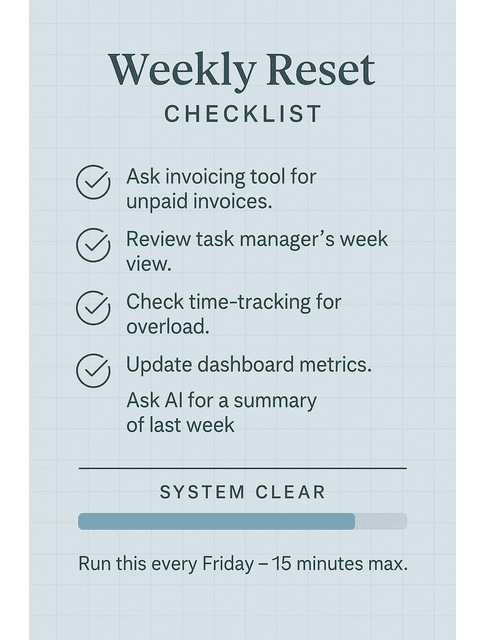
During this reset, you can:
- Ask your invoicing tool for a list of unpaid invoices.
- Review your task manager’s upcoming week view and move anything unrealistic.
- Check your time-tracking or calendar data for signs of overload.
- Update your dashboard with key metrics, including revenue, pitches, and hours.
- Ask your AI assistant for a one-paragraph summary of last week’s work and big wins.
This routine does not need to take long. Ten to twenty minutes is often enough, especially when AI handles the summaries.
Final Thoughts
AI productivity tools will never replace your craft. You use them to strip friction out of your work, from invoicing and scheduling to tracking and planning. Start by improving just one area, such as automating invoices or switching to a clearer task manager, and you will immediately feel a shift in your focus, energy, and confidence. Pick one area—admin, projects, or focus—and set up a single AI assistant to support it this week.
Your words are your real value. Let the machines handle the paperwork.
If you want step-by-step setups you can copy, plus ready-to-use templates for admin, project flow, and focus systems, visit my Amazon Author page. My books break down how to choose the right AI assistants, connect them to the tools you already use, and build a workflow that saves hours every week without sacrificing your writing voice.
FAQs about AI Productivity Tools
AI productivity tools are apps that utilize smart automation to manage tasks such as invoicing, task lists, scheduling, and simple reports. For freelance writers, that means less time on admin, a clearer view of active projects, and more hours left for actual writing. In some tools, you can even paste a long email chain and get a clean to-do list with suggested deadlines.
You do not need a technical background. Most tools use simple interfaces with prompts, templates, and buttons you can click without any coding. If you can describe what you want in plain language, you can get the tool to do it for you.
Choose invoicing apps that handle recurring bills, send automatic reminders, and generate simple reports. Many accounting tools and payment platforms now use AI to sort expenses, draft invoice messages, and forecast cash flow. The best option links directly to where your clients pay—like PayPal or Stripe—so sending your next invoice feels easy and natural.
You can lean on focus apps, smart calendars, and AI-driven email tools to mute distractions, group admin into a few short sessions, and surface only the messages that actually matter. That way, you protect longer blocks of clear time for drafting and revising. Even a single focused 60-minute session on most days can lift both the quality and speed of your writing.
Begin with what causes the most stress—maybe overdue invoices or a messy task list. Select one tool to address the issue and use it consistently for a few weeks. Once it becomes part of your routine, layer in the next step: organize invoicing in month one, centralize tasks in month two, and add a quick weekly review in month three.

Florence De Borja is a freelance writer, content strategist, and author with 14+ years of writing experience and a 15-year background in IT and software development. She creates clear, practical content on AI, SaaS, business, digital marketing, real estate, and wellness, with a focus on helping freelancers use AI to work calmer and scale smarter. On her blog, AI Freelancer, she shares systems, workflows, and AI-powered strategies for building a sustainable solo business.

