

You sit down to write, open your inbox “for a minute,” and the morning disappears into admin. The cursor blinks. You feel behind before you begin. This is where AI-generated content helps you break the stalemate without losing your voice. Used effectively, it speeds up research, outlining, drafting, and editing while you maintain control over quality, tone, and facts. First, you’ll get a 20-minute quick start and micro demo. Then you’ll turn it into workflows, choose safe tools, and measure results for clients.
That “lost morning” is not just a feeling. Microsoft’s Work Trend Index reports that during core work hours, employees are interrupted every two minutes on average by meetings, emails, or chats, with heavy recipients experiencing 275 pings a day.
Everything I’ve shared here—and more—is in my book, available on Amazon. Click the link if you’re ready to take the next step.
AI-Generated Content Basics: What Freelancers Need First
Every freelance writer knows the dread of a blinking cursor and an empty page. This section demonstrates how to utilize AI-generated content to alleviate pressure with a steady, structured approach that saves time and fosters confidence.
Quick Start: One Research-to-Draft Sprint (20 Minutes)
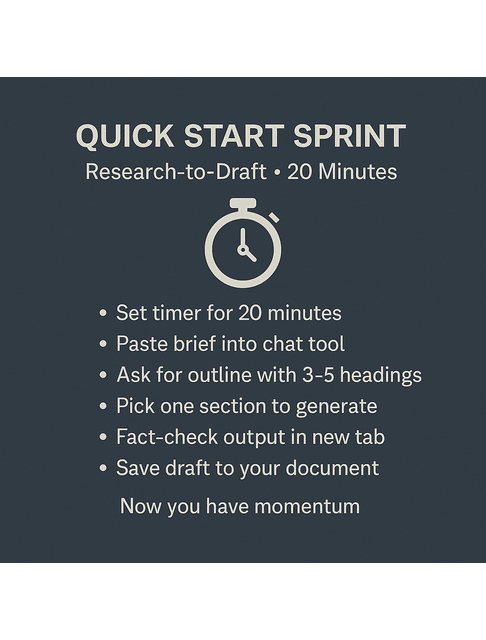
Set a timer. Paste your brief into a chat tool. Request a concise outline with 3 to 5 headings (H2s). Pick one section. Generate a first pass that includes two examples and one statistic with a source. Fact-check the claim in a new tab. Save the draft to your doc. Stop the timer. You now have momentum and a repeatable micro-process in place.
Takeaway: When the timer ends, you’ve shipped a verified section.
Use the sprint when you’re on a deadline; use the micro demo when you want to see the method with real inputs and an edited output.
Micro Demo (Worked Example You Can Copy)
- Brief (topic & audience): “For beginner B2B SaaS marketers, explain how to write a client case study.”
- Prompt (outline): “Outline a 1,200-word post with 4 H2s and two examples. If you suggest stats, include the source title.”
- Model outline (excerpt): 1) Pick a wins-focused angle • 2) Gather proof (quotes, numbers) • 3) Structure (Problem → Approach → Results) • 4) Publish & repurpose
- Prompt (single-section draft): “Write 150 words for ‘Gather proof’ with one real stat and a source title.”
- Raw output (shortened): “Collect baseline metrics and outcomes… Include quotes from customer champions…”
- Fact check: Swap any vague blog-to-blog stat for a verifiable metric from a primary report (e.g., the latest CMI B2B Benchmarks or a recent HubSpot/industry study). Name the report title and year.
- Edited final (150 words): Tighten verbs, remove hedges, add one quoted sentence from a real stakeholder, and link the actual report title.
- Takeaway: Work small, verify fast, and edit for voice before scaling up.
Next, you’ll turn this section-by-section method into a reusable workflow.
Start With AI-Generated Content to Break Blank-Page Pressure
Use a simple prompt to start: “Given this brief and audience, draft a 150-word section that explains X with one example and one cited stat.” A small, specific request is more effective than an open-ended one.
Takeaway: Specific asks consistently outperform open-ended prompts.
When you map your writing flow—research, outline, draft, then edit—you make first drafts predictable and easier to improve. Feed the model different inputs at each stage: notes and sources during research, clean headings for the outline, bullet points for section drafts, and a short style card for edits. The goal isn’t to automate thinking; it’s to assign a clear task to each pass so momentum never stalls.
Guardrails keep quality steady. Build a one-page style card from three of your best samples and pull out tone traits, phrase patterns to use, and phrasing to avoid. Pair that with a simple E-E-A-T check and a three-pass edit—facts first, voice second, structure last—so the final piece sounds like you and stands on verifiable ground.
Workflows That Turn AI-Generated Content Into Real Deliverables
Ideas don’t matter until you turn them into polished drafts that win approval. Here’s how to use AI to build repeatable writing workflows that keep you productive without sacrificing your creative edge.
From Brief to Draft: Outlines, Section Expansions, Examples
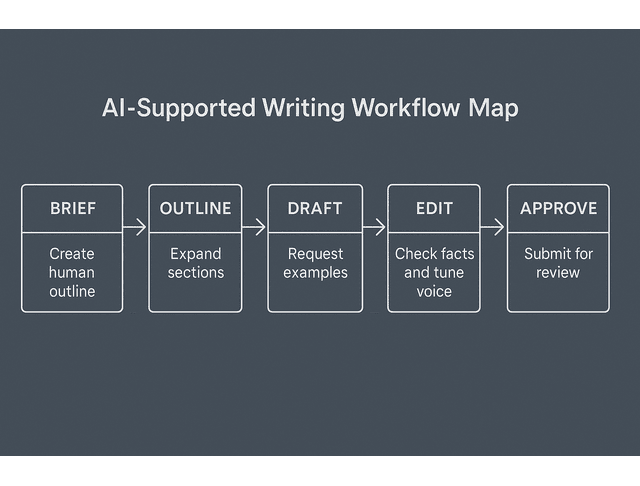
Now that you’ve tested the method on one section, scale it to a full piece. Start with a human outline. Let AI expand single sections, not the full article: request examples, edge cases, and brief scenarios. Keep paragraphs tight and verbs strong. If a section feels thin, request three contrasting examples or a quick counterpoint to increase depth.
Takeaway: End each section with one plain-English takeaway sentence.
Build Reusable Prompts and Templates for Repeat Tasks
Save what works, so you don’t have to rebuild from scratch next time. Examples: outline builder, example expander, FAQ generator, title variants, and meta description drafts. Turn each into a template with variables for topic, audience, desired length, and reading level. You now have a personal prompt library that shortens setup time.
This matters more than most writers realize because app-switching quietly eats the time you think you’re “saving.” Harvard Business Review reports that workers toggle between apps and websites roughly 1,200 times a day, which adds up to just under four hours a week spent reorienting after switching.
Takeaway: A prompt library turns wins into SOPs.
Human-in-the-Loop Editing for Tone, Accuracy, and Clarity
Run the three-pass checklist: facts → tone → structure.
- Facts: verify stats, names, and links in a browser.
- Tone: compare to your style card.
- Structure: tighten transitions, remove redundancy, and add signposts.
Finish with a single-sentence takeaway for each subsection. Stop when every subheading has one clear takeaway sentence.
Before you edit, remind the model—and yourself—what your voice sounds like. Read three samples, name five traits that actually show up on the page, and write a short list of phrases you lean on and phrases you cut. Paste that note into your chat when you request revisions, then read the result aloud and decide whether to keep or discard changes by ear. A quick before-and-after comparison will tell you if the guidance is working: the tuned version should compress clichés, punch up verbs, and maintain your rhythm without sacrificing your personality.
Tools, Costs, and Ethics for Writers Using AI-Generated Content
AI tools can sharpen your process—but only if you understand their limits, costs, and responsibilities. Discover how to select the ideal stack, evade plagiarism pitfalls, and maintain your professional integrity.
Pick Your Stack: ChatGPT, Notion AI, Grammarly, and Docs
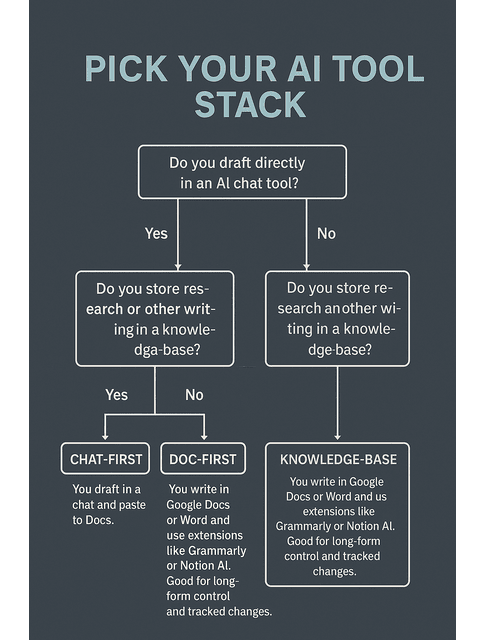
Choose the environment that fits your habits.
- Chat-first: you draft in a chat and paste to Docs. Good for exploration and rapid ideation.
- Doc-first: you write in Google Docs or Word and use extensions like Grammarly or Notion AI. Good for long-form control and tracked changes.
- Knowledge-base: you store research and snippets in Notion, Obsidian, or a wiki, then prompt from that source. Good for repeat clients and complex topics.
Costs & Throughput Snapshot (Typical Ranges)
Expect the following time savings: your cash cost depends on the plan/tokens.
| Deliverable | Steps Used | Time (Manual) | Time (With AI) | Notes |
| 800-word email | Outline → section expansion → tone edit | 2.0–2.5h | 1.2–1.6h | Gains from outline+examples; quick voice pass |
| 1,500-word blog | Research → outline → sections → 3-pass edit | 4.0–5.5h | 2.5–3.5h | Biggest savings in first-draft generation |
| 3,000-word guide | Brief → research table → sections → fact audit | 8.0–10.0h | 5.0–7.0h | Still needs rigorous sourcing + human review |
Plagiarism, Detectors, and When to Credit AI-Generated Content
Detectors are not proof of authorship and can produce false signals. Avoid copy-paste from unknown outputs. Pull facts from primary sources. Paraphrase with understanding, not cosmetic swaps. If a client requires disclosure, use a short, clear line: “I use AI tools to speed research and structure. I write and edit the final content, and I verify all facts.” Anchor quality to citations, clarity, and usefulness—not scores.
AI speeds drafting, but it doesn’t decide the facts—plan for tokens or a monthly plan, and reserve even more time to verify. If you can’t tie a claim to a primary source, delete it. For sensitive topics, consider bringing in a second human reviewer and sending any uncertain content back to the research team for review. Use the tool to accelerate your judgment, never to replace it.
Attribution stays simple when you write it down once. Link stats to the original report, credit quotes with the author, publication, and date, and record image licenses where you grabbed them. If you edit AI output, leave a brief note in the document history so collaborators can see the handoff. These small habits prevent rework and expedite the approval process.
Measure Results: Prove AI-Generated Content Improves Your Work
Numbers tell the story that opinions can’t. This section helps you track the actual changes that occur when you integrate AI—time saved, SEO impact, and measurable proof of quality for your clients.
Tracking Sheet
Use this simple sheet to measure what changes when you add AI to your writing process. Log each project’s word count, manual time, AI-assisted time, and revision notes. Seeing the numbers will help you prove results to clients and refine your workflow.
| Project | Words | Manual Time (h) | With AI (h) | Hours Saved | Revision Rounds | Outcome Note |
| Blog A | 1500 | 4.8 | 3.1 | 1.7 | 1 | Minor edits only; examples clear |
| Case B | 1200 | 3.6 | 2.5 | 1.1 | 0 | Approved v1; quotes strong |
| Guide C | 2500 | 8.0 | 5.4 | 2.6 | 2 | Needed deeper sourcing; improved clarity |
Update the sheet weekly. The data shows trends: where you save the most time, which prompts perform best, and when over-editing erases your gains. In your next proposal, highlight the total hours saved and lower revision counts as evidence that your AI process enhances both speed and quality.
This kind of measurement matters because writing and communication take up far more of the workweek than people expect. Grammarly’s 2024 State of Business Communication report found that people spend 88% of their workweek communicating, and workers spend nearly half of the workweek on writing tasks.
SEO Impact: SERP Movement, Dwell Time, and Conversions
Track:
- Keyword rank at day 0/14/30
- Impressions/clicks
- Dwell time/scroll depth.
Pull rank and click data from Google Search Console; use your analytics platform to track dwell time and scroll depth. Tie each post to one next action (such as a lead magnet or inquiry).
AI-Generated Content as Proof Points in Client Pitches
Use your sheet in proposals. Show hours saved, fewer revision rounds, and faster approvals. Pair this with two or three live links that demonstrate clear structure, strong examples, and consistent voice. Pin your table to proposals so clients see speed and quality—before price.
Treat measurement like a habit, not an audit. For each piece, log words, time spent with and without AI, revision rounds, and one sentence about the outcome. After two weeks, compare like-for-like and keep only what moves speed or clarity. Change a single variable per cycle—prompt shape, section size, or verification step—so you can see cause and effect.
You’re looking for practical shifts, not perfect numbers: roughly a third less time to first draft, most pieces needing only minor edits, small upward movement on target keywords, and a shorter path to approval. If a metric refuses to budge after two cycles, don’t abandon the goal—adjust the workflow that feeds it.
Final Thoughts
You do not need more hours. You need a sharper workflow. With AI-generated content, you can ship faster, keep your voice, and show proof of quality. Verify your facts and track the wins. The result is steady output, calmer days, and stronger client trust.
Next Step: Copy the Quick Start sprint, run it on one live assignment today, and log the time saved in the tracking sheet. Share the result in your next proposal.
If you’re looking for a clear, practical playbook for building this kind of workflow without the noise or hype, consider exploring my books on Amazon. They break down real, repeatable systems you can use immediately to ship faster, protect your voice, and document results clients trust. Visit my Amazon Author page to find the guide that matches where you are now and turn these ideas into a working system.
Frequently Asked Questions
Yes—when the page is genuinely helpful. Match search intent, answer the question directly, include concrete examples, and cite primary sources for any data. Add internal links to related pages, write clear headings, and finish with a human edit for accuracy, tone, and structure. Thin, generic copy (AI or human) won’t rank or sustain engagement.
Google evaluates usefulness, not the tool. AI text isn’t banned; low-value content is. Build trust signals instead of worrying about “detectors”: cite sources, show author expertise (byline, bio), include publication dates/updates, and provide specific, verifiable information. If you use AI, ensure that humans are responsible for fact-checking and final editing.
Create a one-page style card from three strong samples of your writing (tone traits, sentence rhythm, phrases to use/avoid). Start with a human outline, then have AI expand one section at a time. Read the draft aloud and run a three-pass edit—facts → tone → structure. Keep your signature phrases and cut generic filler so the piece still sounds like you.
Plagiarism is using someone else’s words or ideas without credit. Pull facts from primary materials (original reports, standards, laws), quote when words must stay exact, and attribute clearly (author/publication/date). When paraphrasing, rewrite with real understanding—don’t just swap synonyms. Optional tools can flag overlaps, but your judgment and citations are what protect you.
Use a small, specific prompt with constraints and a sourcing requirement. Example:
“Draft a 150-word section for [audience] that explains [topic] with one concrete example and one stat from a named primary source (include the source title and year). Write in a [tone] similar to this style card: [paste traits/phrases].”
Follow up with: “List the source title and link you relied on so I can verify.”

Florence De Borja is a freelance writer, content strategist, and author with 14+ years of writing experience and a 15-year background in IT and software development. She creates clear, practical content on AI, SaaS, business, digital marketing, real estate, and wellness, with a focus on helping freelancers use AI to work calmer and scale smarter. On her blog, AI Freelancer, she shares systems, workflows, and AI-powered strategies for building a sustainable solo business.

