

You send a draft you are proud of, then get a reply you dread: “This sounds a bit cold. Can you make it friendlier?” You tweak a few lines, send it again, and the client still feels “something is off” but cannot explain what. This is the gap sentiment analysis in writing that can help you close.
For freelance writers new to AI, sentiment analysis is a straightforward way to assess the emotional tone of your work before it reaches your client. Instead of guessing whether your blog post sounds warm, confident, or too salesy, you can use AI tools to flag tone problems early, tighten your revisions, and protect your focus time.
Tone issues are also expensive on the client side. Grammarly’s State of Business Communication reporting notes that miscommunication in the workplace costs U.S. businesses an estimated $1.2 trillion every year, which is why “tone accuracy” matters far beyond preference.
In this guide, you will learn how to fold basic sentiment analysis into your workflow without becoming a data scientist. You will see where it fits in your writing process, which tools to start with, and how to use those insights to write clearer copy, smoother emails, and brand-aligned content.
Everything I’ve shared here—and more—is in my book, available on Amazon. Click the link if you’re ready to take the next step.
How Sentiment Analysis in Writing Fits a Freelancer Workflow
You already tweak tone based on instinct; sentiment analysis gives those instincts clear, visible data. When you see how your words “score” emotionally, you can adjust your drafts faster and send work that feels right the first time.
Spot the Emotional Gaps in Your Current Drafts
Before you open any AI tool, start with the drafts you already have. Look at recent client projects where you received feedback about tone:
- “Too formal”
- “Too casual”
- “Too negative”
- “Not persuasive enough”
These comments highlight emotional gaps, not just issues with word choice. Sentiment analysis tools scan your text and score its emotional tone, often on a scale from negative to positive, or across categories like joyful, angry, or confident.
For you as a freelancer, you do not need every possible metric. You mainly want to know:
- Does this piece feel more positive, neutral, or negative overall?
- Are there sections where the tone suddenly shifts?
- Does the intensity (very strong, mild, neutral) match the goal of the piece?
For example, you might paste this line from a “welcome” email into a tool: “Unfortunately, I can’t start on your project this week because my schedule is full.” The tool flags it as Overall: Negative, Intensity: High, and highlights “unfortunately,” “can’t,” and “full” as negative triggers. You soften it to: “I’m glad you reached out—my earliest focused start date is next week, and I’d love to begin then.” A re-check shows Overall: Slightly Positive, Intensity: Moderate, and your message now feels more welcoming while still honest.
Where Sentiment Scores Save You Time on Revisions
Revisions are part of the job, but endless rounds eat your profit. Sentiment analysis can act as a pre-flight check for your writing:
- For a landing page, strive for an overall tone that is positive and confident.
- For a troubleshooting guide, aim for calm, neutral, and reassuring text.
- For a thought-leadership article, consider blending a neutral base with subtle optimism.
Run a sentiment check before you send any draft that really matters. Look for:
- Sections that feel unexpectedly negative or flat
- Overly intense language in professional updates
- Paragraphs where your tone does not match the brief
Fix those issues before the client ever sees them. Over time, this habit reduces the need for rewrites. It establishes a reputation for “getting the tone right” on the first pass, a major advantage in content marketing and copywriting work.
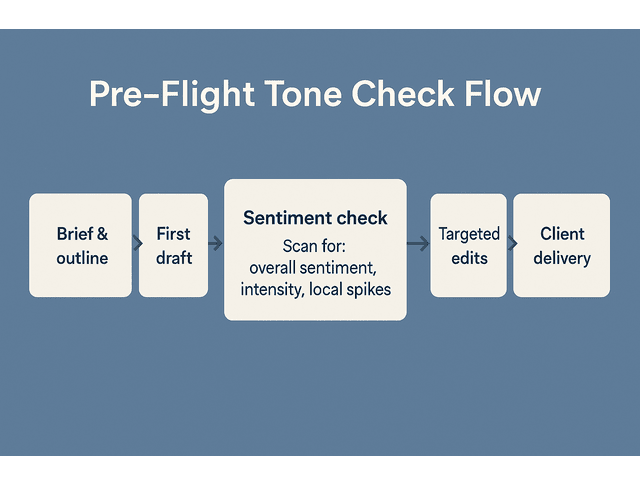
Imagine a SaaS landing page where the intro originally scores Overall: Neutral, Emotion Mix: 40% Trust, 30% Neutral, 30% Fear because you wrote heavy “risk” and “problem” language. You rewrite to highlight clear benefits and user success stories, then the sentiment reads Overall: Positive, Emotion Mix: 60% Trust, 20% Joy, 20% Neutral. The client approves in a single round instead of three, and you’ve just saved yourself hours of unpaid edits.
Sentiment Analysis in Writing for Everyday Client Projects
You can use sentiment analysis in writing across almost every type of freelance project:
- Blog posts: Ensure educational posts remain encouraging and accessible, avoiding dryness or overly technical language.
- Newsletters: Make sure updates sound friendly and aligned with the brand, not like generic corporate blasts.
- Sales pages: Strike a balance between urgency and trust, so your copy feels persuasive without becoming alarmist or pushy.
- Social captions: Keep the tone consistent across multiple posts, even if you drafted them at different times.
For instance, a blog intro that scores as “neutral, low intensity” might be fine for a technical tutorial but too flat for a launch announcement. A quick tweak—adding a clear promise and a hint of excitement—can nudge that score toward “slightly positive, moderate intensity,” which aligns better with promotional content.
The goal is not to chase a “perfect” score. The goal is to determine whether the emotional tone of your content aligns with what the client requested and what their readers expect.
Using AI Tools and Sentiment Analysis in Writing for Better Tone
You don’t need a complicated tech stack to use sentiment analysis in writing—just a couple of tools that fit where you already draft and edit. Once they’re in place, they quietly flag tone issues in the background so you can focus on the higher-level thinking only you can do.
Choosing Beginner-Friendly Sentiment Analysis Tools
Many tools you already know, or could add easily, include basic sentiment features:
- Writing assistants and grammar tools that flag negative or aggressive phrasing
- AI platforms that show simple positive/neutral/negative labels
- Browser-based sentiment checkers, where you paste short sections of text
When you evaluate tools, look for:
- Plain language explanations rather than only numbers
- Clear visual feedback (for example, colored bars or icons)
- Easy integration with your current writing stack, like Google Docs or Word
In many editors, you’ll see this labeled as “tone,” “sentiment,” or “polarity.” Suppose a tool shows you a clear label (for example, “Confident and Friendly”) and a short explanation of why it scored your text that way. In that case, that is often enough to guide useful edits.
Start with one or two tools that feel simple. You can always add more advanced natural language processing features later if you find the data useful.
Setting Up a Simple Comment and Email Workflow
Sentiment analysis is not just for long-form content. It can also rescue you from email misunderstandings.
Set up a small routine for client communication:
- Draft your client email, proposal, or project update.
- Paste the key paragraphs into your sentiment tool.
- Ensure your message conveys a tone that is calm, cooperative, and confident.
- Soften or tone down the language if the tool flags high negativity or very strong intensity.
This matters when you need to set boundaries, discuss scope changes, or push back on unrealistic timelines. A quick sentiment check helps you send messages that are firm yet respectful, so you protect the relationship while still protecting your time.
One reason this helps is that modern work is “ping-heavy,” which makes tone mistakes easier to ship by accident. Microsoft reports that during core work hours, employees are interrupted every two minutes on average by meetings, emails, or chats (and the highest-volume recipients can see).
Reading Sentiment Dashboards Without Getting Overwhelmed
Some AI tools display detailed dashboards, featuring multiple emotion categories, stacked charts, and extensive lists of keywords. As a busy freelancer, you do not have to use all of it.
Focus on three core signals:
- Overall sentiment: Is the text mainly positive, neutral, or negative?
- Intensity: Is the emotion light, moderate, or very strong?
- Local spikes: Are there specific sentences or paragraphs where the tool flags a strong reaction?
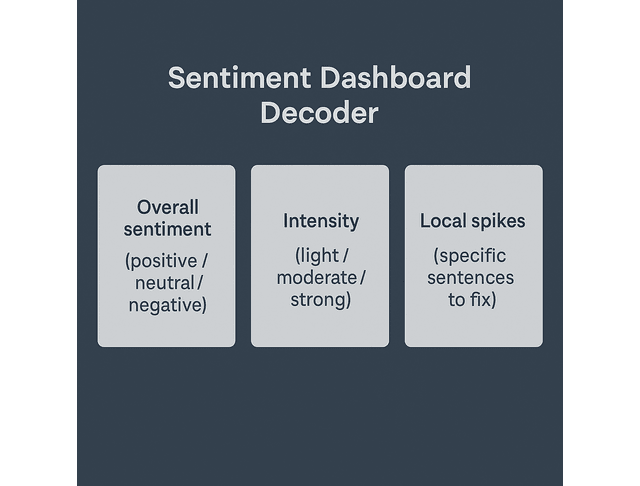
Use those three pieces of information to guide small edits:
- Adjust a harsh sentence that spikes negativity.
- Add warmth to a neutral section that should feel more welcoming.
- Tone down overly intense phrases in technical or instructional content.
For example, you might see a simple dashboard that reads: Overall: Neutral, Intensity: Low, Emotions: 50% Trust, 30% Neutral, 20% Joy for your tutorial. That is likely fine. However, if one paragraph indicates Local Sentiment: Strong Negative, with keywords such as “must,” “fail,” and “wrong,” you know exactly where to soften your language.
Treat the dashboard as a guide, not a verdict. You are still the writer. The AI points at places worth a second look.
Client Communication, Revisions, and Sentiment Analysis in Writing
Most freelance headaches come from misunderstandings, not missing commas. Using sentiment checks on your emails and drafts helps you come across as calm, clear, and collaborative, even when projects become tense.
Use Sentiment Checks Before You Send Client Emails
Client emails carry a lot of emotional weight, especially when you:
- Negotiate rates
- Clarify scope
- Push back on extra requests.
- Explain delays or issues.
A brief email can come across as defensive when you’re feeling stressed. Running these messages through a sentiment tool acts as a small buffer between your mood and what you send.
Before you hit “Send” on a difficult email:
- Paste the text into your tool.
- Look for signs of high negative sentiment or strong intensity.
- Replace sharp phrasing with calm, clear language.
For example, an original line might read: “I can’t make all of these changes today.” A tool flags it as “negative, high intensity.” You revise it to: “I can take a few of these changes today and schedule the rest for tomorrow, so each one gets proper attention.” The sentiment shifts to “neutral to slightly positive, moderate intensity,” and your message still sets a boundary without sounding abrupt.
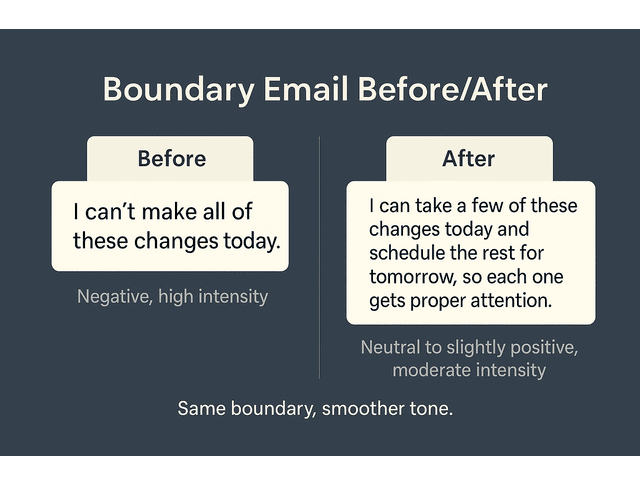
You will still convey what needs to be said. Still, your tone will come across as professional instead of reactive, which supports long-term client relationships.
Align Your Tone With Each Client’s Brand Voice
Most clients want a consistent brand voice. They might describe it as:
- Friendly and helpful
- Professional and authoritative
- Playful and bold
- Calm and trustworthy
You can build a small “tone library” for each client:
- Save a few paragraphs from their existing website, about page, or best-performing blog post.
- Run those samples through your sentiment tool and note the typical patterns.
- Compare your draft’s sentiment to those baseline samples.
A simple “tone card” for each client might look like:
- Client A (wellness brand): “Warm, conversational, hopeful” → typical scores: slightly positive, low to moderate intensity, high “joy” and “trust.”
- Client B (enterprise software): “Formal, expert, serious” → typical scores: neutral to slightly positive, moderate intensity, high “trust” and “anticipation,” very low “joy.”
If your new blog draft for Client B comes back as very positive and high “joy,” you know you may have drifted too far into casual or playful territory. Adjust your language, run a quick re-check, and get closer to the brand voice before you hit send.
If your draft feels more negative, intense, or flat than their usual content, adjust your language accordingly. Over time, this practice makes it easier to slip into each client’s voice without second-guessing yourself.
Review Feedback With Sentiment Analysis in Writing as a Guide
Client feedback itself can feel emotional, especially when it arrives on a busy day. Instead of reacting to the tone of the comments, you can analyze them.
Take a set of comments or tracked changes and:
- Paste them into a sentiment tool.
- See the overall tone of the feedback: frustrated, neutral, pleased, or mixed.
- Use that context to inform your response.
You might discover that a comment string that felt harsh in the moment actually shows as “mostly neutral, low intensity, with one or two slightly negative lines.” That tells you the client is not angry—they are simply being direct. You can respond with: “Thanks for the clear notes. I’ll adjust the intro to be more benefits-focused and soften the call-to-action,” instead of spiraling into self-doubt.
Building a Simple Sentiment Analysis in Writing Habit
The real power of sentiment analysis becomes apparent when it becomes a small, repeatable habit rather than a one-time experiment. With a quick weekly review and a few tone benchmarks, you steadily reduce revision churn and build a sharper, more consistent voice across all your client work.
A 15 Minute Weekly Sentiment Review Routine
You do not need to analyze every single sentence you write. Instead, create a light, weekly routine:
Once a week, set a 15-minute timer and:
- Choose two or three pieces you delivered that week.
- Run a quick sentiment check on each one.
- Note any patterns: too neutral for sales pages, slightly negative on client emails, overly enthusiastic in serious topics.
A sample review note might look like this:
- Project: Fintech blog on budgeting
- Sentiment notes: Intro slightly negative (heavy on “debt” and “mistakes”), body neutral, conclusion positive and reassuring
- Action next time: Open with a hopeful hook and move the “pain” language further down so the overall tone sits closer to neutral/positive.
This mini “tone audit” helps you stay aware of your habits, allowing you to correct them earlier in the process. You might discover, for example, that you naturally write in a more formal style when you are tired, or that your default voice is friendlier than some technical clients prefer.
Create Your Own Tone Benchmarks and Templates
Sentiment analysis becomes more powerful when you know what you are aiming for. Create a small collection of “benchmark” paragraphs that represent your ideal tone for different scenarios:
- A welcoming blog intro
- A confident landing page section
- A calm, clear instruction paragraph
- A firm but kind boundary-setting email
Run each of these through your sentiment tool and keep the scores or descriptions handy.
For example, your “welcoming blog intro” benchmark might score as Overall: Positive, Intensity: Low to Moderate, Emotions: 50% Joy, 30% Trust, 20% Neutral. When you draft a new introduction and the tool indicates that it is mostly neutral or slightly negative, you know you still need to add warmth or encouragement.
Then, turn your best-performing pieces into templates:
- Save intros, transitions, and CTA structures that align well with your clients’ brand voices.
- Use them as starting points, not copy-paste solutions.
- Check new drafts against your benchmark sentiment to ensure they remain within the same emotional range.
This approach gives you both creative freedom and consistent results.
Track Progress With Sentiment Analysis in Writing Over Time
Finally, treat sentiment analysis like any other productivity tool: track whether it helps.
You can keep a simple spreadsheet with columns like:
- Project name
- Type of content (blog, email, landing page)
- Sentiment notes (overall tone, issues spotted)
- Number of revision rounds
- Key client feedback
As you add projects, look for trends:
- Are clients requesting fewer tone-related changes?
- Do certain sentiment profiles lead to faster approvals?
- Are you more confident sending drafts on the first pass?
If you want a quick “why this matters” benchmark: in Grammarly’s 2024 State of Business Communication reporting, 73% of workers say generative AI helps them avoid miscommunications, which is exactly what you’re doing when you use sentiment checks to prevent tone-driven revision loops.
For example, if you notice revision rounds dropping from three or four per project down to one or two, that is a strong sign your tone work is paying off. Over time, this kind of consistency supports stronger testimonials, repeat work, and your ability to position yourself as a premium, “tone-accurate” writer.
If you notice improvements, continue and refine your process. If you see no change, adjust the tools you use or the point in your workflow where you run the checks.
Final Thoughts
Sentiment analysis in writing is not about turning your work into something robotic. It is about giving yourself one more layer of support so you can deliver emotionally accurate content without burning extra hours on guesswork.
As a freelance writer, you already have strong instincts about voice and tone. AI tools help you confirm those instincts, catch blind spots, and communicate with clients more smoothly. Start small: pick one tool, run checks on a few important drafts, and learn from what you see. You will quickly find a rhythm that feels natural and helps you ship stronger work with less stress. If you already use an AI writing assistant, look for its tone or sentiment feature and test it on your next client draft.
If you want a practical guide to using AI tools like sentiment analysis without losing your voice or adding complexity, explore my books on Amazon. They walk through real freelance writing workflows, show where AI actually helps, and set clear standards, so your work stays human and client-ready. Visit my Amazon Author page to find the book that fits your current workflow and start applying these ideas with confidence.
Frequently Asked Questions About Sentiment Analysis and Writing
Sentiment analysis in writing is the use of software to evaluate the emotional tone of text. It analyzes your words and phrases, categorizing them as generally positive, negative, or neutral, often with additional details about intensity or specific emotions.
Sentiment analysis helps you see how your draft might feel to a reader before you send it. You can use it to catch harsh or flat sections, improve clarity, and match the tone your client wants, so you feel more confident hitting the brief on the first pass.
You can start with tools built into writing assistants, grammar checkers, or AI platforms that already support sentiment detection. Many offer simple positive/neutral/negative labels and basic tone suggestions that are enough for most freelance projects, so you don’t have to overhaul your entire stack to begin.
No. Most modern tools hide the complex natural language processing behind simple dashboards and scores. Suppose you paste text into a box and read a summary or color-coded bar. In that case, you have enough skills to benefit from sentiment analysis.
It should not. Sentiment analysis is a support tool, not a substitute for your voice. Use it to highlight possible issues and inform your decisions, but keep your own editorial judgment at the center of your writing process—for example, you may still choose a sharper, more critical tone if the brief calls for a strong, contrarian stance.

Florence De Borja is a freelance writer, content strategist, and author with 14+ years of writing experience and a 15-year background in IT and software development. She creates clear, practical content on AI, SaaS, business, digital marketing, real estate, and wellness, with a focus on helping freelancers use AI to work calmer and scale smarter. On her blog, AI Freelancer, she shares systems, workflows, and AI-powered strategies for building a sustainable solo business.


Pingback: AI Content Writing Tools: Smarter Workflows for Freelancers - The AI Freelancer