

Staring at a blank page after a long client day is brutal. Your brain feels fried, deadlines keep stacking up, and you still have to research, draft, edit, and proofread everything yourself. You’ve probably heard about AI content writing tools, but part of you worries they’ll make your work feel generic—or worse, replace you.
This blog isn’t about replacing you. It’s about helping you stay sharp, protect your energy, and use AI as an assistant so you can write better, faster, without burning out. Most freelancers I talk to don’t want “more content”; they want a way to do good work without feeling wiped out all the time.
If your day keeps getting hijacked before you even start writing, you’re not imagining it. Microsoft’s Work Trend Index reports that during core work hours, employees are interrupted every two minutes on average by meetings, emails, or chats (with the highest-volume recipients seeing 275 pings a day).
Everything I’ve shared here—and more—is in my book, available on Amazon. Click the link if you’re ready to take the next step.
Getting Started With AI Content Writing Tools
You’re already juggling briefs, deadlines, and revisions—learning a new tool can feel like “one more thing” you don’t have time for. This section shows you how to use AI in tiny, low-pressure ways that actually make your writing day easier, not more complicated.
AI Content Writing Tools for Fast Ideas
Think of AI as a brainstorming partner that never gets tired. When you open a chat-based AI writing assistant, you can feed it a topic, a rough angle, or even a messy brain dump. In return, it can give you:
- Topic ideas for a client’s blog series
- Different angles for a single keyword
- Possible headlines and subheadings
- Lists of questions your audience might ask
You’re not outsourcing your thinking. You’re speeding up the boring part—idea generation—so you can focus on judgment and strategy.
A simple way to start: when you get a brief, ask your AI tool for “10 blog angles for [topic] aimed at [audience].” Then use your experience to pick, refine, and adjust the best ones.
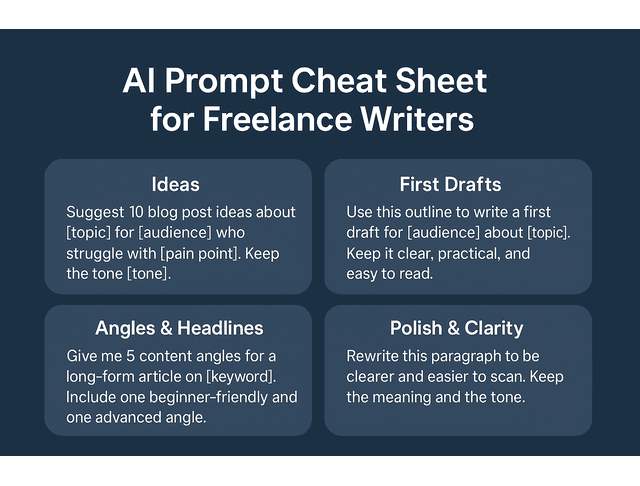
You can get even more specific with simple prompt templates like:
- “Suggest 10 blog post ideas about [service or topic] for [target audience] who are struggling with [main pain point]. Keep the tone friendly and practical.”
- “Give me five content angles for a long-form article on [keyword]. Include one beginner-friendly angle and one advanced angle.”
Run these once, skim the list, and highlight only the ideas that feel realistic for your client and your skills. That alone can shave 20–30 minutes off your brainstorming time.
Turning Rough Thoughts Into Clear Drafts
Once you have ideas, AI can help you turn scattered notes into a structured outline or a rough first draft. Natural language processing (NLP) tools are particularly useful in this context, as they can reorganize bullet points, group similar ideas, and transform fragments into coherent paragraphs.
You still steer the ship. You decide:
- Which points matter for this client
- What tone fits their brand
- Which examples and stories to add
Use AI to:
- Expand a short paragraph into a fuller explanation
- Turn an outline into a rough article
- Rephrase complex sentences into plain language
The key is to treat the draft as a starting point, not a final product. Your job is to shape, cut, and sharpen until it sounds like a real writer—like you.
There’s strong evidence that this “AI as first-pass helper” can meaningfully speed up work. Nielsen Norman Group reports that across three studies, generative AI tools increased business users’ throughput by an average of 66% on realistic tasks.
When you’re turning messy notes into a draft, it helps to give your AI tool a bit of structure. You might say who it’s writing for (“You’re helping a freelance writer create a blog post for [client type] about [topic].”), what you want (“Use this outline to write a first draft that’s clear, practical, and easy to read.”), Then paste your bullets or rough notes. You can also set a few guardrails, like “Avoid jargon, use short paragraphs, and keep the tone [friendly/professional/straightforward].” With that kind of direction, the output usually lands much closer to the draft you actually need.
Using AI to Polish and Clarify Your Writing
AI shines as a quick editor. Instead of rereading a paragraph five times, you can:
- Ask for a clearer version
- Check for grammar and spelling
- Soften a sentence that feels too harsh
- Tighten language that rambles
You can also run the same paragraph through an AI writing assistant a few different ways—“more friendly,” “more professional,” “more concise”—then choose the version that matches the client’s tone.
Over time, this becomes a feedback loop: AI suggests changes, you accept or reject them, and you start to see patterns in your own writing that you want to improve.
Clear writing is also high-stakes for clients. Grammarly reports that miscommunication in the workplace costs U.S. businesses an estimated $1.2 trillion every year, which is why tightening tone and clarity isn’t “extra,” it’s part of delivering professional-grade work.
You can also give it very targeted instructions, such as:
- “Rewrite this paragraph so it’s easier to scan and keep all the original meaning.”
- “Highlight any sentence that feels too long or complicated and suggest a shorter version.”
- “Flag any repeated phrases in this section and suggest alternatives.”
These micro-checks help you clean up your work quickly without handing over control of your voice. For example:
- Original: “This platform can be used by freelancers to increase their productivity when they are working on multiple different client projects at the same time.”
- AI suggestion: “This platform helps freelancers stay productive when they’re juggling multiple client projects.”
- Final version: “This platform helps you stay productive when you’re juggling several client projects at once.”
You keep the meaning, keep your tone, and let AI do the heavy lifting on the first pass.
By the time you’ve tried AI for ideas, drafts, and quick edits, you’ve already seen how it can support individual tasks. Next, you can use those same strengths to make your whole workflow feel smoother.
Smoother Routines With AI Content Writing Tools
If every project feels like starting from scratch, it’s a sign your workflow is doing you no favors. Here, you’ll see how AI can help you build simple, repeatable routines so each new draft feels like a familiar path instead of a fresh uphill climb.
Organizing Drafts From Brief to Final
Freelance work can get messy quickly: multiple clients, diverse niches, and overlapping deadlines. AI can help you bring order to that chaos.
You can ask your tool to:
- Turn a client brief into a step-by-step task list
- Summarize research into key bullet points
- Create a simple structure for each piece: intro, sections, FAQs, conclusion
Instead of jumping straight into writing, you let AI help you build a roadmap. This makes every project feel more manageable and reduces that “where do I even start?” feeling.
A basic breakdown might look like:
- Step 1: “Extract the key details from this brief: audience, goal, main topic, and deadline.”
- Step 2: “Turn those details into a 5-step task list (research, outline, draft, edit, final check).”
- Step 3: “Suggest a logical structure for a 1,500-word blog post on this topic.”
You still adjust the tasks and structure, but you’re no longer staring at a wall of text trying to decode it alone.
Simple Templates With AI Content Writing Tools
Templates are one of the easiest ways to save time. You can write similar things over and over: blog posts, newsletters, social posts, product descriptions.
Use AI to co-create templates like:
- A standard blog post layout for each client
- A repeatable FAQ section structure
- An email nurture sequence outline
Ask your AI tool: “Draft a blog post template for [industry] with an intro, three main sections, and an FAQ at the end.” Then tweak the outline to fit your writing style, and keep that version as your go-to template for future posts.
A simple blog template you might refine and reuse could look like this:
- Hook: 2–3 sentences naming the reader’s main pain point.
- Intro: Brief overview of what the post will help them do or understand.
- Section 1: Define the problem or concept with one example.
- Section 2: Step-by-step process, framework, or workflow.
- Section 3: Extra tips, mistakes to avoid, or advanced ideas.
- FAQs: 3–5 short questions that match what people search or ask.
- Final Thoughts: Short, encouraging wrap-up with a clear takeaway or next step.
Once you have a skeleton like this, you can ask the AI to fill in the rough content, and then refine it for each client.
A Basic Review Loop That Fits Your Style
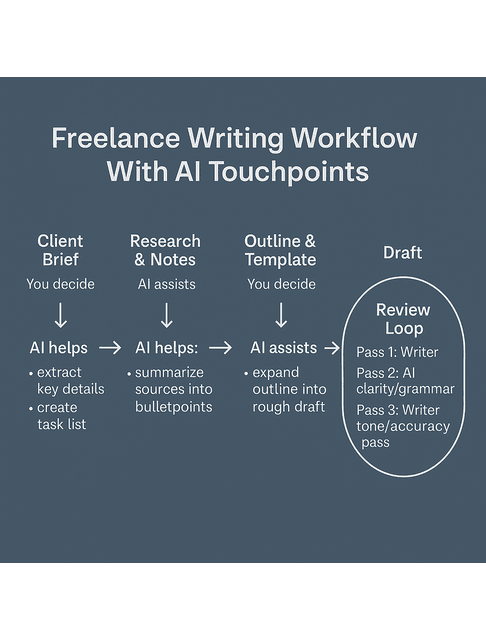
Many writers get stuck in endless revision. AI can help you build a simple review loop so you know when “done is done.”
For example:
- First pass: You write or co-write the draft.
- Second pass: Run sections through an AI editor for clarity, grammar, and structure.
- Third pass: You do a human read for tone, examples, and accuracy.
You can even give your AI tool clear instructions: “Check this for clarity and concision, but don’t change the tone.” That way, it supports you instead of flattening your voice.
When you loop through edits, it helps to tell the tool exactly what each round is for.
For the second pass, you might say:
“Look over this section for clarity and grammar. Trim long sentences, cut any repetition, and keep the tone friendly and professional.”
For the third pass, try:
“Show me any spots that might confuse a beginner and suggest clearer wording, but don’t rewrite the whole thing.”
Clear instructions like that keep each round of revisions tight and stop you from slipping into endless tweaking.
Once your routines feel smoother, the next natural step is to choose which tools deserve a permanent spot in your workflow.
Picking AI Content Writing Tools for Your Workflow
The fastest way to burn out on AI is to grab the “hottest” tool and then feel dumb when it doesn’t fit how you work. This section walks you through choosing tools that match your style, your budget, and your actual client projects—so you get real value instead of tech frustration.
Types of AI Tools and What They Do
Not all tools work the same way. As a freelance writer, you’ll mostly see:
- Chat-based AI assistants – great for brainstorming, drafting, and Q&A.
- Document-first tools – built into word processors or note apps for in-place edits.
- SEO-focused platforms – help with keyword clustering, outlines, and search intent.
- Grammar and style checkers – refine tone, readability, and correctness.
A simple way to choose a starting point:
- If you struggle most with getting started, try a chat-based assistant for ideas and rough drafts.
- If you dread editing and polishing, start with a grammar and style checker.
- If clients care deeply about search traffic, consider experimenting with an SEO tool that suggests relevant topics, headings, and related questions to optimize their online presence.
This way, your tool choice directly targets the part of your workflow that drains you the most.
AI Tool Picker for Freelance Writers
| Your Main Pain Point | Best Tool Type to Try First | Example Use Case |
|---|---|---|
| Getting started on drafts | Chat-based AI assistant | Turn rough notes into a structured outline or first draft |
| Editing and polishing | Grammar & style checker | Improve clarity, flow, and readability in blog drafts |
| SEO and topic planning | SEO-focused platform | Group keywords and suggest related subtopics/headings |
| On-page grammar and tone | Document-first editor | Make inline grammar and tone edits inside your doc |
Test Plan
- Pick one pain point from the left column.
- Choose one tool type to test that matches it.
- Use it on two client pieces this week, then decide if it stays in your stack.
Comparing Features, Ease of Use, and Price
Before you settle on any AI writing tool, do a quick gut check:
- Is the interface clean and easy to navigate, or does it hinder your progress?
- Can it actually handle what you write most often—blog posts, emails, sales pages, whatever your clients need?
- Does the price fit your current income and workload, or will it add pressure?
- Can you try it properly first, with a free tier or a decent trial?
A simple tool you use every day beats a fancy “all-in-one” platform that leaves you confused and exhausted.
As you test, give yourself one small, realistic goal, like: “Use this tool on two blog posts this week and notice where it saves time and where it gets in the way.” That’s more useful than signing up for five tools and barely using any of them.
Choosing Reliable Tools for Client Work
When client work is on the line, reliability matters more than fancy features. Look for tools that:
- Produce readable, not robotic, language
- Let you guide tone and style with clear instructions
- Respect privacy and data security
- Make it easy to copy content into your usual writing setup
Most importantly, never paste AI-generated text into a client doc without reading it closely.
It also helps to set a few safety rules for yourself, such as:
- Don’t paste contracts, personal IDs, or highly sensitive client details directly into any tool.
- When in doubt, anonymize information or summarize the situation instead of sharing raw data.
- Keep a simple note of which tools you use for which tasks so you can explain your process if a client ever asks.
These small habits protect both your clients and your reputation.
Once you know which tools you trust and how you want to use them, the next step is turning that into steady practice and skill growth.
Growing Your Skills With AI Content Writing Tools
In this final section, you’ll learn how to practice with AI, protect your voice, and turn each project into an opportunity to sharpen your skills instead of draining them.
Starting Small With Prompts and Short Tasks
If AI feels intimidating, start tiny. Don’t hand in a whole book or a 3,000-word article on day one.
Instead, try:
- “Rewrite this paragraph to be clearer.”
- “Give me five headline ideas for this topic.”
- “Turn these bullets into a short intro.”
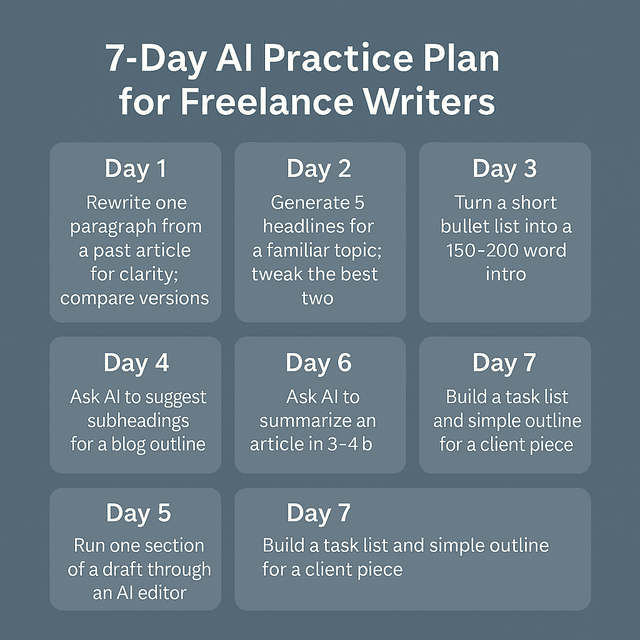
You can even set up a simple 7-day practice plan to get comfortable:
- Day 1: Ask AI to rewrite one paragraph from a past article for clarity. Compare versions.
- Day 2: Generate five headline ideas for a topic you know well. Pick the best two and tweak them.
- Day 3: Turn a short bullet list into a 150–200-word intro using a prompt.
- Day 4: Ask AI to suggest subheadings for a blog outline you’ve already created.
- Day 5: Run one section of a draft through an AI editor for grammar and flow, then accept or reject changes consciously.
- Day 6: Ask AI to summarize one of your existing articles in 3–4 bullets and check if it captured the main ideas.
- Day 7: Utilize AI to create a task list and a simple outline for an upcoming client project.
By the end of a week, you’ll have hands-on experience without risking any live client work.
Keeping Your Voice While AI Supports You
A big fear for many freelancers is losing their voice. That only happens if you let the tool lead the way. To prevent that:
- Always write a sample paragraph in your voice first
- Show the AI what you sound like and ask it to match that tone
- Use AI to refine, not to replace, your phrasing
You can even tell the tool: “Keep this casual and conversational,” or “Match this sample’s tone.” Then compare its output to your own writing and adjust. Over time, you’ll learn how to steer it well.
A simple “voice check” before you send work out can help:
- Read the AI-touched sections out loud—do they sound like something you’d naturally say?
- Look for words or phrases you’d never use and swap them out.
- Make sure at least some of your own examples, metaphors, or turns of phrase remain in the piece.
That way, AI becomes a helper that polishes your voice instead of flattening it.
Faster Feedback Using AI Content Writing Tools
AI can’t replace a good editor, but it can give you quick feedback between rounds of client review. You can ask it to:
- Highlight sentences that feel too long or complex
- Suggest places to add examples or clarify terms
- Point out repetition or vague phrases
Use this as a warm-up exercise before sending work to clients. That way, they see a cleaner draft, you appear more professional, and revisions usually proceed more quickly.
You can also ask for rough metrics that help you tighten your work, such as:
- “What is the approximate reading level of this section?”
- “Which sentences are over 25 words that I should consider shortening?”
- “Show me any phrases I’ve repeated more than twice.”
You still decide what to change, but you’re no longer hunting for every issue by hand.
Final Thoughts
You don’t have to do everything the hard way to be a “real” writer. Used well, AI content writing tools don’t erase your skills—they protect them. They help you move faster through the repetitive parts of the job, allowing you to spend more energy on strategy, storytelling, and client relationships.
Start small, maintain high standards, and treat AI as a powerful tool, not a replacement. You stay in control. The tools help you get there with more energy left at the end of the day.
If you want a clear, practical guide to using AI content writing tools without diluting your voice or standards, explore my books on Amazon. They break down real freelance workflows, show exactly where AI saves time, and keep human judgment at the center of the work. Visit my Amazon Author page to find the book that fits your current stage and start applying these systems with confidence.
Frequently Asked Questions About AI Content Writing Tools
AI content writing tools are programs that use artificial intelligence and NLP to help you brainstorm ideas, build outlines, draft content, and refine your writing. They can make the process faster and lighter, but they still rely on your judgment, skills, and final sign-off.
They can be helpful for SEO when used wisely. Many tools can suggest related keywords, create outlines based on search intent, and help you structure content clearly. However, you still need to fact-check, add real expertise, and avoid keyword stuffing so your content stays useful and human-friendly.
There’s no single “best” tool for everyone. Some writers prefer chat-based assistants for their flexibility in brainstorming and drafting. In contrast, others opt for SEO-focused platforms, and some rely heavily on grammar and style checkers. The best tool for you is the one that fits your niche, your workload, and your budget—and that you actually enjoy using.
AI can spin out copy, but it still can’t grasp your client’s brand, goals, or audience the way you can. You achieve the best results when you let the tool handle the repetitive work, allowing you to stay focused on the key aspects: ideas, structure, and voice.
Treat AI like an extra set of hands, not a stand-in for your work. Pay attention to how often you lean on it, and ensure that every piece it touches still undergoes your own edits, fact-checks, and judgment. Suppose a client ever asks how you use it. In that case, AI helps you move faster during research or early drafting. At the same time, the writing, shaping, and final polish remain yours.

Florence De Borja is a freelance writer, content strategist, and author with 14+ years of writing experience and a 15-year background in IT and software development. She creates clear, practical content on AI, SaaS, business, digital marketing, real estate, and wellness, with a focus on helping freelancers use AI to work calmer and scale smarter. On her blog, AI Freelancer, she shares systems, workflows, and AI-powered strategies for building a sustainable solo business.


Pingback: Text Summarization With NLP For Freelance Writers - The AI Freelancer