

You open your inbox to a long client thread, reread it twice, and still aren’t sure what actually needs to be done. If you’ve been trying to figure out how AI agents work for freelancers, it usually starts here—not with tools, but with the messy, time-consuming work that happens before you can even begin.
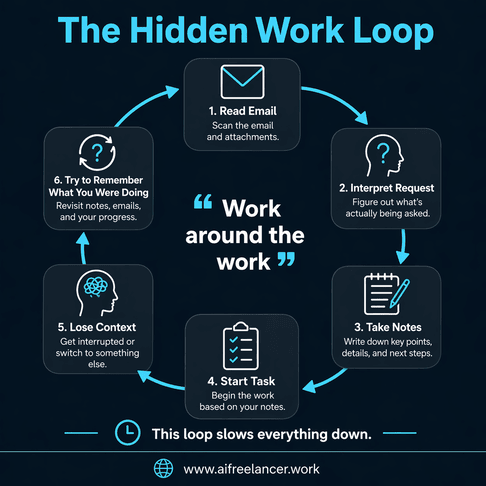
You copy parts into your notes, try to piece together the next steps, then jump back to your draft—and lose your place halfway through. By the time you return, the original task feels harder than it should. If that feels familiar, you’re not alone. This is the invisible layer of work that slows everything down, and it’s exactly where AI agents can make a difference.
If you’ve already explored AI workflow structures that reduce friction in freelance work, you’ll notice this pattern shows up consistently across different types of tasks.
Everything I’ve shared here—and more—is in my book, available on Amazon. Click the link if you’re ready to take the next step.
How AI Agents Work for Freelancers Without Complexity
Most explanations of AI agents make them sound like systems you have to build or tools you have to manage. That’s where the confusion starts. Freelancers don’t struggle because they lack automation—they struggle because the work around the work keeps interrupting them.
Client messages arrive in fragments. Feedback is vague. Instructions change mid-project. You’re not just doing the task—you’re constantly interpreting what the task actually is. When AI is introduced as another layer to manage, it feels like more work, not less.
Research from Microsoft shows that 75% of knowledge workers already use AI at work. The challenge isn’t adoption—it’s turning that usage into something consistent. Most people use AI as a tool but never connect it to how they actually work day to day.
The Simple Model Behind How AI Agents Work for Freelancers
Take any task that slows you down—like turning messy notes into something usable—and you’ll notice the same pattern behind it. Whether you’re working with emails, meeting notes, or client feedback, the process follows a simple structure.
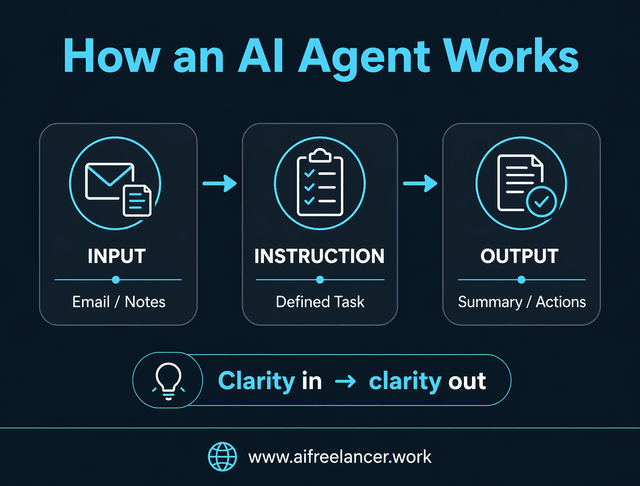
At its core, every AI agent works through three steps: input, instruction, and output. If you’re still unclear on what an AI agent actually does in practical terms, this model is the simplest way to understand it.
The input is what you provide, such as a long email thread or raw notes. The instruction defines what needs to happen, like extracting key decisions or summarizing action points. The output is a clear result you can use immediately.
For example, you might paste a long client email into a tool and ask for tasks, deadlines, and open questions. If the instruction is vague, the output will be vague. If the instruction is specific, the result becomes immediately useful.
The real gain here is not speed alone—it’s clarity. Instead of spending time figuring out what the task is, you move directly into doing the task itself.
Where AI Agents Fit Inside a Freelance Workflow
Think about what happens before, during, and after a typical piece of work. Before you start, you’re often dealing with scattered inputs—emails, notes, or unclear instructions. During the work, you’re shaping ideas into something usable. Afterward, you’re closing loops by sending updates or preparing for the next step.
These transitions are where work slows down.
Before the task, imagine a client brief split across three emails and a Google Doc. Instead of rereading everything and hoping you didn’t miss something, you can combine those inputs and turn them into a structured outline. That saves you from starting with uncertainty and reduces the chance of missing key details.
During the task, you might reach a point where your draft feels off, but you’re not sure why. Instead of rewriting everything, you can use AI to compare your draft with the brief and highlight gaps or inconsistencies, helping you adjust without losing momentum.
After the task, the work isn’t done. You still need to send an update. That usually means thinking through what to say, what to include, and how to phrase it. AI can take your completed work and turn it into a clear update that you refine before sending.
Between tasks, your inbox fills with new inputs—questions, requests, and follow-ups. Instead of holding all of that in your head, AI can extract the actions so you don’t have to keep reprocessing the same information.
This matters because context switching adds up quickly. According to the American Psychological Association, switching between tasks reduces efficiency and increases mental strain. That lost energy doesn’t show up as a single block of time—it shows up as repeated friction throughout your day.
Examples of Small AI Automation Helpers in Freelance Workflows
Once you understand where AI fits, the next step is seeing how it works in real situations. These examples work because they stay narrow. Each one handles a single step that would otherwise slow you down.
Inbox Triage Helper
A client sends a long email late at night. You open it the next morning and see multiple requests, but no clear structure. Instead of rereading it several times, you paste the email into your AI tool and ask it to extract tasks, deadlines, and questions. The result is a clean list you can scan in seconds. You quickly check that nothing important was missed, then move straight into execution instead of interpretation.
Meeting Summary Helper
You finish a call and think, “I’ll organize these notes later.” Later never comes, or when it does, you’ve forgotten key details. Instead, you paste your notes right after the meeting and generate a summary with decisions and next steps. When you review it, you might notice one missing detail and fix it immediately. That small step saves you from having to rewatch the meeting or from guessing what was agreed.
Revision Prep Helper
A client sends feedback across multiple messages: “Can we make this stronger?” “Also, this part feels off.” “And maybe shorten the intro.” Individually, these comments are vague. Together, they’re confusing. You paste everything into your AI tool and ask for a list of specific edits. The output translates those vague comments into actionable changes. You review it to make sure the intent is correct, then apply the edits without second-guessing.
Other helpers can support task routing, draft replies, or client updates. Each one focuses on a single job, which keeps your workflow manageable and easy to adjust over time.
Why Small AI Helpers Work Better Than Complex Automation
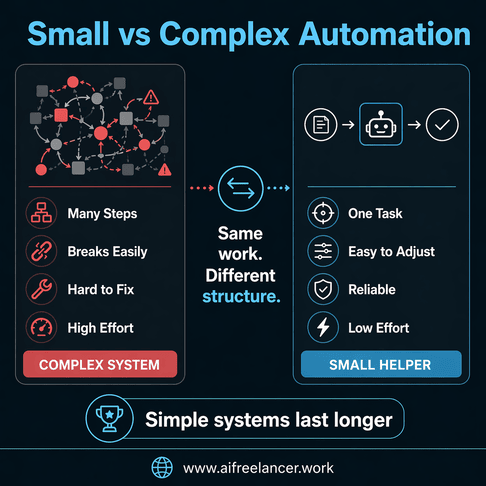
Freelance work is not predictable. Clients change direction, revise instructions, and introduce new constraints mid-project. A large, rigid automation setup struggles in that environment because it assumes stability.
This is where single-purpose systems, compared to complex workflows, become easier to understand in practice.
Small helpers work better because they adapt easily. If a client changes the brief, you update one instruction instead of rebuilding a system. If something doesn’t work, you fix it in one place instead of tracing it through multiple steps.
They also make it easier to stay confident in your work. When you review outputs step by step, you’re less likely to send something incorrect or misaligned, which protects both your time and your reputation.
Most importantly, they reduce mental load. Instead of managing a system, you focus on one task at a time. That keeps your attention on the work itself, not the process around it.
How to Start Using AI in Your Freelance Workflow Today
The easiest way to begin is to pick one moment in your day that repeats. Don’t try to automate everything at once.
A simple starting point is your inbox, because it appears daily, carries low risk, and gives immediate payoff. That combination makes it the easiest place to see immediate value without overthinking the setup.
If you want a clearer starting point, you can build from a minimum viable workflow setup for freelancers instead of trying to design everything from scratch.
A client sends a long email—that’s your trigger. You paste the email into your AI tool as the input. Your instruction is to extract tasks, deadlines, questions, and decisions. The output is a structured list you can act on immediately. Before using it, you review it quickly to confirm accuracy.
The next time a similar email comes in, you reuse the same instruction. Over time, this becomes a reliable step in your workflow.
How to Use AI Without Losing Control of Your Work
The biggest concern freelancers have about AI is not whether it works, but whether it can be trusted in client-facing situations. That concern usually comes from the fear of losing control over communication or decisions.
AI can support your work by summarizing threads, drafting replies, or extracting tasks. However, it should not send messages automatically or make decisions about pricing, scope, or tone.
Maintaining control means setting clear boundaries. Before anything is sent to a client, before deadlines are confirmed, and before tone-sensitive communication is finalized, there should always be a human review. These checkpoints ensure that speed does not come at the cost of accuracy or professionalism.
Final Thoughts
Understanding how AI agents work for freelancers comes down to recognizing where your workflow slows down and addressing those moments directly. The value isn’t in the tool itself, but in how it helps you move through messy, unclear, or repetitive parts of your work.
The most effective way to start is not by building a full system, but by identifying one repeatable friction point—like long client emails or scattered notes—and creating a simple helper around it. That small step creates immediate relief and builds momentum for improving the rest of your workflow.
If you want to go deeper into building simple, repeatable workflows like this, you can explore more frameworks and practical systems on my Amazon Author page. The books break down how to structure your work so it runs smoothly without adding unnecessary complexity.
Frequently Asked Questions About How AI Agents Work for Freelancers
An AI agent is a set of instructions that takes an input, processes it based on a task, and produces an output. For freelancers, this usually means turning messy information—like emails or notes—into something structured and usable. The key is not the tool itself, but how clearly the task is defined.
They support repetitive workflow steps such as organizing inbox messages, turning meeting notes into summaries, preparing drafts, and extracting tasks from client communication. These are the parts of work that often take time but don’t directly produce output.
No. Most freelance use cases rely on writing clear instructions rather than coding. If you can describe what you want done—such as summarizing a message or extracting tasks—you can use AI effectively.
Focus on low-risk tasks like summaries, drafts, and task extraction. These tasks involve organizing or preparing information rather than making decisions. Avoid automating anything that affects pricing, scope, or final client communication without review.
Yes, as long as outputs are reviewed before using them. AI should assist with preparation, but final decisions and communication should always be handled by you. This ensures you maintain control while still benefiting from faster workflows.

Florence De Borja is a freelance writer, content strategist, and author with 14+ years of writing experience and a 15-year background in IT and software development. She creates clear, practical content on AI, SaaS, business, digital marketing, real estate, and wellness, with a focus on helping freelancers use AI to work calmer and scale smarter. On her blog, AI Freelancer, she shares systems, workflows, and AI-powered strategies for building a sustainable solo business.

