

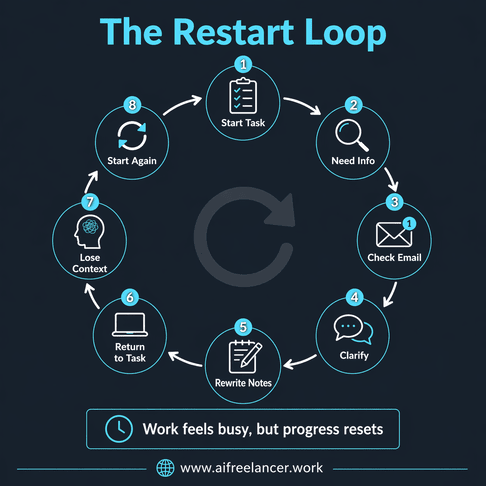
You sit down to write with a clear plan, but before anything meaningful gets done, you’ve already checked email, clarified a message, rewritten a note, and tried to remember where you left off. The work itself isn’t difficult, but it keeps restarting—and that’s what makes your day feel full without real progress. If you’ve been asking, “What is an AI agent?”, it’s probably because you’re trying to fix this exact problem, not learn another piece of tech jargon.
What looks like a productivity issue is often a workflow problem that quietly builds over time. You’re not just doing the work—you’re constantly setting it up, stopping, and trying to pick it back up again. The real question isn’t whether AI can help you write faster, but whether it can remove the parts of your process that keep slowing you down.
Everything I’ve shared here—and more—is in my book, available on Amazon. Click the link if you’re ready to take the next step.
What Is an AI Agent and Why Does It Matter for Freelancers?
Most explanations start with jargon, which makes the concept feel more complicated than it needs to be. In practical terms, an AI agent is a set of instructions that runs for you, taking an input, processing it, and producing an output without requiring you to repeat the same steps each time. It doesn’t replace your thinking; it removes the repeated setup that slows you down.
This distinction matters because freelancers rarely struggle with the core skill of writing. What drains time and energy is everything around it—checking emails for details, turning messages into tasks, organizing notes before starting, and rebuilding context after interruptions. These small actions don’t look like work, but they add up throughout the day and create friction. This is exactly where a structured approach like AI workflow systems for freelancers becomes useful, because it removes the invisible work rather than just speeding up the visible part.
What Is an AI Agent in Plain English?
Think of an AI agent as a repeatable process that no longer depends on you initiating every step. Instead of manually prompting or organizing each task, you define what should happen once, and the system follows that instruction consistently. Over time, this reduces the number of decisions you need to make just to get started.
AI Tools vs AI Systems: What’s the Difference?
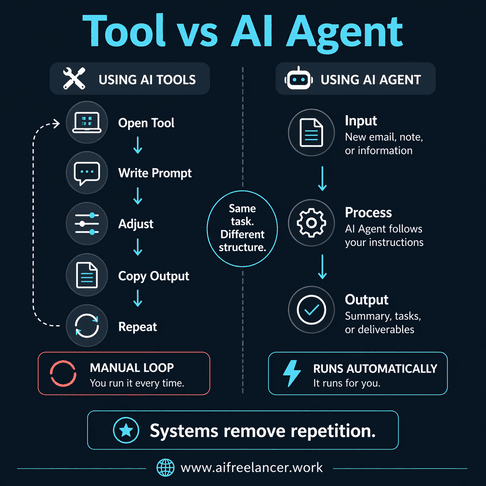
Using AI tools still requires you to drive every step. You open a tool, type a prompt, refine it, copy the output, and move it somewhere else before continuing. While this helps with speed, it still depends on your attention at every stage, which means the process resets each time you begin a task.
An AI agent shifts this into a system, where the process runs based on predefined logic instead of repeated manual input. Instead of asking what to do next, the next step is already built into the workflow, which reduces hesitation and makes the process feel smoother.
Why Freelancers Feel Overwhelmed Without Automation?
The pressure most freelancers feel doesn’t come from a single task but from constant fragmentation across their workflow. Research from Harvard Business Review shows that knowledge workers switch between apps and tasks more than 1,200 times a day, losing up to four hours per week to reorienting and refocusing. This isn’t a discipline problem—it’s a structural one.
Without a system, every task includes an invisible layer of work. Over time, that layer builds up and creates the feeling that you’re always busy but not making meaningful progress.
Why an AI Agent Feels Different From Another App
The difference shows up the moment you stop having to start from scratch. Most tools still expect you to initiate each step, even if they make that step faster. An AI agent changes that pattern by removing the need to restart the process every time the same type of task appears.
Why Tools Require Constant Input
Even with tools like ChatGPT, each task begins with you deciding what to input and how to phrase it. You are still responsible for shaping the request, adjusting it, and guiding the output, which creates a loop where every task starts from zero.
How AI Agents Run Instructions Automatically
With an AI agent, the instructions are already defined. When a new input appears, such as an email or a set of notes, the system follows the same steps without waiting for you to rebuild the prompt. This is similar to how small automation helpers fit into freelance workflows—they don’t replace your work, but they quietly handle the repeated steps that slow you down.
Why Structure Beats Stacking Apps
Adding more apps often spreads your work across different places without reducing the effort required to manage it. A structured workflow brings those steps together, so the work moves in one direction instead of being split across multiple tools. That shift reduces how often you need to stop and coordinate your next move.
What Is an AI Agent Actually Doing Behind the Scenes?
Behind the simplicity, there is a clear structure that explains why this approach works. Once you see that structure, it becomes easier to apply the idea to your own workflow without overcomplicating it.
How the Input → Instruction → Output Model Works
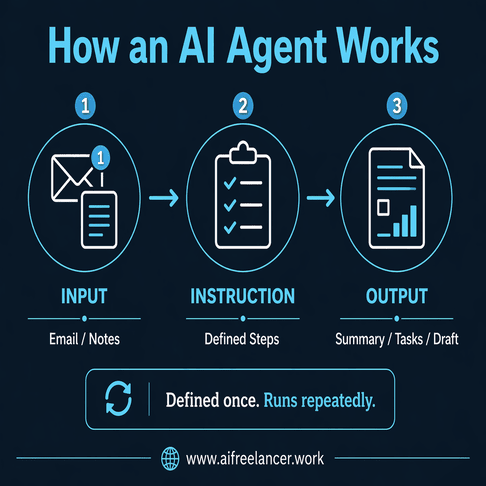
Every AI agent follows a basic pattern where something goes in, a set of instructions processes it, and something usable comes out. The key difference is consistency, because the process does not need to be rebuilt each time you encounter a similar task.
How AI Automation Runs Without Manual Steps
Once the instructions are defined, the system can run with minimal input. This is where the time savings come from—not from faster thinking, but from removing repeated setup. A study from MIT Sloan School of Management found that structured AI workflows can improve task completion speed by up to 40%, especially when the process is clearly defined.
What makes this work in practice is the addition of simple logic layers. A trigger starts the process, such as a new email arriving or notes being added. The instruction tells the system what to do, and a basic decision step determines how the output should be handled, such as whether the message contains actionable items or just information.
Why This Feels Different From Using ChatGPT Manually
Manually prompting AI is still a task because it requires you to re-enter context and instructions each time. An AI agent removes that step, allowing the output to be generated as part of a continuous workflow rather than a series of isolated actions. That continuity is what makes the process feel more stable during the day.
What Is an AI Agent Replacing in Your Daily Workflow?
The biggest shift is not in what you produce, but in how much work happens before you can begin. An AI agent removes the small actions that sit between tasks and delay your progress.
What Is an AI Agent Doing in Everyday Tasks?
Think about a typical moment in your day. You open an email, scan for key details, copy a few lines into your notes, and then rewrite them into something you can act on. A few minutes later, you return to the email because you missed something, and that break forces you to rebuild your focus. This pattern repeats across tasks without being obvious.
The Hidden Work Slowing You Down
This invisible layer of work includes copying information between tools, re-reading context before starting, and switching between apps to complete a single task. According to the American Psychological Association, task switching creates measurable cognitive costs that reduce efficiency and increase mental strain.
From Manual Steps to Automated Flow
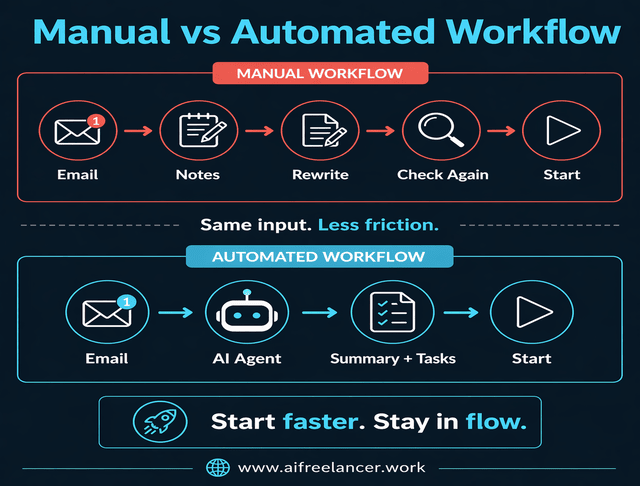
When those steps are handled in one pass, the workflow changes. The same email can produce a clear summary, a list of deliverables, and a starting point for your draft. You still review the result, but you begin from something usable instead of assembling the task piece by piece.
How to Use an AI Agent for Freelance Work (Simple Examples)
Once you see where the friction sits, the next step is to apply the idea in a way that fits your workflow. The goal is not to automate everything, but to remove the slow points that appear repeatedly.
What Is an AI Agent for Freelancers in Real Use Cases?
Freelancers deal with recurring tasks every day, from processing client messages to organizing drafts. These tasks follow a pattern, which makes them suitable for a simple instruction-based system.
Automating Your Writing Workflow
Before writing, most of the time is spent organizing thoughts into something usable. With a defined instruction, raw notes can be turned into a structured outline automatically. If you want to go further, you can build your first simple automation around this exact step—turning scattered input into something you can immediately work with.
Handling Client Communication and Admin Tasks
Client emails often contain all the information you need, but extracting it takes time. When the system pulls out deadlines, deliverables, and next actions in one step, you move directly into execution. That removes the need to revisit the same message multiple times.
Why Work Feels Lighter When an AI Agent Handles the Next Step
What changes over the course of a day is not just how fast you work, but how steady the process feels. When the next step is already defined, you spend less time deciding what to do and more time continuing what you’ve already started without interruption.
Why Switching Between Tasks Slows You Down
Each time you switch tasks, your brain needs to reorient itself. Even short interruptions can create a delay in getting back into focus, especially when you need to recall what you were doing before.
How Fragmented Work Drains Your Energy
It’s not the volume of work that causes fatigue, but the repeated need to re-enter it. When your workflow is fragmented, you keep asking what comes next, and that question itself becomes part of the workload.
How AI Handles the Next Step So You Don’t Have To
When the next step is already part of the process, that pause disappears. Instead of stopping after each action, the workflow continues, which keeps your attention on the work itself rather than on managing it.
What an AI Agent Is NOT (Clearing Common Misunderstandings)
Understanding what an AI agent cannot do helps set the right expectations and prevents frustration later.
Not a Fully Autonomous System
An AI agent does not operate independently in the way people often imagine. It follows instructions that you define and works within those boundaries rather than making its own decisions.
Not Always Accurate
The output still needs review, especially when accuracy matters. For example, a summary of a client email might miss nuance, which is why your input is still necessary.
Not a Replacement for Human Thinking
These limitations matter because not everything benefits from automation. Knowing what should never be automated is just as important as knowing what to automate, especially when decisions involve judgment, nuance, or risk.
How to Start Using AI Agents Without Technical Skills
Starting does not require complex tools or advanced knowledge. The focus should be on simplifying one part of your workflow where repetition already exists.
Start With One Repeated Task
Choose a task that appears frequently, such as processing emails or organizing notes. Repetition is what makes it possible to define the process clearly.
Turn Your Task Into Clear Instructions
Define what goes into the process and what should come out of it. For example, an email workflow might take a message as input, extract key details, and output a short task summary that you can act on immediately.
Use Simple Tools to Run the Workflow
Platforms like Zapier allow you to connect steps without coding. You can start small, test the process, and adjust it until it works consistently.
When You Should NOT Use an AI Agent
Automation is useful, but it does not apply to every type of work. Knowing when not to use it helps you avoid unnecessary complexity.
When the Work Is One-Off or Highly Creative
Tasks that do not follow a pattern are difficult to automate because the inputs and outputs vary too much.
When Decisions Carry High Risk
Important decisions should not rely solely on automated outputs and require careful evaluation.
When Inputs Are Unclear or Unstructured
If the input lacks clarity, the output will be inconsistent, limiting the system’s effectiveness.
What Is an AI Agent Really Doing for Your Workday?
If a task repeats, it can run without you. That single shift changes how your day unfolds because you are no longer rebuilding the same process each time the task appears. Instead, you move forward from a prepared starting point, which keeps your work consistent and easier to continue.
Final Thoughts
If you started by asking, “What is an AI agent?”, the simplest answer still applies: it’s a set of instructions that runs for you. The value becomes clear when you look at what it removes from your day—those small steps that interrupt your focus and slow your progress.
If you want a deeper breakdown of how to build these systems into your writing workflow, check the links to my books on my Amazon Author page.
Frequently Asked Questions About “What Is an AI Agent?”
An AI agent is a set of instructions that takes an input, processes it, and produces an output automatically. Instead of manually handling each step, the system runs the task for you based on predefined logic.
ChatGPT requires you to prompt it manually each time you want an output, while an AI agent follows predefined instructions that run automatically. This reduces how often you need to restart tasks.
Yes, freelancers can use AI agents without coding by using simple automation platforms that connect steps in a workflow. The key is defining clear instructions.
Examples include summarizing emails, extracting action items, organizing notes into structured outlines, and generating drafts from briefs.
AI agents are useful but not perfect, so outputs should always be reviewed, especially for important or high-stakes work.

Florence De Borja is a freelance writer, content strategist, and author with 14+ years of writing experience and a 15-year background in IT and software development. She creates clear, practical content on AI, SaaS, business, digital marketing, real estate, and wellness, with a focus on helping freelancers use AI to work calmer and scale smarter. On her blog, AI Freelancer, she shares systems, workflows, and AI-powered strategies for building a sustainable solo business.

