

You sit down to write with a clear plan, expecting to move straight into a draft. A few minutes in, you check your email to confirm a detail, paste notes into an AI tool, tweak a prompt, move the output into a document, and then fix what didn’t quite follow the brief. By the time you return to the draft, your momentum is gone. This is the problem most people are trying to solve when they look into AI workflow automation—not writing itself, but the constant interruptions that make the work feel heavier than it should.
Many freelancers don’t start exploring AI because they want more tools. They start because they want a smoother way to move from brief to finished work without restarting every few minutes. The problem is that most advice pushes them toward more complex setups, which often add steps rather than remove them. What should simplify the process ends up turning into something you have to monitor—checking prompts, reviewing outputs, and fixing how different tools connect.
Everything I’ve shared here—and more—is in my book, available on Amazon. Click the link if you’re ready to take the next step.
What AI Workflow Automation Actually Means in Practice
Most discussions about automation focus on tools, but that is only a small part of the picture. A tool is something you use. A workflow is the order in which work gets done. If that order is unclear, adding tools will not fix it.
For a freelance writer, the workflow usually starts with a brief, moves into organizing ideas, continues into drafting, and ends with review before delivery. AI workflow automation takes over the small, repetitive steps within that sequence, so you are not rebuilding the same decisions for every project.
The simplest way to understand it is through three parts: input, process, and output. The input is what you receive, such as a client brief, notes, or email instructions. The process is where you extract, organize, and draft. The output is what you deliver, whether that is a summary, a structured outline, or a revision-ready draft.
When that sequence is not clear, automation does not help. It speeds up the wrong steps and forces you to fix more things later.
Why AI Workflow Automation Feels More Complicated Than It Should
The frustration most people feel shows up in how the workday actually unfolds. You open a brief, jump to email to confirm a detail, paste notes into an AI tool, adjust the prompt when the output misses the point, move that output into a document, and then fix sections that do not match the original requirement. By the time you get back to writing, you are no longer sure what the next step should be.
A typical session might start with a brief, move into email to clarify details, shift into a document for drafting, then into an AI tool for support, and back again. Each switch requires you to refocus, and that repeated reset is what drains energy. Harvard Business Review notes that frequent task switching reduces efficiency because of the time it takes to regain focus after each interruption.
When AI Workflow Automation Creates More Work Instead of Less
The signs are easy to recognize once you see them clearly. You might find yourself jumping between tools in the middle of a task, moving from email to a document, then into an AI tool, and back again without completing a single step. Some parts of the process are repeated manually even though they were supposed to be automated. It becomes harder to track where you left off, especially after switching between tasks several times.
In some cases, drafts have to be restarted because the AI output did not follow the brief closely enough. Instead of moving forward, you spend time correcting and reworking what should have been a helpful step. At that point, automation is no longer saving time. It is adding another layer of work.
The issue is not the tool itself. It is the structure of the workflow. When everything is connected at once, each step depends on the previous one working perfectly. That level of dependency is difficult to maintain in real freelance work, where inputs are often incomplete or constantly changing.
Single-Purpose AI Agents vs Complex Workflows (Core Comparison)
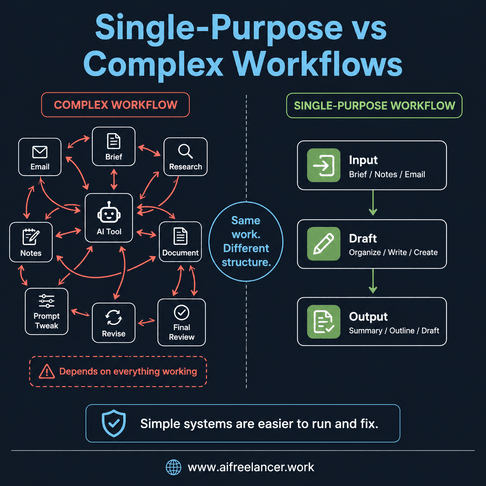
Once the workflow starts to feel heavy, the instinct is often to build a more advanced system. In practice, that approach usually creates more friction. The better approach is to look at how the workflow is structured and decide whether each step needs to be connected or handled independently.
In this context, a single-purpose AI agent is not a complex autonomous system. It is a focused AI setup designed to perform one repeatable task well, such as summarizing a brief, organizing notes, or checking a draft against requirements. A complex workflow, on the other hand, connects multiple tools, prompts, triggers, and outputs into one chain where each step depends on the previous one.
How AI Workflow Automation Works in Simple, Single-Purpose Systems
Simple systems focus on one task at a time, which makes them easier to manage and adjust. Each step has a clear input and a clear expected output, so there is less ambiguity about what needs to happen next. This is exactly how small automation helpers quietly support your workflow without adding complexity.
In writing, this approach works well for tasks such as summarizing client notes, turning rough ideas into an outline, sorting revision feedback into a clear list, drafting client replies, or checking a draft against the original brief. Each of these tasks can stand on its own, which means you can fix or refine it without breaking the entire process.
Where Complex AI Workflow Automation Setups Break Down
Complex workflows attempt to connect multiple steps into a single system. While that sounds efficient, it introduces several points of failure. If one step does not produce the expected output, it can affect every step that follows. Debugging becomes more difficult because it is not always clear where the issue started.
These systems often rely on highly structured inputs, which is rarely the case in freelance work. Briefs can be incomplete, notes can be scattered, and requirements can change. This is also why many automation setups stop working after the first couple of weeks—they cannot adapt to real-world variation.
How to Choose Between Single-Purpose AI Agents and Complex Workflows
Choosing the right approach depends on the nature of the work. If a task is repeated frequently and follows a consistent pattern, a connected workflow may finally justify the setup time. However, if the inputs change from project to project, simpler systems tend to be more reliable.
Several factors can guide the decision. Tasks that are performed often benefit more from automation, especially if the inputs are predictable. Work that carries a higher risk of error, such as client-facing drafts, usually requires a review step regardless of how much automation is involved. The number of tools in the workflow also matters, since each additional tool introduces another point where the process can break.
It is also important to consider the time required to set up the system compared to the time it actually saves. If the setup is complex but the task is not repeated often, the return on that effort is limited. Stability is another factor. Workflows that change frequently are harder to automate effectively, which makes simpler approaches more practical.
A simple rule helps make the decision clearer. If the task changes every time, keep it as a single-purpose step. If the task repeats the same way every week with predictable inputs, then a more complex workflow may be worth building.
How to Simplify AI Workflow Automation Without Losing Output
Simplifying a workflow does not mean reducing output. It means removing unnecessary steps, so you know exactly what happens before drafting, during drafting, and before delivery—this is the foundation of simple automation setups that actually work for freelancers.
- Start with one repeatable task, such as summarizing a brief before drafting
- Reduce steps instead of adding more automation
- Keep a clear sequence from brief to structured notes to draft
- Define what each step should produce before moving forward
- Add one review checkpoint before final delivery
MIT Sloan School of Management highlights that productivity gains from AI are strongest when it is used within a structured workflow rather than as a standalone tool.
A Minimal AI Workflow Automation System That Actually Works for Freelancers
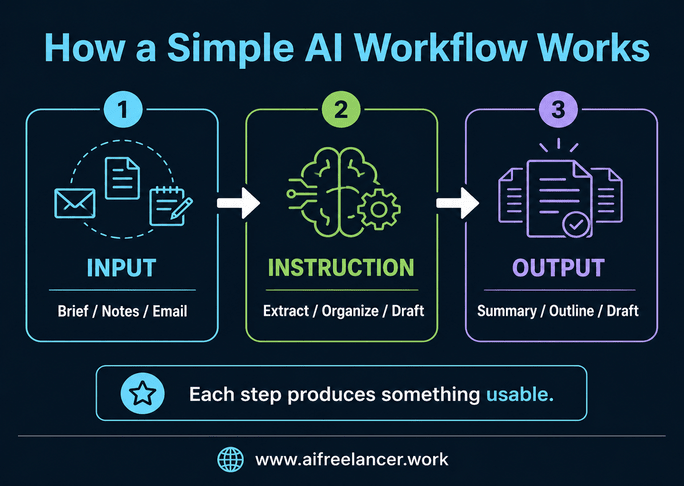
Most freelancers do not need a complex system to improve their workflow. What they need is a clear structure that reduces the number of decisions required at each step—essentially, a minimum viable workflow stack that moves work forward without friction.
The input includes the materials you receive, such as a client brief, notes, or email instructions. The instruction defines what needs to be done with that input, such as extracting key points, organizing ideas into an outline, or defining the tone and structure. The output is the result of that process, which could be a summary, a task list, a draft section, or a revision checklist.
Here is how that works in a real writing scenario.
You receive a vague client brief that includes a topic, a few bullet points, and a general direction. Instead of moving straight into drafting, you use AI to extract the goal, target audience, tone, and key points that must be included. The output becomes a clear content brief you can work from.
From there, you take that structured brief and turn it into an outline. This removes the need to decide the structure while drafting, since each section already has a defined role.
After drafting, you run a final check against the original brief. AI can help compare what was requested with what was written, highlighting gaps or inconsistencies. The result is a revision checklist you can apply before submission.
This example shows how each step produces something usable, making it easier to move forward without rethinking the process.
AI Productivity Systems: When Complex Workflows Make Sense
Complex workflows can still be useful in certain situations. They work best when tasks are repeated at scale and follow a consistent pattern. In team environments, where roles and responsibilities are clearly defined, a more structured system can help coordinate work across multiple people.
These workflows also require stable inputs. When briefs follow a standard format and the process does not change often, the system can run more smoothly. In those cases, the initial setup effort can be justified by the efficiency gained over time. McKinsey & Company reports that organizations see stronger AI value when it is embedded into structured workflows and business processes.
Before You Build: Keep the Workflow Easy to Review
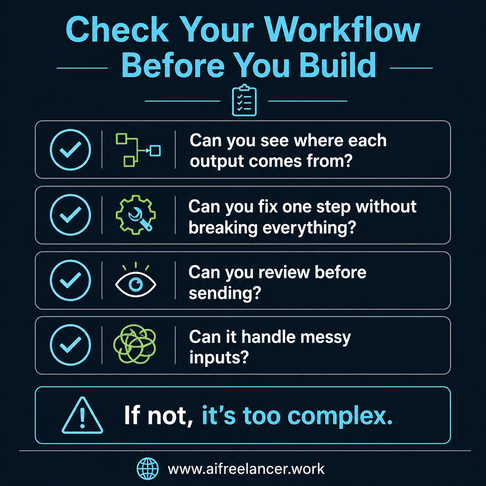
Before adding more steps or connecting more tools, it helps to check whether the workflow is actually manageable.
- Can you clearly see where each output comes from?
- Can you fix one step without rebuilding the entire process?
- Can you review the final output before sending it to a client?
- Can the workflow still run when the brief is incomplete or messy?
If the answer to any of these is no, the workflow is already too complex. The goal is not to build something impressive. It is to build something you can run consistently without stopping to troubleshoot.
Final Thoughts
Most people approach AI workflow automation by adding more tools, more connections, and more steps. That’s why the process starts to feel heavier instead of easier.
The real advantage comes from reducing the gap between receiving a brief and producing a usable draft, while choosing the right level of structure for the task. Single-purpose AI agents help you move forward step by step, while complex workflows only make sense when your process is stable enough to support them.
Start with a structure you can run without thinking through every step. Then add complexity only when it clearly improves output. That’s how AI workflow automation actually reduces workload instead of adding to it.
If you want a deeper look at how to build workflows like this in real freelance scenarios, you can check my books on my Amazon Author page. They break down practical systems you can apply immediately to write faster, reduce revisions, and keep your process manageable.
Frequently Asked Questions About AI Workflow Automation
AI workflow automation is the use of AI to support specific steps in a workflow, such as organizing information, drafting content, or preparing outputs, so the overall process becomes more efficient.
Not necessarily. Complex workflows only work well when tasks are stable and predictable. For most freelance work, simple systems are easier to manage and adjust.
Start with one task, such as summarizing a brief or organizing notes. Define the input, the instruction, and the expected output before adding more steps.
It usually means there are too many steps, too many tools, or unclear inputs. Simplifying the workflow often improves results more than adding more automation.
The best tools depend on your specific tasks. The structure of your workflow matters more than the number of tools you use.

Florence De Borja is a freelance writer, content strategist, and author with 14+ years of writing experience and a 15-year background in IT and software development. She creates clear, practical content on AI, SaaS, business, digital marketing, real estate, and wellness, with a focus on helping freelancers use AI to work calmer and scale smarter. On her blog, AI Freelancer, she shares systems, workflows, and AI-powered strategies for building a sustainable solo business.

