

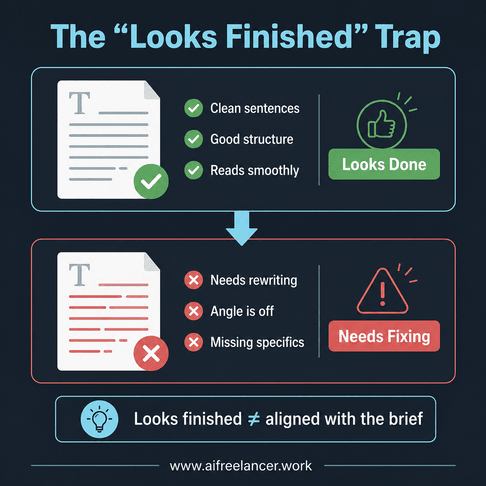
You don’t notice the problem right away when you don’t know when not to use AI writing. The draft looks clean, the sentences flow, and the structure is there, so on a quick read, it feels ready to send—something you could share with minor edits. That early sense of completion is what makes it tricky, because nothing is obviously broken and there’s no clear signal that anything is missing.
Then the client feedback comes in—and that’s where the gap shows.
“Can we make this more specific?”
“This doesn’t quite match the direction.”
“It feels a bit generic.”
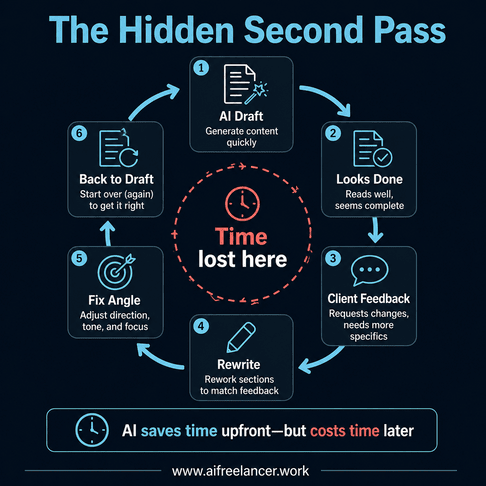
Now you’re back in the document, not writing—but fixing. You adjust the draft angle, rewrite sections, tighten claims, and try to align something that already looked done. What should have been a final pass turns into a full revision cycle, and the time you saved up front disappears into cleanup work. This is where most freelancers get stuck, especially when they start relying on AI to speed things up.
The issue isn’t that AI writes badly. It’s that it can produce something that looks complete before it’s actually aligned with the brief, and if you don’t catch that early, you end up doing the work twice. That’s why understanding when not to use AI writing matters more than learning how to use it.
Everything I’ve shared here—and more—is in my book, available on Amazon. Click the link if you’re ready to take the next step.
When Not to Use AI Writing in Freelance Workflows
Most freelancers don’t lose quality because they use AI—they lose it because they use it in the wrong places, especially when they let it shape the draft before the brief and direction are fully clear. This is where building simple automation systems that are easy to review becomes more effective than relying on complex, all-in-one setups. The issue isn’t the tool itself but the assumption that it can handle every part of the process equally well.
Why Knowing When Not to Use AI Writing Matters More Than Tools
AI struggles most when it operates without a clear context. If the brief is vague or the direction isn’t fully defined, it fills in gaps based on patterns rather than intent. That’s where small mismatches begin—subtle shifts in tone, emphasis, or structure that don’t fully align with the client’s goal.
Because AI produces fluent output, these issues are easy to overlook at first. The draft reads smoothly, but the message doesn’t land as intended. A key benefit might be buried under a general explanation, or a headline meant to drive clicks might sound interchangeable with dozens of others. The result is not a broken draft, but an unfocused one.
Research from the Harvard Business Review shows that knowledge workers switch tasks frequently, which reduces efficiency and increases time spent reorienting. In freelance writing, this shows up as a second pass of work. Instead of moving forward, you go back to fix paragraphs, adjust the draft angle, and rewrite sections that AI generated without enough context. That extra pass is where time disappears.
When Not to Use AI Writing for High-Risk Tasks
If the task requires judgment, clarity, or positioning, automation creates risk rather than speed. These are the points in your workflow where small decisions shape the outcome, and handing them off too early can lead to subtle but costly misalignment.
When Not to Use AI Writing for Client-Facing Content
Client communication depends heavily on context. Emails, proposals, and replies need to reflect tone, relationship, and timing, which are difficult to generalize. AI can generate clean sentences, but it often defaults to neutral phrasing that lacks intent.
For example, a revision reply that should say, “I see what you mean—let me tighten the angle and send an updated version,” might come back sounding like a customer support script. It’s technically correct, but it removes the sense of ownership and collaboration that clients expect. This is also where clear boundaries with clients matter—because tone, expectations, and communication style should never be outsourced to automation.
Client Strategy AI Shouldn’t Decide for You
Strategy involves deciding what to emphasize, what to leave out, and how to frame the message. These decisions depend on understanding the client’s audience, offer, and goal—not just the topic.
In SEO work, this often shows up as an angle problem. You might need to target a specific search intent, but AI produces a broad introduction that doesn’t match it. In thought leadership, it may present balanced but shallow insights instead of a clear point of view. The draft reads well, but it doesn’t move the work forward because the direction isn’t strong enough.
Final Copy That Needs Your Accountability
Final drafts carry your name, which means they require your judgment. In fact-based content, AI may introduce small but important issues, such as outdated references or unsupported claims.
A sentence like “Studies show this approach improves results” may sound credible, but without a source, it weakens the content. This is where a claim check matters. Before anything reaches the client, you need to verify statements, tighten phrasing, and make sure the draft is fully aligned with the brief.
When Not to Use AI Writing vs Where AI Actually Helps
The goal isn’t to avoid AI entirely. It’s to understand where it supports your process and where it starts to interfere with it, so you can use it deliberately instead of by default.
A Simple Rule for When Not to Use AI Writing in Decisions
A practical way to approach this is to separate tasks based on their role in the workflow. Tasks that involve interpretation, positioning, or direction should remain human-led, since they shape the outcome. Work focused on organizing or formatting information is where AI can assist effectively. Refining language can also benefit from AI support, but it still requires review to ensure the output stays aligned and accurate.
This rule keeps your workflow predictable and reduces the need for rework later. It also helps you decide when to rely on your system and when to step in manually instead of defaulting to automation.
Freelance Tasks AI Can Help With Safely
AI works well for preparation tasks because these do not require judgment. It processes information quickly and helps you move forward without changing the direction of the work.
- Summarizing research and notes
- Extracting key points from scattered inputs
- Generating outline variations
These tasks reduce effort without affecting the draft angle or client brief.
Use AI for Prep Work, Not Final Judgment
AI can also assist in expanding drafts or improving clarity once the direction is already set. It can restructure sentences, suggest transitions, or offer alternative headlines, but these outputs should remain part of the drafting stage.
According to research affiliated with the Massachusetts Institute of Technology, generative AI improves productivity in structured tasks—where the goal is clear, and the work is repeatable. In freelance writing, summarizing notes or organizing sections fits that pattern because the task is defined and the output is predictable. Defining the draft angle or making positioning decisions does not, because those depend on context, intent, and judgment. This is where AI starts to create friction instead of saving time, because it produces output that still needs to be rethought rather than simply refined.
Freelancer Automation Mistakes That Lower Quality
Most issues with AI are not caused by the tool itself but by how it is used within the workflow. Without clear direction at the start, it becomes easy to rely on it too early or without enough input.
Real-World Automation Mistakes in Client Work
One common mistake is using AI to generate a draft before fully understanding the brief. This often leads to content that needs to be reworked because the angle doesn’t match the client’s goal.
Another example is using AI-generated replies in client communication without reviewing tone. A message that should feel collaborative may come across as distant, which can affect how the client responds and lead to unnecessary back-and-forth.
Output Misuse and Blind Trust
Another issue is treating AI output as final instead of intermediate. Accepting content without a review pass leads to drafts that feel incomplete, even if they look polished on the surface.
This is especially common in SEO work, where AI-generated sections may include general statements that need to be supported or clarified.
Why AI Mistakes Create More Revisions
When these mistakes occur, they lead to specific types of feedback: sections that feel too broad, claims that need clarification, or messaging that doesn’t match the brief. Each of these requires a revision pass, which adds time and slows down delivery.
When Not to Use AI Writing in Your Workflow Design
A good workflow is defined by how clearly it separates different types of work. Without that structure, it becomes harder to maintain consistency and easier for small issues to compound.
Structure the Workflow Around the Client Brief
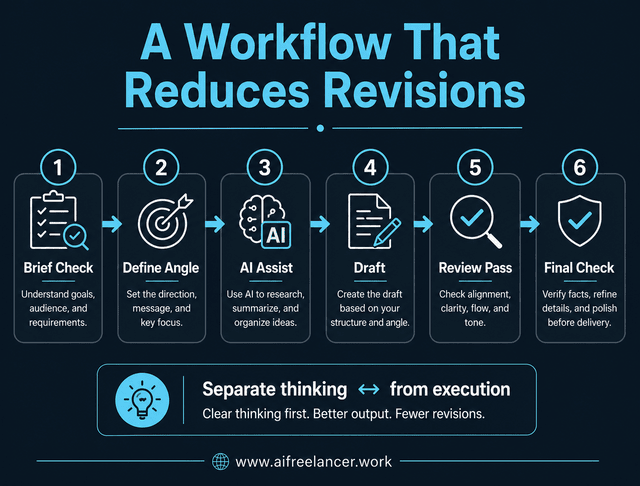
A simple, repeatable structure can make a significant difference:
- Start with a brief check and define the draft angle manually
- Use AI to organize inputs or summarize information
- Set the structure before drafting
- Use AI to assist with drafting sections
- Run a review pass for alignment and clarity
- Do a final claim check and polish before submission
This sequence keeps thinking and execution separate and makes it easier to track where issues occur. For many freelancers, this works best when combined with a simple 3-step message handling system that keeps communication and output aligned.
Keep the Review Points Easy to See
Equally important is making review points visible. When you can clearly identify where decisions are made and where output is checked, it becomes easier to maintain quality and improve your process over time.
The McKinsey & Company notes that AI delivers the most value when it is integrated into structured workflows. In freelance work, that means AI helps when it follows your process, but slows you down when you use it before defining the brief or skipping the review pass entirely.
Use AI Without Flattening Your Voice
Once the workflow is clear, the final risk is voice. This is where AI polish can quietly remove the edge that made the draft useful and turn something specific into something generic.
Speed is often the reason freelancers turn to AI, but control is what determines whether the output works. Without control, the content may lose the tone and emphasis that make it effective.
Keep the Draft Angle Human
AI can help organize ideas, but it should not define the perspective of the piece. The draft angle comes from your understanding of the client’s goals, audience, and intent, and that perspective is what gives the content direction.
Edit the Draft Before It Reaches the Client
Editing is where the draft becomes client-ready. This includes adjusting tone, refining emphasis, and aligning the content with expectations so it feels intentional rather than generated.
A simple voice pass can help:
- Check if the tone matches the client’s brand
- Adjust sentences that sound too neutral or generic
- Add emphasis where key points need to stand out
- Clarify any claims that feel vague
These adjustments are small, but they make the difference between a draft that works and one that needs another round of revisions.
Final Thoughts on When Not to Use AI Writing
Knowing when not to use AI writing is what separates fast output from work that clients trust and approve with fewer revisions. The difference is not in how much AI you use, but in how clearly you define its role in your process.
AI should make your process lighter, not make your judgment invisible. It works best when it supports preparation and structure, and it becomes less effective when it replaces direction, interpretation, or final review. When you keep that distinction clear, you reduce unnecessary revisions and produce work that feels aligned from the start.
If you want to build systems that help you write faster without sacrificing clarity or control, check out my books on my Amazon Author page. They break down practical workflows you can apply immediately to your freelance work.
Frequently Asked Questions About When Not to Use AI Writing
You should avoid using AI writing when defining the draft angle, writing proposals, handling revision replies, and finalizing client-ready copy. These steps require context, tone awareness, and decision-making that AI cannot fully replicate, which is why they should stay human-led.
AI can support research, outlining, and drafting, but it cannot replace judgment, positioning, or client communication. Freelancers who use AI effectively keep control over decisions and use AI only for execution support, not direction.
The main risks include generic tone, unsupported claims, and misalignment with the client brief. These issues often lead to more revisions because the content doesn’t fully meet expectations, even if it appears polished at first.
They define the draft angle themselves, then use AI to assist with structure and clarity. Before submission, they run a voice pass to adjust tone, emphasis, and phrasing so the content matches the client’s style and intent.
AI can help generate outlines and draft sections, but it should not define the angle or final copy. Freelancers still need to align the content with search intent, verify claims, and refine the message to ensure it delivers real value.

Florence De Borja is a freelance writer, content strategist, and author with 14+ years of writing experience and a 15-year background in IT and software development. She creates clear, practical content on AI, SaaS, business, digital marketing, real estate, and wellness, with a focus on helping freelancers use AI to work calmer and scale smarter. On her blog, AI Freelancer, she shares systems, workflows, and AI-powered strategies for building a sustainable solo business.

