

Your inbox isn’t full—it’s unstructured, and that’s exactly why email management for freelancers often feels harder than it should. You open your email to check one thing, and suddenly you’re dealing with a revision request, a new lead, a payment notification, and three “just checking in” follow-ups. Nothing looks clearly urgent, but everything feels urgent.
Without structure, every email sits at the same level. You end up rereading threads, delaying replies, and losing track of what actually needs action. In real client work, this shows up as missed follow-ups, slower responses, and revision requests that stay unresolved longer than they should.
Everything I’ve shared here—and more—is in my book, available on Amazon. Click the link if you’re ready to take the next step.
Email Management for Freelancers Starts With Structure, Not Tools
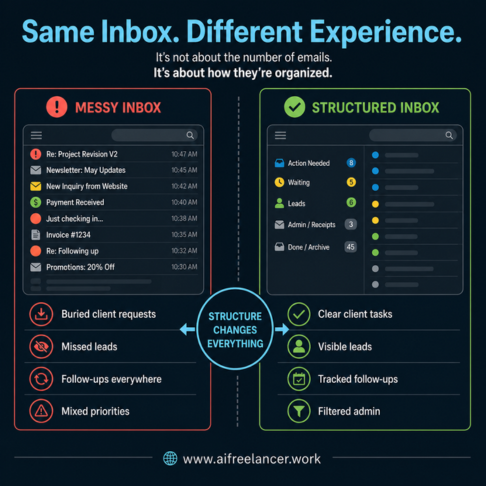
An unstructured inbox mixes everything together, which is why it feels overwhelming even when the volume is manageable. A revision request, a new inquiry, and a receipt don’t belong in the same mental category, yet they compete for attention when they appear side by side.
Here’s how the same inbox can feel completely different depending on structure:
- Messy inbox:
- Client revision request is buried under newsletters
- Lead inquiry was missed for 2 days
- “Just checking in” follow-ups stacking up
- Invoice notification mixed with project emails
- Structured inbox:
- Active client work is grouped into one stage
- Leads are separated and visible
- Follow-ups are tracked instead of remembered
- Admin emails filtered out of the main view
The volume doesn’t change, but the experience does. Structure reduces friction before you even start working.
Why Your Inbox Feels Overwhelming (And Keeps Getting Worse)
The problem isn’t just the number of emails you receive. It’s the constant switching between unrelated conversations. You might go from reviewing a draft to answering a new inquiry, then to checking a payment notification. Each shift forces your brain to reload context, which slows everything down.
That slowdown isn’t just a feeling—it’s measurable. Switching between tasks reduces efficiency and increases cognitive load, which is why even simple replies start taking longer as the day goes on.
Why Email Management for Freelancers Needs Clear Inbox Stages
Mixing leads, active work, and admin emails creates false urgency. A proposal follow-up starts to compete with a client revision, even though they require different priorities. Without clear stages, everything lands in one place and forces you to decide what matters every time you open your inbox.
The Real Reason Client Emails Turn Into Endless Back-And-Forth
Unclear replies create more emails. Vague responses invite follow-up questions, turning a single exchange into a long thread. Over time, this adds unnecessary work without improving the outcome.
Cognitive Overload From Constant Inbox Switching
Jumping between unrelated threads forces your brain to reprocess context repeatedly. You go from one project to another without finishing either, which creates mental fatigue and slows your output.
A typical day without structure makes this worse. In the morning, you open your inbox and scan everything without knowing where to start. By midday, you’re replying reactively and losing track of conversations. By the end of the day, you still have unanswered emails, unpaid invoice reminders you meant to send, and proposal follow-ups that slipped through. The workload doesn’t just grow—it fragments.
A Simple Email Management for Freelancers Workflow That Works
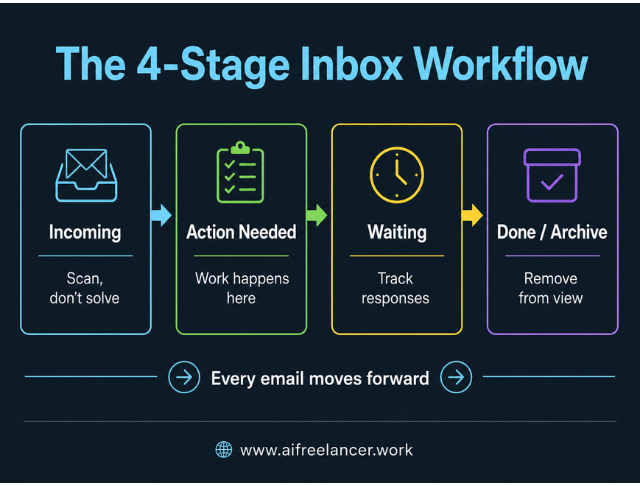
The goal is to stop deciding what each email means every time you open it. Instead of treating your inbox like a list, treat it like a flow where each message has a clear role.
Use a simple 4-stage system:
- Incoming
- Action Needed
- Waiting
- Done / Archive
This approach connects directly to how a broader AI workflow for freelancers is designed—inputs move through defined stages until they become finished output.
Each stage defines what happens next. Incoming is where everything lands, and your only job here is to scan, not solve. This prevents you from getting pulled into tasks too early.
Action Needed is where actual work happens. If something takes less than five minutes, you handle it immediately. If it takes longer, you move it into a focused work block so it doesn’t interrupt your flow.
Waiting is where you track emails that are already handled but still active. This includes drafts you’ve sent for approval, proposals waiting for a response, or follow-ups that need checking later. Instead of remembering these, you review them at set times.
Done or Archive is for anything completed. Once it’s out of your active view, it stops competing for attention.
Example: How One Email Moves Through the System
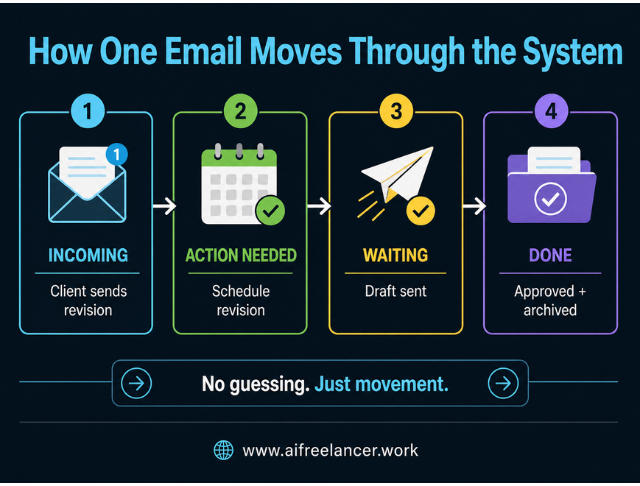
A client sends a revision request.
- It lands in Incoming while you scan your inbox
- You move it to Action Needed because it requires work
- You schedule it for your afternoon writing block instead of handling it immediately
- After completing the revision and sending the updated draft, the thread moves to Waiting
- Once the client approves it, the email moves to Done / Archive
Instead of reopening the same email multiple times, the system gives each message a clear next step, so client revisions, approvals, and follow-ups don’t sit in the same mental pile. This is the difference between reacting to emails and moving them through a process.
Movement Rules
Movement between stages follows simple rules. After a reply is sent, the email moves to Waiting. Once a task is completed, it moves to Archive. A client response sends it back to Action Needed. This keeps your inbox moving forward without constant re-evaluation.
How to Apply Email Management for Freelancers in Daily Work
A system only works if it fits how freelancers actually operate. You don’t need to manage your inbox all day—you need it to guide when to act. Most freelancers I work with struggle not because they lack tools, but because they don’t have a consistent way to process incoming work.
Applying Email Management for Freelancers to Client Communication
Clear replies reduce follow-ups. Anticipate the next question and answer it upfront to close loops faster and avoid unnecessary threads.
For example:
Weak reply:
“Let me know your thoughts.”
Stronger reply:
“Please confirm whether you prefer Option A or B by Friday so I can finalize the draft and deliver the updated version on Monday.”
The second version shortens the conversation and makes the next step obvious, so you’re not chasing the same client for clarification later.
Turning Your Inbox Into a Task System Without Extra Apps
Emails often represent tasks, but leaving them in your inbox keeps them unclear. Schedule revision requests to make them actionable, and track proposal follow-ups instead of relying on memory. This prevents paid work from getting buried under promotional emails and receipts.
This aligns closely with a 4-category task system, where incoming work is categorized before it is executed, instead of being handled reactively.
Using Email Management for Freelancers to Reduce Revisions
Better communication leads to better drafts. When expectations are clear from the start, there are fewer clarification emails and fewer revision cycles. This improves both your efficiency and the client experience.
A simple daily routine keeps the system running. In the morning, you process incoming emails and identify your top priorities. During the day, you respond in focused blocks instead of reacting constantly. At the end of the day, you clear remaining tasks, review waiting items like approvals or unpaid invoices, and reset your inbox.
The benefit of structure is not speed alone—it’s consistency. When each email follows a clear path, you stop wasting time deciding what to do next and start completing work in sequence. This is critical when you’re learning how to reduce email decision fatigue in a real freelance workflow.
This is exactly why structured workflows outperform reactive work. Productivity gains are strongest when tasks follow a defined process instead of being handled ad hoc.
Organizing Your Inbox Without Overcomplicating It
An inbox system breaks when it becomes harder to maintain than the work it supports. Once your workflow is clear, your setup should be simple and easy to manage.
You don’t need dozens of labels or folders. You need a small system that mirrors your workflow. Labels can represent your stages, while filters can handle low-priority emails like newsletters or receipts. At the same time, important decisions—like prioritizing client work—should remain manual.
This approach mirrors a 3-lane inbox system, grouping emails by action instead of scattering them across multiple categories.
Keep the system constrained:
- Max 4 active labels that match workflow stages
- No nested folders
- No “just in case” categories
Avoid common mistakes that add complexity without value. Creating labels for every client makes the system harder to manage. Storing finished work in your inbox keeps unnecessary clutter visible. Filtering important emails out of sight can cause missed opportunities, especially when a lead inquiry gets buried in an automated folder.
Where Tools Fit (And Where They Don’t)
Once the basic inbox structure is in place, tools should only support what already works.
Most freelancers can get far with built-in features:
- Filters to separate newsletters and admin emails from client work
- Templates for repeated replies like proposals, follow-ups, or onboarding
- Snooze or reminders for emails that need attention later
- Labels that match your workflow stages
Only add tools when they remove friction. If you are repeating the same action multiple times a day, a tool can help streamline it. If it introduces another step or requires constant management, it is not solving the problem. Most freelancers do not need more tools—they need a clearer way to handle incoming work so client emails, leads, and admin tasks don’t compete for attention.
From Overwhelmed to In Control: What Changes With Structure
The difference shows up in how your day flows, not just how your inbox looks. At first, the change is subtle, but it becomes more noticeable as fewer tasks remain unresolved.
When emails are sorted by stage, prioritization becomes faster. Faster prioritization leads to fewer delays, which reduces the need for follow-ups. With fewer follow-ups, your day has fewer interruptions, and your attention stays on actual work.
Leads no longer get buried under promotions. You don’t reopen the same thread just to figure out the next step. You end the day with clarity—knowing which client revisions are complete, which proposals are still waiting, and which follow-ups need attention.
Most of the day doesn’t disappear into “work”—it disappears into communication. Email, chat, and follow-ups quietly take over your time, leaving less space for focused output.
That pattern is widespread. Workers spend a large portion of their day on communication tools, which reduces the time available for deep, uninterrupted work.
Final Thoughts: Email Management for Freelancers Is a Workflow Problem
If your inbox feels chaotic, it is reflecting how your work is currently structured. Email management for freelancers is not about chasing inbox zero or trying new tools every week. It is about creating a simple system that moves emails from input to action to completion with a clear path.
That path matters because it separates client revisions, lead inquiries, and follow-ups instead of letting them pile into the same crowded space. Instead of rereading threads and guessing the next step, you move each email forward until you finish it.
If you want to build systems like this into your writing process, explore more workflow-based strategies on the blog, including an AI workflow for freelancers and how structured inputs improve output quality. You can also check my books on my Amazon Author page for practical frameworks that help you write faster, reduce revisions, and build a calmer freelance workflow.
Frequently Asked Questions About Email Management for Freelancers
Freelancers avoid missed deadlines by separating emails into stages and reviewing action items at set times. Tracking waiting emails, such as approvals or pending feedback, ensures nothing is forgotten.
Track follow-ups by moving emails into a waiting stage and reviewing them daily or every 48 hours instead of relying on memory.
Keep leads in a dedicated stage or label so they stay visible and don’t get buried under ongoing project emails.
Reducing email overwhelm starts with separating different types of emails and limiting how often you check your inbox. Clear replies and scheduled email blocks also reduce unnecessary back-and-forth.
The best system is a simple workflow that keeps emails moving. A 3–4 stage inbox structure works well because it is easy to maintain and fits daily freelance work.

Florence De Borja is a freelance writer, content strategist, and author with 14+ years of writing experience and a 15-year background in IT and software development. She creates clear, practical content on AI, SaaS, business, digital marketing, real estate, and wellness, with a focus on helping freelancers use AI to work calmer and scale smarter. On her blog, AI Freelancer, she shares systems, workflows, and AI-powered strategies for building a sustainable solo business.

