

You open a guide on how to build an AI agent expecting something you can apply immediately, but instead, you get pulled into tools, frameworks, and setup steps that don’t connect to the work in front of you. Meanwhile, the real problem remains unchanged: a vague client brief, an empty draft, and no clear starting point for using AI effectively.
This is where most freelancers get stuck. They try AI, get inconsistent results, and end up doing more cleanup than before. Without a clear workflow, AI becomes something you experiment with instead of something you rely on to finish real work.
This guide focuses on a simple, practical structure—Trigger → Prepare → Review—that helps you turn unclear input into usable, client-ready output. Instead of adding more steps, it gives you a repeatable way to move from input to output with less friction. If you’re looking for a broader way to apply this across your business, start by building small automation systems that actually support your work.
Everything I’ve shared here—and more—is in my book, available on Amazon. Click the link if you’re ready to take the next step.
How to Build an AI Agent Without Code or Complexity
Most content about AI agents assumes you want to build something technical, but that assumption doesn’t match how freelance work actually happens. When your goal is to finish drafts faster and reduce revisions, introducing tools and setups too early creates unnecessary friction.
Why Most “Build an AI Agent” Guides Don’t Work
Many guides start by asking you to choose tools before you’ve defined your workflow, which forces you to make decisions without context. You’re expected to think about integrations, memory, or frameworks before solving the basic problem of turning a brief into a draft, and that disconnect makes the process harder than it needs to be.
According to McKinsey & Company’s 2025 workplace AI report, nearly all organizations are investing in AI, yet only a small fraction consider themselves mature in its use. This gap explains why access alone is not enough—without a clear workflow, AI remains inconsistent in real work.
The issue isn’t access—it’s applying AI in a way that fits actual tasks. Most people are using AI, but far fewer are using it the same way twice, which is why results feel inconsistent.
What an AI agent really is
At its core, an AI agent is a repeatable workflow that moves from input to output through defined steps. Instead of thinking in terms of tools, think in terms of how work flows—from receiving a brief to delivering a finished piece. If that idea still feels abstract, this breakdown of how AI agents actually function in real work makes it easier to see how the pieces connect.
The 3-Step System Behind Every AI Agent
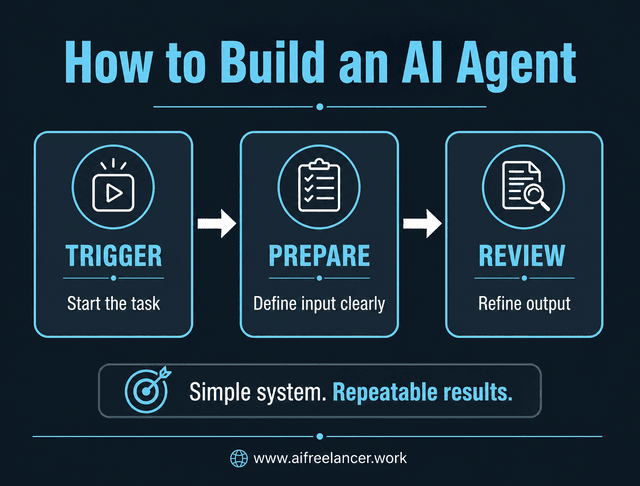
If AI helps you draft faster but leaves you cleaning up the same mess every time, the problem is not the tool—it’s the missing structure between input and output. A simple pattern fixes that gap.
How to Build an AI Agent Using Trigger → Prepare → Review
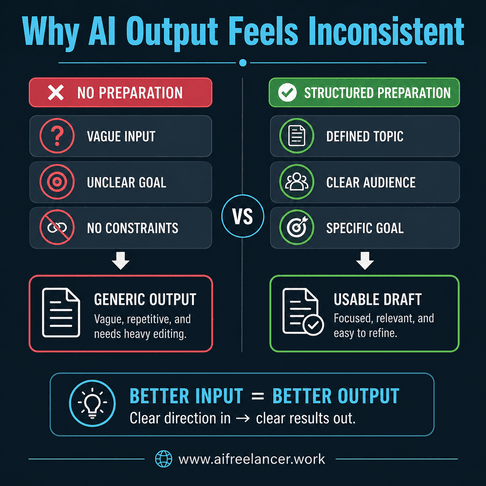
Every effective AI workflow follows three steps that work together as a sequence. The trigger is what starts the process, such as receiving a client brief or opening a draft task. Preparation is where you clarify the input before AI is involved by defining the topic, audience, goal, tone, format, constraints, and exclusions. The review step completes the workflow by refining the output so it aligns with the brief and meets quality standards.
When these elements are defined, AI has direction. When they are missing, output quality drops because the model fills gaps with assumptions. This becomes much easier to implement when you follow a simple workflow setup that removes guesswork.
Why Structured Workflows Reduce Cognitive Overload
When your workflow is undefined, each step requires a decision, whether it’s choosing a prompt, adjusting direction, or fixing output issues. These micro-decisions accumulate and slow down execution.
The Federal Reserve Bank of St. Louis reported in its analysis on generative AI and productivity that workers using generative AI saved an average of 5.4% of their work hours, or roughly 2.2 hours per week. Those gains are easier to achieve when AI is used within a repeatable workflow instead of being applied randomly.
A defined sequence reduces that friction by turning repeated decisions into a consistent process you can follow, which is why structured workflows tend to feel easier to maintain over time.
Where to Use This AI Agent Workflow in Writing
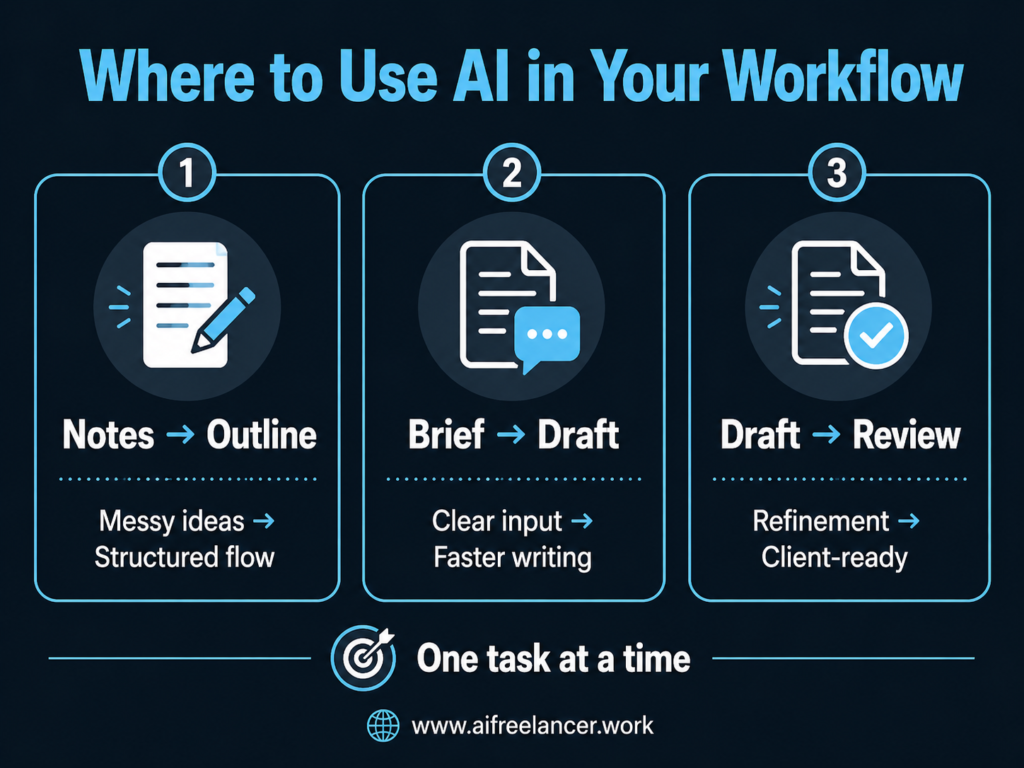
If AI gives you output but not relief, it usually means you’re applying it to the wrong part of your workflow. The goal is not to use AI everywhere—it’s to remove a specific bottleneck.
Use It for Turning Notes Into Outlines
If your notes are scattered, this workflow helps organize them into a structured outline. Instead of juggling multiple ideas, you convert them into sections with a clear flow, which reduces the effort required to start writing.
Use It for Drafting From Structured Briefs
If starting drafts takes too long, using a structured brief provides clear direction. This reduces guesswork and leads to more usable first drafts, allowing you to spend less time rewriting and more time refining.
Use It for Editing and Cleanup
If revisions take most of your time, using AI as a structured reviewer allows you to identify repetition, unclear sections, and tone inconsistencies while keeping control over the final output.
How to Build an AI Agent for the Right Task
Choosing the right starting point depends on where friction shows up in your process. Struggling to organize ideas points to improving the notes-to-outline stage. Slow drafting signals a need for clearer, more structured briefs. Long revision cycles usually mean the review step needs tightening, since that’s where most quality issues get resolved.
How to Build an AI Agent for Your First Workflow
The previous section shows where this workflow applies. This section focuses on how to choose one starting point and set it up without overcomplicating the process.
Choose the Workflow Problem First
Look at your recent work and identify where time is lost or decisions are repeated. This might be organizing ideas, starting drafts, or refining output. That friction point becomes the foundation of your first workflow, because improving one repeated task has a bigger impact than trying to optimize everything at once.
Match the Task to the Right Simple AI Workflow
Each task should have its own workflow so it can be improved independently. Notes can be turned into outlines, briefs can guide drafting, and drafts can be refined through review. Keeping these separate makes it easier to troubleshoot and refine each step without affecting the others.
Keep Your AI Workflow Simple and Repeatable
Consistency matters because it reduces the need to rethink your process each time. When the structure stays the same, improvements come from refining inputs instead of rebuilding everything, which keeps the workflow manageable over time. This is the same principle behind starting with a minimum viable workflow instead of overbuilding.
Build a Real AI Agent Step by Step
Most guides stop at explaining the idea. This is where you see what actually changes when you apply the workflow to real work.
How to Build an AI Agent From a Real Freelance Task
Consider a task where you need to write a 1,200-word blog about AI tools for freelancers. The trigger begins when you receive a brief, even if it lacks detail. The preparation step expands that brief into a structured input that defines the topic, audience, goal, tone, format, constraints, and exclusions. You then generate a draft using a guided prompt and review the output to refine clarity and alignment before finalizing it.
Full Example: Input → Prompt → Output → Revision
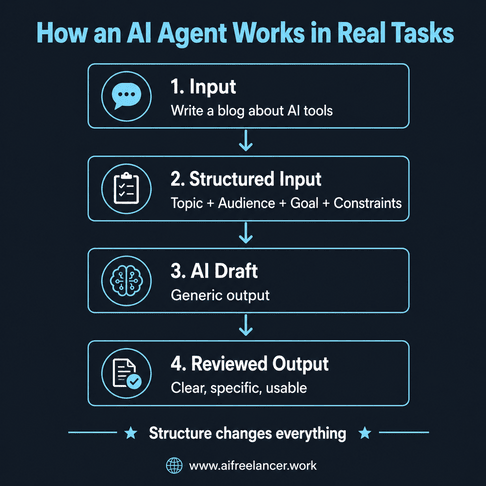
Raw input:
“Write a blog about AI tools for freelancers.”
Structured version:
- Topic: AI tools for freelance writers
- Audience: mid-career freelance writers
- Goal: help readers choose practical tools
- Tone: clear and non-technical
- Format: 1,200-word blog with sections
- Constraints: avoid generic tool lists
- Exclusions: no technical setup
Prompt:
“Write a 1,200-word blog for mid-career freelance writers about practical AI tools they can use to reduce workload. Focus on real workflows and include clear examples.”
Typical AI output (before review):
“AI tools can help freelancers save time and improve productivity. Many tools are available for writing, editing, and research. These tools can make your work easier and faster.”
Revised version (after review):
“AI tools are most useful when they replace a specific step in your workflow, not when they try to handle everything at once. For example, using AI to turn a messy client brief into a structured outline removes the hardest part of starting a draft and reduces the amount of rewriting later.”
What changed and why:
- generic claims replaced with task-based example
- vague language replaced with specific workflow use
- repetition removed
- tone made more direct and practical
This difference is what turns AI output into something you can actually use in client work.
Review Checklist for Your First AI Agent
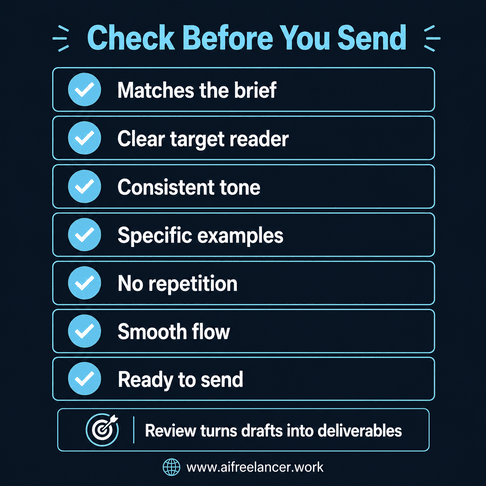
Before you treat AI output as finished work, run it through a quick review filter. This step is what separates usable drafts from client-ready content and prevents small issues from turning into major revisions later.
- Does the output match the original brief and goal?
- Is the reader clearly defined and addressed throughout the piece?
- Is the tone consistent from start to finish?
- Are examples specific, or do they feel generic?
- Are repeated ideas removed or tightened?
- Does the flow move logically from one section to the next?
- Would you feel confident sending this to a client as-is?
Using this checklist turns the review step into a consistent process instead of a vague “final pass,” which helps maintain quality across different projects.
How to Build an AI Agent That Actually Saves Time
If your workflow still requires significant rewriting or constant prompt adjustments, it isn’t saving time—it’s shifting effort across steps. The goal is to reduce the total workload, not just speed up one part of the process.
Where Most Workflows Break
Workflows often fail when they include too many steps, lack a clear starting point, or rely on vague input. Without preparation, AI fills gaps incorrectly, which increases revision time and makes the process feel inefficient.
Why Better Inputs Reduce Revisions and Improve Client-Ready Drafts
AI follows direction, so clearer inputs lead to outputs that are closer to your intent. Instead of rewriting entire drafts, you refine what is already there, which reduces both effort and turnaround time.
A 2025 study published in the Quarterly Journal of Economics on generative AI and worker productivity found that access to generative AI suggestions improved worker productivity and overall work experience. For freelance writers, these gains are most noticeable when AI is guided by a structured workflow rather than used inconsistently.
This improvement is most noticeable when the same workflow is reused consistently, because each step becomes easier to execute over time.
Common Mistakes When Building Your First AI Agent
Mistakes in building workflows often create more work rather than reducing it, especially when the structure is overlooked or steps are skipped.
Trying to Automate Everything at Once
Combining multiple tasks into one workflow makes it harder to manage and troubleshoot, which leads to inconsistent results. When something goes wrong, it becomes difficult to identify whether the issue started in the input, the draft, or the review stage, so fixing it takes longer.
Skipping the Preparation Step
When inputs are vague, AI generates output based on assumptions instead of direction. This leads to drafts that don’t match your intent, which means you spend more time rewriting instead of refining, effectively canceling out any time saved.
Trusting AI Output Without Review
Unreviewed content often includes generic phrasing, weak transitions, or tone mismatches. Over time, this affects the quality of your work and how clients perceive it, which makes the review step essential for maintaining consistency and credibility.
Final Thoughts
Learning how to build an AI agent is about creating a repeatable workflow that fits your actual work. When you consistently apply Trigger → Prepare → Review, you reduce decision-making, improve output quality, and make your process more predictable.
Over time, this leads to faster drafts, fewer revisions, and a smoother workflow that allows you to focus on execution. If you want to go deeper into AI writing workflows and build systems that help you write faster, reduce revisions, and avoid burnout, visit my Amazon Author page and explore my books designed to support freelance writers who want better output without losing control of their voice.
Frequently Asked Questions About How to Build an AI Agent
An AI agent is a structured workflow that uses AI to complete a task from start to finish. It works by defining how a task begins, how input is prepared, and how output is reviewed before it’s used, which makes the result more predictable and easier to refine.
Start with one task and apply Trigger → Prepare → Review. Define what starts the task, organize the input so AI has direction, and refine the output before using it. This approach focuses on building a repeatable workflow rather than setting up complex systems.
No, coding is not required for simple AI agents used in writing workflows. Most beginner setups rely on structuring inputs and refining outputs, which makes them accessible without technical knowledge.
Examples include turning notes into outlines, expanding briefs into drafts, and refining drafts before submission. Each example follows a structured workflow that ensures consistency and reduces the need for repeated decision-making.
AI tools perform individual tasks, such as generating text or summarizing content, while AI agents combine those tools into a structured workflow that completes a process from start to finish in a consistent way.

Florence De Borja is a freelance writer, content strategist, and author with 14+ years of writing experience and a 15-year background in IT and software development. She creates clear, practical content on AI, SaaS, business, digital marketing, real estate, and wellness, with a focus on helping freelancers use AI to work calmer and scale smarter. On her blog, AI Freelancer, she shares systems, workflows, and AI-powered strategies for building a sustainable solo business.

