
You finally have an AI workflow that saves time. Research takes minutes instead of hours, outlines come together faster, and you can finish client work without spending your entire evening at your desk. Then a new client arrives with different requirements. Your workflow keeps following the old instructions, and you spend more time correcting its output than you expected.
The problem isn’t necessarily your AI tool. Your workflow may have been designed around one set of requirements, with no easy way to accommodate changes. You need a system that can handle new assignments without forcing you to rebuild everything.
That means choosing the right tasks, keeping instructions organized, testing realistic scenarios, and maintaining the workflow without creating another administrative burden.
Everything I’ve shared here—and more—is in my book, available on Amazon. Click the link if you’re ready to take the next step.
What Makes an AI Workflow Sustainable?
A workflow that works beautifully today might become difficult to use next month. Client requirements change, tools receive updates, and tasks that once followed a predictable sequence develop exceptions.
An AI workflow is a repeatable sequence of tasks that combines AI-assisted activities, automated steps, and human decisions. For example, you might use AI to organize research notes, produce an outline, and pause for your approval before drafting begins. You don’t need several connected applications or autonomous AI agents to create one.
The Difference Between a Working AI Workflow and a Sustainable One
A workflow might produce excellent outlines for one client but become difficult to use when another client needs a different structure. A sustainable workflow continues delivering useful results as your work evolves.
Four characteristics determine whether your system can achieve that:
- Initial success: It completes the intended task.
- Reliability: It produces acceptable results across different assignments.
- Adaptability: You can accommodate new requirements without rebuilding the process.
- Maintainability: You can check, update, and correct the workflow without excessive effort.
The workflow consistently follows its original instructions, so it remains reliable under those conditions. Its weakness appears when another client needs something different. If changing the target audience or heading structure requires rewriting instructions throughout the process, the workflow lacks adaptability.
Why Simple Systems Are Easier to Maintain
It’s tempting to connect every available tool when you’re building an automated workflow. One application collects research, another organizes it, a third produces the outline, and a fourth transfers everything into your writing platform. Each connection introduces another dependency, and when something goes wrong, you must determine which step caused the problem.
Before automating these transfers, examine whether you need them at all. If you’re copying the same research notes into three applications, removing an unnecessary transfer may improve the process more than automating it. Your freelance productivity tools should support your work without creating duplicate information or additional coordination.
A simpler research-to-outline process might use one AI tool and a document containing the approved brief. You organize the notes, generate the outline, and review the result. The simpler arrangement may provide everything you need.
If you want to connect recurring tasks without adding unnecessary tools, start with a simple automation system that you can understand and maintain yourself.
Anthropic’s guide to building effective AI agents recommends starting with straightforward solutions and adding complexity only when simpler approaches cannot meet the task’s requirements.
How to Design an AI Workflow for Long-Term Use
To build an AI workflow that lasts, choose a recurring task, map its steps, separate reusable instructions from changing requirements, and establish human review points. Test the process with realistic assignments, then review its performance and update only the steps that need correction.
You have probably encountered this problem: a task takes too long, so you introduce AI without examining the existing process. The results improve initially, but inconsistent instructions and unnecessary steps eventually create more work.
Choose a Process Worth Automating
Start with a task you perform frequently and can describe clearly. You need to understand its requirements before deciding what AI should handle.
Evaluate potential tasks using three criteria:
- Frequency: Does the task occur often enough to justify the setup effort?
- Consistency: Does it follow a recognizable process across assignments?
- Judgment: Which decisions require your professional expertise?
Suppose you want to automate your entire article-writing process. You soon discover that clients provide different briefs, research requirements, and formatting instructions. Automating everything immediately could make those differences harder to manage.
Instead, begin with organizing research notes. You already have the source material, and the expected result is straightforward: group relevant information by topic and identify gaps that need further research. Once that step works consistently, you can expand the process.
Give this first workflow a clear boundary. It begins when you supply the research notes and ends when those notes are organized and ready for review. Outline generation can become the next stage after the initial process proves useful. This principle also applies when building small business automation.
McKinsey’s 2026 global AI survey found that nearly three-quarters of respondents at organizations classified as AI high performers reported fundamentally redesigning workflows, compared with approximately one-quarter of other respondents. The findings concern organizations rather than individual freelancers, but they reinforce the value of examining how work happens before introducing AI.
Map Your AI Workflow Before Choosing Tools
You cannot reliably automate a process you haven’t clearly defined. When a step goes wrong, you need to know which research notes or client instructions it received, what it was supposed to produce, and where the result should go next.
Your connected process could look like this:
- Original input: Supply the approved client brief and research notes.
- First AI task: Organize the research notes by topic.
- Intermediate output: Produce organized notes that the next step can use.
- Second AI task: Develop an outline using the organized notes and approved brief.
- Final output: Produce proposed headings, supporting points, and identified research gaps.
- Human checkpoint: Review the outline against the brief before drafting begins.
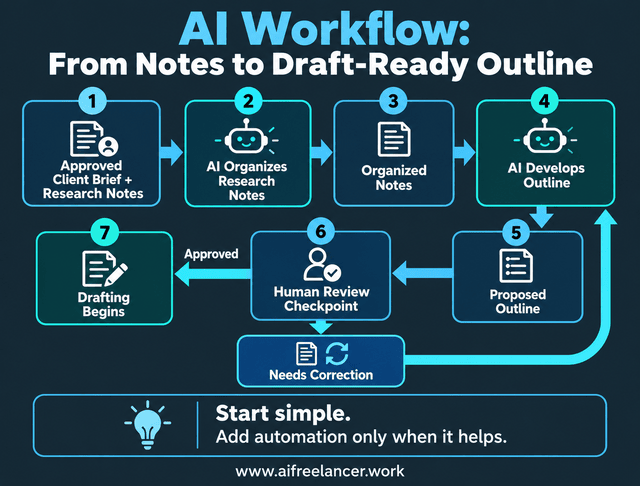
If the outline fails review, return it to the relevant AI step for correction. If it passes, you begin drafting.
You can run this sequence manually within one AI tool, reviewing the organized notes before submitting them for outline generation. Alternatively, an automation platform can pass the output to the next step automatically. Both follow the same underlying process, so begin with manual handoffs and automate them only when they provide a worthwhile benefit.
The sequence reduces more than execution time. With the steps documented, you don’t have to reconstruct the sequence for every assignment. For a broader explanation of how these steps fit together, see our guide to AI workflows for freelancers.
Separate Stable Steps From Changing Requirements
Your workflow becomes harder to maintain when you mix permanent process instructions with information that changes from one client to another. Keep these two categories separate.
Stable instructions describe the recurring process. They tell AI how to organize research, develop an outline, identify missing information, and prepare the output for your review.
Variable instructions describe the assignment. They include the client’s target audience, preferred tone, keywords, required structure, and other deliverable specifications.
You could organize the instructions this way:
Reusable instruction: Organize the supplied research notes by topic, identify missing information, and develop an outline that follows the approved brief.
Client-specific input: Target audience: freelance writers. Primary keyword: AI workflow. Required structure: four H2s.
When a new client arrives, you update the brief and reference material without rewriting the core process. The same sequence handles the new assignment, while the client-specific input determines the content and structure. You don’t need to remember which requirements belong to which client or rebuild the workflow.
Decide Where Human Judgment Belongs
An AI-generated outline can look complete while containing unsupported claims, missing requirements, or an argument that doesn’t make sense. If your workflow sends that outline directly into drafting, the problems move forward with it.
Place human checkpoints where your professional judgment matters. In the research-to-outline process, AI can organize notes and propose a structure. You remain responsible for checking the sources, evaluating the argument, and approving the outline. You should verify that cited sources exist and actually support the claims attributed to them. An AI-generated reference is not proof that the underlying information is accurate.
If the client brief contains conflicting instructions, stop and resolve the ambiguity rather than allowing AI to make an unsupported assumption. When an outline fails review, return it for a specific correction. If the problem comes from incomplete instructions, update the inputs before generating another version. Review the corrected outline again before moving to drafting.
How to Test an AI Workflow Before Depending on It
Your workflow handles the first assignment perfectly. The headings follow the brief, the research appears organized, and you finish ahead of schedule. Then another assignment arrives with missing information, and the same process produces an unusable outline.
One successful result doesn’t establish reliability. You need to know what happens when the workflow encounters the variations that occur in real client work.
Test Your AI Workflow With Realistic Assignments
Start by defining what an acceptable result looks like. Without clear standards, you may confuse an impressive-looking output with one that actually meets the assignment.
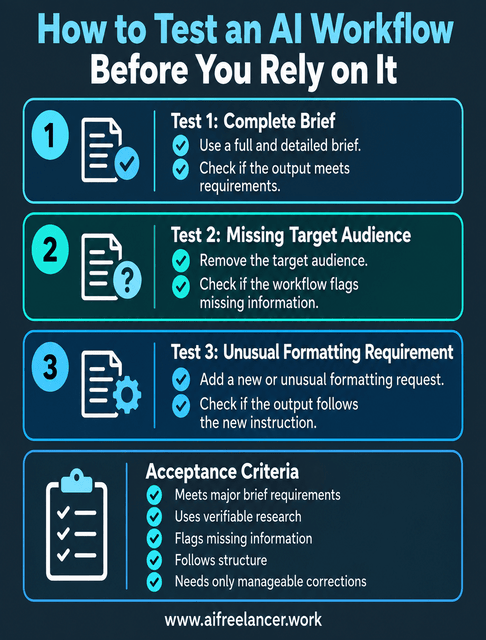
For the research-to-outline workflow, establish these acceptance criteria:
- The outline addresses the major brief requirements relevant to the outlining stage.
- Research claims remain traceable to sources that you can verify.
- The workflow identifies missing information instead of inventing it.
- The proposed headings follow the required structure.
- The outline requires only manageable corrections before approval.
Now test the process with several assignments. First, use a complete brief containing all the necessary information. Check whether the workflow produces an outline that meets your criteria.
Next, deliberately remove the target audience from the brief. The workflow should flag the missing information rather than invent an audience. For the third test, introduce an unusual formatting requirement. Check whether the output follows the new instructions instead of reverting to the original client’s preferences.
Research from METR illustrates why task complexity matters. Its 2026 evaluations found that publicly available AI models performed worse on more complicated, less clearly specified software tasks than on simpler ones. These findings do not measure freelance writing performance, but they demonstrate why success on a well-defined task does not establish reliability when conditions become more complicated.
If a test fails, identify the affected step and make a targeted correction. For example, if the workflow invents an audience, revise the instructions to check for required brief information before outlining. Then rerun the failed test and a previously successful one.
A workflow passes when its outputs meet the acceptance criteria, even if their wording varies. If an output fails a requirement that matters for the assignment, correct the affected step before regular use. You don’t need to eliminate harmless variations.
Anthropic’s guidance on evaluating AI agents explains how evaluations help identify behavioral changes and problems that might otherwise appear only during regular use. For your freelance workflow, you don’t need a sophisticated testing platform. Save a few representative assignments, keep their acceptance criteria, and use them whenever you make substantial changes.
Plan for Exceptions and Failed Steps
Even a tested workflow will encounter situations you didn’t anticipate. A source becomes unavailable, a client omits essential information, or an AI tool stops responding.
When missing information affects the accuracy or suitability of the output, pause the affected step and request clarification. For example, if the brief lacks a target audience, the workflow should request that information. If the missing information does not affect the required output, the workflow can continue. Flag the omission only if it matters to your review.
If you can’t verify a research source, the workflow should flag the claim for your review. Keep that claim out of the approved outline until you can confirm its supporting evidence.
Unexpected failures require a different response. If a tool stops responding, you may retry the affected step. If an output becomes unusable, you may need to restore a working version or complete the task manually.
You also need to design your workflow for bad days, when information is missing, a deadline is approaching, or you cannot spend an hour troubleshooting.
Measure Whether the Workflow Actually Saves Time
Generating an outline in five minutes feels productive. But how much time have you spent checking sources, correcting the structure, and updating the instructions? You need to measure the entire process.
In a 2023 experiment published in Science, researchers studied 453 college-educated professionals performing writing tasks. Participants given access to ChatGPT completed the tasks 40% faster on average, while assessed output quality improved by 18%. The experiment measured specific writing assignments, so its findings do not establish how much time your entire freelance workflow will save.
To assess your own results, establish a baseline by recording how long several assignments take without the workflow. Then track the time required to run the AI-assisted process, review the output, make corrections, and maintain the system.
Your calculation is straightforward:
Net time saved = Manual completion time − Total AI-assisted completion time
Consider this hypothetical example in which both approaches produce the same research-to-outline deliverable:
| Activity | Time |
| Original manual process | 90 minutes |
| Running the AI workflow | 10 minutes |
| Reviewing and correcting | 25 minutes |
| Average maintenance per assignment | 5 minutes |
| Total AI-assisted process | 40 minutes |
| Net time saved | 50 minutes |
The workflow saves 50 minutes, even after accounting for review, corrections, and maintenance. Your actual results will depend on the assignment and the quality of the generated output. A complicated research project may require considerably more verification than a familiar topic.
Also consider whether the workflow reduces the information you must remember, the decisions you must repeat, and the steps you must supervise. Saving 50 minutes matters, but repeatedly checking whether the system used the correct client instructions can still make the process mentally demanding. A dependable workflow should reduce the coordination you personally carry between assignments.
Tool costs and output quality matter, too. A process that saves time but repeatedly produces weak outlines may still be a poor choice. Likewise, a process that requires expensive subscriptions might offer little financial benefit.
How to Maintain an AI Workflow Without Creating More Work
Your workflow has passed its tests and now saves time on regular assignments. That doesn’t mean you can ignore it indefinitely. New requirements, changing tools, and recurring corrections can gradually reduce its value.
You need a maintenance routine that catches problems without turning workflow management into another daily responsibility.
Document Your Process and Establish a Maintenance Routine
You don’t need elaborate technical documentation. Keep a simple reference document containing the workflow’s purpose, main steps, required inputs, working instructions, and approval points. Store it alongside a few representative test assignments so you can locate everything quickly, even during a busy week.
Continue reviewing each outline before drafting. After the first five assignments, assess the workflow’s overall performance against your acceptance criteria and record recurring corrections. If the workflow performs consistently, continue using it and review it when requirements, tools, or performance change. Treat five assignments as a starting point rather than a universal rule, since higher-risk workflows may require checks during every run.
Use four questions to guide the review:
- Does it still produce results that meet your acceptance criteria?
- Have the inputs, tools, or client requirements changed?
- Are you spending more time correcting outputs than before?
- Does the workflow still save enough time to justify maintaining it?
If you manage several automated processes, a weekly maintenance checklist can help you catch recurring problems without reviewing every workflow from scratch.
For example, suppose your recent outlines contain numbered plain-text headings instead of the required Markdown heading markers, such as ##. You must manually reformat each outline before sending it for approval. Before changing anything, save a dated copy of your working instructions and representative test examples.
Check whether the formatting instructions still specify the correct output. If they do, examine the AI-generated result and any subsequent step that processes it. Once you identify the cause, make a targeted adjustment and rerun a previously successful test.
If the updated workflow performs worse, compare it with the saved version. You can recover the original instructions instead of trying to reconstruct them from memory.
The NIST AI Risk Management Framework addresses broader AI risk management, including testing and monitoring throughout a system’s lifecycle. For your smaller workflow, saving working instructions and testing changes provides a practical way to check whether an update has introduced new problems.
Know When to Update, Simplify, or Retire a Workflow
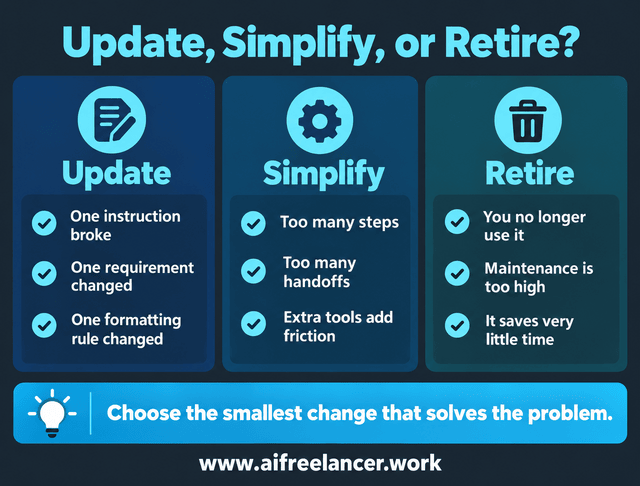
Choose the smallest change that solves the problem.
Update: A client changes the required heading structure. You revise the relevant formatting instructions while keeping the rest of the workflow.
Simplify: Transferring outlines between two applications creates recurring formatting problems. You remove the unnecessary transfer and complete the process in one tool.
Retire: You built an automation for a client service you no longer provide. The process no longer has a recurring task to perform.
If a workflow worked initially but now needs constant correction, examine why automation stops working before deciding whether to fix or replace it.
What Is the Difference Between an AI Workflow and AI Automation?
An AI workflow describes how tasks, tools, and decisions fit together to complete a process. AI automation uses artificial intelligence to execute activities with reduced manual intervention.
Your workflow may contain automated steps, but it does not need to operate independently. For example, AI can prepare a proposed outline while you retain responsibility for approving it.
How Do You Build a Reliable AI Workflow?
Start with a recurring task that has clear inputs and an identifiable output. Map its steps, separate reusable instructions from changing requirements, and establish human checkpoints.
Test the workflow using representative assignments before relying on it. Once you begin using it regularly, monitor output quality and make targeted adjustments when necessary.
How Often Should You Review an Automated Workflow?
Review frequency depends on how frequently the process changes and the consequences of errors.
A simple research-to-outline workflow may only require a brief review after several assignments or a change in requirements. An automation that publishes content or sends client messages without approval requires closer monitoring because mistakes can reach other people immediately.
What Causes AI Workflows to Become Unreliable?
Common causes include outdated instructions, changing inputs, inconsistent AI outputs, unavailable integrations, and insufficient testing.
A workflow can also become difficult to maintain when unnecessary tools or steps accumulate. To identify the problem, compare recent outputs with your original acceptance criteria and determine which step no longer behaves as expected.
How Do You Know Whether an AI Workflow Is Worth Maintaining?
Compare the time saved against the time spent running, reviewing, correcting, and maintaining the workflow.
Also consider output quality, tool costs, and how frequently you use the process. If maintenance consistently consumes more resources than the workflow saves, consider simplifying it or returning to a manual approach.
Final Thoughts
Your next AI workflow doesn’t need to automate an entire writing project. Start with a narrow, recurring task, such as organizing research notes. Establish what an acceptable result looks like, build a small process, and test it against realistic assignments.
After several projects, review the results. Expand the workflow only when the existing process consistently delivers useful work without excessive corrections. The goal is to spend less time managing your process and more time doing the work that requires your experience.
If you’re ready to turn scattered prompts into a repeatable writing process, explore my books on AI-assisted freelance writing. Visit my Amazon Author page for practical guidance on building workflows you can use across client projects.
Sources
- Anthropic — Building Effective Agents — https://www.anthropic.com/engineering/building-effective-agents
- Anthropic — Demystifying Evals for AI Agents — https://www.anthropic.com/engineering/demystifying-evals-for-ai-agents
- McKinsey & Company — The State of AI in 2026: On the Road to ROI — https://www.mckinsey.com/capabilities/quantumblack/our-insights/the-state-of-ai
- METR — Frontier Risk Report (February to March 2026) — https://metr.org/frontier-risk-report
- Science — Experimental Evidence on the Productivity Effects of Generative Artificial Intelligence — https://doi.org/10.1126/science.adh2586
- NIST — AI Risk Management Framework — https://airc.nist.gov/airmf-resources/airmf/5-sec-core/

Florence De Borja is a freelance writer, content strategist, and author with 14+ years of writing experience and a 15-year background in IT and software development. She creates clear, practical content on AI, SaaS, business, digital marketing, real estate, and wellness, with a focus on helping freelancers use AI to work calmer and scale smarter. On her blog, AI Freelancer, she shares systems, workflows, and AI-powered strategies for building a sustainable solo business.