
You built the automation because you were tired of doing the same thing over and over. For a few weeks, it worked beautifully. Then a field stopped transferring. An output needed correcting. A client changed an instruction. Before long, you were checking your business automations almost as often as you used to do the work manually.
That is one of the more frustrating things about automation. A workflow can work perfectly when you build it and still become unreliable later because your tools, inputs, rules, exceptions, and expectations can change while the automation stays exactly where you left it.
It helps to distinguish three things. A failure means the automation cannot complete the workflow. Drift happens when it still runs but produces increasingly inaccurate or unsuitable results. Obsolescence happens when the automation technically works but no longer matches how you actually work.
Everything I’ve shared here—and more—is in my book, available on Amazon. Click the link if you’re ready to take the next step.
Business Automations Rarely Fail All at Once
Some failures are easy to spot because the workflow simply stops. The harder ones are quieter. Your automation keeps running, so you assume everything is fine while small errors and workarounds slowly pile up.
When Business Automations Are Running but Still Broken
Imagine you automate part of your content workflow. A client brief arrives, information gets organized, and an AI tool produces a first draft for review. Then the client updates the tone requirements, but the automation still uses the old instructions. The draft appears on schedule. Every integration fires correctly. No error message appears. Technically, the automation succeeded, but from your perspective, it failed because you now have to rewrite parts of the draft.
An automated workflow has at least three tests to pass:
- Did it complete the task?
- Did it follow the current process?
- Did it produce something you can actually use?
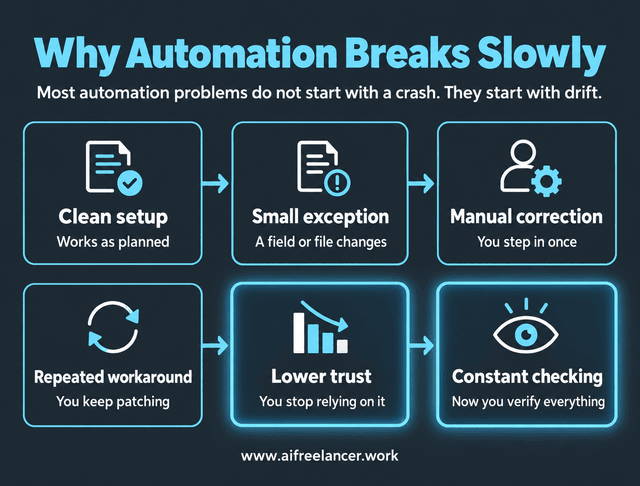
Problems often develop gradually:
clean setup → small exception → manual correction → repeated workaround → lower trust → constant checking
Once you start checking every output “just in case,” some of the value of automation has already disappeared. One way to troubleshoot the workflow itself is to break it into five basic parts. That is also the logic behind building simple automation systems that are easy to understand and maintain:
Trigger → Information → Action → Destination → Human Check
This model helps you pinpoint where the automation is breaking down. Maybe the trigger has changed, or the information is no longer coming from the right place. Perhaps the action no longer fits the situation, the result is being sent to the wrong destination, or the human check is missing at a critical point.
Silent Workflow Failures Are Harder to Spot
An automation does not need to crash to cause trouble. It may skip a step, transfer incomplete information, apply an outdated rule, format something incorrectly, or produce an output that no longer meets your standard. These silent workflow failures become harder to detect because successful automation builds trust. After a workflow runs correctly 30 times, you stop watching execution number 31 as closely.
Research from Deloitte found that 62% of organizations surveyed identified difficulty integrating different automation solutions as a major barrier, while 52% cited difficulty changing business processes or ways of working. The scale is different from freelance work, but the underlying problem is the same: automation depends on both technology and the process around it.
The important question is what tends to change around the automation and how those changes affect the workflow.
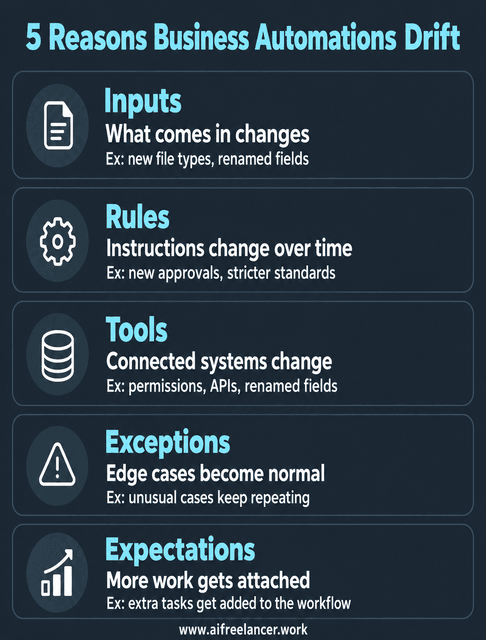
Five Things That Make Business Automations Drift
The first framework helped locate a problem inside the workflow. This one looks outward at the conditions that tend to change over time. Most drift comes from five places: inputs, rules, tools, exceptions, and expectations.
Workflow Drift Often Starts With Changing Inputs
Automations depend on assumptions about what comes in. Perhaps your client usually uploads a Word document, but this time sends a spreadsheet. A form field gets renamed.
Small input changes can cause failed triggers, incomplete transfers, incorrect categorization, or missing downstream actions. That is also why starting with the smallest workflow stack that can reliably do the job is useful. When one small automation has one clear job, you can usually see where it broke. When the same workflow tries to summarize an email, create tasks, update a database, draft a reply, generate a proposal, and schedule follow-up all at once, diagnosis becomes much harder.
Rules Change Even When the Workflow Does Not
A workflow can follow every instruction correctly and still produce the wrong result if those instructions are outdated. A client changes their approval process. You adopt a stricter sourcing standard.
The automation does not know that unless you update it. Rule drift is easy to miss because the system appears to be working exactly as designed.
Your Tools and Integrations Change
Business automation often involves several connected systems. Credentials expire. Permissions change. An API gets updated. A field gets renamed.
The more tools in the chain, the more places there are for a seemingly small change to affect something downstream. Every additional tool, branch, handoff, and condition also creates maintenance debt, the future checking and repair work created by today’s complexity. This is one reason single-purpose automations often outperform complicated multi-step systems over time. Single-purpose workflows often age better because each step has a clear input and expected output.
Exceptions Eventually Stop Being Exceptions
Most automations are designed around the happy path, where everything arrives on time and in the expected format. Real freelance work is rarely that cooperative. A client sends half the information. Two instructions contradict each other. A source cannot be verified.
One unusual case is an exception, but ten recurring exceptions mean the process itself has changed. A rare exception may only need a manual fallback. A recurring one usually means the workflow should be changed.
Expectations Rise After Automation
Automation can also change how much work you take on and what you expect from the system. You automate a repetitive task and gain capacity. Then you add another client, promise faster turnaround, or connect more work to the same workflow.
Nothing may be wrong with the automation itself. The workflow simply has to carry more than it did when you built it. Once you know where drift comes from, the next job is catching it without rebuilding your workday around monitoring.
How to Keep Business Automations Working Without Babysitting Them
If your solution to unreliable automation is checking every workflow every morning, you have simply replaced one type of repetitive work with another. Reliable automation needs enough oversight to catch meaningful changes without turning monitoring into a second job.
Give Every Automation an Owner
Even if you work alone, ownership matters. For every important automation, you should know:
- what it does
- what a successful result looks like
- what failure looks like
- which tools it depends on
- when it needs review
A short record is usually enough. Note what starts the automation, which tools it uses, what output you expect, what must still be checked manually, and what changed most recently.
Build Checkpoints Around High-Risk Steps
Not every automation deserves the same level of scrutiny. If a workflow renames internal files, an occasional mistake may be annoying but recoverable. If it sends invoices, publishes content, communicates with clients, or changes important project information, the consequences are higher.
Watch for early signs of drift:
- more frequent manual overrides
- repeated corrections
- growing exception volume
- longer completion times
- declining output quality
- more “I’ll just check this one” moments
A useful review framework is Inputs → Rules → Tools → Exceptions → Expectations. Also count invisible maintenance work. Automation can appear to save 30 minutes while quietly giving ten of those minutes back through checking, correcting, searching, remembering, and restarting.
A simple decision rule helps: if the same exception appears repeatedly, fix the workflow. If the exception is rare but costly, add a checkpoint. If the automation saves less time than it consumes in maintenance and correction, simplify it or retire it.
After a successful fix, the workflow should need fewer manual rescues, produce the expected result more consistently, and make unusual cases obvious when they occur. If you are still checking everything because you do not trust it, the underlying problem probably is not resolved. That is where designing workflows that remain reliable as your work changes becomes more important than simply getting the automation to run once.
Test Business Automations With Messy Inputs
A clean test proves that an automation works under clean conditions. Real client work is less predictable, so stress-test important workflows with situations such as:
- incomplete information
- conflicting instructions
- unusual file formats
- unavailable tools
- ambiguous cases
- situations where the workflow cannot decide what to do
Then test the failure path. If the automation cannot continue safely, does it stop, preserve the information already collected, flag the problem, and tell you that human review is needed?
A strong failure path should leave the work recoverable. The system might save the original input, record the last successful step, and stop before sending or publishing anything incorrect.
Better Business Automations Know When Not to Automate
At some point, maintaining an automation stops being the obvious answer. If a workflow keeps demanding fixes, workarounds, and supervision, the better question is whether it still deserves to exist in its current form.
When Business Automations Create More Work Than They Save
Watch for a workflow that requires constant correction, generates frequent exceptions, saves only a few minutes, needs several paid tools, or makes you anxious enough to double-check every result.
A simple way to think about its value is: time saved − maintenance time − correction time − supervision = real automation value. It also helps to separate three decisions:
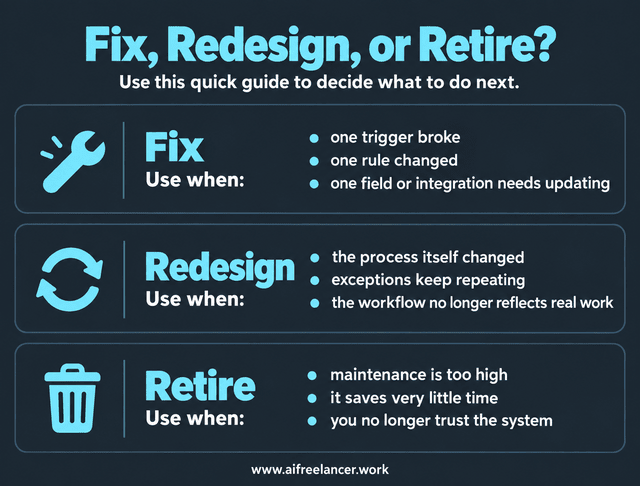
- Fix it when the core workflow still makes sense, and the problem is limited to one rule, trigger, field, or integration.
- Redesign it when the process itself has changed enough that the current workflow no longer reflects how the work is done.
- Retire it when the maintenance burden is higher than the value it creates.
A minimum viable automation does not need to connect every stage of your business. It can stop after one useful action and hand the next decision back to you.
Keep Judgment-Heavy Decisions Human
Some tasks contain a repeatable process but still need judgment at an important point. For a freelance writer, that might include interpreting ambiguous client feedback, approving a final draft, deciding whether a source is credible, handling a scope change, or making an editorial call that depends heavily on context.
You can still automate the predictable work around those decisions. The system can collect the information, organize it, and prepare what you need before handing the task back to you.
Microsoft’s 2026 Agent Confidence Index found that 59% of the technical experts surveyed named keeping humans in the loop as their top priority for agent adoption, ahead of observability and governance documentation. Microsoft describes the boundary similarly: well-specified, reversible work is a better fit for agents, while high-stakes or context-dependent decisions call for human sign-off.
Simplify Before You Add Another Automation Tool
When an automation starts struggling, adding another tool can feel like the obvious solution. Before you do, ask:
- Is the existing process clear?
- Is the problem frequent enough to automate?
- Can I simplify the current workflow instead?
- Who will maintain it?
- What happens when the normal process fails?
Sometimes another tool is justified. Sometimes removing a handoff, branch, or dependency solves the problem more cleanly.
Why Does an Automation Stop Working After a Few Weeks?
Automations often become unreliable because the conditions around them change. Inputs may look different, tools or permissions may change, business rules may be updated, or exceptions may appear that were not part of the original setup.
How Often Should I Review an Automated Workflow?
Review frequency should depend on risk. Client-facing or high-impact workflows deserve more frequent checks, while stable internal automations may only need periodic review or attention when something changes.
Can an Automation Be Broken Even if It Still Runs?
Yes. A workflow can complete every step and still be functionally broken if it uses outdated rules, transfers incomplete information, or produces an output that no longer meets your needs.
When Should I Redesign an Automation Instead of Fixing It?
A small fix is usually enough when one trigger, rule, field, or integration has changed. Redesign makes more sense when recurring exceptions, new dependencies, or changing requirements have altered the process itself.
When Should I Stop Automating a Task?
Consider retiring an automation when maintenance, corrections, and supervision regularly cost more time than the task it replaces. Tasks with unstable inputs or heavy judgment may also be better handled manually or with partial automation.
Final Thoughts
Good business automations should handle predictable work quietly, flag unusual cases, and stay easy to trust. The goal is not more automation. It is a workflow that saves time without creating another layer of checking and maintenance.
For more practical ways to use AI and systems without adding more complexity, explore my books on my Amazon Author page.
Sources
- Deloitte, Automation with Intelligence
https://www.deloitte.com/us/en/insights/topics/talent/intelligent-automation-2022-survey-results.html - Microsoft, The 2026 Agent Confidence Index: Where 300 Builders See Real Momentum
https://www.microsoft.com/en-us/microsoft-cloud/blog/2026/06/29/the-2026-agent-confidence-index-where-300-builders-see-real-momentum/

Florence De Borja is a freelance writer, content strategist, and author with 14+ years of writing experience and a 15-year background in IT and software development. She creates clear, practical content on AI, SaaS, business, digital marketing, real estate, and wellness, with a focus on helping freelancers use AI to work calmer and scale smarter. On her blog, AI Freelancer, she shares systems, workflows, and AI-powered strategies for building a sustainable solo business.