
You built an AI automation to get work off your plate. Then a client forgets an attachment, an integration disconnects, or the AI confidently sends the wrong information to the next step. Suddenly, the system that was supposed to save you time needs your full attention.
That is the problem with designing automation around perfect conditions. Your normal workflow matters, but the real test comes when something is missing, unusual, delayed, or simply wrong. Reliable automation does not need to handle every imaginable disaster. It needs to recognize the problems most likely to disrupt your work and know what to do next.
Everything I’ve shared here—and more—is in my book, available on Amazon. Click the link if you’re ready to take the next step.
Why AI Automation Needs a Bad-Day Plan
Most automations look dependable during setup because you test them with clean inputs and expected situations. Real client work rarely stays that tidy. The more responsibility you give a workflow, the more important its response to unusual conditions becomes.
Otherwise, automation can shift work rather than remove it. You stop doing the repetitive task and start checking whether the system did it correctly. That extra checking is one reason your workload can still feel heavy even after you automate part of the job.
The Happy Path Is Only Part of AI Automation
The happy path is the sequence you expect. A client submits a content brief. Your workflow saves the information, summarizes the requirements, creates a project record, and generates your research tasks.
Now remove the attachment. A fragile automation might continue anyway and create incomplete tasks based on partial information. A better system notices that something required is missing and stops before the problem moves downstream.
Some problems are easy to anticipate. Forms may arrive incomplete, connections can expire, APIs can become temporarily unavailable, and AI outputs may fail to follow the requested format. Other failures will surprise you, but you only need to prepare for the ones common enough to threaten deadlines, client relationships, or work quality.
Stanford’s 2026 AI Index reported 362 documented AI incidents in 2025, up from 233 in 2024. Those incidents are much broader than a freelancer’s everyday workflow problems, but they reinforce a practical point: capable AI systems still need safeguards, testing, and oversight.
Edge Cases Reveal Fragile Workflows
An edge case is simply a situation outside the normal path. You may only encounter it occasionally, but that does not mean you can ignore it.
Problems can come from several directions. A client may send incomplete or contradictory information. An AI model may return an unusable result. An external app may stop responding. Your real working process may also change while the automation continues following an older version of it.
Start with the situation rather than the technical label. You do not need to become an expert in exception handling to notice that a workflow assumes every client will provide the same information in the same way. The useful question is straightforward: What happens here when reality does not match the assumption?
Reliability Is About Trust, Not Perfection
You probably do not need an automation with 99.999% uptime or an enterprise monitoring center. You need to know whether the work finished correctly. An automation can fail without crashing.
Suppose an AI step summarizes a research document and passes that summary to your writing workflow. The system may mark the step as successful even though the summary omitted a critical limitation. Every technical component worked, but the result did not.
This is a silent failure, and it can be more troublesome than an obvious error because nothing tells you to investigate. McKinsey’s 2025 global AI survey found that 51% of respondents from organizations using AI reported at least one negative consequence, with nearly one-third reporting consequences related to AI inaccuracy.
A completed run does not always mean a correct result. Once you accept that, the next step is to find where bad inputs, wrong outputs, or broken dependencies can enter the workflow.
Build AI Automation Around What Can Go Wrong
Once you stop assuming every run will follow the happy path, you can design the workflow differently. Do not begin by adding complicated error controls everywhere. If you are still building the foundation, start with a simpler automation setup before adding more moving parts. First find the places where missing information, wrong outputs, or broken dependencies could cause the most trouble.
Map Failure Points Before You Build
Take the workflow one step at a time. Ask what information each step needs, what assumptions it makes, which tools it depends on, what happens if its output is wrong, and which later steps will use that output. Mapping the basic trigger-to-result flow can make those dependencies much easier to see.
That last question catches a problem that is easy to miss. One bad result can travel.
Imagine that AI incorrectly identifies a project as a 1,000-word blog instead of a 3,000-word guide. The next automation creates the wrong task, assigns the wrong deadline, estimates the wrong workload, and may even generate the wrong outline. The original mistake happened once. The workflow multiplied it.
Pay particular attention to steps that feed several later actions. A mistake near the beginning of an automated process often costs more than one near the end.
Decide What AI Automation Should Never Guess
AI is useful partly because it can interpret information that does not fit neat rules. That flexibility is also why you need limits.
Low-risk decisions can usually continue automatically because mistakes are cheap and easy to reverse. Medium-risk decisions may need a quick check. High-risk decisions involving client approval, financial figures, final factual claims, sensitive information, ambiguous instructions, or irreversible actions should stop before the system acts.
Suppose a client message says, “Use the previous version, except for the changes we discussed.” If the workflow cannot identify which version or which changes the client means, it should ask for clarification or put the task in front of you.
The NIST AI Risk Management Framework treats validity, reliability, safety, resilience, accountability, and transparency as characteristics of trustworthy AI. You do not need an enterprise governance program to apply the same basic principle to freelance workflows.
Give AI Automation a Safe Way to Fail
Finding possible problems is only useful if your workflow knows what to do with them. The goal is not to eliminate every failure. Give common failures somewhere safe to go instead of allowing the automation to push ahead blindly.
Use Fallback Paths for Common Exceptions
A fallback is the alternative route the workflow takes when the normal route cannot continue. It does not have to be complicated.
If a required file is missing, request it. If an AI summary does not meet your validation rules, move it to a review queue. If an integration is temporarily unavailable, save the job for another attempt rather than throwing away the input. If two pieces of information conflict, stop instead of arbitrarily choosing one.
A useful fallback should preserve at least one of three things: the task, the data, or the place where the workflow stopped. Saving the task keeps the work from disappearing. Saving the data keeps you from losing what the workflow already collected. Preserving the stopping point lets you return to the exact place where new information is required.
Good fallback workflows also prevent questionable information from moving forward. You can automate common exceptions without putting a person into every step of the process.
Know When AI Automation Should Hand Work Back to You
Automation should know its limits. When something goes wrong, you generally have four options: retry, pause, reroute, or escalate.
Retry when the problem is probably temporary. Pause when the workflow needs more information. Reroute when another process can safely handle the task. Escalate when the decision requires human judgment.
For freelancers, pause and escalate matters most. A vague client instruction will not become clearer because the AI repeats the same request three times. Likewise, a client-facing action that could create confusion, cost money, or damage trust should stop before the system commits to it.
Zapier’s 2026 guidance on trustworthy AI agents recommends failure-case design and human checkpoints when a wrong action could hurt a customer or cost money.
McKinsey also found that 27% of respondents whose organizations used generative AI said employees reviewed all AI-generated content before use. A similar share reviewed 20% or less, showing that oversight varies according to the work and its risks.
The point is not to review everything. Use human attention where the decision itself requires judgment.
Make Failures Visible Instead of Silent
An automation that fails loudly can be annoying. One that fails quietly can be expensive. This is where you add the checks that tell you whether the result is actually usable.
That may be as basic as an error notification, a failed-task list, a status field, an exception folder, or a daily summary of incomplete jobs. The exact method matters less than whether you can quickly tell that something needs attention.
Do not confuse “the automation ran” with “the work succeeded.” If an AI step extracts five required fields from a client document, your success condition should not merely be that the AI returned text.
Add validation criteria that match the task. Check whether all required fields exist, whether values follow the expected format, whether totals or dates make sense, and whether the result meets any confidence threshold you have set. For an AI-generated summary, validation might mean confirming that required sections are present before the result moves to the next step.
A few targeted checks can make silent errors much easier to catch.
Test AI Automation on a Bad Day Before You Trust It
A successful test using perfect information only proves that your workflow works under perfect conditions. That is useful, but incomplete. Before relying on an automation for real client work, deliberately make its day worse.
Run the Bad-Day Test
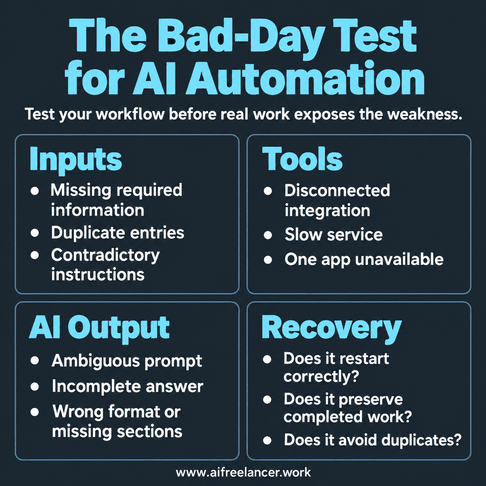
Take your finished workflow and interfere with it. Test the inputs by removing required information, submitting duplicates, or adding contradictory instructions. Test the tools by disconnecting an integration or making one app temporarily unavailable.
Then test the AI output with an ambiguous request, an unusual file, or information that could produce a plausible but incomplete answer. Focus on whether the workflow detects the problem and responds appropriately.
Does it continue when it should stop? Does it tell you what went wrong? Does it route the task somewhere safer?
Zapier’s 2026 guidance on AI-agent evaluation notes that clean sandbox tests can miss messy real-world problems such as missing fields and rate limits, which is why evaluation needs to include imperfect conditions.
You are finding weaknesses while the consequences are cheap. That gives you a better sense of what the automation will do when a real problem appears.
Test Recovery, Not Just Failure
Catching a problem is only half the job. Suppose step six of an eight-step workflow fails. If fixing that error forces you to repeat steps one through five, the automation may still create unnecessary work.
Now test recovery. See whether the workflow restarts from the correct point, preserves completed tasks, avoids duplicate actions, and behaves normally on the next run.
Simple checkpoints can help. You might use status labels such as received, validated, processed, needs review, and complete. The workflow can then see what has already happened instead of starting blindly from the beginning.
Good recovery keeps one failed step from forcing you to restart the whole workflow.
Keep a Manual Path for Critical Work
Automation should save you from repetitive work. It should not make you incapable of completing the work without it. Keep a straightforward manual path for tasks you cannot afford to leave unfinished.
You do not need a manual backup for every automated task. Maintain one when failure could cause a missed deadline, lost data, client disruption, or work that cannot simply wait until the tool comes back.
If your automated publishing workflow stops on the morning a client article must go live, you should still know where the approved file is, how to access the CMS, and what steps remain. You may rarely use the fallback, and that is the point.
Add Only as Much Protection as the Risk Requires
Once you start adding safeguards, another problem appears: too many checks can make a simple workflow harder to maintain.
A workflow that saves interesting links into a research database does not need the same safeguards as one that sends client emails automatically. At this stage, you are deciding how much protection the whole workflow needs, not whether one particular AI decision should continue or stop.
Judge that by how much damage a mistake could cause, how likely it is, how easy it would be to detect, and how difficult it would be to undo. Detectability matters because an obvious error can often be corrected quickly, while a quieter mistake may sit unnoticed for hours or days.
If the consequence is small, easy to spot, and reversible, basic checks may be enough. If failure could affect client communication, money, confidential data, or an action that is hard to undo, use stronger safeguards around those points.
Watch repeated exceptions too. If you keep manually fixing the same problem, you no longer have an edge case. Your actual process has changed, and the automation probably needs redesign rather than another patch. That is also a sign to look at how you build workflows that hold up over time instead of continually repairing the same weak point.
A Simple Bad-Day Checklist for Your Next Workflow
Before you call a new automation finished, run through these questions:
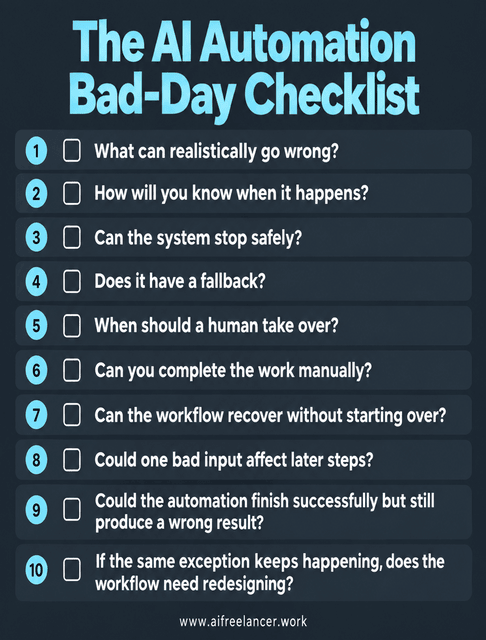
You do not need an elaborate answer to every question. You need enough clarity that one bad input does not turn your time-saving system into an afternoon of detective work.
What Is AI Automation in Simple Terms?
AI automation combines automated workflows with artificial intelligence. Traditional automation follows predefined rules, while AI can interpret less structured information such as emails, documents, or natural-language requests before the workflow takes its next action.
What Is the Difference Between AI Automation and Regular Automation?
Regular automation works best when inputs and rules remain predictable. AI automation adds a model that can classify, summarize, extract, generate, or make limited decisions from less predictable inputs.
That flexibility also means you need to account for uncertainty, testing, monitoring, and human review where appropriate.
How Do You Know if a Process Is Worth Automating With AI?
Look for work that happens frequently, follows a recognizable pattern, takes meaningful time, and contains a step that benefits from interpretation or judgment.
Do not start with a chaotic process simply because AI makes automation possible. Stabilize the process first so you can identify inputs, expected outputs, exceptions, and success conditions.
What Are Examples of AI Automation?
Examples include classifying incoming client messages, summarizing meeting notes, extracting details from documents, routing inquiries, preparing first-draft replies, organizing research, and creating tasks from project briefs.
The safest applications usually automate predictable work while keeping human approval around decisions with higher consequences.
Does AI Automation Replace Human Work?
AI automation can remove individual tasks or steps, especially repetitive administrative work. It does not automatically remove the need for human judgment.
In many workflows, your role shifts from performing every step to reviewing exceptions and handling decisions the system should not make alone.
Final Thoughts
AI automation earns its place in your workflow when you can stop thinking about it every five minutes. If you have to constantly check whether it misunderstood something, missed a step, or quietly produced the wrong result, you have moved the workload rather than reduced it.
Design the workflow for the ordinary day, but test it for the bad one. Give predictable failures somewhere safe to go, make important exceptions visible, and keep yourself in the loop where your judgment actually matters.
You do not need the most sophisticated automation. You need one that still helps when work becomes messy. If you want more practical ways to build AI into freelance work without turning every process into something you have to babysit, explore my books on my Amazon Author page.
Sources
- Stanford HAI — 2026 AI Index Report: Responsible AI — https://hai.stanford.edu/ai-index/2026-ai-index-report/responsible-ai
- McKinsey & Company — The State of AI in 2025: Agents, Innovation, and Transformation — https://www.mckinsey.com/capabilities/quantumblack/our-insights/the-state-of-ai-2025
- McKinsey & Company — The State of AI: How Organizations Are Rewiring to Capture Value — https://www.mckinsey.com/capabilities/quantumblack/our-insights/the-state-of-ai-how-organizations-are-rewiring-to-capture-value
- NIST — AI Risk Management Framework FAQs — https://www.nist.gov/itl/ai-risk-management-framework/ai-risk-management-framework-faqs
- Zapier — How to Build Safe and Trustworthy AI Agents — https://zapier.com/blog/safe-trustworthy-ai-agents/
- Zapier — AI Agent Evaluation: How to Test AI Agents — https://zapier.com/blog/ai-agent-evaluation/

Florence De Borja is a freelance writer, content strategist, and author with 14+ years of writing experience and a 15-year background in IT and software development. She creates clear, practical content on AI, SaaS, business, digital marketing, real estate, and wellness, with a focus on helping freelancers use AI to work calmer and scale smarter. On her blog, AI Freelancer, she shares systems, workflows, and AI-powered strategies for building a sustainable solo business.