

Suppose you are like most freelance writers, your week often disappears into a flurry of invoices, follow-ups, and “just checking in” emails that never quite seem to end. You sit down to write, open your inbox “for a minute,” and suddenly you are chasing client details instead of working on drafts. This is exactly where AI tools for small business start to feel less like hype and more like backup for your one-person team.
In this guide, you will see how simple tools can handle invoices, payments, and everyday admin so you can spend more of your time on actual writing. You don’t need a technical background. You need clear examples and a few starting points that fit a freelance workflow. By the time you finish reading, you will know how to send your next invoice faster and tighten your payment process.
Everything I’ve shared here—and more—is in my book, available on Amazon. Click the link if you’re ready to take the next step.
How AI Tools for Small Business Fit a Freelance Writer’s Life
Your workday looks full, but too much of it goes to chasing invoices, updating spreadsheets, and replying to money-related emails. When you plug AI business tools into that routine, you keep the income flowing without sacrificing your best writing hours.
Why Client Work Feels Heavy Without Automation
As a freelancer, you juggle multiple roles at once—writer, project manager, bookkeeper, and client support. Every time you send a custom invoice in a spreadsheet or draft a payment reminder from scratch, you burn time and energy that could go to real work.
Without basic automation, you are:
- Rewriting the same invoice details
- Searching old email threads for rates and scopes
- Tracking payments in scattered notes or manual spreadsheets
AI for small business is not about replacing your judgment. It is about creating systems that remember details for you. AI invoicing tools can store your rates, client information, and standard line items, enabling you to generate a new invoice with just a few clicks, rather than rebuilding it from scratch every time.
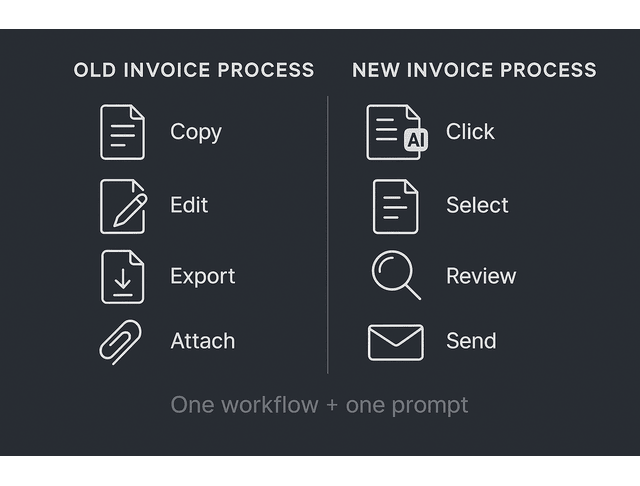
A simple before-and-after workflow makes the difference clear:
- Before: you copy an old invoice into a spreadsheet, edit each line, export to PDF, attach it to an email, and write a custom message.
- After: you click “New invoice,” pick the client from a list, select a saved template, let the tool suggest line items, and send the invoice with a prewritten email that you only tweak in a few seconds.
You can even ask an AI assistant to write that email for you. For example:
Prompt example:
“Write a short, friendly email to send with this invoice. Mention the project name, the due date on the invoice, and express gratitude to the client for their collaboration. Keep the tone professional and warm.”
Common Money Tasks That Drain Freelance Writers
Think about the parts of your money workflow that feel heavy:
- Creating and sending invoices
- Updating who has paid and who still owes
- Sending follow-ups for late payments
- Exporting numbers for simple bookkeeping
A big reason this feels never-ending is that collections work quietly turns into a part-time job. QuickBooks research reported that 65% of businesses spend an average of 14 hours per week on administrative tasks related to collecting payments, which helps explain why invoicing and follow-ups can swallow time you meant to protect for writing.
Many AI-enabled small business accounting tools already include features that freelance writers can utilize, such as automatic invoice reminders, expense categorization, and simple dashboards for tracking cash flow. Tools like Xero, Wave, or FreshBooks now ship with built-in AI that suggests categories, detects patterns, and reduces manual entry.
You still decide your prices and terms. The tool handles the repetition.
From Manual Admin to Smart Workflows with AI Assistants
An AI assistant like ChatGPT or a built-in AI inside your billing platform can:
- Draft polite invoice emails
- Generate payment reminder scripts
- Summarize what you earned this month by client or project
- Turn your notes into a clear report for your accountant
You can also connect AI tools to automation platforms such as Zapier or Make. That connection lets you create simple workflows like:
- When an invoice is marked as paid, update the Google Sheet and send yourself a notification via Slack or email.
- When a client signs a contract, create a draft invoice and a task in your project manager.
You do not have to set up a complex system on day one.
A good way to begin is to select one workflow and pair it with a corresponding prompt. For example, after a project wraps, you can run this through your assistant:
Prompt example:
“Summarize this finished project in 4 bullet points I can keep for my records. Include the client name, project type, fee, and delivery date. Make it concise and clear.”
That summary can live next to your invoice and help you track what you actually did for each client.
Choosing AI Tools for Small Business to Handle Invoicing
Messy invoices and forgotten line items quietly cost you money and credibility. The right AI invoicing tools turn your usual chaos into clean, consistent bills that take minutes to prepare.
AI Tools for Small Business for Simple, Accurate Invoices
The right invoicing tool can store your client data, track due dates, and maintain clean records. Many modern platforms now offer AI features that help you:
- Suggest line items based on past invoices
- Catch missing fields before you send
- Generate neat summaries of your income
As a freelance writer, look for:
- Customizable invoice templates with your logo and branding
- Options for both flat-fee and per-word or per-hour billing
- Currency support if you work with international clients
- Clear reports you can export at tax time
You can then pair that with a general AI assistant to draft the text that accompanies each invoice, such as notes on scope, usage rights, or terms of use.
To make this practical, treat your first setup as a mini project and follow a short checklist:
- Upload or create a simple logo to ensure your invoices appear consistent and professional.
- Add one existing client with name, email, and default currency.
- Create one standard line item that reflects your usual rate, such as “Blog article up to 1,500 words.”
- Set a default due date that matches your policy, such as 7 or 14 days after the invoice date.
- Send one test invoice to yourself so you can see exactly what clients will receive.
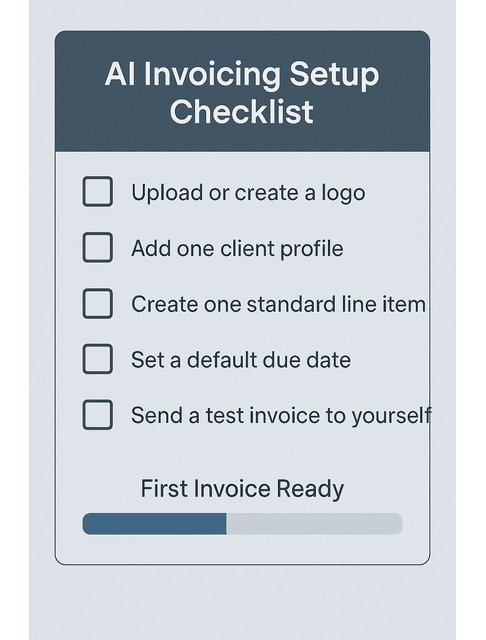
This first pass takes a little time, but every invoice after that becomes a quicker, more reliable process.
What to Look For in AI-Powered Billing Software
When you evaluate AI invoicing tools, keep it simple. You want:
- Integrations with your payment processor or bank
- Smart suggestions that you can override at any time
Good AI tools for small business invoicing will:
- Learn your typical rates and descriptions
- Spot strange numbers that might be typos
- Offer quick filters, such as “unpaid,” “overdue,” or “this quarter.”
You stay in control. Treat AI as a helpful assistant who prepares the invoice, and you review and approve it before it goes out.
Since you are working with client data, also check the tool’s privacy and security page. Look for clear statements about how the tool stores, encrypts, and uses your data for model training. If you handle sensitive information or work under a non-disclosure agreement (NDA), select tools that enable you to turn off data sharing whenever necessary.
Link Your Proposals, Contracts, and Invoice Templates
A smooth workflow connects your agreements to your invoicing system. For example:
- You create a proposal or simple contract in a tool like Notion, Google Docs, or a dedicated proposal app.
- You ask an AI writing assistant to summarize key terms, such as fee, timeline, and deliverables.
- You paste that summary into your invoicing system or use an integration so the invoice pulls those details automatically.
Once this is in place, each new project transitions smoothly from “yes” to “invoice sent” with fewer chances to overlook a detail or undercharge.
You can also ask your assistant to build a small library of invoice notes that you reuse. For example:
Prompt example:
“Based on these terms, write a short note I can add to the invoice that summarizes scope and usage rights in plain language. Keep it under 50 words.”
Over time, you will have ready-made wording for different project types that still reflects your policies.
Using AI Tools for Small Business to Automate Payments
Once your invoices are clear and consistent, your next step is to convert them into payments without requiring constant follow-up.
Late payments are not just annoying. They create a low-level stress that follows you into every project. Payment automation enables you to utilize AI to ensure timely payments, allowing you to focus on delivering high-quality work instead of chasing transfers.
And it’s not only late payments. Sage research reported that SMBs lose 24 days a year to financial admin, including work like invoicing, chasing payments, and correcting errors—exactly the kind of repetition you want to get out of your writing day.
Connect Payment Gateways, Banks, and Accounting Apps
Payment automation starts with solid connections. Many platforms now support:
- Built-in payment links on your invoices
- Automatic reconciliation when a payment arrives
- Sync with Stripe, PayPal, Wise, or local bank transfers
Many modern finance platforms now include smart matching powered by AI. For example, the system compares an incoming payment with open invoices and suggests the correct match.
This reduces the time you spend checking each line in your bank statement.
If you work with international clients, choose gateways that support multiple currencies and show fees clearly. A slightly higher cost is worth it if your clients pay in their own currency with one click and you are paid faster, with less back and forth about methods and conversions.
Match Your Payment Workflow with AI Tools for Small Business
Every writer has a slightly different payment workflow. You might:
- Charge a deposit upfront
- Work on retainers
- Invoice per milestone or per batch of articles
AI tools for small business can support each of these models if you choose a platform with flexible rules. Look for features such as:
- Scheduled invoices for monthly retainers
- Automatic reminders a few days before and after the due date
- Tags or labels for different clients or services
Then use AI to draft your payment terms in clear, reader-friendly language. You can feed your typical policies into an assistant and ask it to create templates for:
- Net 7, Net 14, or Net 30 terms
- Late fees that match your comfort level
- Different rules for new clients and long-term partners
You can also ask your assistant to phrase your terms in a way that feels aligned with your brand. For example:
Prompt example:
“Rewrite these payment terms in a clear and friendly tone for my freelance writing clients. Keep them firm but respectful, avoid legal jargon, and keep it under 120 words.”
Reduce Late Payments with Smart Reminders and Tracking
Instead of chasing each client by hand, you can:
- Turn on automatic reminders inside your invoicing tool
- Use AI to write short, polite follow-up messages that sound like you
- Set thresholds so you get an alert when an invoice is more than a certain number of days overdue
This helps you maintain a calm and consistent tone, even when cash flow is tight. You handle payments professionally and predictably, which also protects your client relationships.
A simple reminder schedule works well for many freelancers:
- One reminder three days before the due date as a friendly heads up
- One reminder on the due date with a direct link to pay
- One reminder seven days after the due date that mentions you will pause new work if the account stays overdue
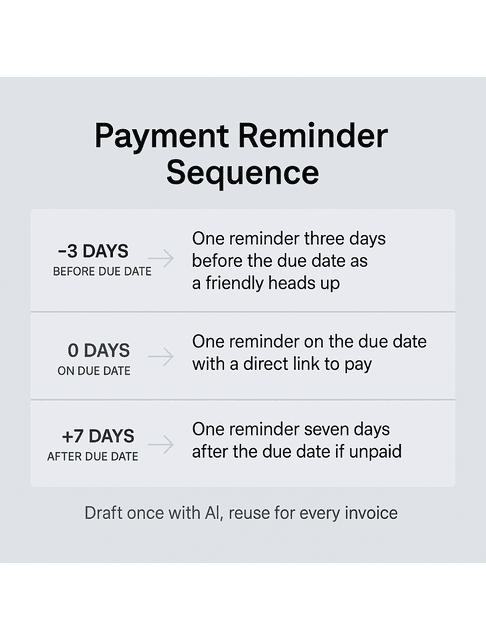
You can draft these templates once with an AI assistant, store them in your invoicing tool as templates, and then let the system send them automatically for each new invoice.
Productivity Routines with AI Tools for Small Business
You do not need more willpower to stay productive. You need a system that removes small decisions from your day. AI-powered routines protect your focus, organize your tasks, and make it easier to stay focused on deep writing sessions, even when your schedule is full.
Set Up an AI-Assisted Writing and Editing Workflow
AI productivity tools can support your writing process without compromising your unique voice. For example, you can use an assistant to:
- Turn a client brief into a detailed outline
- Brainstorm headline variations
- Suggest a structure for long guides or case studies
- Catch grammar issues or unclear sentences
Use tools like ChatGPT, Notion AI, or Grammarly as helpers, not as ghostwriters. You can paste your own draft and ask for:
- Clarity suggestions
- Plain-language rewrites for dense sections
- Style checks to match a client’s tone guide
Over time, you build prompt templates for repeated tasks, such as “clean up this invoice email” or “summarize this project update in three sentences.”
Some practical prompt ideas you can reuse:
Outline prompt:
“Turn this client brief into a detailed outline for a 1,500-word blog post. Include H2 and H3 headings and bullet points under each section. Keep it suitable for a business audience.”
Editing prompt:
“Review this paragraph for clarity and concision. Keep my tone and main idea, but make the sentences smoother and easier to read.”
Status update prompt:
“Summarize this project update into three short sentences I can send to my client. Mention what I finished, what I am doing next, and whether anything is blocked.”
These small patterns save time and reduce the mental effort required to perform repetitive tasks.
Use Automation to Protect Your Focus Blocks
Many freelance writers struggle to protect deep work time. Notifications and administrative tasks eat into the hours they meant to spend writing.
This context-switching is more costly than it looks. Research shared by UC Berkeley (citing UC Irvine work on interruptions) reports that after an interruption, it can take about 25 minutes and 26 seconds to return to the same task, which helps explain why a quick inbox check can blow up an entire writing block.
AI and automation can help you:
- Schedule focus blocks on your calendar and auto-decline meetings during that window
- Batch admin tasks like invoicing, file naming, and simple reporting
- Route non-urgent messages into a “later” folder
Tools like AI calendar assistants and automation platforms can rearrange your day based on deadlines and energy levels.
You still choose your priorities. The system organizes them so you have clear, uninterrupted writing time.
A simple weekly pattern might look like this:
- One 90-minute writing block each morning reserved for deep work
- One 30-minute admin block in the afternoon for invoices, emails, and updates
- One short planning session on Friday using AI to list next week’s top three priorities
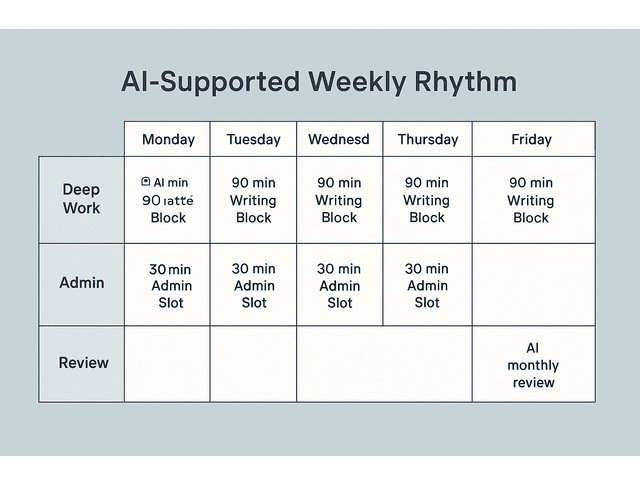
You can set your calendar to auto-decline invites during your focus block with a polite reply that offers two alternative times. This protects your best hours without creating friction.
Build a Sustainable Writing Rhythm with AI Tools for Small Business
The real win is not a single productivity trick. It is a rhythm you can maintain even during busy seasons.
You can use AI to:
- Review your past month and show which clients or projects paid the most with the least friction
- Spot which tasks keep pushing into evenings and weekends
- Suggest a weekly template that balances client work, marketing, and admin
When you treat AI as part of your operating system, your workload becomes more predictable and manageable. You start each week with a clear plan, rather than a messy list of unfinished tasks.
A simple review prompt at the end of each month can help:
Prompt example:
“Here are my finished projects, hours, and earnings for this month. Identify which clients or project types gave me the highest effective hourly rate and the least stress. Suggest what I should do more of next month and what I should do less of.”
Answers like this provide you with data that you can actually use to shape your schedule and client mix.
Final Thoughts
AI can feel overwhelming if you try to learn every tool at once. You do not need that. Start with one or two AI tools for small business that directly reduce your stress: a simple invoicing platform with smart reminders, a payment system that syncs with your bank, or a writing assistant that helps you clean up emails and briefs.
For many freelance writers, a simple starter stack might look like this: one AI-enabled invoicing or accounting tool, one general AI assistant you use for emails and prompts, and one calendar or project app that you actually open every day. If each tool earns its keep by saving you time on a specific task, your setup will stay lean instead of turning into clutter.
As a freelance writer, your earning power comes from clear thinking and consistent delivery. Let the tools handle the repetition so you can preserve your focus, energy, and best ideas. As one small next step, choose a single client and commit to sending their next invoice through a new tool with an AI-drafted email, to see how much time and friction you save.
If you want a clear, beginner-friendly system for choosing and using AI business tools without turning your workflow into clutter, check out my books on my Amazon Author page. You’ll find practical guides and templates you can apply the same day to streamline invoicing, client communication, and day-to-day admin—so you can spend more time writing and less time chasing tasks.
Frequently Asked Questions About AI Tools for Small Business
There is no single best tool for every business. For freelance writers, a good starting stack includes an AI-enabled invoicing tool, a general AI writing assistant like ChatGPT, and a simple project or calendar app with automation capabilities. For example, combine a basic invoicing platform with ChatGPT for email automation and Google Calendar for time management.
AI can automate invoice processing and payment reminders, draft and refine client communications, outline articles and case studies, and summarize lengthy client documents or research. It can also help you track tasks and deadlines so you spend less time on admin and more time writing.
Start with one small workflow, such as invoicing for your next client project, and add a single AI or automation tool to support it. Once that feels comfortable, extend AI to another area, such as outlining articles or summarizing briefs.
Freelancers often use ChatGPT or Jasper for generating ideas and rough drafts, Grammarly for refining grammar and tone, and Canva’s AI features for creating simple graphics and social media posts. These tools accelerate the content creation process while still allowing you to control strategy, tone, and final quality. You can test each one on a single blog post or social content batch before deciding whether to keep it.
You can start with a modest monthly budget that covers one invoicing or accounting tool, one AI writing assistant, and one basic project or calendar app. Many platforms offer free tiers or low-cost plans, so you can upgrade later once the tools clearly save you time or help you earn more. A realistic starting point is to keep your total AI and tooling spend under the value of one small project per month until you see consistent returns.

Florence De Borja is a freelance writer, content strategist, and author with 14+ years of writing experience and a 15-year background in IT and software development. She creates clear, practical content on AI, SaaS, business, digital marketing, real estate, and wellness, with a focus on helping freelancers use AI to work calmer and scale smarter. On her blog, AI Freelancer, she shares systems, workflows, and AI-powered strategies for building a sustainable solo business.

