

You’re bouncing between three client blogs, a sales page, and an inbox full of “quick questions.” It feels like you’re running 47 tabs in your head, and every new AI update adds one more. You know these tools could take some pressure off, but you’re already stretched thin and don’t have space to “learn machine learning” on top of your daily workload. Here’s the good news: you don’t need a data science degree to benefit from machine learning for writers. You need a clear sense of what it is, what it can (and can’t) do for your writing workflow, and where it slots into the work you already do for clients.
This guide breaks down the basics in straightforward terms, walks you through real freelance scenarios, and offers small, low-risk experiments you can try without putting your voice—or your reputation—on the line.
There’s also real evidence that these tools can improve speed and quality when used as support. In a peer-reviewed study published in Science, access to ChatGPT reduced the time required to complete writing tasks by 40% and increased output quality by 18% (as rated by independent evaluators).
Everything I’ve shared here—and more—is in my book, available on Amazon. Click the link if you’re ready to take the next step.
Machine Learning for Writers: What It Is and What It Isn’t
You keep hearing about AI “changing everything.” Still, no one explains what’s actually happening under the hood in terms a busy writer can use. This section strips machine learning down to plain language so you can finally understand what it is, what it isn’t, and where it fits in your client work.
Machine Learning for Writers in Plain Language
Instead of combing through thousands of articles yourself to see how intros work or which phrases show up in product reviews, you let a machine learning model do that pattern-hunting for you. It races through massive volumes of text, identifies repeated structures and connections, and then uses those patterns to make predictions—such as “Which word will probably come next?” or “Does this review sound positive or negative?”
For you as a freelance writer, that means:
- Tools that can suggest headlines and outlines based on similar articles
- Draft paragraphs that follow common structures for blog posts, FAQs, or product descriptions
- Quick tone checks and rewrites that match “friendly,” “professional,” or “direct” instructions
You don’t need to follow all the math running in the background. What matters is that the tool studies numerous examples and then relies on those patterns to make its best guess about what should come next.
On a normal Tuesday, that might look like this: a client sends you a vague brief for a 2,000-word SaaS blog. You drop their landing page, last month’s blog. Two reference articles into an AI assistant, ask for a summary and angle ideas, and walk away with a clear outline and a list of subtopics in under 30 minutes—work that might have eaten your whole morning without ML in the background.
Key Concepts: Models, Training Data, and Patterns in Text
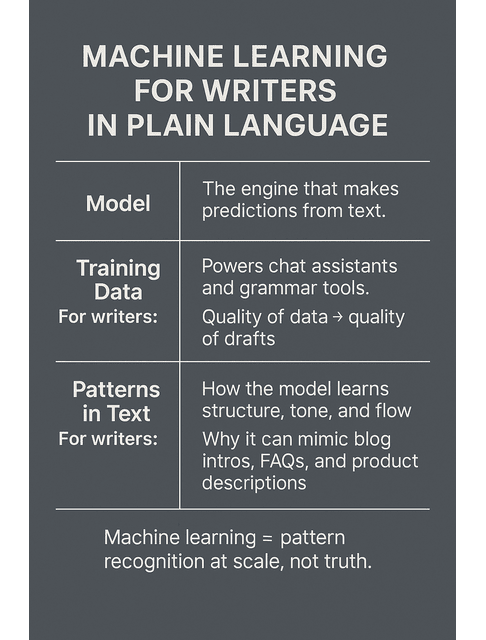
A few simple terms help you feel less intimidated and more in control:
- Model: You can treat it like the engine doing the guessing behind the scenes. The system that runs a chatbot isn’t necessarily the same one a grammar checker or SEO tool uses, because each one supports a different kind of task.
- Training data: The examples the model learned from. This could be books, articles, code, forum posts—whatever the creators fed into it.
- Patterns in text: The structures it picks up—how intros tend to work, how headings are formatted, how a “how to” post usually flows, and so on.
Why this matters to you:
- Training data quality affects output quality. Messy data → messy drafts.
- Models that specialize in language are usually better for writing tasks than generic “all-purpose” AI.
- Knowing its pattern-based nature helps you avoid treating it like an authority. It’s not “understanding truth”; it’s predicting what looks right.
You can see these concepts in features you already use: language models sit behind chat-style assistants that help you brainstorm; training data shapes how well your grammar checker understands nuance; pattern-finding powers SEO tools that group related keywords into topic clusters and recommend subheadings.
Machine Learning vs “Traditional AI”: What Writers Actually Need to Know
Traditional AI often followed hand-written rules: “If this, then that.” Machine learning learned from data instead of depending on a giant rulebook.
For writers, the practical differences are:
- Old-school AI: Grammar checkers with rigid rules, clunky chatbots that only recognized specific phrases.
- ML-driven tools: Fluid chat experiences, natural rewrites, draft generation, summarization, sentiment analysis, and topic clustering.
That shift from rigid rules to learning from examples is why today’s tools feel less like clunky forms and more like a flexible assistant you can talk to. Once you see machine learning as large-scale pattern recognition in text, it’s easier to understand how it can quietly support your research, outlines, drafts, and edits.
How Machine Learning for Writers Supports Your Daily Workflow
You don’t need another shiny tool; you need fewer late nights hunting for angles, organizing notes, and fixing clunky drafts. Here, you’ll see exactly how machine learning can shave time off research, outlining, drafting, and editing—without turning your work into generic AI sludge.
Research, Ideation, and Outlining With ML-Powered Writing Tools
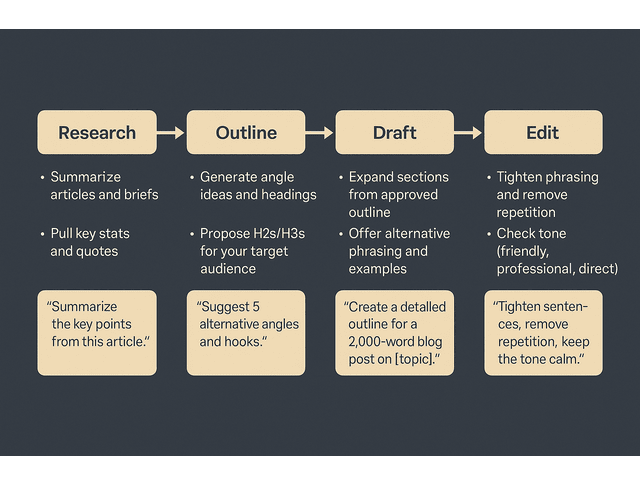
As an overworked freelance writer, you don’t get paid to stare at a blank Google Doc. You get paid to deliver strong ideas and organized drafts on schedule.
Machine learning can support that by:
- Summarizing research: Paste long briefs, articles, or transcripts and ask for concise summaries with key points and quotes.
- Expanding angles: Feed the tool your working title and niche, then ask for alternative angles, hooks, and examples for your target audience.
- Structuring your outline: Provide your goal (e.g., “2,000-word guide for SaaS founders”) and let the tool propose a logical section flow you can tweak.
You’re still in charge of judgment—deciding what’s relevant, what’s on brand, and what fits the client’s brief. The tool compresses the time between “I have a topic” and “I have a clear outline I can write from.”
This matters because a big chunk of your time disappears into “finding and re-finding” what you need. In an APQC survey of 982 knowledge workers, respondents estimated they spend 2.8 hours per week looking for or requesting needed information. Summarization, clustering, and clean brief extraction can reduce how often you get stuck rereading and hunting through long docs.
You can turn this into a repeatable mini-workflow with simple prompts, for example:
- Research prompt:
“Summarize the key points from this article for a freelance writer who needs to explain it to non-technical SaaS founders. Include five bullet points and any stats that matter.”
- Angle prompt:
“Here’s my working title and brief. Provide me with five alternative angles and opening hooks for a 1,500-word blog targeting [audience]. Keep the ideas practical and grounded, not hypey.”
- Outline prompt:
“Create a clear outline for a [word count] blog post on [topic] aimed at [audience]. Use H2 and H3 headings, and include short notes about where specific examples should go.”
Without these steps, you might spend 60–90 minutes jumping between tabs before your outline feels solid. With them, you can often get to a usable outline in 20–30 minutes and spend more of your energy on the parts clients actually see. On a typical 1,500-word blog post, that can mean cutting outline time in half while starting from a clearer structure instead of a blank page.
Picture a B2B SaaS client asking you for a post on “reducing churn with better onboarding.” You pull up three competitor blogs and the client’s product page, skim them, then drop the key URLs or pasted text into your AI assistant and run a summarization pass to spot themes and gaps. Next, ask for a list of fresh angles, pick the one that best fits your client, and use the tool to spin up a rough outline that leverages their strengths. You still choose the angle, shape the narrative, and decide what stays—but the machine does the heavy lifting of scanning, sorting, and organizing the raw material.
Where AI Tools Stop and Machine Learning for Writers Begins
In reality, the same underlying ML concepts drive many of the tools you use—they show up in different packages.
Think of it like this:
- Chat-based assistants: Great for brainstorming, outlining, and rough drafting.
- Grammar and style tools: Often use ML to catch subtle phrasing issues, style shifts, and tone mismatches.
- SEO and content tools: Use ML to cluster keywords into topics, analyze SERPs, and suggest content gaps.
When you think “machine learning for writers,” you’re really thinking about how these underlying pattern-finding abilities show up in your everyday tools—where they supercharge your process and where you still need to step in as the expert.
You might combine them on a single piece: use an SEO tool to cluster related keywords and understand search intent, a chat assistant to draft an outline around those clusters, and a grammar tool to polish your final draft. The label “machine learning” isn’t the point; the workflow is.
And when people ask, “Does this actually help?” there’s more data behind the productivity claim than just anecdotes. Nielsen Norman Group reports that across three studies, generative AI tools increased business users’ throughput by an average of 66% on realistic tasks.
Guardrails for Content Creators: Accuracy, Bias, and Ethical Use
With all that power in your workflow, you also need a few safety rails.
Machine learning models can:
- Sound confident when they’re wrong
- Inherit bias from their training data
- Fabricate stats, quotes, and sources
As a professional writer, put these guardrails in place:
- Verify anything that sounds like a fact. You should verify dates, statistics, quotes, and legal or medical claims at the source.
- Watch for bias and stereotypes. If an example feels off or unfair, rewrite it. The model doesn’t get the final say on your values.
- Be transparent with yourself about your workflow. You don’t have to detail your tools to every client, but you should know where the line is between “assist” and “outsourcing your judgment.”
Practically, that might look like this: the tool suggests that “72% of users churn in the first week.” You paste that phrase into a search engine, discover no reliable source, and drop the stat entirely or replace it with a verified, sourced figure. When it proposes a case study that feels oddly stereotypical or one-dimensional, you rewrite it with more nuance and range.
Even with these guardrails in place, it’s normal to feel wary about using AI at all—especially when clients are watching. The next section turns those worries into small, controlled experiments you can run on your own terms.
From Fear to Experiments: Making Machine Learning for Writers Feel Safe
If you’ve ever worried that using AI will scare off clients or dilute your voice, you’re not alone. This section walks you through the biggest fears, then turns them into small, low-risk experiments so you can try machine learning on your own terms.
Common Myths That Keep Writers From Using Machine Learning
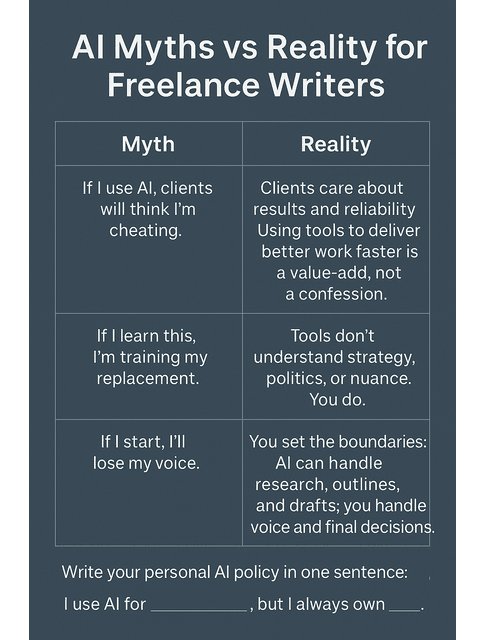
You’ve probably heard one or more of these:
- “If I use AI, clients will think I’m cheating.”
- “If I learn this, I’m training my replacement.”
- “If I start, I’ll lose my voice and everything will sound generic.”
In reality:
- Clients care about results, reliability, and fit. If you use ML tools to deliver better work faster without cutting corners, that’s a value-add, not a threat.
- Tools often fail to understand the client’s strategy, offers, or politics. You do.
- You can set strict boundaries: maybe you use ML only for research, outlines, and line edits—but not for full drafts on high-stakes pieces.
Fear shrinks your options. Small, controlled experiments expand them.
To make those boundaries real, you can write a simple personal policy, such as:
- “For standard blog posts, I may use AI for summarizing research, generating outlines, and suggesting alternative phrasing. I always draft key arguments, stories, and conclusions myself.”
- “For sensitive or high-stakes content (mental health, finance, legal, medical, or founder stories), I only use AI for basic language polishing after I’ve written the full draft.”
Once you write down your boundaries, you can more easily design a drafting process that protects your voice instead of diluting it.
Protecting Your Voice While Using AI-Assisted Drafting
If you’re worried everything will start to sound like the same chatty, generic AI blog, treat the tool like a junior assistant:
- You write the first paragraph and the key transitions. Let the tool fill in the middle sections; you can rewrite.
- You define the tone before generating anything. Describe your style: “calm, direct, slightly conversational, no fluff.”
- You always do a “voice pass.” Read the draft aloud and adjust anything that doesn’t sound like you.
Over time, you’ll build a repeatable pattern: the machine gives you a rough block of marble; you sculpt it into something that sounds like your work.
How to Explain Machine Learning Basics to Clients Without Jargon
Some clients are curious. Others are nervous. A simple, non-technical explanation helps:
- “I use AI tools to speed up research and structuring, then I write and edit everything myself so the content still sounds like your brand.”
- “Think of it as having a very fast assistant that can draft options. I’m still the one deciding what’s accurate, strategic, and on-brand.”
You don’t need to say “machine learning model” or “training data.” Anchor the conversation in outcomes: better speed, more consistency, and more of your time going into the parts they actually value.
You can even build this into your onboarding materials with a short script, for example:
- Onboarding doc snippet:
“To deliver your content efficiently, I use select AI tools for research, outlining, and language polishing. I handle strategy, structure, and final edits to ensure the work reflects your voice and goals.”
- If a client asks directly, ‘Do you use AI?’
“Yes, I use AI for behind-the-scenes support—things like summarizing long background materials or generating alternative phrasings. The core ideas, structure, and final wording are always crafted and checked by me.”
Next Steps: Put Machine Learning for Writers to Work in Your Business
Knowing the basics is helpful, but change only happens when your weekly workflow undergoes a shift. In this final section, you’ll choose one simple area to test, plug machine learning into it, and build a calm “human first, AI second” system that actually fits your freelance business.
Think of this as a three-part plan: pick one stage to test, wrap it in a simple system, then give it a weekly rhythm.
Choose One Workflow to Test First: Research, Draft, or Edit
Trying to “AI-ify” your entire business at once is a fast track to overwhelm. Pick one stage:
- Research: Utilize ML-powered summarization and note cleanup.
- Draft: Use AI to expand outlines into rough sections you then revise.
- Edit: Use rewriting and tone tools to sharpen clarity and flow.
Run a single client piece through the new workflow. Compare time spent and mental load against your usual process. Keep what helps, drop what doesn’t.
To make the tests concrete:
- Research experiment: For your next blog, run all source articles through a summarization prompt first, then build your outline only from those summaries. Track how long it takes versus your usual tab-drowning method.
- Draft experiment: Take an approved outline, write the intro and conclusion yourself, and use an AI assistant to generate the middle sections. Then do a strict voice and accuracy edit.
- Edit experiment: Draft as usual, then run the piece through a clarity-and-tone prompt (e.g., “Tighten sentences, remove repetition, keep the tone calm and professional”) and compare AI suggestions to your own edits.
Building a Simple “Human First, AI Second” Writing System
You stay in control when your process looks like this:
- Clarify the brief: Goals, reader, non-negotiables.
- Design the outline: You drive; AI can suggest tweaks.
- Draft: Alternate between your own writing and AI-assisted expansion where it makes sense.
- Edit and verify: You own accuracy, nuance, and final tone.
The system works because the human decisions come first and last. The machine helps in the messy middle.
You can articulate this as a simple checklist you run on each project:
- Did I define the audience, goal, and key points to include before opening any AI tool?
- Did I use AI only where it saved meaningful time (research, outline, draft, edit), rather than using it by default everywhere?
- Did I manually review the facts, tone, and structure before delivering it to the client?
Simple Weekly Practice Plan Using Machine Learning for Writers
To sidestep tool-hopping and scattered experiments, give yourself a simple weekly routine:
- Day 1: Choose one recurring task (for example, outlining blogs for a retainer client).
- Day 2–3: Use one AI tool on that task only. Jot down what made things easier and what slowed you down.
- Day 4: Tweak your prompts or steps. Cut anything that felt like extra work for no real gain.
- Day 5: Determine whether this workflow warrants a permanent spot, requires further refinement, or should be discarded.
In a month, you’ll have a handful of tested, comfortable ways to use machine learning for writers—without feeling like you’re rebuilding your entire business from scratch.
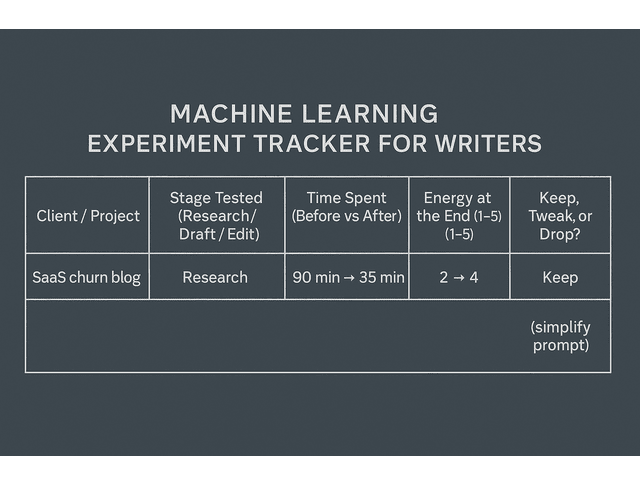
If you want to keep it simple, you can track your experiments in a tiny table like this:
- Client / Project:
- Stage tested (Research / Draft / Edit):
- Time spent (before vs after):
- Energy level at the end (1–5):
- Should we keep, tweak, or drop this workflow?:
As you fill this in, pay attention not just to how fast you finish, but to how you feel at the end of each piece. The workflows that leave you clearer and less drained are the ones worth turning into your new default.
Final Thoughts
You don’t have to become a data scientist, rebrand as an “AI consultant,” or hand your livelihood to a black box. You need to understand, at a basic level, how machine learning for writers supports your existing skills instead of replacing them.
Start with one leak in your week—the research that takes too long, the outlines that drain you, the edits that stretch into the night. Add one small, tightly scoped experiment with an ML-powered tool. Keep what genuinely reduces your mental load and helps you deliver better work. Ignore the rest.
Your clients hired you for your judgment, your voice, and your ability to turn chaos into clear, useful content. Machine learning is there to carry some of the weight, so you can keep doing that work without burning yourself out.
If you want a practical, writer-first guide to using machine learning tools without hype or overwhelm, explore my books on Amazon. They break down real freelance workflows, show exactly where ML can save time (research, outlines, edits, and client comms), and keep your judgment and voice in charge. Visit my Amazon Author page to find the book that fits the leak you want to fix first and start applying these systems right away.
Frequently Asked Questions About Machine Learning for Writers
Machine learning for writers involves utilizing AI tools that have analyzed vast amounts of text to assist with research, outlining, drafting, editing, and SEO. Instead of building everything from scratch, you rely on these tools to notice language patterns, propose headlines, draft rough sections, summarize long sources, or highlight tone problems. You still control the strategy, the accuracy, and the final voice of the piece.
Any time you ask a chat assistant to turn a rough idea into a full paragraph, run a draft through a grammar tool for better wording, use an SEO app to group related keywords, or paste a long article into a summarizer, you’re already working with machine learning. Most writers use these tools to reduce research time, get started when they feel stuck on an outline or draft, and maintain clear and consistent writing from piece to piece.
Machine learning can produce generic content, but it struggles with deep audience insight, original angles, complex narratives, and brand nuance. Clients want strategy, empathy, and context—not just words. Treat ML as a powerful assistant that helps you move faster. At the same time, you stay responsible for the thinking, positioning, and final message.
Most machine learning tools for writers serve non-technical users. You work with them through prompts, templates, and simple settings. Clear instructions, a solid process, and strong editing skills matter far more than knowing how to program.
Most freelancers do well with a small, focused stack: a general-purpose chat assistant for brainstorming and drafting, a grammar and style checker for polishing, and an SEO or content platform for topic research. Start with one tool in each category, test them on real client pieces, and keep only the ones that genuinely save time and reduce stress in your existing workflow.

Florence De Borja is a freelance writer, content strategist, and author with 14+ years of writing experience and a 15-year background in IT and software development. She creates clear, practical content on AI, SaaS, business, digital marketing, real estate, and wellness, with a focus on helping freelancers use AI to work calmer and scale smarter. On her blog, AI Freelancer, she shares systems, workflows, and AI-powered strategies for building a sustainable solo business.


Pingback: Supervised vs Unsupervised Learning: Writer’s Guide - The AI Freelancer