

If you’ve ever opened a 40-page PDF and thought, “I don’t have time for this, but I still have to make sense of it,” you’re not alone. Freelance writers juggle client briefs, technical blog posts, reports, and endless links. They still have to deliver sharp, on-voice content on deadline. That constant reading and distilling is where quiet burnout starts. This is exactly where text summarization with NLP can significantly reduce the workload without altering your voice.
It also helps to name the real problem: reading is not the only drain. McKinsey Global Institute estimates the average “interaction worker” spends 28% of the workweek managing email and nearly 20% looking for internal information or tracking down people who can help. When your day is already fragmented, summarization becomes a workflow advantage, not a novelty.
Everything I’ve shared here—and more—is in my book, available on Amazon. Click the link if you’re ready to take the next step.
Text Summarization With NLP: What It Is And Why It Matters
Understanding how text summarization with NLP works provides a straightforward way to reduce the reading load without compromising quality.
From Long-Form Articles To Clear Summaries For Clients
At its simplest, text summarization tools use natural language processing (NLP) to read a piece of content, identify the most important points, and condense them into a shorter version. Instead of manually skimming long articles or reports, you get a quick snapshot of what matters.
For client work, that snapshot is gold. It helps you:
- See the main argument without rereading the same paragraphs.
- Pull out key benefits, proof points, and objections for your draft.
- Spot gaps or contradictions you may need to clarify with the client.
You stay in control of the narrative. The tool reduces the time between “I got the brief” and “I know what I’m writing.”
Core NLP Ideas Behind Modern AI Summarization
You don’t need a data-science background, but a few basics help you use these tools wisely:
- Relevance: NLP models try to find sentences or ideas that carry the most weight in the text.
- Context: Modern models examine how sentences relate to each other, rather than just individual lines.
- Abstractive vs. Extractive: Some tools lift important sentences (extractive). Others rewrite key ideas in new words (abstractive).
For you as a writer, this means:
- Extractive summaries are closer to the original wording and safer for fact-checking.
- Abstractive summaries are more readable but can occasionally “hallucinate” details, so they need more scrutiny.
This isn’t just a theoretical risk. Research in abstractive summarization has found factual issues are common—for example, one study reported nearly 30% of outputs from a state-of-the-art neural summarization system contained “fake” or fabricated facts. That’s why your workflow should treat abstractive summaries as notes to verify, not copy to paste.
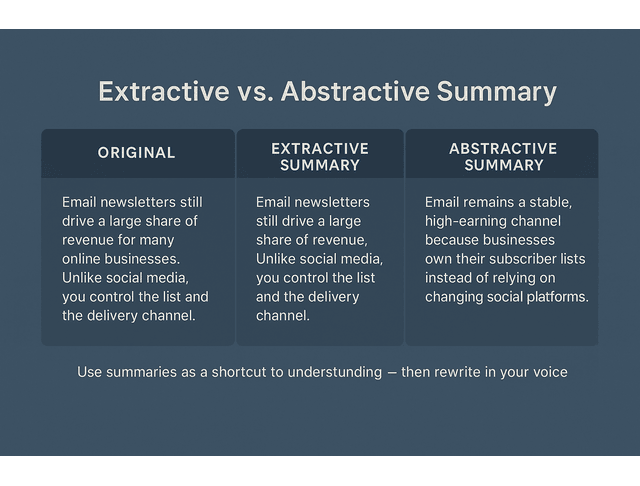
A tiny example makes this clearer. Imagine this original paragraph:
“Email newsletters still drive a large share of revenue for many online businesses. Unlike social media, you control the list and the delivery channel. When algorithms change, your email subscribers don’t disappear overnight.”
An extractive summary might look like:
“Email newsletters still drive a large share of revenue. Unlike social media, you control the list and the delivery channel.”
An abstractive summary might look like:
“Email remains a stable, high-earning channel because businesses own their subscriber lists instead of relying on changing social platforms.”
As a writer, you’d use these as a quick mental shortcut, then rewrite in your own voice for the client’s brand, for example:
“If your main sales channel lives in someone else’s algorithm, it can vanish without warning. Email is different — you own the list. You can reach subscribers directly, which is why it still drives serious revenue for many online businesses.”
In practice, understanding this helps you decide when to trust the summary and when to go back to the source.
Where Text Summarization With NLP Fits In Your Process
Summarization works best as a front-end support step, rather than a replacement for your own thinking. For example, you can use it:
- After receiving a long client brief.
- When reviewing multiple sources on the same topic.
- While exploring new niches, you’re still learning the landscape.
You might slot it into your workflow like this:
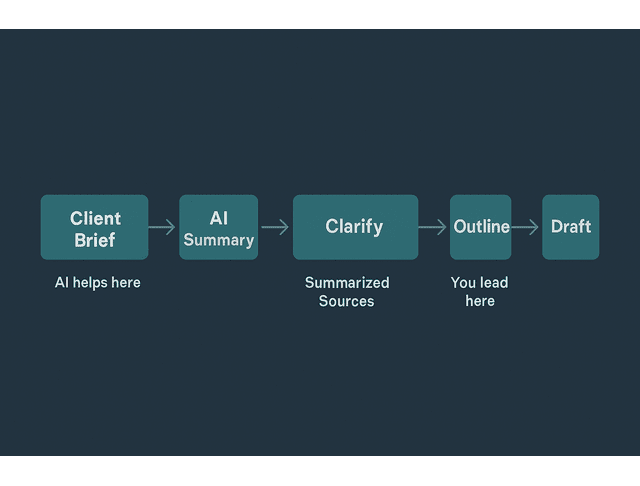
Brief → Summarize → Clarify → Research → Outline → Draft → Edit → Deliver
You’re still doing the real writing. NLP compresses the “getting up to speed” phase, allowing you to focus your best energy on structure, storytelling, and tone.
Now let’s look at how this plays out in your day-to-day work.
How Freelance Writers Use Text Summarization With NLP Daily
The writers who stay sane aren’t reading more — they’re using smarter shortcuts. A few small changes to how you handle briefs and research can transform NLP summarization into an everyday assistant, rather than a novelty.
Turn Client Briefs Into Quick AI Summaries
Messy briefs are a hidden time sink. Instead of reading them three times, paste the brief into your summarization tool and ask for:
- A 3–5 sentence overview of the project.
- A bullet list of goals, target audience, and must-include points.
- Any constraints, such as word count, tone, brand rules, or banned phrases.
You can use a simple prompt like:
“Summarize this client brief in 5 sentences. Then list: 1) target audience, 2) main goal, 3) must-include points, 4) constraints (tone, word count, banned phrases).”
Now you have a clean, searchable summary you can keep in a tab next to your draft. It’s easier to:
- Check alignment as you write.
- Spot missing details you should clarify before you start.
- Reorient yourself quickly when you return to the project days later.
This matters because “finding what you need” is a real weekly drain. In an APQC survey of knowledge workers, respondents estimated they spend 2.8 hours each week looking for or requesting needed information. Summarization won’t fix every system problem, but it can reduce how often you get stuck rereading and hunting inside long docs.
Using Text Summarization With NLP To Draft Faster Outlines
Research is where many writers lose hours — especially with SEO blog content, thought leadership pieces, and long-form guides.
A more efficient research flow:
- Gather 2–4 key sources: client links, top-ranking articles, and maybe one report.
- Run summaries on each source and extract key points, claims, and data.
- Compare summaries to find overlaps, disagreements, and unique angles.
- Build your outline based on what the client’s audience actually needs to know.
Prompts you might use here:
“Summarize this article in 10 bullet points focused on the main arguments and supporting data.”
And then:
“You are helping a freelance writer plan a blog on this topic. From these summaries, list the 5–7 key points that should appear in the article, grouped into logical headings.”
Instead of bouncing between a dozen open tabs, you’re pulling from a tight set of distilled notes. It feels closer to arranging a quick mind map than battling through untouched source material.
Protect Tone When You Expand Summaries
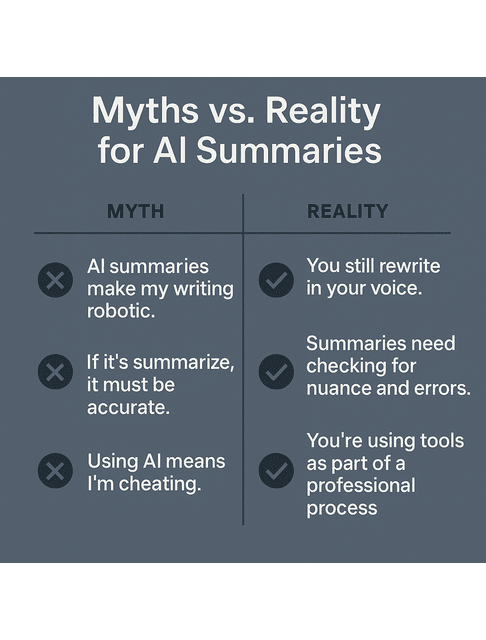
The common fear: “If I use AI, everything will sound generic.” That only happens if you copy the summaries straight into your draft.
To keep your voice:
- Treat summaries as notes, not final copy.
- Rewrite everything in your own words.
- Add transitions, examples, and stories that match the brand’s style.
- Adjust phrasing so it sounds like you, not like a tool.
If you want help spotting stiff or robotic lines, you can try:
“Review this draft section for stiff or generic phrasing. Point out lines that sound robotic and suggest more natural alternatives, but don’t change the overall structure.”
Let text summarization with NLP handle the compression. You handle the expression.
Common AI Myths That Block You From Text Summarization With NLP
Now let’s deal with the worries that keep many writers from trying these tools in the first place. If you’ve hesitated to use AI because you’re afraid of sounding robotic or “cheating,” you’re not alone. Once you see what these tools actually do — and what they can’t do — it becomes easier to use them without compromising your standards.
Fear Of Sounding Robotic: What Really Happens
Summarization models don’t know your style or your client’s brand voice. Developers design them to compress ideas, not to replace your craft, and you only get a robotic tone when you paste their wording straight into your draft instead of rewriting it yourself. When you use summaries as a fast way to understand complex material and then put everything into your own words, your work stays human and on-brand.
Red Flags When AI Summaries Go Wrong
Summaries can shave off a lot of reading time, but they still need your eyes on them. Pay attention to:
- When a complex idea gets flattened into something too vague.
- Statements that sound confident but are never actually supported by the source.
- Missing qualifiers like “in some cases” or “in this sample,” which quietly change the risk or scope.
When you see these red flags:
- Revisit the source text around the original statements.
- Mark sections that need manual checking.
- Ask more targeted prompts like “Summarize only the limitations section” or “List the three main risks mentioned.”
You can also build a quick accuracy check into your process with a prompt like:
“Compare this summary with the original text and list any statements the source doesn’t clearly support or that change its meaning.”
The summary is a shortcut to understanding, not a shortcut past accuracy.
Pairing Your Judgment With Text Summarization With NLP
Think of the tool as a fast but inexperienced assistant. It can:
- Read long material quickly.
- Surface the obvious key points.
- Suggest a rough structure.
You bring the expertise:
- You decide what matters for the brief.
- You frame the message for the target audience.
- You catch nuances the tool can’t see — like brand positioning, objections, and industry politics.
That combination — AI speed plus your editorial judgment — is what clients are really paying for.
Simple Workflows That Blend Text Summarization With NLP And Editing
Here’s how to turn all of this into simple routines you can repeat every week. When you plug summarization into the right spots in your process, you save time quietly in the background while your writing stays front and center.
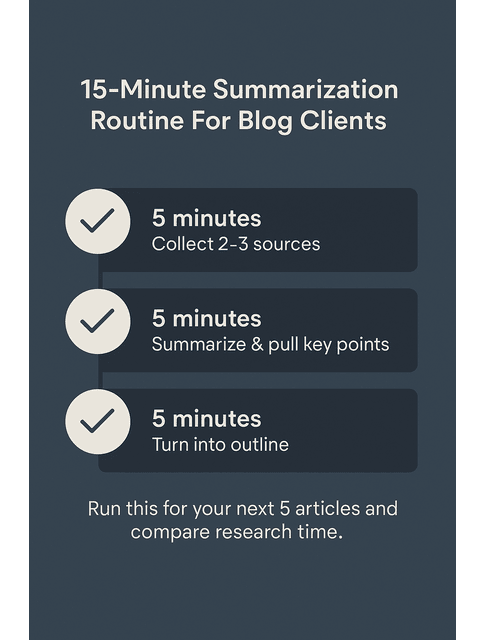
15-Minute Summarization Routine For Blog Clients
For recurring blog or newsletter clients, build a small, repeatable routine:
- 5 minutes: Collect 2–3 core sources per article.
- 5 minutes: Summarize each source and pull key points, stats, and questions.
- 5 minutes: Turn those points into an outline with headings, subheadings, and a rough angle.
By the time you start drafting, you already have a clear understanding of the narrative flow. The blank page feels less intimidating because you’re not starting from raw material — you’re starting from a structured set of ideas.
Here’s how this looks in practice for a 1,500-word SEO blog on “remote team communication.”
- Before NLP: you might spend 60–90 minutes reading five articles, skimming a report, and taking scattered notes.
- With NLP in place, you pick three strong sources, run summaries with key-point bullets, and compare overlaps. In about 30–40 minutes, you have a clean list of must-cover points and a working outline. The writing time stays the same, but your mental load during research drops, and you reach the “I know what this article will say” moment much faster.
Pick AI Tools And Extensions That Stay Out Of Your Way
You don’t need a massive “all-in-one” platform to use summarization effectively. Start with tools that are:
- Simple: browser extensions or in-app features that work in one or two clicks.
- Flexible: they can handle web pages, PDFs, and pasted text.
- Accessible: they fit your budget and don’t require hours of setup.
Suppose a summarizer adds friction or breaks your focus. In that case, it doesn’t belong in your workflow, no matter how powerful it looks on paper.
Measure Time Saved And Quality Gains From NLP Summarization
To know whether these tools deserve a permanent place in your process, track a few projects:
- How long did research take before you used AI?
- How long does it take now that summarization is in place?
- Do your outlines feel clearer and easier to write from?
- Are clients happier with how you handle complex topics?
You don’t need a complex system — a simple grid works:
Client | Project / Topic | Research Time (No NLP) | Research Time (With NLP) | Notes On Quality / Client Feedback
Fill this in for your next 5–10 pieces. Suppose you notice consistent time savings and more confident drafts. In that case, you’ve found a sustainable way to use NLP as a productivity layer, not a gimmick.
To make this even easier, consider converting the prompts, steps, and tracking grid from this post into a one-page checklist in your notes app or project hub. Every time you start a new client piece, glance at it and decide where summarization belongs in that project. Over the course of a month or two, you’ll have real data on how much time and energy it saves you.
Final Thoughts
You don’t need to become a machine to keep up with demanding clients and complex topics. You can let text summarization with NLP handle the heavy, repetitive reading. At the same time, you stay focused on the parts only you can do: judgment, storytelling, nuance, and voice. Start small — one client, one workflow, one summarizer — and let the results tell you whether this belongs in your long-term writing toolkit.
If you want a practical, writer-first guide to using NLP summarizers without losing nuance or control, explore my books on Amazon. They break down simple workflows you can apply to real client work, show how to keep your voice intact, and help you turn “time saved” into measurable wins. Visit my Amazon Author page to choose the book that fits your workflow and start using these systems right away.
Frequently Asked Questions About Text Summarization With NLP For Freelance Writers
Text summarization in NLP is the process of using algorithms to turn longer content into a shorter version that keeps the main ideas. For writers, it works like a fast “first pass” that turns dense material into clearer notes you can use for outlines and drafts.
For SEO blogs, newsletters, and thought leadership pieces, it cuts down the time you spend skimming articles, reports, and briefs before you even start outlining. Instead of manually digesting every line, you get quick overviews, key points, and structure so you can invest more energy in strategy, messaging, and polish — the high-value parts of your work.
It’s accurate enough to guide your understanding, but it shouldn’t be your only source of truth. Always cross-check important claims, numbers, and quotes against the original, especially if you write in technical, financial, medical, or legal niches where details really matter.
Not if you use them properly. When you treat summaries as research notes and rewrite everything in your own words, your voice stays intact and aligned with brand guidelines. Generic-sounding content often results from copying the tool output directly into the final draft without incorporating your usual judgment and style.
Many AI writing tools, browser add-ons, and note apps already offer built-in summarization, so you can work with what you have. Start by trying the summarization features in the tools you use every day—like your main AI chat or document assistant. Run them on a few real projects, then stick with the one that proves dependable, straightforward, and painless to plug into your current workflow.

Florence De Borja is a freelance writer, content strategist, and author with 14+ years of writing experience and a 15-year background in IT and software development. She creates clear, practical content on AI, SaaS, business, digital marketing, real estate, and wellness, with a focus on helping freelancers use AI to work calmer and scale smarter. On her blog, AI Freelancer, she shares systems, workflows, and AI-powered strategies for building a sustainable solo business.

