
You finish a 1,500-word client article in half the usual time using AI. Then you spend another two hours correcting questionable claims, rewriting generic paragraphs, and fixing the tone. Suddenly, your productivity gain disappears. The problem isn’t necessarily your writing process. You may be using the wrong tools for the work.
The best AI writing tools cut research, drafting, and editing time without compromising the quality your clients expect. This guide compares six tools for research, drafting, marketing content, and editing, helping you decide which ones deserve a place in your freelance writing workflow.
Everything I’ve shared here—and more—is in my book, available on Amazon. Click the link if you’re ready to take the next step.
How to Choose the Best AI Writing Tools
A tool can produce polished paragraphs in seconds and still create more work than it saves. If you’re constantly rewriting its output, checking invented references, or correcting the tone, speed alone means little.
Start by identifying where you lose the most time. A blog writer handling research-heavy assignments needs different capabilities from a ghostwriter managing a 60,000-word manuscript. Likewise, a marketer producing weekly email campaigns may value brand consistency more than detailed manuscript analysis. Understanding how different AI writing platforms support your workflow can make that decision easier.
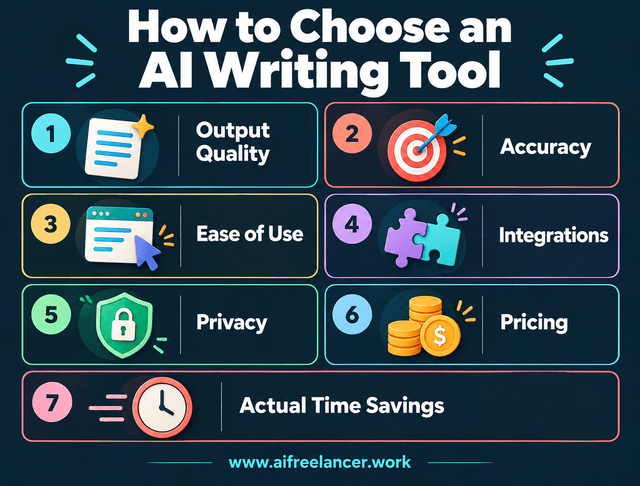
Consider these factors before choosing AI writing software:
- Output quality: Does the tool produce usable material, or do you spend too much time rewriting it?
- Accuracy: Can you verify its claims, quotations, and references?
- Ease of use: Can you incorporate it into your existing process without adding unnecessary steps?
- Integrations: Does it work with the documents and platforms you already use?
- Privacy: Can you use it without exposing confidential client information?
- Pricing: Do the features justify the subscription cost?
- Actual time savings: Does it reduce total project time, including verification, editing, setup, and workflow maintenance?
You should also consider how much control you retain over your writing voice. Privacy concerns how a platform handles information, while voice preservation concerns whether its suggestions support your style and editorial judgment.
To compare tools fairly, give them the same real assignment or a representative portion of it. Use an identical brief, audience description, and source material, then record the time spent generating, verifying, and editing the output. Evaluate the final quality against the client’s requirements and compare the total time with your usual process.
Research suggests that AI assistance can improve writing efficiency, but the results depend on the task. In a randomized experiment involving 453 college-educated professionals, Noy and Zhang (2023) found that access to ChatGPT reduced completion time for selected professional writing tasks by 40% and improved evaluated output quality by 18%. Those findings don’t establish equivalent gains for every freelance assignment.
A tool that produces a faster first draft may still be the weaker choice if another requires fewer corrections and delivers more consistent results. Frequent prompt repairs or manual transfers between applications can also erase the time you initially saved.
Best AI Writing Tools for Freelancers
Once you know what to look for, the next step is matching those requirements to specific tools. Some focus on research or drafting, while others offer specialized support for marketing content, proofreading, or manuscript editing.
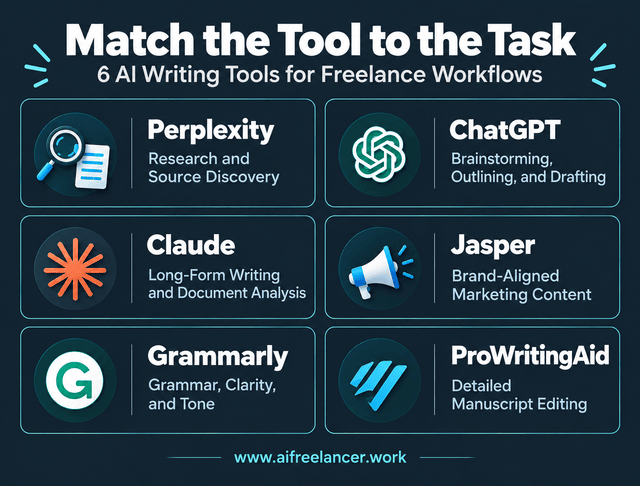
For most freelance writers, ChatGPT is a practical starting point because it supports brainstorming, outlining, drafting, and revision. Choose Perplexity when research is your biggest bottleneck, Grammarly for everyday proofreading, and ProWritingAid for detailed manuscript editing. Claude is worth evaluating for document-intensive assignments, while Jasper is better suited to recurring marketing campaigns that need coordinated brand messaging.
Several of these tools offer free plans with limitations, although access and pricing vary. Their capabilities also overlap, so you may not need a separate subscription for every stage of your writing process. These recommendations combine practical freelance writing considerations with documented product features, rather than claiming that every tool has undergone identical hands-on testing.
Perplexity for Research and Source Discovery
Research-heavy assignments can consume hours before you write a single paragraph. You need credible information, recent developments, and sources that support your client’s claims.
Perplexity helps you discover sources through conversational searches. Instead of opening numerous results without knowing which are relevant, you can ask a focused research question and examine the references it provides.
Suppose you’re writing about small-business cybersecurity. You could ask Perplexity to identify recent reports from government agencies and established research organizations. You would then open the original publications, check their dates, and extract the findings relevant to your outline.
That last step matters. A source-linked answer is not automatically a verified answer. The referenced publication may be outdated, misinterpreted, or unrelated to the exact claim.
In a 2025 Stanford-led study, researchers found that certain specialized legal AI research systems produced hallucinations in more than 17% of evaluated responses. The study examined legal research tools, not Perplexity or the other writing products reviewed here, but it illustrates why even source-oriented AI systems require verification.
Unlike conventional search engines, Perplexity can combine information from multiple results into an initial explanation. That helps when you’re exploring an unfamiliar subject, although a conventional search engine gives you more direct control over which pages you examine.
ChatGPT can also assist with web research. Perplexity is worth adding if its source-discovery format helps you reach reliable publications faster. Otherwise, your existing search tools may be sufficient.
ChatGPT for Brainstorming, Outlining, and First Drafts
A client sends you a vague brief: “Write an informative article about automation for small businesses.” You know the topic, but the intended audience, angle, and structure remain unclear.
ChatGPT can help turn that broad instruction into a workable content plan. You can use it to identify missing information, propose article angles, develop an outline, and draft selected sections after you verify the research.
Its main advantage is flexibility. The same assistant can help you organize interview notes, simplify technical explanations, revise transitions, and check whether a draft follows the client’s instructions.
In my freelance writing workflow, I use ChatGPT for outlining and drafting before manually editing the content and completing the final quality checks. This division of work helps me use AI for speed while keeping control over the finished article.
A 2025 Pew Research Center study found that 52% of workers who had used AI chatbots at work had used them to edit written content, while 47% had used them to draft written material. These findings reflect how workers use AI, not proof that its output is publication-ready.
The quality of your input matters, though. Asking for “a professional article” often produces generic language. Instead, give AI a short voice anchor with examples of your preferred sentence style, tone, phrases to avoid, and details it must preserve. Include the audience, objective, approved outline, verified sources, and writing constraints.
For recurring assignments, maintain a reusable project brief containing the client’s audience, tone, formatting requirements, and approved terminology. Keep assignment-specific research separate from general writing instructions to avoid carrying outdated facts or irrelevant client details into a new draft.
ChatGPT is a sensible first choice when you produce different types of content and want one assistant for planning, drafting, and revision. Its versatility makes it useful across assignments that require different formats, audiences, and levels of editorial support.
Claude for Long-Form Writing and Document Analysis
You’ve completed eight chapters of a business ebook when you notice a problem. Chapter 6 recommends a process that contradicts the advice in Chapter 2. Finding and correcting inconsistencies across a lengthy manuscript can take hours.
Claude can help you analyze substantial source materials, organize chapter-level information, and revise prose using supporting documents.
With the manuscript, interview transcripts, research notes, and approved outline available, you could ask Claude to identify repeated arguments, compare chapters against the outline, or locate passages that need clarification.
These tasks are useful when you’re managing more material than you can comfortably review in one sitting. However, the ability to process a long document does not guarantee that every detail will be retained or interpreted correctly.
ChatGPT can also support long-form writing, so compare both assistants using the same manuscript excerpt and editorial instructions. Check which one identifies genuine inconsistencies, follows your requirements, and produces revisions that need less correction.
If you regularly compare interview transcripts, research notes, and multiple manuscript chapters, Claude is worth testing alongside ChatGPT. If your current assistant already handles those tasks accurately within your available limits, switching may offer little benefit.
Jasper for Brand-Aligned Marketing Content
You’re managing content for three clients. One prefers formal financial explanations, another wants conversational website copy, and the third expects energetic promotional emails. Mixing their brand voices can lead to avoidable revisions.
Jasper focuses on marketing content production, including brand-related workflows and coordinated messaging.
You could maintain separate brand guidelines, campaign objectives, and content requirements for each client within a dedicated marketing platform. This helps you organize recurring campaigns without repeatedly rebuilding the same instructions.
With ChatGPT, you can provide a brand guide and generate campaign materials, but you remain responsible for organizing the instructions and checking consistency across deliverables. Keep your standard research, outlining, and editing process separate from client-specific instructions such as audience, brand voice, keywords, and deliverables.
Jasper becomes more relevant when several writers need to follow the same brand guidelines across multiple campaigns. If you work independently on occasional marketing assignments, a well-maintained brand brief and a general-purpose assistant may already cover your needs. Comparing AI-powered content automation options can help you determine whether a specialized marketing platform is worth the investment.
Grammarly for Grammar, Clarity, and Tone
You’ve finished the article, checked the research, and refined the argument. Yet awkward sentences, repeated phrasing, and small grammatical errors can still undermine an otherwise strong draft.
Grammarly helps identify grammar issues, unclear wording, and potential tone problems. It can be particularly convenient when you’re editing client emails, blog posts, proposals, and other everyday business writing.
Its suggestions still require judgment. A technically correct rewrite may sound too formal, remove a deliberate stylistic choice, or change the emphasis of a sentence.
It’s also important to distinguish proofreading from substantive editing. Grammarly can help identify sentence-level problems, but it cannot replace your judgment about whether an article answers the reader’s question, develops a convincing argument, or uses reliable evidence.
Use it after you’ve addressed the draft’s structure and factual accuracy. Otherwise, you may spend time polishing paragraphs that should be rewritten or removed.
For daily proofreading across emails, proposals, and short articles, Grammarly may be all the editing software you need. For detailed analysis of recurring patterns across a book-length manuscript, ProWritingAid offers a more specialized approach. Understanding the differences between these two editing assistants can help you choose the right one for your assignments.
ProWritingAid for Detailed Manuscript Editing
Across an 80,000-word manuscript, repeated phrases, inconsistent style, and recurring sentence patterns become harder to notice. These problems require a different level of analysis from proofreading a 1,000-word blog post.
ProWritingAid provides detailed editing reports that can help writers examine readability, repetition, sentence structure, and stylistic patterns.
A self-publishing author might use these reports to identify overused expressions across chapters or examine passages that consistently read awkwardly.
The trade-off is review time. Detailed reports can reveal problems, but they also generate suggestions that you must evaluate. Accepting every recommendation may flatten your writing voice.
For a book manuscript, those reports can help you investigate recurring problems that are difficult to notice during ordinary proofreading. For a short client blog post, reviewing several detailed reports may take longer than correcting the draft directly. The same cost-benefit question applies to every writing tool, especially when you’re considering another paid subscription.
Free vs. Paid AI Writing Tools: What Do You Need?
You subscribe to ChatGPT Plus, add Perplexity Pro for research, and keep Grammarly Pro for editing. Three months later, you’re still using ChatGPT for most assignments.
Whether those subscriptions make sense depends on how often you write, the complexity of your assignments, and the limitations you encounter with free plans.
A freelancer producing two blog posts weekly may be comfortable with free plans. Perplexity offers free core searches, ChatGPT and Claude provide limited free access, and Grammarly offers basic writing assistance. You may encounter restrictions, but they won’t necessarily prevent you from completing assignments.
A writer managing daily assignments may benefit from higher usage allowances. For reference, the published US monthly prices for ChatGPT Plus, Claude Pro, and Perplexity Pro are each $20. However, these subscriptions offer overlapping capabilities, so subscribing to all three isn’t automatically a better investment.
For a manuscript editor, specialized software may justify the expense. ProWritingAid’s free plan limits editing to 500 words at a time, while its paid plans support larger documents and more extensive reporting. Grammarly’s paid features may be more relevant if your work primarily involves shorter professional content.
Jasper requires a different calculation. Its published Pro pricing is $69 per month when billed monthly or $59 per month when billed annually. That additional cost is easier to justify when you regularly produce coordinated marketing content across brands or campaigns.
These are published US prices, not guaranteed local checkout prices. Taxes, regional pricing, billing terms, and product features may change. Check the ChatGPT, Claude, Perplexity, Jasper, Grammarly, and ProWritingAid websites before subscribing.
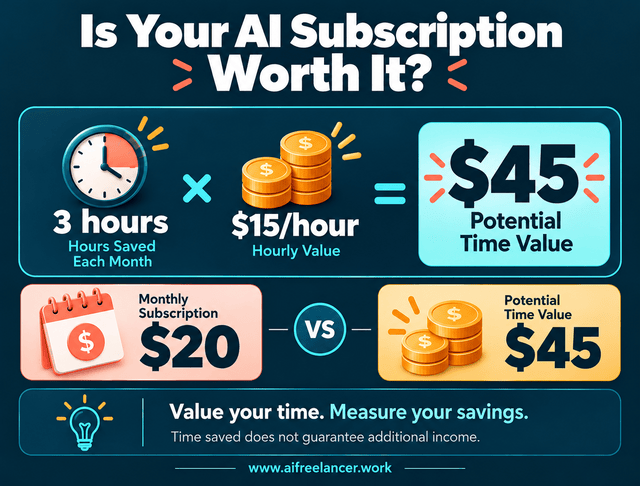
Consider the economics before upgrading. If a subscription costs $20 monthly and saves you three genuinely productive hours, its value depends on what those hours are worth to your business. But you must include the time spent reviewing and correcting its output.
If you value your working time at $15 per hour, saving three hours represents $45 in potential time value. That doesn’t automatically mean you’ve earned another $45, but it helps you judge whether the subscription is worthwhile.
How to Build a Simple AI Writing Workflow
Your research sits in one chatbot, the approved outline is in another, and the draft is in Google Docs. When a client asks where a statistic came from, you spend ten minutes searching through conversations.
To avoid losing information between applications, give each tool a specific role and keep your approved research and instructions in one accessible place. Imagine a client commissions a 1,500-word article about reducing administrative work in a small accounting firm.
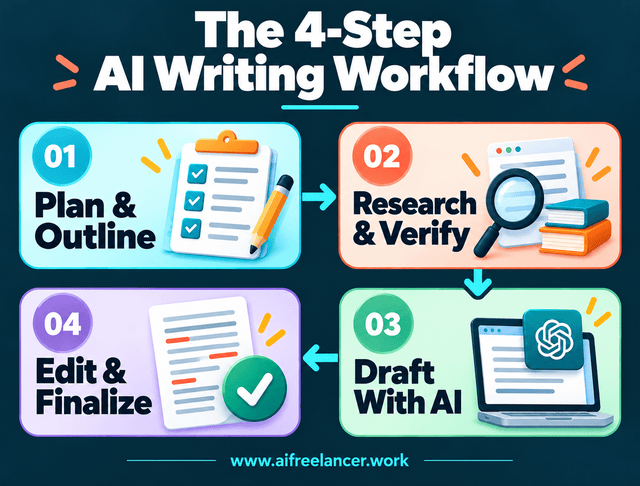
1. Turn the Client Brief Into a Clear Outline
Start with the audience, purpose, search intent, and deliverables. Use ChatGPT to identify missing details and suggest an outline based on the client’s requirements.
Review the structure yourself before drafting. If the client wants practical advice for small accounting firms, reject broad sections about enterprise automation that won’t help the intended reader.
2. Research the Topic and Verify Sources
Use Perplexity or another research method to discover relevant publications. Examine the sources and record the findings that support each section.
Suppose an AI-generated summary claims that automation reduces administrative work by 60%. You open the cited study and discover that the figure refers to one narrow task rather than overall administrative workload.
You correct the interpretation before it enters the draft, then record the verified finding in a simple research document with its source link, publication date, and the outline section where you’ll use it.
3. Draft With AI Without Losing Your Voice
Provide the approved outline, verified research, audience information, and writing requirements. Ask your AI assistant to help draft selected sections using the evidence you’ve collected.
Review the argument, examples, and language. Replace vague recommendations with practical explanations that an accounting firm owner can apply.
4. Edit, Fact-Check, and Prepare the Final Draft
Use Grammarly or another editor to identify grammar problems, repetition, and unclear sentences. Check the finished article against the client’s brief and confirm that every factual claim has appropriate support.
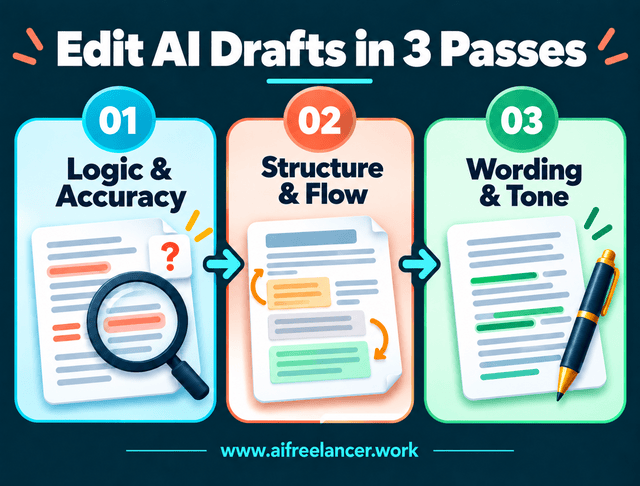
Review AI-generated drafts in three passes. Check the argument and factual logic first, then fix the structure and transitions. Polish individual sentences last so you don’t waste time editing paragraphs that you’ll eventually delete.
Your final review should also consider the reader’s experience. Does the article answer the question clearly? Are the examples relevant? Does the writing sound natural?
Measure your own results. If a comparable assignment previously took six hours and your AI-assisted process takes four hours, you’ve saved two hours, assuming both totals include research, verification, editing, and corrections. The improvement matters only if the finished work still meets the client’s standards.
What Are the Best AI Writing Tools for Freelancers?
For general writing tasks, start by evaluating ChatGPT. Choose Perplexity when source discovery is your main bottleneck, or consider Grammarly for routine proofreading. Claude, Jasper, and ProWritingAid serve more specialized long-form, marketing, and manuscript-editing needs.
Are There Good Free AI Writing Tools?
Yes. Free versions of ChatGPT, Claude, Perplexity, Grammarly, and ProWritingAid can support occasional assignments. A free setup may be sufficient if usage limits don’t interrupt your work and you can complete the necessary research, drafting, and editing.
Do Freelance Writers Need More Than One AI Writing Tool?
No. Start with one general-purpose assistant and add another tool when it consistently cuts research time, catches editing problems your current software misses, or makes recurring client assignments easier to manage.
How Should Freelance Writers Handle Confidential Client Material When Using AI?
Review your client’s confidentiality agreement and the platform’s privacy and data-handling policies before uploading sensitive information. Remove identifying details where possible, and obtain permission when necessary. Never assume that an AI tool’s privacy settings automatically authorize you to share confidential documents or unpublished client materials.
Is AI-Generated Content Good Enough to Publish Without Editing?
AI-generated content still needs human review. Check factual claims, quotations, sources, originality, tone, and compliance with the client’s instructions. Even polished writing can contain misleading information or miss important context.
References
- Anthropic. (n.d.). What is the Pro plan?. Claude Help Center.
- Grammarly. (n.d.). How much does Grammarly Pro cost?. Grammarly Support.
- Jasper. (n.d.). Plans & pricing.
- Lin, L., & Parker, K. (2025, February 25). Workers’ experience with AI chatbots in their jobs. Pew Research Center.
- Magesh, V., Surani, F., Dahl, M., Suzgun, M., Manning, C. D., & Ho, D. E. (2025). Hallucination-free? Assessing the reliability of leading AI legal research tools. Journal of Empirical Legal Studies, 22, 216–242.
- Noy, S., & Zhang, W. (2023). Experimental evidence on the productivity effects of generative artificial intelligence. Science, 381(6654), 187–192.
- OpenAI. (n.d.). What is ChatGPT Plus?. OpenAI Help Center.
- Perplexity. (n.d.). Perplexity: AI for the curious.
- ProWritingAid. (n.d.). What is the difference between Free, Premium, and Premium Pro?. ProWritingAid Help Center.
Final Thoughts
The best AI writing tools are the ones that help you deliver better work without creating unnecessary costs or extra editing. You don’t need six subscriptions to build an effective freelance writing workflow.
Start with your biggest bottleneck. Test one tool on a real assignment, track your total working time, and evaluate the quality of the finished deliverable. Keep the software only when it earns its place in your process.
If you want to develop more reliable AI-assisted writing systems, explore my books on Amazon for practical guidance on AI, freelance writing, and productivity.

Florence De Borja is a freelance writer, content strategist, and author with 14+ years of writing experience and a 15-year background in IT and software development. She creates clear, practical content on AI, SaaS, business, digital marketing, real estate, and wellness, with a focus on helping freelancers use AI to work calmer and scale smarter. On her blog, AI Freelancer, she shares systems, workflows, and AI-powered strategies for building a sustainable solo business.


Pingback: AI Tools for Writers: Match the Right Tool to Your Goals - The AI Freelancer