

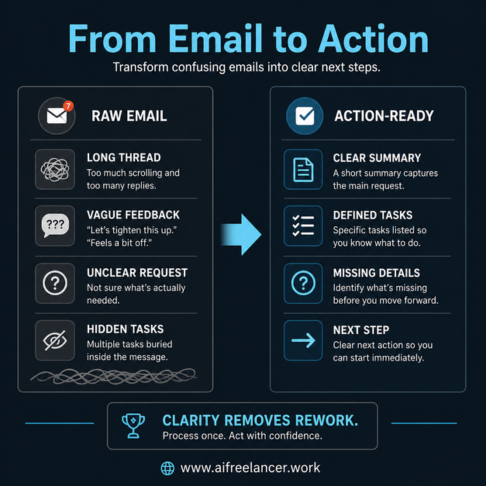
You open an email, read it, and still don’t know what to do next. It’s a long thread with scattered feedback, a few vague lines like “let’s tighten this,” and no clear instructions on what actually needs to happen. You scroll up, reread earlier replies, and try to piece it together—then move on because the next step isn’t obvious. If you’re trying to figure out how to manage email overload, this is usually where the problem starts.
It’s rarely about how many emails you have. It’s that every message feels like unfinished work—client revisions, follow-ups, approvals, and “quick” requests that hide actual tasks inside them.
This is the same process I use when handling client revisions and approvals, especially when feedback is scattered across long threads, because it keeps the email from becoming the task itself.
Research from Microsoft shows that employees using Microsoft 365 are interrupted, on average, every two minutes by a meeting, email, or notification. When your inbox becomes one of those interruptions, the cost compounds quickly. Harvard Business Review also reports that workers toggle between apps and websites roughly 1,200 times a day, spending nearly four hours a week reorienting themselves after switching. This is exactly why frequent task switching drains your focus faster than you realize.
This article won’t give you inbox zero tips. It will show you how to process emails once, turn them into clear tasks, and move on—with AI helping you reduce the time spent sorting through messages.
Everything I’ve shared here—and more—is in my book, available on Amazon. Click the link if you’re ready to take the next step.
How to Manage Email Overload by Fixing the Real Bottleneck
Most advice tells you to organize your inbox. But even a clean inbox still leaves you with the same problem: figuring out what each message actually requires before you can act. This is where a more structured way to handle incoming messages becomes more important than simply organizing them.
Why How to Manage Email Overload Feels Harder Than It Should
Every email contains multiple hidden decisions. You’re not just reading—you’re figuring out the request, the urgency, what’s missing, and whether it requires a reply or a task. Even a short message can combine feedback, scope changes, questions, and loosely mentioned deadlines in a way that isn’t immediately clear.
When these aren’t defined, your brain keeps returning to the same message. That’s why you reread emails—not because you forgot, but because the work was never broken down into something usable.
Where Time Gets Lost in Email Processing
The biggest time drain isn’t replying. It’s figuring out what the email actually means.
You scan threads to find context, piece together vague instructions, and switch between tools to organize your thoughts. It’s common to open your inbox in the middle of focused work, check for a reply, and lose momentum entirely. When emails are left “for later” without a defined next step, you end up restarting the same thinking process each time you return to them.
Why Common Solutions Break Down
Filters, folders, and inbox zero can make your inbox look organized, but they don’t reduce the effort required to process each message. You still need to interpret the request, decide what needs to happen next, and determine how to respond.
That’s why these systems don’t solve the real problem. Organizing messages is not the same as clarifying the work inside them.
A Simpler Way to Manage Email Overload Using a Workflow
The shift is simple: instead of managing emails, you process them once and turn them into clear tasks. This is the foundation of building a repeatable AI-powered workflow that removes guesswork from your inbox.
How to Manage Email Overload by Turning Emails Into Tasks
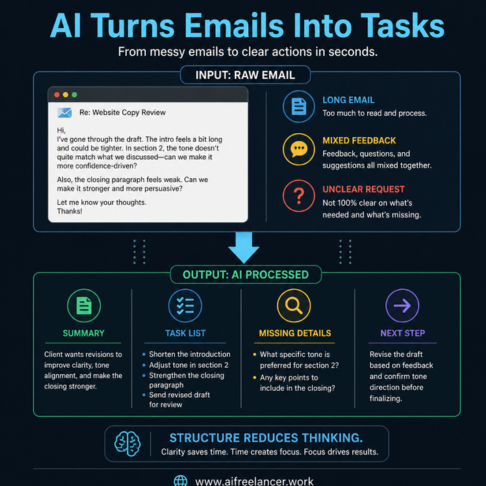
A typical email might look like this:
“Hey, can you take another look at the intro? It feels a bit long. Also, maybe adjust the tone in section 2. Let me know what you think.”
At first glance, it feels simple, but it still requires you to decide what to change, how to approach it, and what to send back.
After processing, it becomes:
- Task 1: Shorten the introduction
- Task 2: Adjust tone in section 2
- Task 3: Send revised draft for review
Now the work is clear. You don’t need to revisit the message—you can start immediately.
The Email Processing System Step by Step
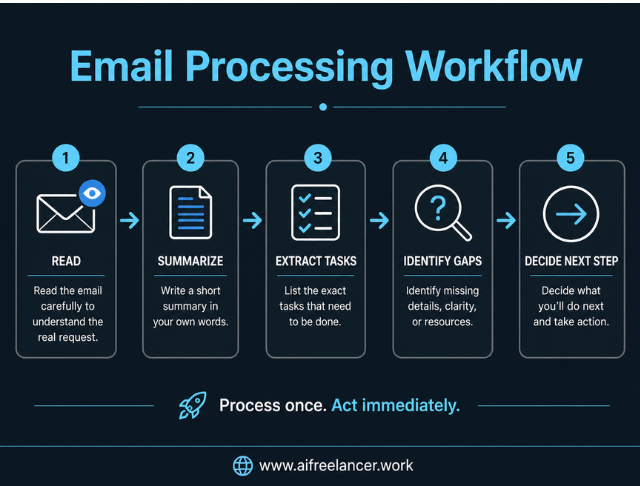
Use the same process for every email:
- Identify the real request
- Write a summary in your own words
- List the exact tasks required
- Decide what you will do next
- Move the task into your task list or draft a reply
Here’s a complete walkthrough.
Example email:
“Hi, I reviewed the draft. The intro feels a bit long. Section 2 might need a stronger tone. Also, can we add a clearer closing? Let me know your thoughts.”
Processed output:
- Summary: Client wants revisions to improve clarity, tone, and closing
- Tasks:
- Shorten introduction
- Strengthen tone in section 2
- Add a clearer closing
- Missing details:
- Preferred tone direction for section 2
- Next step:
- Revise the draft and send the updated version
Once this is done, the message becomes a reference point instead of something you need to keep opening.
How to Manage Email Overload With AI Assistance
Once you know what to extract from each email, AI can help you do the first pass faster. Instead of starting from a blank read, you begin with a structured version of the message.
How to Manage Email Overload Faster With AI Prompts
Use a prompt like:
“Summarize this email, list the tasks, identify missing details, and suggest the next step.”
Use this when a message feels dense, unclear, or mixed with feedback and questions. Instead of manually sorting through paragraphs, AI can pull out revision requests, separate feedback from questions, highlight missing details like deadlines or tone, and suggest whether you should revise immediately or ask for clarification first.
Sample AI output:
- Summary: Client wants revisions to improve clarity and tone
- Tasks:
- Revise introduction
- Adjust tone in section 2
- Improve closing
- Missing details:
- Confirm preferred tone direction
- Next step:
- Revise draft and prepare reply
This removes the need to figure out the message from scratch.
MIT Sloan explains that AI’s bigger value comes from reshaping workflows, not just helping with isolated tasks. That supports the point here: AI is more useful when it helps structure the email-to-task process instead of simply generating replies.
What to Automate vs What to Review
AI is useful for structuring information, but not for making final decisions. It can extract the request, list tasks, and organize content into something usable. However, you still need to verify accuracy, adjust tone, confirm intent, and decide the final action.
AI can miss nuance or misinterpret unclear instructions, so review is essential. Avoid sending AI-generated replies directly without checking them first, especially when tone, client context, or scope is involved.
How to Manage Email Overload Without Burning Out
Even with a system in place, email can still disrupt your day if you check it constantly. The issue shifts from clarity to attention.
Signs Your Inbox Is Causing Cognitive Overload
You delay replies even when messages are simple, check emails without acting, and feel mentally drained after going through your inbox. It’s also common to open your inbox mid-task, check for client responses before starting work, or leave a thread unresolved because it still feels unclear.
These patterns show that your inbox is interrupting your ability to complete work, even when the emails themselves are not complex.
Building a Repeatable Email Workflow
A consistent routine helps you stay in control. One simple way to reduce friction is by structuring your inbox into clear lanes, similar to a simple three-part inbox structure that separates action, waiting, and reference.
- Process emails in defined blocks
- Apply the same workflow every time
- Keep the inbox for communication, not task storage
A practical rhythm looks like this:
- Morning: quick scan for urgent messages so you don’t carry uncertainty into your day
- Midday: process emails using your workflow while your focus is still strong
- Afternoon: execute tasks you already defined without switching back to the inbox
- End of day: review remaining emails and define next steps so nothing lingers overnight
Between these blocks, your focus stays on execution rather than interpretation.
Final Thoughts
Email overload is not about how many messages you receive. It improves when each message points to a clear step you can act on.
Learning how to manage email overload starts with processing each message once and turning it into something you can execute immediately. When that step is done, your inbox stops pulling you back into the same thread.
AI supports this by extracting requests, listing tasks, and organizing information so you can move directly into execution instead of figuring things out repeatedly.
If you want to build systems like this into your workflow, check my books on my Amazon Author page, where I break down practical AI setups for freelancers and founders.
Frequently Asked Questions About How to Manage Email Overload
Start by processing each email into clear tasks instead of leaving it in your inbox. Define what needs to be done, what requires a reply, and what can be scheduled for later. This reduces repeated reading and helps you move directly into execution.
Use a structured workflow that lets you read once, extract tasks, and move on. When each message is turned into a defined action, you avoid reopening threads and repeating the same thinking process.
Yes. AI can summarize emails, extract tasks, identify missing details, and suggest next steps. This reduces the time spent figuring out what each message means and helps you focus on execution.
Because each email can contain multiple decisions. When those decisions are unclear, your brain keeps returning to the same message, which creates mental load even with a small inbox.
No. A clean inbox does not guarantee clarity. Focus on turning emails into actions and decisions instead of simply organizing them.

Florence De Borja is a freelance writer, content strategist, and author with 14+ years of writing experience and a 15-year background in IT and software development. She creates clear, practical content on AI, SaaS, business, digital marketing, real estate, and wellness, with a focus on helping freelancers use AI to work calmer and scale smarter. On her blog, AI Freelancer, she shares systems, workflows, and AI-powered strategies for building a sustainable solo business.

