

You clear your inbox, feel a quick sense of control—and then the work hits you anyway. That’s the disconnect most freelancers experience but rarely name, and it’s exactly why Inbox Zero doesn’t work the way you expect it to. You respond to emails, archive threads, and aim for a clean inbox, thinking it will make your workload lighter.
A few hours later, you’re opening the same messages again, trying to figure out what actually needs to be done. The inbox looks organized, but the work itself is still unclear.
The problem isn’t discipline or effort. It’s what the system ignores. Emails are not tasks—they’re inputs. And when those inputs stay unstructured, the work never truly begins.
Everything I’ve shared here—and more—is in my book, available on Amazon. Click the link if you’re ready to take the next step.
Why Inbox Zero Doesn’t Work for Freelancers
Inbox Zero promises clarity by removing visual clutter. A clean inbox suggests everything has been handled, but freelance work doesn’t follow that logic. Most client communication isn’t a simple “read and respond” interaction—it’s layered, evolving, and often incomplete.
A single email can include feedback, revision requests, follow-up questions, and even a new scope. You might respond to the most obvious part, archive the thread, and move on, thinking it’s handled. But when it’s time to execute, you reopen the message and realize you’re still figuring things out.
In client projects, most revision loops don’t come from bad writing—they come from unclear instructions at the start. Important details are scattered across replies, clarifications, and additional messages. Clearing the inbox doesn’t remove that complexity—it simply hides it from view. This becomes more obvious when you look at how client emails actually function in day-to-day work.
Where Inbox Zero Breaks in Client Communication
Freelance work lives inside messy communication, not neatly packaged instructions. Emails are rarely single actions. Instead, they contain multiple decisions that unfold over time through feedback loops, approvals, and revisions.
The typical pattern starts with reading the email and making quick decisions without a structured process. You archive the message to stay organized, but when it’s time to start the work, you have to reopen it and reinterpret what the client meant. This leads to missed details, repeated effort, or delays in delivery.
Here’s where it gets worse. A client might approve your work and then add, “one quick thing” at the end of the message. That small note often introduces a new scope—something that wasn’t part of the original task. Because it’s buried in the same email, it doesn’t get tracked properly. You either miss it or deal with it later, usually under pressure.
Revision requests are often a symptom of unclear initial instructions rather than poor execution. The problem isn’t the quality of your work—it’s that the work was never clearly defined in the first place.
Why Inbox Zero Doesn’t Work When Emails Contain Multiple Tasks
One email often includes edits, approvals, and new requests all at once. Without a system to extract those elements, tasks remain buried inside paragraphs. You end up prioritizing based on memory instead of a clear structure, which increases the chance of missing important actions.
Why Inbox Zero Doesn’t Work In Long Feedback Threads
Client communication rarely happens in a single message. Instructions evolve across replies, and new comments can override earlier ones without being consolidated. This forces you to piece together context each time you revisit the thread, increasing mental effort and the likelihood of mistakes.
The issue isn’t the inbox itself—it’s what happens after you read the email.
The Missing Step Between Reading and Doing
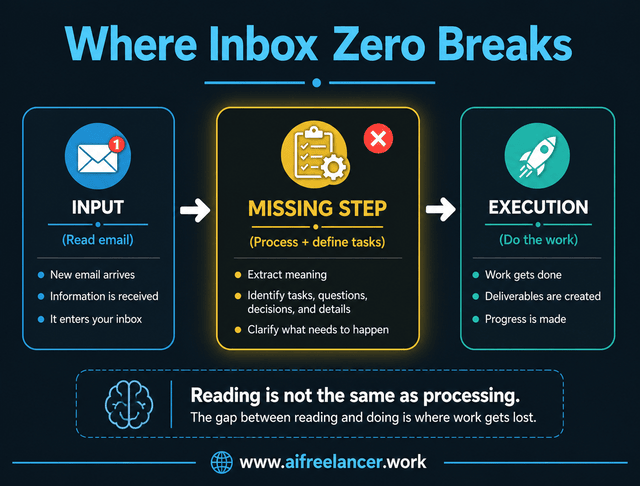
Inbox Zero focuses on clearing messages but doesn’t define what happens next. That gap sits between reading and execution, and it’s where most inefficiency comes from.
A simple way to understand this is through three stages: input, processing, and execution. Inbox Zero handles the input stage by clearing messages, but it stops there. Processing—where you extract meaning, define tasks, and clarify details—is often skipped or done mentally. As a result, execution becomes inconsistent and prone to errors.
This shows up in a very practical way. You read an email, start working, then realize halfway through that you missed a detail. You go back to the email, reread it, adjust your work, and repeat the cycle. That back-and-forth isn’t just annoying—it’s expensive in time and focus.
Research from the American Psychological Association shows that frequent task switching reduces productivity and increases mental fatigue, which explains why jumping between emails and active work slows progress. At the same time, the Microsoft Work Trend Index highlights how a large portion of the workday is spent on communication instead of execution, making it harder to focus on actual deliverables.
Why Inbox Zero Doesn’t Work as an Email Productivity System
Clearing messages creates the illusion of progress, but it doesn’t eliminate the need for decision-making. Instead, those decisions are postponed. A clean inbox may look organized, but it often hides unclear next steps that still require attention.
Inbox Zero is not broken—it’s just solving the wrong problem. The fix starts when you stop treating “read” as the same thing as “handled.” Once an email is read, it needs to be converted into something you can act on without reopening the thread.
A Better System for Managing Email Overload
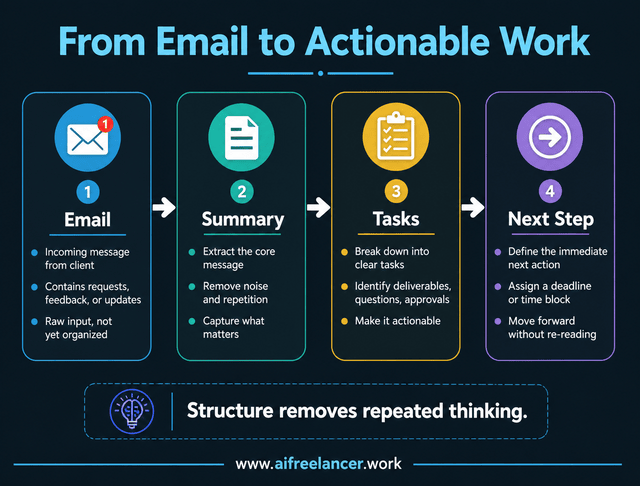
Instead of managing emails, the goal should be to manage work. This requires a shift from inbox-focused thinking to workflow-based thinking, where each email is processed into something actionable.
The structure is simple: email → summary → task → next step. This approach transforms messy inputs into clear, usable outputs that can be executed without revisiting the original message.
Before applying this system, emails often feel vague and incomplete. After processing, they become structured with a clear summary, defined tasks, identified missing details, and a specific next action. This reduces unnecessary back-and-forth and prevents misalignment.
This approach becomes even more effective when combined with a structured AI-driven workflow for handling freelance tasks, where each step—from input to execution—is clearly defined.
The idea is simple. The value comes from doing it the same way every time.
How to Manage Emails Faster with a Workflow System
Speed doesn’t come from reading emails faster. It comes from removing the need to repeatedly interpret the same information.
A practical system starts with reading the email once, then extracting all tasks, questions, and decisions. These are converted into clear action steps, with any missing details flagged before work begins. From there, each task is assigned a next step or deadline and stored outside the inbox.
If you’re trying to simplify this further, it helps to rethink how you actually handle incoming messages from the start instead of relying on inbox clearing as your main system.
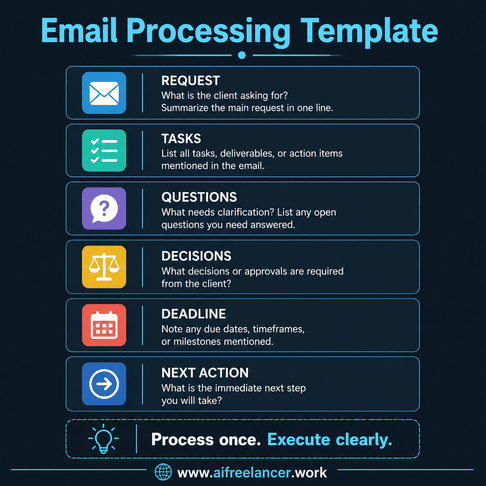
Email Processing Template
- Request: What is the client asking for?
- Tasks: What needs to be done?
- Questions: What is unclear or missing?
- Decisions: What requires approval?
- Deadline: When is this needed?
- Next action: What happens now?
This template ensures that every email is processed the same way. Instead of reopening threads, you work from structured information that is ready for execution. Once this workflow is clear, AI becomes useful as a way to speed up the processing step rather than adding another layer to manage.
How AI Helps Without Adding Another Tool to Manage
AI becomes useful after the workflow is clear, because it speeds up the processing step instead of creating another place to manage work. It can quickly summarize long emails, extract tasks, and highlight missing details that would otherwise require multiple readings.
Example
Raw email:
“Hey, can you tweak the intro to make it more engaging? Also, I think section 2 feels too long. Maybe cut it down a bit. And can we add something about AI tools somewhere? Not urgent, but would be good. Let me know what you think.”
AI output:
- Summary: Client wants revisions to improve engagement and structure
- Tasks:
- Rewrite the intro for a stronger hook
- Shorten section 2
- Add a section about AI tools
- Questions:
- What tone should the intro follow?
- How much should section 2 be reduced?
- Where should the AI tools section be placed?
- Next step: Confirm details before revising
Human review:
- Check tone and brand alignment
- Confirm priorities with the client
- Validate the scope before starting
AI reduces the time spent organizing information, but it still requires a final review to ensure accuracy and alignment.
Inbox Zero vs Workflow Clarity
Inbox Zero focuses on cleanliness, while workflow systems focus on clarity. A clean inbox may look organized, but it often hides unresolved work.
A structured workflow, on the other hand, makes tasks visible and actionable from the start. Instead of going back to emails to figure out what to do, you move forward with clearly defined steps. This reduces missed details, cuts down on clarification messages, and makes it easier to execute work without restarting.
Many freelancers discover that most productivity tools don’t fix this problem because they focus on organizing tasks after the fact instead of structuring the input correctly.
Final Thoughts
Why Inbox Zero doesn’t work comes down to a simple mismatch. It treats emails as items to clear, when they are actually inputs that need to be structured before work can begin.
When you shift from inbox management to workflow management, the process becomes clearer and more efficient. Tasks are defined upfront, decisions are made once, and execution becomes more predictable.
If you want a more practical starting point, consider using a simple multi-step inbox structure that separates inputs clearly instead of trying to keep everything in one stream.
For more practical AI workflow systems for freelance writing, visit my Amazon Author page and explore my books on writing faster, reducing rework, and building cleaner client workflows.
The next time a client sends a messy email, don’t archive it just because you replied. Turn it into a task list first. That’s where the real relief starts.
Frequently Asked Questions About Why Inbox Zero Doesn’t Work
Inbox Zero focuses on clearing emails, but freelance work involves extracting tasks, decisions, and context from those emails. Without structure, the work remains unclear even after the inbox is empty, especially when instructions are spread across multiple messages.
Inbox Zero isn’t outdated, but it’s incomplete. It works for simple communication but falls short in complex workflows where emails contain multiple tasks, evolving instructions, and hidden scope.
A workflow system that converts emails into structured tasks is more effective. It ensures that work is defined, actionable, and ready for execution without repeated interpretation.
Freelancers manage email overload by processing emails into summaries and task lists, then moving execution into dedicated systems instead of relying on the inbox. This reduces rereading and speeds up delivery.
AI can assist with summarizing emails and extracting tasks, but it cannot replace structured workflows. Human review is still needed to ensure accuracy, intent, and alignment with client expectations.

Florence De Borja is a freelance writer, content strategist, and author with 14+ years of writing experience and a 15-year background in IT and software development. She creates clear, practical content on AI, SaaS, business, digital marketing, real estate, and wellness, with a focus on helping freelancers use AI to work calmer and scale smarter. On her blog, AI Freelancer, she shares systems, workflows, and AI-powered strategies for building a sustainable solo business.

