

You sit down to write with a clear plan—but within minutes, you’re pulled into an email, a quick source check, then a message that “only takes a second.” When you finally get back to your draft, you’ve lost your place. By the end of the day, you’ve been busy the entire time, yet the main task is still unfinished. If you’ve been trying to figure out how to stop multitasking, this is where things break down. It’s not just a distraction—it’s the constant pull away from your work that forces you to restart again and again before anything gets done.
Everything I’ve shared here—and more—is in my book, available on Amazon. Click the link if you’re ready to take the next step.
How to Stop Multitasking When Your Workday Keeps Pulling You Away
Real work rarely breaks because you chose to lose focus. More often, it breaks because small demands keep pulling your attention away before the task is done.
Why “How to Stop Multitasking” Advice Fails in Real Workflows
Most advice about multitasking assumes you can simply ignore distractions. That might work in theory, but in real freelance work, switching isn’t optional. You have client messages, edits, and research happening at the same time, and each one feels like it needs your attention now.
This is exactly where using AI in your workflow starts to make a difference—when your process is built to keep you moving instead of constantly resetting.
Research from the American Psychological Association shows that task switching creates measurable mental costs, reducing efficiency and increasing cognitive strain.
What Constant Task Switching Actually Looks Like in a Real Workday
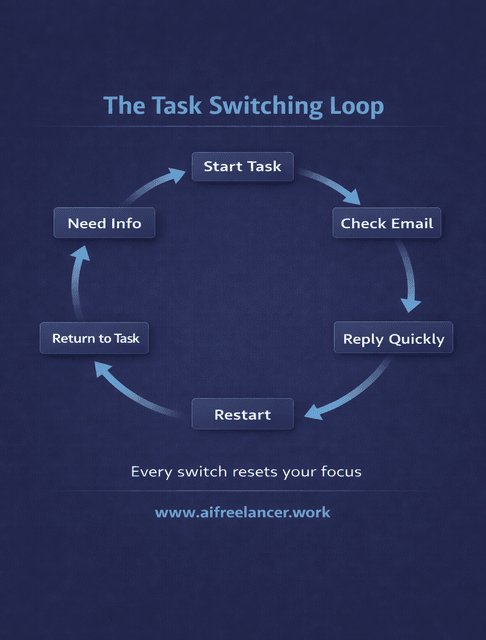
What you call multitasking is usually something else. It looks like this: you open a draft, realize you need one more source, switch to research, notice an email, reply quickly, and then return to the draft only to reread what you wrote because you’ve lost your train of thought. This loop repeats throughout the day, especially when you’re handling multiple clients or projects.
The Real Reason How to Stop Multitasking Feels So Hard
Once your work is spread across too many tools and tasks, even simple work starts to feel heavier than it should. That is why the problem keeps showing up even when you try to stay focused—your setup is working against you.
How to Stop Multitasking When Your Tasks Are Fragmented
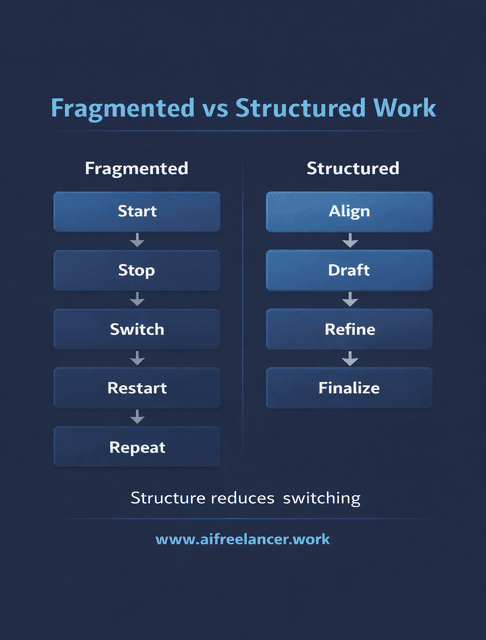
This is not about discipline. It is about fragmentation. Your emails, drafts, edits, and research all live in separate places, and none of them has a clear start or finish. You move forward in small pieces, then keep coming back to the same task without ever completing it.
A large part of this comes from invisible work draining your time—the small actions between tasks that don’t feel like progress but keep slowing you down.
The Hidden Restart Cost Behind Every Task Switch
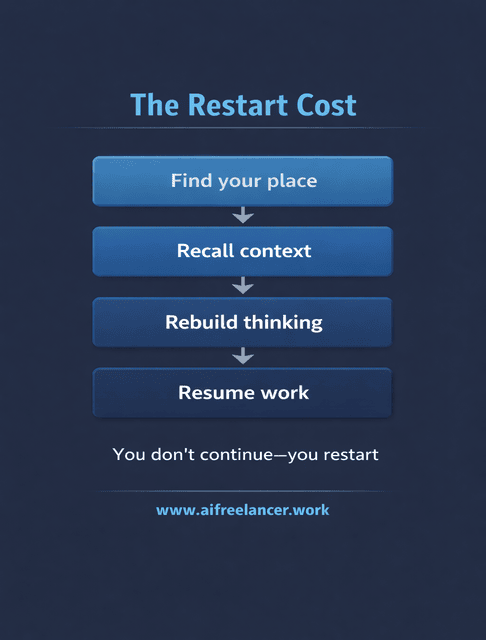
Every time you return to a task, you pay a hidden cost. You have to figure out where you left off, remember what you were planning to do, and rebuild your train of thought. That effort is easy to miss in the moment, but it adds up quickly.
According to Harvard Business Review, knowledge workers can switch between applications hundreds—sometimes more than a thousand—times per day, leading to substantial lost time and energy each week.
Why Multitasking Feels Productive but Reduces Real Output
Multitasking feels productive because you are constantly doing something. You answer a message, fix a sentence, check a source, and move on. It feels like progress because something is always happening.
But the real cost shows up later. You lose the thread of your argument and end up rewriting sections just to make them flow again. Edits take longer because you see the same material with fresh eyes each time rather than improving it in one pass. What should have been a single session turns into multiple returns to the same task.
A Simple System for How to Stop Multitasking at Work
The natural response is to try harder—to stay focused, to push through. But that usually leads to the same result because the work’s structure has not changed. A better approach is to adjust how the work flows so you are not forced to keep stopping and starting.
How to Stop Multitasking Using Task Batching and Deep Work Blocks
One of the simplest ways to reduce switching is to stop mixing different types of work. Writing, editing, and communication each require a different kind of attention. When you keep them separate, your brain does not have to keep resetting every few minutes.
Build a Structured Workflow, So You Don’t Have to Keep Restarting Tasks
Think of your work in stages instead of scattered actions.
Start with alignment. Before you begin writing a client blog, take a few minutes to lock in the goal, audience, and angle. Pull together your brief, links, and notes so you are not stopping halfway through to search for missing pieces.
Move into drafting. Stay with the writing until you have a complete version, even if it is rough. This is where most people get pulled away, especially when something feels unclear. Instead of switching tasks, leave a quick note and keep going.
Then refine. Now you go back through the draft to improve clarity and structure. Because the full piece is already there, you are not jumping between writing and editing.
Finally, expand and finalize. Add examples, tighten transitions, and format the piece for delivery. At this point, you are finishing the work, not reopening it.
How a Structured Workflow Keeps Work Moving Forward
Each stage gives you a clear next step, so you are not reopening a draft just to figure out what to do. You stay with the same type of thinking longer, which makes the work feel easier and more consistent.
Example: How This Workflow Looks in a Real Freelance Task
Take a typical blog assignment for a client.
Without structure, it often looks like this: you start writing, stop to check the brief again, switch to research mid-paragraph, answer a “quick” client message, then return and reread everything just to continue. That cycle repeats until the draft is finished.
With a structured workflow, the process changes. You begin by aligning—reviewing the brief, defining the angle, and gathering sources before writing. During drafting, you stay with the writing, leaving placeholders instead of switching tasks. In the refine stage, you focus only on improving clarity and flow. By the time you reach finalization, you are polishing, not rebuilding.
The work feels smoother because you are not constantly restarting. You are continuing.
How to Stop Multitasking with an AI-Assisted Workflow
Once your workflow is clear, the next step is handling the smaller interruptions that still pull you away. This is where AI becomes useful—not as a replacement, but as a way to keep your momentum intact.
Use AI to Reduce Task Switching and Manual Glue Work
Most interruptions do not come from the main task. They come from the small steps around it. A long client message that needs to be understood. Notes that are too messy to use. A quick reply that pulls you into your inbox.
Instead of leaving your draft, AI can handle these tasks right where you are. Paste a message to generate a short list of actions. Turn scattered notes into something usable without breaking your flow. Draft a quick reply and move on, instead of getting pulled into a longer exchange.
This becomes even more powerful when paired with a simple inbox system that prevents messages from constantly interrupting your work.
How AI Preserves Context Between Tasks
When information is already condensed and organized, you do not have to reread everything to pick up where you left off. That makes returning to your work faster and less mentally draining.
Research from McKinsey & Company shows that productivity gains from AI are highest when it is integrated directly into workflows rather than used as a separate tool.
Where AI Fits in Your Workflow (And Where It Doesn’t)
AI works best when it supports the process. It can help you get started faster and handle small tasks that would normally interrupt you. But it should not replace your thinking or your voice.
If you find yourself spending more time fixing AI output than using it, step back. It is probably being used at the wrong stage.
Practical Ways to Protect Your Workflow from Interruptions
Even with a strong workflow in place, interruptions will still happen. The difference now is how you handle them so they do not undo your progress.
Set Boundaries That Reduce Reactive Work
Instead of checking email throughout the day, define specific windows for communication. Let messages sit while you finish a focused block of work. Most interruptions feel urgent, but very few actually are.
A simple system, like a simple three-lane inbox system, can help you separate what needs attention now, later, and not at all—so you are not constantly reacting.
Design Your Environment to Minimize Switching Triggers
Notifications, open tabs, and alerts make it easier to drift. Clearing some of that noise helps you stay with your current task without constant breaks.
Capture Interruptions Without Acting on Them
When something new comes in, write it down and keep going. That small step allows you to stay in your current work without losing track of what needs attention later.
Final Thoughts
If you’re trying to figure out how to stop multitasking, the real shift is this: stop organizing your day around tasks, and start organizing it around how work actually moves.
When your workflow is clear and connected, you don’t keep restarting. You move forward, finish faster, and produce stronger work with less effort.
If you want a system that helps you write faster, stay focused, and reduce revisions, check out my books on my Amazon Author page.
Frequently Asked Questions About How to Stop Multitasking
Multitasking forces your brain to keep switching, which slows you down each time you return to a task. Over time, this leads to more errors and longer completion times.
Start by separating different types of work, following a structured workflow, and limiting when you respond to messages. This reduces unnecessary switching.
Multitasking sounds like doing multiple things at once, but in practice, you are switching between tasks. Each switch requires your brain to reset.
It forces you to rebuild your train of thought every time you return to a task. That makes work feel slower and more mentally demanding.
Yes. It can handle smaller tasks like summarizing messages or organizing notes, so you can stay focused on the main work longer without breaking your flow.

Florence De Borja is a freelance writer, content strategist, and author with 14+ years of writing experience and a 15-year background in IT and software development. She creates clear, practical content on AI, SaaS, business, digital marketing, real estate, and wellness, with a focus on helping freelancers use AI to work calmer and scale smarter. On her blog, AI Freelancer, she shares systems, workflows, and AI-powered strategies for building a sustainable solo business.

