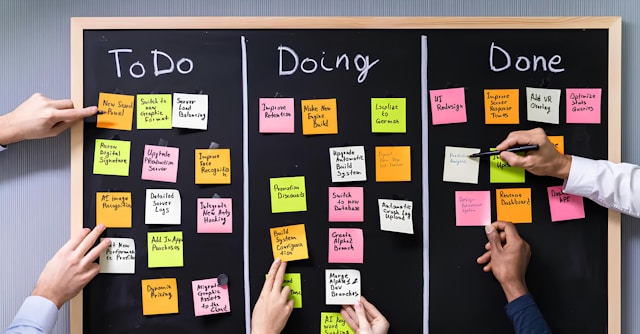
If you are trying to figure out how to organize tasks without constantly feeling behind, the problem is probably not your motivation. It is a fact that every unfinished task, reminder, message, and idea is competing for attention at the same time.
You sit down to work, open your task list, and immediately feel overwhelmed. A client revision needs attention. An invoice still has not been sent. Three unread Slack messages are waiting. A new idea for your website suddenly feels urgent; somewhere in the middle of all that, you are also supposed to do the actual work that pays you.
This is why so many professionals struggle with task organization. The problem is usually not laziness, lack of motivation, or poor work ethic. The problem is that everything lives in the same mental bucket. When every unfinished item stays mentally active, your brain keeps switching contexts instead of making progress.
Research from the American Psychological Association shows that multitasking and constant task switching reduce productivity and increase mental strain. That constant shifting is exhausting, especially for freelancers, founders, consultants, and creative professionals already juggling multiple responsibilities.
Most people do not need a more complicated productivity system. They need a simpler way to decide what deserves attention now, what can wait, and what should stop occupying mental space altogether.
That is where the 4-category task system comes in:
- Now
- Later
- Admin
- Waiting
It is simple enough to maintain during busy weeks, yet structured enough to keep your workload from turning into an endless, overwhelming list.
Everything I’ve shared here—and more—is in my book, available on Amazon. Click the link if you’re ready to take the next step.
How to Organize Tasks Without Feeling Overwhelmed
Most task systems fail because they flatten task importance. A random idea gets the same visual weight as a client deadline. An invoice reminder sits beside deep strategy work. A “quick reply” ends up interrupting focused work for thirty minutes because one email becomes five more tabs, three follow-ups, and a Slack conversation.
Over time, the task list stops helping you decide what to do next, which is often the real reason traditional productivity methods break down under modern workloads.
Part of the reason unfinished work feels mentally heavy is that the brain tends to keep incomplete tasks psychologically “open.” Researchers often connect this to the Zeigarnik effect, where unfinished work continues pulling attention even when you are trying to focus elsewhere. You may finish writing half a proposal, switch to invoices for ten minutes, then return to the proposal, still thinking about payment reminders, unread emails, or whether a client replied.
Researchers at Stanford University found that heavy multitaskers struggle more with filtering irrelevant information and switching effectively between tasks. In practical terms, constantly scanning overloaded task lists trains your attention to stay focused.
The issue becomes worse when shallow work and focused work live together in the same space. Writing a proposal requires a completely different mental state than scheduling meetings or replying to invoices. Yet many people jump between both all day long.
Researchers also use the term “attention residue” to describe what happens when part of your focus remains stuck on the previous task after switching. For example, you might pause a writing session to answer a billing email, then return to the document still half-thinking about overdue invoices, scheduling issues, or whether the payment was confirmed.
The result is usually slower execution, more rereading, forgotten follow-ups, difficulty prioritizing, and constant low-grade stress. Separating task types reduces the amount of mental switching required during the workday.
The 4-Category Task System for Clearer Workflows
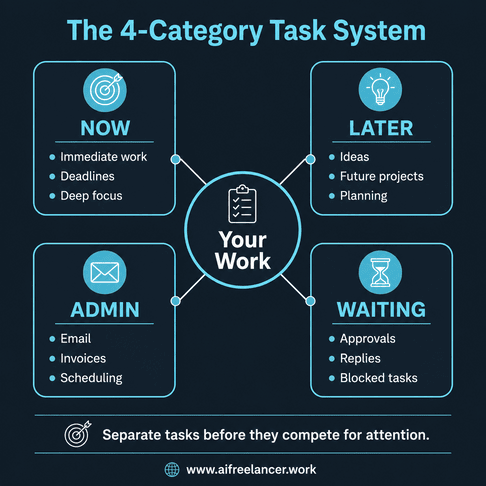
The 4-category system works because every task has a defined role. Instead of asking yourself what deserves attention every time you open your task list, the decision is already partially made. Each category handles a different type of work.
Now
The Now category is for work requiring immediate attention. This usually includes deadline-sensitive work, active client deliverables, focused work blocks, and tasks directly tied to revenue or delivery.
Now is not a dumping ground for everything unfinished. That is one of the biggest mistakes people make. When Now becomes another overloaded list, prioritization becomes difficult again. If a task does not require action yet, it does not belong here.
A useful rule is to keep Now intentionally small. In many cases, 1–3 meaningful tasks are enough for a focused work block. Meetings, recurring admin work, and blocked items usually should not stay in Now unless they directly affect immediate delivery. Otherwise, the category slowly fills with obligations instead of execution priorities.
Later
Later is for important work that does not need attention today. Future projects, strategic ideas, improvements, content ideas, and planning items can safely live here without interrupting current execution.
For example, a new lead magnet idea may be valuable, but it should not compete with a client deadline due tomorrow morning.
One common failure point is turning Later into an idea storage with no review process. Over time, the category becomes crowded with abandoned plans and unfinished intentions. Reviewing Later during weekly planning sessions helps prevent buildup while keeping useful ideas accessible.
Admin
Admin contains maintenance work like invoices, scheduling, uploads, email replies, expense tracking, document organization, and follow-ups. The key is batching these tasks together instead of scattering them throughout the day.
Answering invoices, scheduling calls, and checking messages in one dedicated block prevents shallow work from constantly interrupting focused sessions. This matters because interruptions carry hidden costs.
According to research from the University of California, Irvine, it can take significant time for people to fully regain focus after interruptions during concentrated work. One “quick check” often turns into twenty minutes of mental drift.
Admin work becomes dangerous when it quietly expands across the entire day. Many professionals feel productive because they stayed busy answering messages, organizing files, and handling small requests, but very little meaningful progress actually moved forward.
Waiting
Waiting is one of the most underrated categories in any workflow system. It is where delegated tasks, pending approvals, unanswered client questions, invoice payments, blocked projects, and follow-ups waiting on someone else should live.
Instead of mentally tracking whether someone replied, the task already has a designated place. This reduces the mental burden that causes many professionals to lose track of unfinished follow-ups and blocked work. You no longer need to reopen the same email thread repeatedly just to remember that progress is blocked.
Many people resist using Waiting because they feel uncomfortable removing stalled work from active attention. However, constantly revisiting blocked tasks creates anxiety without creating progress. A short daily review keeps Waiting visible without letting it dominate the workday.
How to Organize Tasks When Everything Feels Important
One reason people struggle to prioritize is urgency distortion.
When everything sits in one large list, everything starts to feel equally urgent. A Slack notification creates pressure. An unread email feels important. A random request arriving today suddenly jumps ahead of planned work, even if it has no immediate deadline.
This creates reactive work habits.
Not every unfinished task requires action today. A task can still be important, valuable, or necessary without requiring immediate execution.
The 4-category system separates active work, future work, maintenance work, and blocked work. That separation makes prioritization easier because tasks stop competing unfairly for attention.
When deciding where something belongs, ask:
- Does this affect today’s delivery, deadline, or income?
- Am I waiting on someone else?
- Is this maintenance work?
- Can this safely wait until later?
There will still be days when multiple urgent tasks collide. In those situations, the goal is not perfect prioritization. The goal is to make tradeoffs visible. A clear system makes it easier to see which commitments affect delivery, client trust, revenue, or long-term work quality.
How to Organize Tasks Using the 4-Category System Every Day
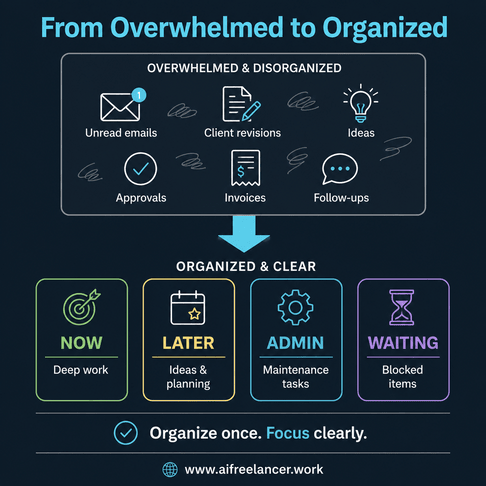
The system works best when task handling becomes lightweight and repeatable. Start with one capture point. Instead of storing tasks across notebooks, inboxes, sticky notes, screenshots, and random documents, collect everything in one place first. That prevents unfinished work from staying in your head.
Once captured, sort tasks immediately. A client approval request should move directly into Waiting instead of remaining in Now all day. A future marketing idea should move into Later instead of competing with active client work.
Before using categories, many people repeatedly reopen the same inbox, reread the same thread, or mentally track unfinished approvals throughout the day. After categorization, the workflow becomes clearer:
- Active work moves into Now
- Blocked items move into Waiting
- Future ideas move into Later
- Maintenance tasks move into Admin
Your Now category should stay intentionally small. In most cases, keeping 1–3 primary tasks is enough for a focused work block because you already know what deserves attention next.
A simple daily review may include checking Waiting for follow-ups, choosing a few Now tasks, batching Admin into one work block, and moving future items into Later. By the time work starts, the list should already show what deserves immediate attention, what can wait safely, and what still depends on someone else.
After a few weeks, many people notice fewer forgotten follow-ups, less rereading, faster task startup, fewer reactive interruptions, clearer workday planning, and less mental fatigue at the end of the day.
Using AI to Support Task Organization
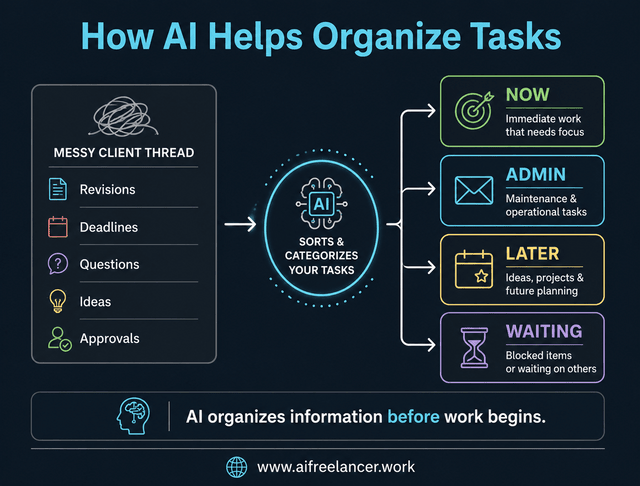
AI becomes useful when it processes messy information instead of generating more clutter. This works especially well when combined with structured systems for handling client communication and execution.
For example, AI can summarize long email threads, extract deadlines, identify blockers, separate admin tasks from focused work, and organize scattered notes into actionable items.
Instead of manually rereading a client thread five times, you can prompt AI with:
“Summarize this email and extract the actionable tasks.”
You can also use:
“Sort these tasks into Now, Later, Admin, and Waiting.”
This becomes especially useful during client revisions, project handoffs, meeting summaries, brainstorming sessions, content planning, and email-heavy workflows.
For example, a long client feedback thread may contain revisions requiring immediate action, future ideas, scheduling requests, and pending approvals. AI can separate those into categories before you even begin planning the work.
A raw client message like:
“Please revise section two today, send me a new invoice next week, and let’s revisit the webinar idea later after approval.”
can quickly become:
- Now → revise section two
- Admin → prepare invoice
- Later → webinar idea
- Waiting → approval confirmation
That reduces manual sorting before work even starts. Human judgment still matters because priorities still depend on deadlines, business impact, and delivery commitments.
Once the system is in place, the main challenge becomes keeping the categories honest instead of letting everything slowly drift back into one overloaded list.
Common Mistakes When Organizing Tasks
Turning Now Into a Dumping Ground
If everything stays in Now, the category becomes meaningless. Now should contain the next meaningful actions, not the entire workload. A useful fix is setting a hard limit on how many active priorities can stay in the category at one time.
Checking Waiting Too Rarely
Blocked work still needs visibility. If Waiting is ignored for too long, missed approvals and follow-ups can quietly delay projects, affect delivery timelines, and create avoidable client friction. A short end-of-day review usually prevents this problem from building up.
Mixing Admin With Focused Work
Admin tasks are necessary, but they use a different kind of attention. Constantly checking messages, invoices, and scheduling requests throughout the day fragments attention. Batching admin work into scheduled windows protects deeper work sessions.
Overcategorizing Tasks
Too many labels create unnecessary maintenance. Most people do not need twelve categories, color systems, or complicated tagging rules. If maintaining the system starts taking more effort than the actual work, the structure has probably become too complicated.
Why Simple Task Systems Work Better Long-Term
Complex productivity systems often collapse during busy weeks because they require too much upkeep.
A lightweight system survives pressure better. When tasks already have a clear place, prioritization becomes faster, follow-ups become easier to track, fewer tasks get forgotten, and focused work becomes easier to protect.
The system also reduces context switching. Writing a proposal requires different attention than answering invoices or scheduling calls. Grouping similar task types creates smoother work blocks with fewer interruptions.
Simple systems are easier to maintain during stressful weeks because they require fewer moving parts. You spend less time reorganizing the system itself and more time actually moving work forward.
Over time, this also affects work quality. Fewer interruptions mean deeper concentration, better client delivery, clearer thinking, and less end-of-day exhaustion.
Final Thoughts
Learning how to organize tasks is not really about creating the perfect productivity system. It is about reducing the amount of mental effort required to decide what deserves attention.
The 4-category system works because it separates active work, future work, maintenance work, and blocked work before they all collide inside the same overloaded list.
Start simple:
- capture everything in one place
- sort tasks into four categories
- keep Now small
- review Waiting daily
After a few weeks, the difference often becomes noticeable. The work already has a category, so you stop reopening the same client thread six times a day. Waiting holds unfinished approvals for review, while admin tasks stay contained instead of interrupting focused work throughout the day.
You do not need more complexity to feel organized. Most people simply need a clearer system for managing work without constant mental overload. You need fewer unnecessary decisions during the workday.
If you want more practical systems for AI-supported workflows, writing productivity, and anti-overwhelm task management, visit my Amazon Author page for books designed for freelancers, creators, and overloaded professionals building sustainable workflows.
Frequently Asked Questions About How to Organize Tasks
If your task list keeps growing but you still feel behind, the problem is usually not volume. It is that deep work, admin work, future ideas, and blocked tasks are competing in the same space. Separating those task types into categories makes prioritization easier and reduces mental switching throughout the day.
Start by identifying which tasks directly affect today’s deadlines, deliverables, client expectations, or income. Then separate blocked items from active work. Many people waste energy mentally tracking tasks they cannot even move forward with.
Long task lists often combine focused work, shallow admin work, reminders, ideas, approvals, and follow-ups into one place. That forces the brain to repeatedly reevaluate priorities instead of executing clearly. Over time, rereading becomes more exhausting than the actual work itself.
Most people work better with fewer active priorities. In many cases, keeping 1–3 meaningful Now tasks is enough for a focused work block. Once the active list becomes too large, everything starts competing equally for attention again.
Yes, especially when handling messy inputs like long email threads, meeting notes, or client feedback. AI works best when extracting tasks, identifying blockers, separating admin work, and organizing scattered information before planning begins.
Sources
- American Psychological Association — Multitasking Research
- Stanford University — Media Multitaskers Research Study
- University of California Irvine — The Cost of Interrupted Work Study

Florence De Borja is a freelance writer, content strategist, and author with 14+ years of writing experience and a 15-year background in IT and software development. She creates clear, practical content on AI, SaaS, business, digital marketing, real estate, and wellness, with a focus on helping freelancers use AI to work calmer and scale smarter. On her blog, AI Freelancer, she shares systems, workflows, and AI-powered strategies for building a sustainable solo business.