
You open your to-do list to get organized, but instead of feeling clearer, you feel heavier. That is exactly why to-do lists don’t work for many freelancers, creators, consultants, and overloaded professionals today. There are client revisions beside grocery reminders, research tasks mixed with admin follow-ups, and deep writing work sitting next to scheduling errands. You scroll through the same unfinished tasks repeatedly, trying to decide what matters most, yet somehow the day still disappears without meaningful progress.
The issue is not laziness or lack of discipline. The problem is that modern knowledge work creates too many competing mental demands inside one flat system.
A traditional to-do list was designed for a simpler kind of work. Modern work is different. Today, people constantly switch between writing, responding, researching, planning, revising, coordinating, and making decisions. When all of that lives inside one giant list, everything starts feeling equally urgent. Seeing every unfinished responsibility at once creates constant pressure, even before the workday properly begins.
The result is not a better organization. It is a work system that becomes harder to think inside.
Most people try solving this by finding a better app, adding more tags, or reorganizing priorities. But the deeper issue is structural. The better question is not:
- “What should I do next?”
The better question is:
- “Where does this task belong?”
That shift changes how work moves through the day.
Everything I’ve shared here—and more—is in my book, available on Amazon. Click the link if you’re ready to take the next step.
Why Everything Starts Feeling Urgent
The biggest problem with most productivity systems is not the number of tasks. It is the way those tasks compete for attention. A freelance writer might have client edits, research notes, unpaid invoices, marketing posts, discovery calls, and email follow-ups inside one single list. The brain does not experience that as organization. It experiences it as unfinished obligations competing for space.
The Hidden Cost of Overloaded Task Lists
Every unfinished task quietly pulls attention back toward itself. Even when you are not actively working on it, part of your attention keeps checking whether something urgent, incomplete, or forgotten needs action. Over time, this repeated mental sorting becomes exhausting.
Research from the American Psychological Association has long discussed how repeated decision-making drains mental energy over time. In overloaded task systems, this happens constantly because every glance at the list creates another round of prioritization. The problem is not just the workload itself. It is the constant mental evaluation surrounding the workload.
This is what many freelancers experience daily. You open your list intending to start writing, but before you begin, you notice an unpaid invoice, a scheduling issue, a client email, and several overdue reminders. Instead of starting immediately, you begin mentally negotiating what deserves attention first.
The work feels harder to start because the brain is already busy sorting competing priorities.
Why Mixed Workloads Create Constant Pressure
Not all work uses the same type of attention. Writing a strategic article requires a different mental mode than replying to emails or organizing schedules. Yet many task systems flatten those responsibilities into one visual stream.
Your attention shifts from creative thinking to shallow admin work, then to communication tasks, then back to strategy again within minutes. Each switch makes it harder to regain momentum because the brain has to reload context repeatedly.
Research from Stanford University found that heavy multitaskers struggle more with filtering irrelevant information and switching attention effectively. This matters because many modern workflows unintentionally train the brain to operate in fragmented attention states all day long.
The issue is not simply “being busy.” The issue is that meaningful work keeps getting interrupted by maintenance work that feels urgent in the moment, including the invisible coordination tasks that quietly hold modern work together.
Why Overloaded Professionals Never Feel “Done”
One of the most frustrating parts of task overload is that the list never appears finished. As soon as tasks are checked off, new ones replace them. Small urgent items also tend to overpower larger, meaningful projects because they are faster to complete.
This is why many professionals spend entire days “getting things done” while still feeling behind afterward.
Freelancers experience this especially hard because their workload includes invisible responsibilities that continue to sit in the background mentally. A writer may still be thinking about unclear client feedback while answering emails or mentally tracking unpaid invoices while trying to focus on research. Unfinished work keeps leaking into other parts of the day because everything remains mentally active at the same time.
For example, a freelance writer’s task list may contain article revisions, invoice follow-ups, AI-generated content ideas, client emails, interview scheduling, and research tasks, all mixed. None of those tasks is inherently difficult on its own. The problem is that they demand different kinds of thinking while competing in the same workspace.
That pressure often follows people after work because unfinished responsibilities keep pulling attention back toward them.
Why Deep Work Breaks Inside Crowded Task Systems
Creative and strategic work suffers the most inside overloaded systems because deep thinking depends on continuity. Writing, planning, problem-solving, and strategy all require enough uninterrupted time for ideas to build on themselves.
A crowded task list breaks that momentum constantly.
The problem is not only distraction. It is how difficult it becomes to return to focused work after attention gets pulled elsewhere. A writer answering two quick emails may spend far longer trying to mentally return to the article than the emails themselves actually required.
Over time, this creates shallow workdays where people stay busy but struggle to produce meaningful output.
Why AI Can Make Crowded Workflows Worse
AI tools can speed up output, but they can also create larger piles of unfinished information when there is no processing system behind them. Someone using AI might generate outlines, summaries, research notes, email drafts, and brainstorming ideas within an hour. Without structure, all of that becomes another layer of unfinished material competing for attention.
The problem today is often not a lack of information. There is too much unprocessed information sitting in the same workspace.
For example, someone might ask AI to generate twenty content ideas but never decide which ideas belong in active projects, which belong in future drafts, and which should simply be archived. Everything stays visible, so the workspace becomes more crowded instead of clearer.
That is why AI works best when it helps process information before it reaches today’s work list, especially when paired with a structured AI-powered work system for independent professionals.
The Difference Between Task Management and Workflow Design
Most productivity advice focuses on task management, but task management and workflow design are not the same thing.
Task management answers:
- “What needs to be done?”
- Workflow design answers:
- “Where does this belong, and when should it be handled?”
That difference matters because lists mainly store work, while workflows move work through stages.
Instead of placing everything in one space, the work gets separated into clearer categories. Writing tasks stay inside writing sessions. Admin work stays inside admin blocks. Communication tasks stay grouped instead of interrupting focused work throughout the day.
This removes much of the repeated mental sorting that makes overloaded workdays feel chaotic.
A Better Workflow Than One Giant To-Do List
The solution is not finding a better to-do app. The solution is separating work before it reaches today’s visible workload.
Separate Work by Cognitive Demand
Different types of work create different kinds of mental strain, which is why many professionals benefit from a simpler way to separate active work by function instead of urgency. Writing, planning, and problem-solving require longer periods of concentration. Admin work and communication tasks use a different kind of attention entirely. Waiting tasks, such as pending approvals or unanswered client questions, also create mental pressure when they remain mixed beside active work.
A writing session should not compete visually with invoice reminders or scheduling tasks. Each category needs its own workspace because different tasks require different levels of concentration, memory, and decision-making.
When unrelated work stops competing for attention, it becomes easier to stay focused long enough to make meaningful progress.
Create Work Blocks Instead of One Giant Task List
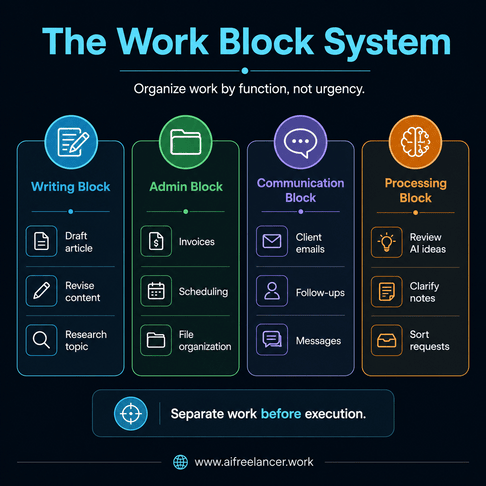
Execution becomes easier when work is grouped by mental mode instead of deadline alone. A structured workflow might include deep writing blocks, admin processing sessions, and communication windows for email and messaging.
A freelance writer reviewing client revisions should not simultaneously see outreach reminders, grocery errands, brainstorming notes, and scheduling tasks. Those responsibilities belong in different parts of the workflow because they pull attention in different directions.
The difference becomes clearer when comparing the two approaches.
Instead of jumping between revising a client blog, sending invoice reminders, reviewing AI ideas, and answering emails throughout the day, each type of work gets handled during its own dedicated block. Writing tasks stay together. Admin tasks stay together. Research and planning tasks stay separate from communication work.
A simpler active work view makes the day easier to navigate because fewer unrelated decisions compete for attention simultaneously.
Why Workflow Separation Reduces Burnout
Burnout is not caused only by workload volume. It is also caused by constant exposure to unfinished responsibilities. When everything remains visible all day, it becomes difficult to mentally step away from work.
Separating work reduces visual overload, repeated rereading, constant switching, and hesitation before starting difficult tasks. Research from Harvard Business Review found that workers spend substantial time switching between apps and tasks throughout the workday, contributing to lost focus and reduced efficiency. The research highlights an important reality about modern work: fragmented attention carries a real cognitive cost.
This is why overloaded professionals often feel mentally tired before meaningful work even begins. Their attention has already been fragmented by smaller competing demands throughout the day.
The goal is not to do less meaningful work. The goal is to stop carrying every responsibility mentally at the same time.
What Replaces Why To-Do Lists Don’t Work in Modern Workflows
The strongest workflows reduce visible mental clutter before execution begins. That requires processing work before it enters today’s active workload.
The Capture → Process → Execute System
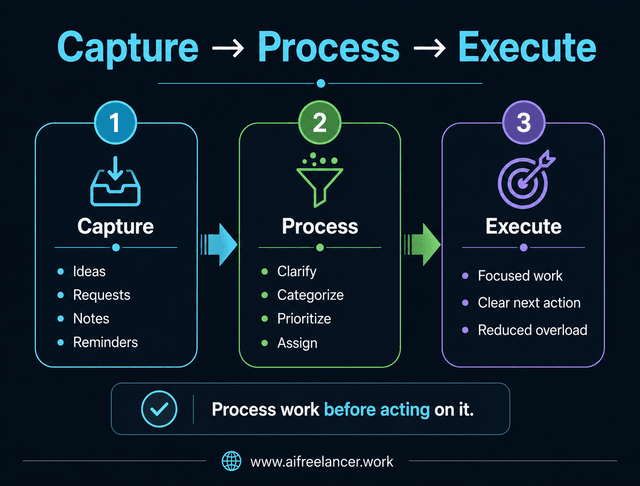
A more sustainable workflow follows three stages:
- capture
- process
- execute
Capture allows ideas, requests, and reminders to leave your head quickly, which also reduces the mental pressure that comes from trying to remember unfinished responsibilities throughout the day. This stage is intentionally simple because the goal is speed, not organization. Notes, tasks, voice memos, and reminders all enter a temporary holding area instead of immediately entering today’s visible work list.
Processing happens separately. This is where tasks are clarified, categorized, and reduced into actionable next steps. During processing, you decide whether the task actually matters, what kind of work it is, whether action is needed now, and where it belongs in the workflow.
Execution happens only after clarification. This prevents the daily work view from becoming a storage container for unresolved thinking.
Inactive tasks stay outside the immediate work view until they become relevant again.
Build Processing Systems Instead of Endless Active Lists
Most people use their to-do list as an inbox, reminder system, archive, planning board, and execution system all at the same time. That creates overload immediately because unfinished ideas and actionable work compete inside one visible space.
A better workflow separates capture from execution. Before tasks enter the workday, they should already have clear next actions, proper categories, reduced ambiguity, and defined context.
This removes much of the repeated rereading that slows people down.
For example, a vague task like:
- “Handle client feedback.”
becomes:
- Review sections 2–4
- Clarify CTA request
- Rewrite introduction
- Send the revision draft by Thursday
That small change makes the task easier to start because the thinking has already been reduced upfront.
How AI Supports Workflow Processing Instead of Task Hoarding
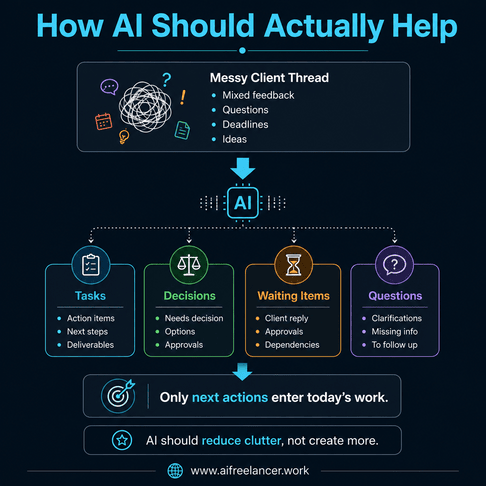
The best use of AI is not generating more unfinished material. It is helping reduce messy information before it reaches the workday.
Instead of dumping raw notes into a giant list, AI can summarize email threads, extract action items, identify missing decisions, and separate questions from tasks before anything enters today’s visible work.
A simple workflow might look like this:
- Paste a messy client thread into AI
- Ask AI to separate tasks, decisions, questions, and waiting items
- Move only true next actions into the active work view
- Store reference notes separately
A messy client message may contain feedback, scheduling requests, unanswered questions, and future ideas, all mixed. AI can help separate those pieces before they become another source of clutter inside the workday.
Why a Smaller Active Work View Feels Easier to Execute
A smaller visible workload changes how work feels psychologically. Instead of seeing dozens of unrelated tasks simultaneously, the brain sees only the tasks relevant to the current work block.
During a writing session, the visible work may contain only article drafting, revision tasks, and research notes. Admin reminders and communication tasks remain outside view until their designated processing windows.
This reduces resistance because fewer competing demands remain active at the same time. The workday starts feeling more manageable without relying on urgency or pressure to function.
Why do to-do lists feel overwhelming?
To-do lists become overwhelming when they mix unrelated tasks into one visible space. The brain repeatedly scans unfinished work, which increases decision fatigue and mental pressure throughout the day.
What is better than a traditional to-do list?
A workflow-based system is often more effective than a flat task list. Separating work into categories like deep work, admin, communication, and waiting tasks helps reduce overload and improve focus.
Why do I keep procrastinating even with a to-do list?
Many people procrastinate because their tasks are unclear, mentally demanding, or mixed with too many competing priorities. For example, vague tasks like “handle feedback” or “work on an article” require additional thinking before work even begins. The issue is often workflow friction, not laziness.
How can I organize tasks without feeling overwhelmed?
Reduce the number of tasks visible at one time. Process tasks before execution, define clear next actions, and separate work by type instead of storing everything in one giant list.
Can AI help with task management and productivity?
Yes, but AI works best as a processing tool rather than a storage tool. AI can summarize information, extract action items, and organize messy inputs before they enter your active workflow.
Sources
- American Psychological Association. (2012, December 1). What you need to know about willpower: The psychological science of self-control.
- Murty, R. N., Dadlani, S., & Das, R. B. (2022, August 29). How much time and energy do we waste toggling between applications?. Harvard Business Review.
- Stanford University. (2009, August 24). Media multitaskers pay mental price, Stanford study shows. Stanford Report.
Final Thoughts
The real reason why to-do lists don’t work is not that people are lazy, distracted, or undisciplined. The problem is structural. One giant list forces different types of work into the same mental space, where creative work competes with admin work and deep thinking competes with shallow maintenance tasks.
Modern productivity requires workflow architecture, not endless task accumulation. The strongest systems reduce overload by separating work into clearer work blocks that protect attention, energy, and focus quality over time.
Your workload may not actually be the biggest problem. The real issue may be that too much work is living in the same visible space at the same time.
If this kind of workflow thinking resonates with you, the books on my Amazon Author page go deeper into AI-assisted writing systems, workflow design, and practical ways to reduce overload without sacrificing quality or output.

Florence De Borja is a freelance writer, content strategist, and author with 14+ years of writing experience and a 15-year background in IT and software development. She creates clear, practical content on AI, SaaS, business, digital marketing, real estate, and wellness, with a focus on helping freelancers use AI to work calmer and scale smarter. On her blog, AI Freelancer, she shares systems, workflows, and AI-powered strategies for building a sustainable solo business.