
How to keep track of tasks at work gets much harder the moment your brain turns into a storage system instead of a workspace.
You sit down to focus, but before the day properly begins, your attention is already fragmented. A client asked for revisions yesterday. An unpaid invoice still needs a follow-up. Somewhere inside a Slack thread is a deadline you forgot to confirm. While trying to work on a draft, your brain suddenly reminds you about a proposal you meant to send two days ago.
This is the hidden workload many freelancers, consultants, and overloaded professionals carry every day. The work itself is not always the hardest part. The exhausting part is trying to mentally hold unfinished tasks while also doing the work directly in front of you.
The problem is usually not laziness, lack of discipline, or poor memory. The real problem is that too much work never becomes organized into clear next steps. Instead, deadlines, revisions, follow-ups, approvals, and loose reminders stay scattered across emails, browser tabs, Slack messages, notes, and unfinished conversations, quietly competing for your attention throughout the day.
Over time, remembering work becomes its own form of work. The more unfinished tasks your brain tries to track, the harder it becomes to focus clearly and fully disconnect from work afterward. The answer is not to remember more. It is to build a simple system that captures, clarifies, and organizes work before your brain starts carrying it.
Everything I’ve shared here—and more—is in my book, available on Amazon. Click the link if you’re ready to take the next step.
Why People Forget Tasks Even When They Stay Busy All Day
Most people assume forgotten tasks come from distraction. In reality, forgotten work often comes from carrying too many unfinished mental loops at once. You can stay busy for ten straight hours and still feel mentally scattered because your attention is constantly switching between visible work and unfinished reminders in the background.
Your Brain Was Never Designed to Be a Task Manager
Human memory works best when information has structure, context, and closure. Modern work rarely gives you any of those things.
Instead, freelancers often operate inside fragmented workflows. Client requests hide in long email chains. Deadlines get mentioned casually in Slack. Ideas sit in random notes. Revisions mix with approvals and questions. Admin tasks get squeezed between deep work sessions. Your brain then tries to hold it all together at the same time.
Researchers from the American Psychological Association have repeatedly linked multitasking and constant task-switching to reduced productivity and increased mental fatigue. Switching attention between unfinished tasks forces the brain to repeatedly reload context, which increases cognitive strain.
That strain is not always dramatic. Sometimes it simply feels like you know you are forgetting something, even when you cannot identify exactly what it is.
Every Uncaptured Task Becomes Another Mental Tab
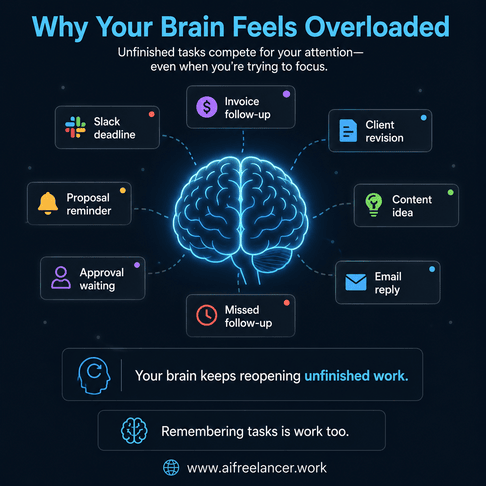
Think about how many unfinished reminders your brain carries during a normal workday.
You might be writing a draft while simultaneously trying to remember a client follow-up, an unpaid invoice, requested revisions from yesterday, and a content idea you do not want to lose. Even if you are focused on one task, part of your attention remains occupied by unfinished work.
Research on executive function and working memory from the Harvard Center on the Developing Child explains that the brain has limited capacity to manage attention, information, and task-switching at the same time. The more unfinished items your mind tries to actively track, the harder it becomes to focus deeply on any one task.
This is why overloaded freelancers often feel mentally tired before the day even starts.
A freelancer managing three clients in one day may move from writing a landing page to checking a delayed invoice, reviewing client edits, confirming deadlines, answering Slack messages, and updating project notes. Even if each interruption only lasts a minute or two, the switching accumulates throughout the day.
Glue Work Quietly Drains Your Focus
A large portion of freelance work is not the actual deliverable. It is the work around the work.
That includes checking messages, tracking approvals, remembering deadlines, reviewing revisions, clarifying requests, organizing scattered information, following up on invoices, and waiting for responses. These small administrative tasks may only take a few minutes individually, but together they create constant interruption.
You are not just writing the article. You are remembering that the CTA needs approval, the invoice is unpaid, and the client still has not confirmed the source link.
Microsoft’s 2023 Work Trend Index found that employees are interrupted roughly every two minutes by meetings, messages, emails, or app notifications. For freelancers, those interruptions often happen while juggling multiple clients, projects, and deadlines simultaneously.
The result is not just lost time. It becomes harder to stay focused long enough to do meaningful work without mentally jumping between revision notes, invoice reminders, client approvals, and unfinished follow-ups.
Signs Your Workflow Is Relying Too Much on Memory
Once memory becomes part of your workflow, the signs usually show up in small, repeated behaviors.
You Constantly Feel Like You Forgot Something
You finish one task, but cannot fully relax because another unfinished reminder immediately surfaces. Over time, that creates a low-grade mental vigilance that quietly drains energy throughout the day.
You Reopen the Same Messages Multiple Times
Many freelancers repeatedly reopen the same email or Slack thread just to reload context. You are not rereading because you enjoy it. You are rereading because the information was never converted into a clear workflow.
For example, you might reopen Slack just to remember whether the client confirmed the Thursday deadline.
Small Tasks Keep Interrupting Deep Work
You try to focus on writing, designing, or client delivery, but tiny unfinished tasks keep resurfacing in the background. You suddenly remember an invoice reminder, a proposal follow-up, or a missing revision detail while trying to finish focused work.
Your Brain Never Fully “Logs Off”
One of the clearest signs of cognitive overload is when work still feels mentally open after the workday ends.
You stop working physically, but mentally, you are still carrying deadlines, approvals, follow-ups, revisions, and unresolved requests. That constant mental openness is one reason burnout builds slowly over time.
How to Keep Track of Tasks at Work When Everything Feels Scattered
Most people are not overwhelmed by the number of tasks alone. They are overwhelmed by work that has not become a clear next step yet. These symptoms usually come from the same source: work enters your day before it has been processed.
The Real Problem Is Work That Has Not Become a Next Step
An input is anything that asks for your attention before it becomes a clear next action.
Inputs include emails, Slack messages, client comments, meeting notes, voice notes, random ideas, calendar reminders, browser tabs, and revision requests. The problem is not simply having too many tasks. The problem is that these inputs remain unresolved and mentally active.
For example, a freelancer may receive a client request inside Slack, a deadline update in email, revision notes in Google Docs, a payment reminder from accounting software, and a new idea while working on another project. When none of these inputs get processed into a reliable system, the brain becomes the backup storage location.
Emails, Slack Messages, and Notes Become Mental Clutter
Scattered communication creates problems because information stays mixed.
A single client thread may contain revisions, approvals, deadlines, ideas, questions, and unrelated discussions all in one place. When nothing gets processed clearly, your brain compensates by trying to remember everything.
That is why freelancers often keep multiple tabs open “just in case” or revisit old conversations repeatedly. The work is not only about doing the project. The work is also sorting through information every time you need to act on it.
Why Most To-Do Lists Fail Under Cognitive Load
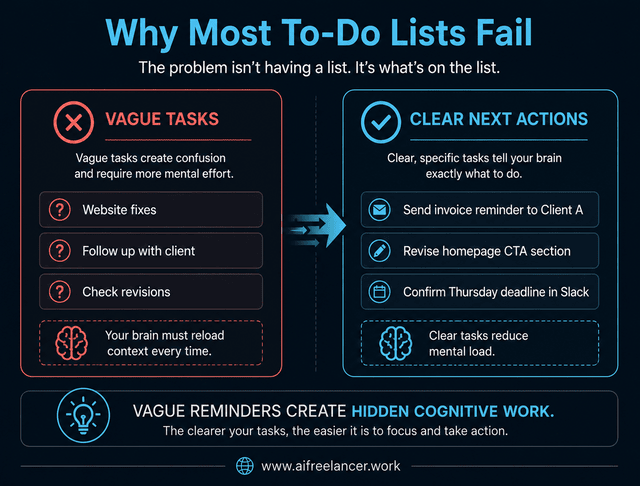
Many to-do lists fail because they store vague reminders instead of actionable work. This is one reason your task system starts creating more mental clutter instead of reducing it.
Tasks like “Website fixes,” “Follow up with client,” or “Check revisions” do not reduce mental load because they still require interpretation later. Each time you revisit them, your brain has to reload the entire context.
Instead of storing vague reminders, convert them into visible next actions:
- Send invoice reminder to Client A
- Revise homepage CTA section
- Confirm the Thursday deadline in Slack
Specificity reduces confusion and lowers the effort required to restart work later.
A useful rule is this:
If you cannot immediately start the task in one sitting, it is probably still too vague.
What To Do Instead of Dumping Everything Into One List
Not every unfinished item belongs in the same category.
Actionable tasks, ideas, waiting items, reference material, and unresolved decisions should not all sit in the same list. “Waiting for approval” is not the same as “write blog draft,” and “research idea” is not the same as “send proposal.”
When everything lives in one giant list, your brain constantly sorts and re-sorts information every time you look at it. That hidden sorting process creates more mental fatigue than most people realize.
A simpler approach is separating work by state and urgency instead of forcing everything into one massive list. Systems like a simple Now, Later, Waiting, and Admin workflow reduce cognitive overload because your brain no longer needs to repeatedly sort unfinished work every time you open your task manager.
The 4-Part System That Helps You Keep Track of Tasks at Work
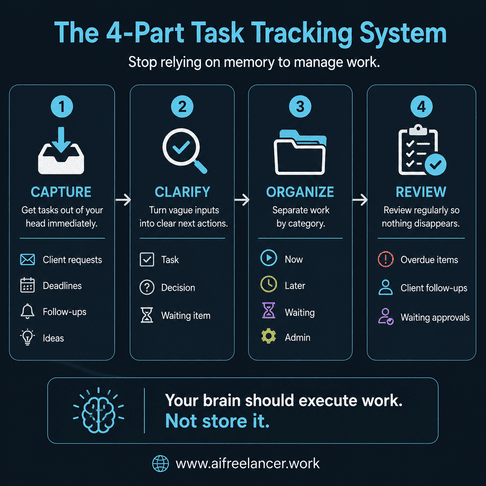
The goal is not to remember more tasks. The goal is to reduce how much unfinished work competes for your attention throughout the day.
The solution is not to remember harder. It is to give every task, decision, deadline, and waiting item a clear place to go. This works especially well when combined with a structured freelance workflow built around processing work instead of reacting to it.
Capture Everything Before Your Brain Starts Holding It
The moment work appears, capture it immediately.
Do not rely on memory to “hold it for later.” Instead of trying to remember revisions, deadlines, follow-ups, invoice reminders, and content ideas, put them in one trusted place right away.
Your capture location can be a task app, notebook, project board, simple inbox document, or notes app. The specific tool matters less than consistency. Date-specific items should go into a calendar. Actionable work should go into your workflow system. Ideas and reference material should live separately so they do not compete with active tasks.
Turn Vague Requests Into Clear Next Steps
Most mental overload comes from ambiguity.
Convert vague requests into specific work. A task is something you can do. A decision is something that needs a choice. A waiting item is something blocked by another person. An idea is something useful, but not ready for execution yet.
For example:
- “Can we soften the intro?” → Task
- “Should we target founders or freelancers?” → Decision
- “Waiting for client approval” → Waiting item
A useful question to ask is:
“What is the next visible action here?”
That single question reduces confusion quickly. If the task still feels mentally heavy after reading it, it probably needs more clarification.
Categorize Work So Your Brain Stops Switching Contexts
One reason freelancers feel overwhelmed is that every type of work competes for attention simultaneously.
Simple categories reduce that friction:
- Now
- Later
- Waiting
- Admin
Only actionable work should appear in today’s working view. Everything else should have a separate place.
For example, “waiting for feedback” should not sit beside active writing tasks. Future content ideas should not compete with invoice follow-ups. Admin work should not interrupt deep creative sessions. This reduces the mental effort required to decide what deserves attention right now.
Review the System Instead of Rechecking Everything Mentally
Without review habits, tasks slowly disappear back into mental storage.
A lightweight review rhythm helps prevent that. You can check your system in the morning, do a midday capture check, reset your list at the end of the day, and review waiting items before they disappear from view.
During reviews, check for overdue tasks, client follow-ups, unclear items, waiting approvals, and tomorrow’s priorities. The goal is not micromanagement. The goal is to replace constant mental vigilance with a reliable process.
Many freelancers also reduce communication overload by using brief status updates that clearly show what is finished, what is next, and what is waiting on someone else instead of rewriting long progress explanations every day.
A Freelancer’s Example of How to Keep Track of Tasks at Work
Most forgotten tasks start with unclear communication.
What a Scattered Client Request Looks Like
A client message might say:
- “Can we revise the intro?”
- “Please add the stat from last month.”
- “I’m not sure the CTA fits.”
- “Can we move the deadline to Thursday?”
At first glance, that looks like one message. In reality, it contains tasks, decisions, deadlines, approvals, and unresolved questions.
When everything stays bundled together, your brain must keep reopening the thread to remember what matters.
How One Client Message Becomes Several Different Kinds of Work
A structured workflow separates the message into clear categories:
- Task → revise intro
- Task → add stat
- Decision → confirm CTA direction
- Waiting → client approval
- Deadline → Thursday
That separation gives each item a clear role inside the workflow. Instead of constantly revisiting the original thread, you can move directly into execution.
How AI Helps You Keep Track of Tasks at Work Without Adding More Complexity
AI becomes useful when it reduces hidden workload instead of creating more digital clutter. Once the system is clear, AI can help with the messy processing stage.
AI Should Process Information, Not Replace Thinking
AI works best when handling organizational work like summarization, task extraction, workflow organization, and clarifying next actions.
For example, you can paste a long client thread into AI and ask:
- “Extract only actionable tasks from this thread.”
- “Separate decisions, deadlines, and waiting items.”
- “What information is still missing before work can start?”
The important part is verification. AI outputs still need human review before entering your workflow.
Use AI to Pull Tasks Out of Messy Messages
AI becomes valuable when it reduces manual sorting work.
It can help turn an email into a task list, a thread into a work brief, or meeting notes into action items. For example, this client message:
“Can we make the intro softer, add the stat from last month, and maybe move the CTA?”
can become:
- Task → revise intro tone
- Task → insert last month’s statistic
- Decision → confirm CTA direction
- Waiting → client to send stat source
The goal is not maximum automation. The goal is to make the next step easier to identify.
When AI Makes Task Tracking Worse
AI can also increase overload when it creates too many summaries, unverified outputs, extra documents to review, vague recommendations, or clutter without clear next actions. If AI produces more information than clarity, it becomes another source of cognitive overload.
AI Should Make the Next Step Clearer, Not Create More Work
The best workflow systems feel calmer, not more complicated.
AI helps most when it shortens clarification work, organizes scattered communication, and makes next actions visible faster. That is very different from blindly automating everything.
Why do I keep forgetting tasks at work, even when I stay busy?
Many professionals forget tasks because their workflows rely too heavily on memory. Unprocessed emails, scattered notes, vague reminders, and constant interruptions increase cognitive overload and make it harder to track unfinished work mentally. A useful starting point is tracking every forgotten task for one week. Patterns usually reveal where your workflow is breaking down.
What is the best way to organize work tasks without feeling overwhelmed?
The best approach is to separate work into clear categories such as actionable tasks, waiting items, ideas, and admin work. This reduces mental clutter and helps your brain focus on visible next actions instead of constantly sorting information. Try separating today’s active work from waiting items and future ideas first. That single change often reduces mental clutter immediately.
How do freelancers keep track of multiple client tasks?
Freelancers often use workflow systems that capture client requests immediately, convert vague communication into actionable steps, and organize work by priority or status. Regular reviews also help prevent tasks from disappearing between projects and client conversations.
How does cognitive overload make it harder to keep track of tasks?
Cognitive overload happens when too many unfinished tasks compete for attention simultaneously. Your brain then spends more energy trying to remember work than actually completing it, which increases stress, distraction, and mental fatigue. Reducing open loops and clarifying next actions helps lower that mental pressure.
Do task management systems help reduce burnout?
Yes. Reliable systems reduce mental tracking, repeated context switching, and constant vigilance. When your workflow consistently captures and organizes work, your brain no longer needs to carry unfinished tasks all day. Systems do not remove all stress, but they reduce the constant feeling that something important might slip through the cracks.
Sources
- American Psychological Association. (2006, March 20). Multitasking: Switching costs.
- Center on the Developing Child at Harvard University. (n.d.). A guide to executive function.
- Microsoft. (2023, May 9). Will AI fix work? 2023 Work Trend Index annual report. Microsoft WorkLab.
Final Thoughts
Learning how to keep track of tasks at work is not really about becoming more disciplined or remembering more information. It is about reducing the number of unfinished things competing for your attention throughout the day.
Most freelancers are not overwhelmed because they are incapable. They are overwhelmed because modern work constantly pushes unfinished tasks, revisions, deadlines, and admin work into the background of their thinking.
Reliable systems reduce that pressure. They create clearer next actions, reduce decision fatigue, and make it easier to focus on the work that actually matters instead of constantly trying to mentally track everything at once.
A reliable workflow does not just help you remember tasks. It helps you stop carrying them.
I write more about freelance systems, AI workflows, and writing processes in my books. You can find them on my Amazon Author page.

Florence De Borja is a freelance writer, content strategist, and author with 14+ years of writing experience and a 15-year background in IT and software development. She creates clear, practical content on AI, SaaS, business, digital marketing, real estate, and wellness, with a focus on helping freelancers use AI to work calmer and scale smarter. On her blog, AI Freelancer, she shares systems, workflows, and AI-powered strategies for building a sustainable solo business.