
You are halfway through a draft when the notification appears: “Hi, just checking in. How is everything going?”
The project is not late. You have not forgotten the deadline. You were doing the research, writing, or editing the client hired you to do. Still, the message pulls you out of the work and creates pressure to prove that you are making progress.
Learning how to communicate with clients does not mean answering messages all day. It means giving clients enough information that they do not have to keep asking where the project stands.
A reliable communication system shows what is happening, whether the client needs to act, and when they will hear from you again. When those details are easy to find, most clients feel informed without needing constant reassurance.
Everything I’ve shared here—and more—is in my book, available on Amazon. Click the link if you’re ready to take the next step.
Set Communication Expectations Before Work Begins
The easiest “just checking in” message to handle is the one your onboarding process prevents. When the client knows how the project will run before you begin, there is less room for them to invent their own communication schedule.
Two expectations need to be clear from the start. Response time is how quickly you answer a client’s message, while the update schedule is when you send a progress report without being asked.
You might respond to messages within one business day, but send project updates every Friday. These are separate promises, and clients should understand both.
Set One Client Communication Channel
A client sends the original brief by email, adds instructions in Slack, shares feedback in Google Docs, and follows up through WhatsApp because they are unsure which channel you check most often.
Choose one official place for project communication. This might be email, Upwork, a project management platform, or comments in a shared document.
Tell the client where to send questions, leave feedback, find files, record approvals, and confirm deadline or scope changes. A simple policy might say:
Please send project questions and approvals through email so we have one written record of decisions. Feedback on the draft can be added directly to the shared Google Doc.
You do not have to ignore a client who uses the wrong channel. Redirect the conversation politely and record the final decision in the agreed location.
For example:
Thanks for sending this. I’ll add it to our email thread so the new instruction stays with the rest of the project details.
Clients are more likely to follow up when they cannot find the latest decision, file, or status update.
How to Communicate With Clients About Timelines
A final deadline does not tell the client what happens before delivery. If the only date they know is “August 21,” two weeks of silence can feel like two weeks of inactivity.
Show the stages between kickoff and completion. A two-week writing project might follow this timeline:
- August 3: Brief and source materials received
- August 4 to 6: Research and competitor review
- August 7: Outline completed
- August 8: Mid-project update
- August 9 to 14: Drafting
- August 15 to 16: Editing and fact-checking
- August 17: First draft delivered
- August 18 to 20: Client review
- August 21: Final revisions completed
The dates do not need to describe every hour of your work. They only need to show the client where the project is going and when they will hear from you.
Always name the next update date. When clients know that an update is coming on Friday, they have a reason to wait until Friday instead of asking on Wednesday.
Establish Response-Time Expectations
Fast replies can make a good first impression, but they can also create an expectation you cannot maintain.
Set a response window you can meet consistently. For example:
I respond to project messages within one business day, Monday through Friday.
You can also clarify your normal working hours, weekend availability, what qualifies as urgent, whether meetings require advance scheduling, and how many calls are included in the project.
A response window tells clients when they can expect an answer.
Define What the Client Must Provide
Not every delay belongs to the freelancer. A project may be waiting for source materials, brand guidelines, interview notes, approval, or consolidated feedback.
Define the client’s responsibilities before work begins. Depending on the project, you may need:
- A complete brief
- Access to source materials
- Brand and style guidelines
- Outline approval
- One set of consolidated comments
- A designated decision-maker
- Written approval of scope changes
Explain how late input affects the delivery schedule:
The delivery date assumes that outline approval is received by August 7. If approval arrives later, the final deadline will move by the same number of business days.
This avoids an awkward situation in which the client delays the project and later asks why the work is not finished.
It also gives you a clear response when a project is waiting on them:
Research is complete, and the outline is ready. Drafting will begin after I receive your approval on the proposed structure.
Why Clients Keep Checking In
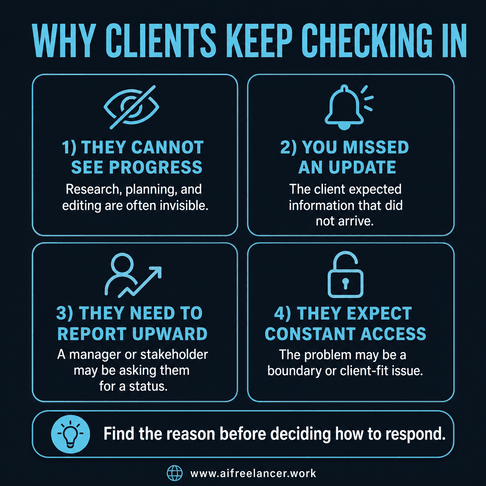
A client can know the final deadline and still feel uneasy about everything happening before it. Before labelling them impatient, find out what the message is really asking.
Most check-ins come from one of four situations. The client cannot see the project’s progress, you missed an update or commitment, the client needs information for another stakeholder, or the client ignores boundaries that have already been explained.
Each situation requires a different response.
Diagnose the Reason for the Check-In
Start by looking at your own communication. Did you confirm that you received the brief? Did you give the client a project timeline? Have you stated when the next update will arrive?
When none of those details are clear, the check-in may be reasonable.
You should also consider the client’s situation. The person who hired you may have a manager, marketing director, publisher, or investor asking for an internal progress report. Their message may be less about supervising you and more about answering someone else.
A useful response can acknowledge that need:
The research stage is complete, and I am drafting the first two sections today. The project remains on schedule for Friday. You are welcome to share that status with your team.
If you missed an update, take responsibility instead of hiding behind your communication policy:
I should have sent the planned update yesterday. I’m sorry I missed it. Research and outlining are complete, drafting is underway, and the delivery date remains Friday.
Give more information when the client lacks it. Acknowledge the mistake when you failed to provide it.
The type of client also affects what they need. A solo business owner may want reassurance that the project remains on schedule. An agency account manager may need a concise update they can forward.
A corporate team may require written approvals and milestone dates. A recurring client may only need a monthly overview and an immediate message when something changes.
Regardless of who is asking, the problem often begins with the same gap: they cannot see the work happening before the draft arrives.
Make Invisible Writing Work Visible
A client can see a finished article, landing page, or book chapter. They cannot see much of the work required to produce it.
They may not see you evaluating sources, reviewing competing content, checking search intent, organising the argument, restructuring a weak section, verifying claims, or editing for tone and clarity.
From the client’s side, four quiet days may look like nothing has happened. From your side, those days may contain the work that determines whether the final draft is credible.
Name the current stage instead of sending unfinished work merely to prove that you are busy:
Research and source evaluation are complete. I am now building the article around the strongest findings before drafting the main sections.
This gives the client a meaningful status without forcing you to send rough notes, partial drafts, or material that is not ready for review.
That five-minute reply can cost more than five minutes. In a workplace study, researchers found that people took an average of 23 minutes and 15 seconds to return to a suspended task after switching to other activities.
The reply may be quick, but recovering your train of thought can take much longer.
Recognize What the Client Still Does Not Know
A “just checking in” message usually contains an unstated question. The client may be wondering whether you received the instructions, whether the deadline is still realistic, whether something has gone wrong, or whether you need anything from them.
Your communication system should answer those questions before they become separate messages.
Instead of writing:
Everything is going well.
Write:
Research is complete, and I am drafting the main sections today. I do not need anything else from you at this stage. The first draft will arrive on Friday, and I will contact you sooner if anything affects that date.
The second update is not much longer, but it removes several areas of uncertainty.
Separate Client Uncertainty From Micromanagement
Better communication will not solve every client relationship.
A client may continue asking for updates even after you have provided a project schedule, a current status, a delivery date, a regular update day, and a clear response window.
Look at what happens after you provide a direct answer. A client with a genuine information gap will usually feel reassured. A micromanaging client may ask the same question again, request unfinished work, or contact you through another channel before the agreed update time.
One missed update usually requires a direct acknowledgment and prompt correction. A missed deadline requires a realistic recovery plan and consistent follow-through. When the same commitments are missed repeatedly, the client may have a valid reason to ask for more frequent updates until trust improves.
Some clients also carry distrust from a previous freelancer who disappeared or missed deadlines. You are not responsible for another provider’s behaviour, but clear dates and consistent delivery can help establish a better pattern.
Build a Clear Client Update System
When clients repeatedly ask the same status questions, stop rewriting the answer from scratch. Build a short update process you can use throughout the project.
The system needs three parts: project milestones the client can understand, a predictable reporting schedule, and a short format for every update.
Create Useful Project Milestones
Turn one large deadline into a series of recognisable stages.
For a long-form article, the milestones might be:
- Brief received
- Research underway
- Outline completed
- Draft in progress
- Draft delivered
- Feedback received
- Revisions underway
- Final version delivered
A nonfiction book may use larger milestones such as concept approval, research completion, outline approval, sample chapter delivery, midpoint review, full manuscript delivery, and revisions.
Milestones should make sense to the client. “Worked for six hours” says how you spent your time, but “research completed” tells the client what has changed.
Useful milestones usually mark real progress, require client action, or affect the delivery date.
“Reviewed three competitor pages” is an internal activity. “Competitor review completed” is a client-facing milestone. “Added comments to the document” is an action. “Client feedback received” is a milestone because it allows revisions to begin.
Each milestone should also have an owner. The writer completes research, the client approves the outline, the writer submits the first draft, the client consolidates feedback, and the writer completes revisions.
Use a Predictable Client Update Schedule
There is no universal rule for how often freelancers should update clients. The right schedule depends on the length, complexity, risk, and importance of the project.
Projects lasting a few days may need only a confirmation and delivery message. One- to two-week projects often need one midpoint update. Longer projects may need weekly updates, while books and large content assignments usually work better with milestone-based reporting.
Projects tied to product launches, advertising campaigns, or several departments may need more contact because one missed date affects other work.
More frequent updates may also be appropriate when the scope is still changing, the client is waiting for external approvals, the project is recovering from a missed deadline, or the work involves confidential or regulated material.
Routine assignments with clear briefs and established clients may need less.
If Friday is your update day, send the update on Friday even when everything is going according to plan. A consistent reporting rhythm that clients can rely on reduces uncertainty without forcing you to send daily messages.
A scheduled update can be short:
Friday update: Research and outlining are complete. Drafting begins Monday, and the first version remains scheduled for Wednesday. I do not need any additional materials at this time.
Write Updates That Remove Uncertainty
The best project updates are specific without becoming long reports.
Lead with the status:
The outline is complete, and drafting is underway.
Use dates rather than soft promises:
I will send the first version by 3 p.m. Friday.
Name the next action:
Please approve the revised structure by Tuesday so I can begin Chapter 3 on Wednesday.
Identify blockers without providing a diary of everything that went wrong:
I am waiting for the final interview transcript. If it arrives by Thursday, the original deadline will remain unchanged.
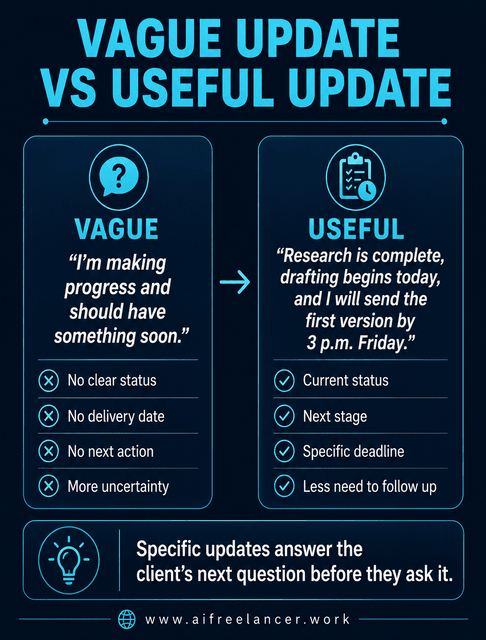
Compare these two updates:
Vague
I’m making progress and should have something soon.
Specific
Research is complete, drafting begins today, and I will send the first version by 3 p.m. Friday.
The specific version gives the client information they can use and share internally.
Use the Done, Now, Next, Needed, Date Framework
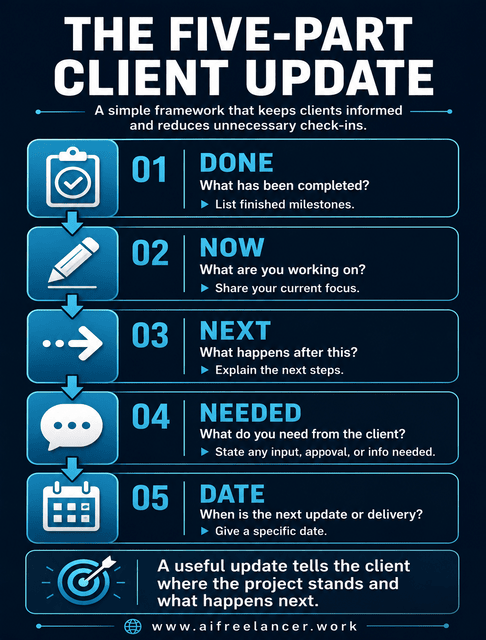
Use the same five-part structure for every progress update. In this framework, Needed means anything needed from the client.
Done
State what has been completed.
Now
Explain what you are currently working on.
Next
Tell the client what happens after the current stage.
Needed
Identify any information, approval, or decision needed from the client. Give a due date when their response affects the schedule.
Date
State when the next update or deliverable will arrive.
At a glance:
Done → Now → Next → Needed → Date
Here is the complete framework in action:
Done: Research and competitor review are complete.
Now: I am developing the outline.
Next: Drafting begins after the outline review.
Needed: Please approve the proposed examples by Wednesday.
Date: I will send the first draft on Friday.
Some freelancers prefer a shorter status format built around completed work, the next step, and current blockers. The five-part version adds the client’s required action and the next date, which can be useful when projects have several moving parts.
“Everything is on track” may sound reassuring, but it does not tell the client what has been completed or what happens next. The five-part update does.
See the System Work in a Real Project
Consider a 10,000-word ebook scheduled over four weeks. During the first week, the client sends several “just checking in” messages because no draft has arrived. The writer has completed the research and is building the chapter outline, but none of that work is visible to the client.
The writer introduces four milestones: research complete, outline approved, first half drafted, and full manuscript delivered. Updates will arrive every Friday. The client will approve the outline and provide consolidated feedback within two business days.
The next update says:
Done: Research for all six chapters is complete.
Now: I am finalising the chapter outline and source plan.
Next: Chapter drafting begins after outline approval.
Needed: Please approve the outline by Monday, so the original delivery date remains unchanged.
Date: I will send the first two chapters next Friday.
The client now knows that substantial work has been completed, why no chapters have arrived, what they must approve, and when they will see the first written material.
During the second week, the client does not send an unscheduled status request. They receive the two chapters on Friday and return feedback on Monday. The next update confirms that the first half of the manuscript is complete and that the remaining chapters are in progress.
The writer did not work longer hours or send daily reports. The project simply became easier for the client to follow.
Use Simple Tools and Automate Only What Is Routine
Once the message format works, choose the simplest way to deliver it consistently.
You do not need an expensive client portal to keep clients informed.
Use the lightest tool that fits the work. Email works well for straightforward assignments, while a shared Google Doc is better for feedback-heavy projects. A spreadsheet can track milestones and due dates. Trello or Notion may suit multi-stage projects, while Upwork milestones work for platform-based assignments. A client portal makes sense only when several files, approvers, or recurring deliverables are involved.
Choose a tool both sides will actually use. A polished dashboard has no value when the client still emails you because they never open it.
Automation can help with routine communication, but it should come after the process works manually. Start with small automation workflows that remove repetitive admin from your day instead of building a complicated system you will not maintain.
Meeting confirmations, deadline reminders, approval reminders, and scheduled prompts to prepare a weekly update are usually safe to automate.
AI can help organise meeting notes or turn confirmed project notes into a draft update. It should never guess progress, approvals, blockers, or revised dates.
Delays, missed deadlines, scope disputes, pricing conversations, and relationship problems require human judgment.
A study of 40 information workers tracked over 12 workdays found that longer daily time spent on email was associated with lower perceived productivity and higher measured stress. Participants who relied primarily on notifications to check email also reported lower productivity than those who mainly checked through self-initiated interruptions. The study found an association between these patterns rather than proving that email use directly caused the reported outcomes.
Use email for communication, but do not let every notification decide what you work on next.
Check Whether the System Is Reducing Follow-Ups
After using the process for a full project, review whether it actually saved time.
Count how many unscheduled status messages the project generated. Also look at the time spent answering progress questions and how quickly the client approved work or returned feedback.
Suppose a previous four-week project generated eight unscheduled status messages and about 90 minutes of extra communication. After introducing weekly updates and clear milestones, a similar project generates two unscheduled messages and takes 25 minutes of status communication.
The numbers do not need to be perfect. You only need enough information to see whether the process is saving time or shifting the same work into another platform.
You can also track missed update commitments, approval turnaround time, or the number of messages sent through the wrong channel.
Look at the questions the client continued to ask. Those questions reveal what your process failed to show.
Sometimes one better sentence in your update does more than another project management tool.
Protect Your Time Without Going Silent
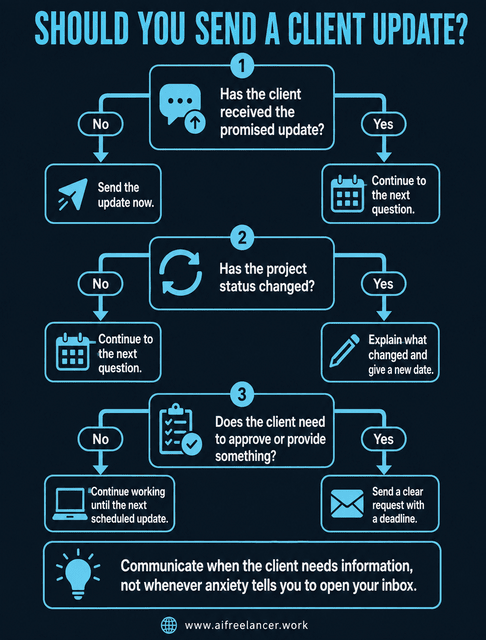
A client should not have to chase you for basic information. You also should not have to remain online all day to prove that you are professional.
Tell clients when they will hear from you, then close your inbox and do the work.
Protect Focus Time
A “quick” message can turn into a chain of activity. You open the notification, check the project file, review the previous conversation, write a reply, notice another email, and return to the draft with less energy than before.
Microsoft reported that employees using Microsoft 365 received a meeting invitation, email, or chat notification every two minutes on average during an eight-hour core workday. Its separate figure of 275 interruptions over a full 24-hour day referred to the 20 percent of users who received the highest volume of notifications, not the average employee.
You may not receive a notification every two minutes, but frequent alerts still divide the workday into small pieces and make sustained research, writing, and editing harder.
Protect focused work by deciding when you will check messages. Check client communication at planned times, disable nonessential notifications, keep email closed during research or drafting blocks, separate communication hours from deep-work hours, and respond within the promised window rather than immediately.
Some freelancers reply instantly because they fear that silence will cost them the client. Others use quick replies to reduce their own anxiety.
Repeated immediate responses can train clients to expect immediate access. When a reply takes longer on another day, the client may assume something is wrong.
A dependable response window is more useful than occasional instant replies.
Set Communication Boundaries Without Sounding Defensive
A boundary should describe how you work, not scold the client for contacting you.
Use calm, practical language:
- I check project messages twice each business day.
- You can expect a response within one business day.
- I send progress updates every Thursday.
- Please add feedback to the shared document so no comments are missed.
- I am in a drafting block this afternoon and will respond tomorrow morning.
These statements tell the client what will happen.
Set the boundary before you become frustrated. A calm onboarding message is easier to receive than a new rule introduced after several tense conversations. It is also easier to protect your availability without making the client feel dismissed when those expectations were discussed before the project began.
Respond to an Early “Just Checking In” Message
When the project is on schedule, keep the reply short:
Thanks for checking in. The project is currently in the drafting stage and remains on schedule for Friday. I will send the next progress update on Wednesday, as planned.
Do not answer every check-in with a lengthy explanation, an unscheduled meeting, or an unfinished draft. Give the client the information they need and point them back to the agreed schedule.
When the client needs information for a manager, give them a concise status they can forward:
Research and outlining are complete, drafting is underway, and delivery remains scheduled for Friday.
When you miss the planned update, acknowledge it directly:
I should have sent this yesterday. Research is complete, and the draft is in progress. The Friday deadline remains unchanged.
Communicate Delays Before the Client Has to Ask
Silence is most damaging when the deadline is at risk.
Contact the client as soon as you know the original plan is no longer realistic.
A useful delay message explains what changed, what has been completed, how the timeline is affected, what the revised delivery date is, what you are doing next, and whether the client needs to make a decision.
For example:
I need to revise the delivery date from Thursday to Monday. Research and the first half of the draft are complete, but two interview transcripts arrived later than expected and need to be incorporated. I will finish the remaining sections on Friday and complete the edit on Monday morning. No action is required from you unless Monday affects your publishing schedule.
Avoid vague phrases such as “I need a little more time.” Give the client a date they can plan around.
When you have already missed a promise, acknowledge the problem, provide a realistic plan, and meet the revised commitment.
Enforce Boundaries and Know When to Walk Away
A client who continues demanding constant updates after receiving clear information may need a service package that includes daily reporting, additional meetings, or more hands-on support.
Use a gradual response:
- Restate the communication process.
- Redirect messages to the agreed channel.
- Remind the client of the response window.
- Explain how additional reporting affects the workflow.
- Offer a paid reporting option when appropriate.
- Revise the scope if their needs have changed.
- End the relationship only after reasonable solutions fail.
You might write:
The current package includes one weekly update and one review call. Your team appears to need daily reporting, which I can add as a separate service.
After the first repeated check-in, restate the agreed process. If the pattern continues, ask whether the client needs daily reporting or additional meetings. If they keep ignoring the written process after that discussion, revise the scope or decline future work.
Warning signs of a deeper client-fit problem include:
- Ignoring agreed response windows
- Contacting you through several channels
- Demanding daily reports for short assignments
- Requesting unfinished work repeatedly
- Treating every question as urgent
- Expecting unpaid calls or meetings
- Using update requests to expand the scope
Ending the relationship should be the final option, not the first response to an anxious client. Abuse, threats, harassment, or nonpayment may require immediate action under the contract.
Client Communication Templates for Common Situations
The principles are easier to use when you do not have to write every message from scratch. Adapt these templates to your project, tone, and agreement.
Onboarding Communication Policy
Use this after the client approves the project.
I’ll use email as our main communication channel, with feedback added directly to the shared Google Doc. I respond to project messages within one business day and will send progress updates every Friday. The project includes one review call and two revision rounds. To keep the delivery date on schedule, please provide approvals or consolidated feedback within two business days.
The message gives the client a channel, response window, update schedule, feedback process, and responsibility before problems arise.
Routine Project Status Update
Use this for weekly or milestone-based reporting.
Done: Research and outlining are complete.
Now: I am drafting the main sections.
Next: Editing and fact-checking will follow.
Needed: No additional materials are needed from you.
Date: I will send the first draft on Friday.
The format can be shortened for routine projects or expanded when several stakeholders are involved.
Reply to a “Just Checking In” Message
Use this when the project remains on schedule.
Thanks for checking in. The project is currently in the drafting stage and remains on schedule for Friday. I’ll send the planned progress update on Wednesday.
When you miss an update, add a direct acknowledgment. When the client needs an internal report, provide one sentence they can forward.
Project Delay Notice
Use this as soon as you know the deadline must change.
I need to move the delivery date from Thursday to Monday. Research and the outline are complete, but the remaining interviews arrived later than planned and need to be included in the draft. I will finish drafting on Friday and complete the edit on Monday morning. Please let me know today if Monday affects your publishing schedule so we can discuss the best option.
The client learns about the problem before they have to chase you for information.
How often should freelancers update clients?
Update frequency depends on the project’s length, complexity, risk, and number of stakeholders. Short assignments may need only a confirmation and delivery message. One- to two-week projects often need one midpoint update, while long projects may need weekly or milestone-based reports. Agree on the schedule before work begins.
What should a client progress update include?
A useful client progress update should state what is finished, what is happening now, what comes next, whether the client needs to provide anything, and when the next update or deliverable will arrive. The Done, Now, Next, Needed, and Date framework covers all five points.
Why do clients keep asking for updates?
Clients often ask for updates because they cannot see the project’s progress, need information for another stakeholder, feel unsure about the deadline, or have had a bad experience with a previous provider. Repeated check-ins can also follow a missed commitment or signal an expectation of constant access.
What should you do when a client ignores your communication policy?
Restate the agreed process calmly and redirect the client to the correct channel or update schedule. If the behaviour continues, document it and discuss whether the client needs daily reporting, additional meetings, or more hands-on support. Extra communication that requires substantial time may need to be added to the project scope.
Should freelancers charge for frequent meetings and reports?
Routine updates should usually be included in the service, but daily reports, additional calls, and meetings with multiple stakeholders can become separate deliverables. Define what the package includes before work begins. When the client requests more communication, explain the time involved and offer it as a paid addition.
Sources
- Mark, G., González, V. M., & Harris, J. (2005). No task left behind? Examining the nature of fragmented work. Proceedings of the SIGCHI Conference on Human Factors in Computing Systems, 321–330. Association for Computing Machinery. ics.uci.edu
- Mark, G., Iqbal, S. T., Czerwinski, M., Johns, P., Sano, A., & Lutchyn, Y. (2016). Email duration, batching and self-interruption: Patterns of email use on productivity and stress. Proceedings of the 2016 CHI Conference on Human Factors in Computing Systems, 1717–1728. Association for Computing Machinery.
- Microsoft. (2025, June 17). Breaking down the infinite workday. Microsoft WorkLab.
Final Thoughts
Learning how to communicate with clients is not about replying faster, sending daily reports, or remaining available whenever someone opens their inbox.
Before your next project starts, tell the client where updates will appear, when you will send them, and what could move the deadline. That one message may prevent a week of unnecessary check-ins.
A simple system can protect your writing time while giving clients the information they need to trust the process.
For more practical guidance on freelance writing, client systems, AI-supported workflows, and building a sustainable writing business, visit my Amazon Author page.

Florence De Borja is a freelance writer, content strategist, and author with 14+ years of writing experience and a 15-year background in IT and software development. She creates clear, practical content on AI, SaaS, business, digital marketing, real estate, and wellness, with a focus on helping freelancers use AI to work calmer and scale smarter. On her blog, AI Freelancer, she shares systems, workflows, and AI-powered strategies for building a sustainable solo business.