
You finally get into the flow of a client project, then a message appears: “Hi, just checking in. Any update?” Now you have to stop, remember where everything stands, decide how much to explain, write the message, and find your way back into the work. Good client communication matters, but keeping clients informed should not become a second job.
A simple status format can prevent a lot of that friction. Instead of writing every update from scratch, tell the client three things: what you finished, what happens next, and anything preventing progress.
That is the Done, Next, Blocked format.
It is short enough to repeat across projects but direct enough to answer the questions that usually trigger a client check-in.
Everything I’ve shared here—and more—is in my book, available on Amazon. Click the link if you’re ready to take the next step.
Client Communication Should Not Become Another Job
A client asking for an update is not necessarily being difficult. From their side, the project may have disappeared from view. You know what you researched this morning, what you revised yesterday, and what you plan to finish tomorrow. They do not.
That information gap matters because clients usually want reassurance about a handful of practical things. Has progress been made? Is the deadline still safe? Do they need to approve anything? Is something holding up the work?
You could answer those questions with long emails, frequent Slack messages, and detailed progress reports. But doing so can create another problem: the communication starts competing with the work itself.
Microsoft’s 2025 Work Trend Index illustrates how fragmented digital work can become. Among the 20% of Microsoft 365 users receiving the highest volume of pings, Microsoft recorded an average of 275 meetings, emails, or chat notifications per day, with a ping arriving about every two minutes during an eight-hour workday.
Freelancers may not receive that exact volume, but the underlying problem is familiar. Every message can pull your attention away from drafting, researching, designing, editing, or solving a difficult problem.
Routine client updates need to be easy enough to send without pulling you out of the work for long.
Why Client Communication Breaks Down Even When the Work Is on Track
One of the frustrating things about client check-ins is that they can arrive when nothing is actually wrong.
The draft may be progressing. The deadline may be secure. You may not need anything from the client. Yet the client cannot see any of that unless you tell them.
This is why a communication problem can sometimes be a visibility problem rather than a performance problem.
Most routine project updates need to answer four practical questions:
- Has meaningful progress been made?
- Is the project still moving toward the expected deadline?
- Does the client need to approve or provide anything?
- Is anything preventing the work from moving forward?
You do not need a formal project status report to answer them. A few specific lines are often enough.
Good Project Updates Reduce the Need for Constant Check-Ins
The problem with reactive updates is not just the time spent typing them. You first have to mentally reopen the project.
Perhaps you are writing Client A’s landing page when Client B asks about an article. You stop, check the document, remember what was completed, look at the deadline, write the update, and then return to the landing page.
Multiply that across several clients and communication becomes part of the workload you have to manage.
Using the same short structure each time means you do not have to figure out how to frame every update from scratch. It also gives clients information before they have to ask for it, which can help you reduce unnecessary “just checking in” messages while keeping them informed.
Client Communication Works Better When Clients Know What to Expect
For a routine progress update, most clients need three answers:
- What has been completed?
- What happens next?
- Is anything preventing progress?
Those three questions map directly to:
Done. Next. Blocked.
Use the Done, Next, Blocked Format for Client Communication
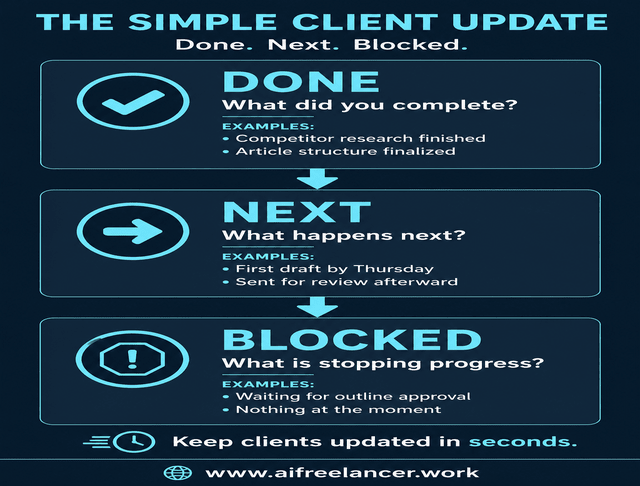
When you are overloaded, the last thing you need is another complicated reporting process. Done / Next / Blocked gives every routine update the same basic structure, so you are not staring at an empty message box wondering how to explain the project.
Done / Next / Blocked is a three-part client update format that states what has been completed, what happens next, and anything preventing the project from moving forward.
At its simplest:
- Done: What you completed
- Next: What you will work on next
- Blocked: What is preventing progress or what you need from the client
If nothing is blocking the work, say so. “Blocked: Nothing at the moment” is a perfectly straightforward update.
Done: Make Project Progress Visible
“Done” should show progress, not provide a diary of everything you touched.
A freelance writer, for example, might report:
- competitor research completed
- outline approved
- first draft finished
- two sections revised
- final proofread completed
Avoid listing every small action you took to get there. Your client probably does not need to know that you opened seven tabs, reviewed three documents, reorganized your notes, and rewrote the introduction twice.
There is also a difference between reporting activity and reporting an outcome.
“Done: Worked on the article” tells the client very little.
“Done: Completed competitor research and finalized the article structure” tells them exactly where the project stands.
The same principle applies outside writing. A designer saying “Done: Worked on the homepage” gives the client almost no useful information. “Done: Completed the desktop homepage concept and incorporated the approved brand colors” shows a specific outcome.
Next: Give the Client a Clear Next Step
A weak project update explains the past but leaves the future vague.
“Next” tells the client where the project is going and, when relevant, when they should expect the next deliverable.
You might say:
- Drafting the first three sections next
- Revising the copy based on your approved comments
- Preparing the final files for delivery
- Moving into the second round of edits
Timing makes this even more useful.
“Next: Drafting” leaves room for another question.
“Next: I’ll complete the first draft by Thursday and send it for review” answers two questions at once.
A good Next line tells the client what happens now and what they should expect from you next.
Blocked: Use Client Communication to Surface Problems Early
Nobody enjoys telling a client that something is holding up the work. That discomfort can make freelancers wait too long, soften the message until it becomes unclear, or hope the issue resolves itself.
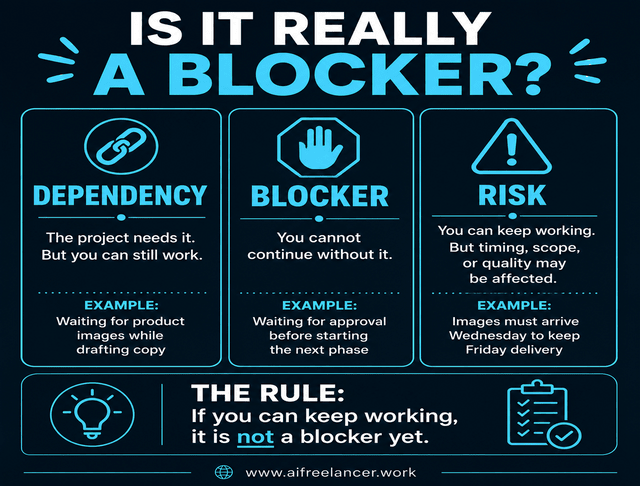
A blocker stops the work from moving forward. A dependency is something the project relies on, such as approval, access, source files, or client feedback. If you can keep working without it, it is not a blocker yet.
A risk may affect timing, quality, or scope later, but you can continue for now.
For example, missing login credentials may not matter while you are drafting another section. Once you reach the point where you need those credentials and cannot continue without them, the dependency becomes a blocker.
Common blockers include:
- missing feedback
- account or platform access
- files or source material
- approval
- information needed to continue
- a decision the client needs to make
State the problem plainly.
“Blocked: Waiting for your approval of the outline before I draft Section 2.”
Or:
“Blocked: I need access to the analytics account before I can complete the performance section.”
If the work can continue but a deadline may be affected, say that instead.
“Risk: I can continue drafting, but I still need the final product images by Wednesday to keep Friday’s delivery date.”
You do not need to add Risk as another permanent field. Mention it only when the distinction matters.
If several issues exist at once, lead with the one that affects progress or timing most. Clients do not need a list of every minor complication. They need to know what requires attention now.
Most importantly, if something could affect an agreed deadline, say that clearly. Do not make the client work it out from vague wording.
The Project Management Institute reported that ineffective communication was associated with 56% of projects that failed to meet their original goals. The research is broader than freelance work, but it reinforces a practical point: when several people are responsible for keeping a project moving, unclear status information can create real problems.
Once you know what belongs in each part, the next step is making the format easy enough to use repeatedly.
Make Client Communication Short Enough to Repeat
A template only saves time if you can actually use it on a busy Wednesday afternoon. If it requires a page of explanation, several status fields, and a mini report every time you send it, you will eventually stop using it.
A Simple Client Update Template
For a routine project update, this is enough:
Hi [Name],
Here’s where things stand:
Done:
[What has been completed]
Next:
[Next task, milestone, or deliverable]
Blocked:
[What you need from the client, or “Nothing at the moment.”]
[Optional next deadline or update date]
Thanks,
[Name]
Whether you send it by email, Slack, Upwork, Teams, or a project-management platform, the client should be able to understand the status quickly.
What changes is the information underneath the labels.
Keep it specific and brief. Include a date when the client needs to know when something will arrive, when they need to act by a certain point, or when a delay could affect delivery. Include an action when the client needs to do something.
The labels do not help much if the message underneath them is vague. “Done: Stuff completed. Next: More work. Blocked: Maybe waiting on something” still leaves the client guessing.
Before and After: Turning a Vague Update Into a Useful One
Sometimes the easiest way to see why an update is weak is to read it from the client’s side. If they finish your message and still have to ask what is done, what happens next, or whether a delay is coming, the update has not done its job.
Imagine sending this:
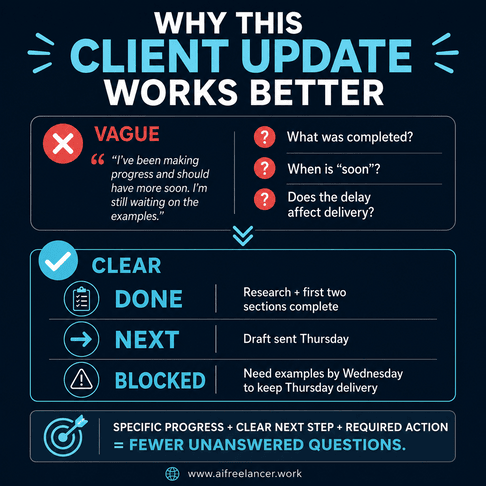
“Hi Sarah, just letting you know I’ve been making progress on the article and should have more soon. I’m still waiting on the examples we discussed.”
It sounds friendly, but important information is missing. Sarah cannot tell how much has been completed. “Soon” gives her no useful timing. She also cannot tell whether the missing examples threaten the deadline.
Now use Done / Next / Blocked:
Done: Completed the research and first two sections.
Next: I’ll finish the draft and send it Thursday.
Blocked: I still need the customer examples for the case-study section. If you send them by Wednesday, Thursday’s delivery stays on track.
The second version is not dramatically longer. It is simply more useful.
Sarah can see the progress, knows what you will do next, knows when to expect the draft, and knows what you need from her.
Match Your Client Update Cadence to the Project
Once you decide to communicate more proactively, it is easy to swing too far and start reporting every small movement. That creates more work for you and more messages for the client.
Decide When Clients Actually Need an Update
There is no universal schedule that fits every freelance project.
A two-day editing job may not need a formal update at all. A six-week ghostwriting project probably does. A project waiting on client approval may need a message immediately rather than waiting for the normal Friday update.
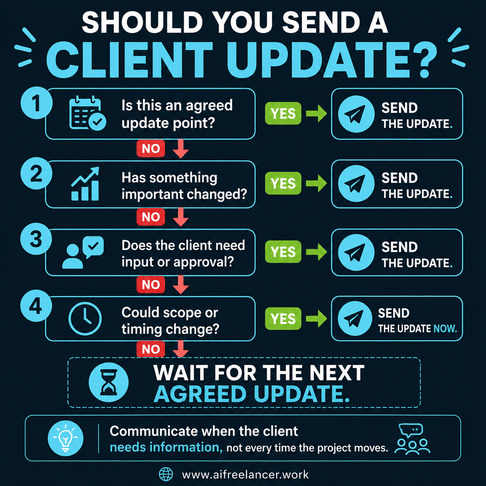
Useful triggers include:
- an agreed weekly update for longer projects
- reaching a project milestone
- encountering a blocker
- needing a client decision
- discovering something that could affect the scope or deadline
A practical rule is to send an update when the client needs new information, when an agreed checkpoint arrives, or when something changes that affects the project.
Set that expectation early when possible. If the client knows they will receive an update every Tuesday, they have less reason to wonder whether they need to ask on Monday. For longer engagements, you can go further and build a simple weekly reporting routine so clients know when to expect a fuller picture of progress.
When You Do Not Need to Send an Update
Freelancers sometimes overcorrect. After deciding they should communicate proactively, they start reporting every small movement.
You probably do not need another update when:
- nothing material has changed
- the client already received the scheduled update
- no client action or approval is required
- another agreed update is coming soon
- you would only be repeating information you already sent
The point is not maximum communication. It is useful communication.
Turn Client Updates Into a Repeatable System
The first time you use Done / Next / Blocked, it saves you from writing one update from scratch. The larger payoff comes when you stop rebuilding the process for every client.
Use the Same Structure for Routine Updates
Once clients get used to receiving the same kind of clear update, you spend less time deciding how to explain where a project stands.
That does not mean a three-line status message will eliminate every follow-up. Some clients prefer frequent contact. Some projects are complicated. Sometimes priorities change quickly.
The advantage is simple: routine status updates become routine for you too. The same principle applies to other repetitive parts of freelance work. You can automate the repetitive parts of your freelance workflow without automating the judgment that clients still expect from you.
When You’re Waiting on the Client
Client dependencies can be awkward because you need to make the problem visible without making the message sound accusatory.
Avoid:
“Still waiting on a few things.”
Use:
“Blocked: I’m waiting for the product screenshots. If I receive them by Thursday, I can keep Friday’s delivery date.”
Keep the tone factual. You are not assigning blame. You are documenting what the project needs to move forward.
One Format Can Work Across Multiple Clients
This is where the system becomes particularly useful if you are juggling several projects at once.
The same structure can work across writing, editing, design, consulting, and other client services.
The key is to record progress as you work rather than reconstructing the project later from memory. If you finish a milestone, change a deadline, or become dependent on client input, update that status in your task manager, project document, or notes at the same time. When update day arrives, the information is already there.
That same habit can also keep small client tasks from slipping through the cracks when you are moving between several projects and deadlines.
That matters because coordination work can consume a surprising amount of time. Asana’s Anatomy of Work research, based on more than 10,000 knowledge workers, found that 60% of work time was spent on activities surrounding the actual skilled work, including communication, chasing updates, searching for information, and switching between tools.
For example:
Client A
Done: Research completed.
Next: Drafting Sections 1–3 by Wednesday.
Blocked: Nothing at the moment.
Client B
Done: Homepage copy revised.
Next: Moving to the services page after approval.
Blocked: Waiting for homepage approval.
Once you use the same structure across projects, the rest is mostly setup:
- using the same Done / Next / Blocked snippet for every client
- keeping updates in one recurring email thread or project channel
- sending them at agreed milestones or on an agreed day
- pulling status information from your task manager instead of remembering it from scratch
- updating project status during the work itself
- saving the format as a reusable email or text template
If the project status is already written down, you only need to pull out what the client needs to know.
How Often Should You Communicate With Clients?
The right frequency depends on the length and complexity of the project and what you agreed with the client. Long projects may benefit from scheduled weekly updates, while shorter projects may only need milestone messages.
Do not wait for the normal update date when the client needs to make a decision or a problem threatens the deadline.
What Should a Client Progress Update Include?
A client progress update should state what has been completed, what happens next, and whether anything is preventing progress.
If the client needs to provide something, name the action clearly. If timing has changed, state the effect on the deadline.
Should I Send an Update if Nothing Has Changed?
Not always. If the client already knows the current status, no action is required, and another agreed update is coming soon, another message may only repeat what they already know.
For a long project with scheduled updates, a short confirmation that the work remains on track can still be worthwhile.
What if the Client Is Causing the Project Delay?
State the dependency without blame. Say what you need, when you need it, and how the timing affects the project.
For example: “Blocked: I’m waiting for final approval. If I receive it by Tuesday, the Friday delivery date remains unchanged.”
What if a Client Wants Daily Updates?
If daily reporting is part of the engagement, agree on a short format so the reporting itself does not interfere with delivery.
Done / Next / Blocked works well here because the update can stay concise.
Final Thoughts
Good client communication should make a project easier to manage for both sides.
Done / Next / Blocked keeps the routine part simple:
- Done shows where the project stands.
- Next tells the client what to expect.
- Blocked makes delays and required actions visible.
The format is deliberately small. That is what makes it useful when deadlines pile up, and several clients need your attention at once.
If you want more practical systems for managing freelance workflows, using AI effectively, and making your writing process easier to run, you can explore my books on my Amazon Author page.
Sources
- Microsoft WorkLab — Breaking Down the Infinite Workday
https://www.microsoft.com/en-us/worklab/work-trend-index/breaking-down-infinite-workday - Project Management Institute — The High Cost of Low Performance: The Essential Role of Communications
https://www.pmi.org/learning/library/en-2013-pulse-high-cost-low-performance-13512 - Asana — Why “Work About Work” Is Bad for Productivity
https://asana.com/resources/why-work-about-work-is-bad

Florence De Borja is a freelance writer, content strategist, and author with 14+ years of writing experience and a 15-year background in IT and software development. She creates clear, practical content on AI, SaaS, business, digital marketing, real estate, and wellness, with a focus on helping freelancers use AI to work calmer and scale smarter. On her blog, AI Freelancer, she shares systems, workflows, and AI-powered strategies for building a sustainable solo business.